
Start Learning Free: Master ReactJS 18 and Firebase 9 by Building a Professional Realtor Clone Project

Modern web developers need more than theoretical knowledge.
Employers and clients want developers who can create responsive interfaces, manage user accounts, store application data, integrate maps and third-party tools, protect private pages, and deploy complete web applications.
The ReactJS 18 and Firebase 9 Realtor Clone Specialization offers a project-based learning path that helps you practise these skills by building a functional real-estate application.
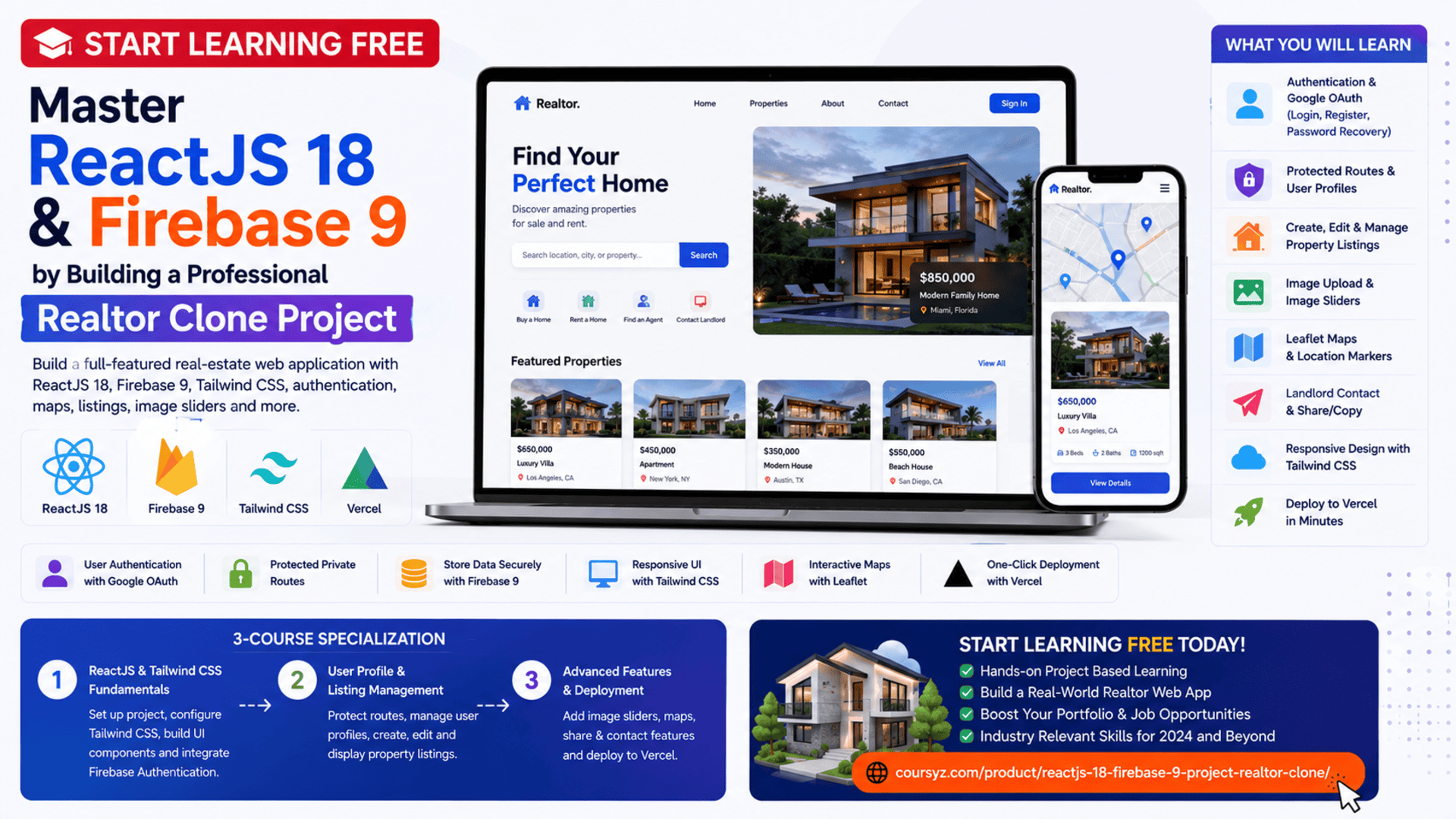
Instead of studying isolated code examples, you will work through the development of a complete realtor platform using ReactJS 18, Firebase 9, Tailwind CSS, OAuth, dynamic listings, user profiles, image sliders, interactive maps, and cloud deployment.
You may be able to start learning free by selecting one of the individual courses and checking whether Preview lessons are currently available.
Why Build a Realtor Clone Project?
A real-estate application is an excellent portfolio project because it combines many important web-development features inside one platform.
A professional realtor website may need to support:
- User registration and login
- Password recovery
- Google OAuth
- Protected profile pages
- Property listings
- Listing creation and editing
- Image uploads
- Dynamic property information
- Interactive maps
- Landlord contact forms
- Responsive layouts
- Loading indicators
- Search and navigation
- Cloud deployment
Building these features helps you understand how different front-end and cloud technologies work together.
You will not only practise creating pages. You will learn how to connect authentication, user data, application state, reusable components, third-party libraries, and deployment into one complete project.
About the ReactJS 18 and Firebase 9 Realtor Clone Specialization
This is a three-course specialization designed for intermediate developers.
The recommended learning schedule is approximately:
- Three courses
- Four weeks
- Around 10 hours per week
- Flexible, self-paced learning
The three courses are:
- ReactJS and Tailwind CSS Fundamentals
- User Profile and Listing Management
- Advanced Features and Deployment
The learning path begins with project setup and interface development before progressing into authentication, protected profiles, listing management, interactive maps, advanced components, and production deployment.
Recommended Knowledge Before Starting
This program is best suited to learners who already have a basic understanding of:
- JavaScript
- React fundamentals
- Components
- Props
- State
- Basic HTML
- Basic CSS
- Web-development concepts
- Package installation
- Command-line basics
Previous Firebase experience may be helpful, but it is not required.
Because the program is project-focused, learners should be comfortable reading JavaScript and understanding basic React application structure.
What You Will Learn
Throughout the specialization, you will learn how to:
- Install and configure ReactJS 18
- Create a modern React project
- Install and configure Tailwind CSS
- Build responsive interface components
- Structure a real-estate web application
- Configure Firebase 9
- Add user registration and login
- Implement password recovery
- Add Google OAuth authentication
- Protect private routes
- Create and update user profiles
- Add logout functionality
- Build dynamic page components
- Create and edit property listings
- Display a user’s listings
- Add loading spinners
- Build image sliders
- Add share and copy functionality
- Integrate Leaflet maps
- Create landlord contact components
- Build a dynamic homepage
- Manage application data
- Improve UI and UX
- Deploy the completed application to Vercel
Course 1: ReactJS and Tailwind CSS Fundamentals
Estimated duration: seven hours
The first course introduces the project structure and the main tools used to build the realtor application.
It covers:
- ReactJS 18 installation
- Project setup
- Tailwind CSS configuration
- Responsive styling
- Application templates
- Components
- Firebase configuration
- Firebase Authentication
- User registration
- User login
- Password recovery
- OAuth
- Dynamic interface development
Set Up ReactJS 18
React allows developers to build modern interfaces using reusable components.
A component may represent:
- Navigation bar
- Property card
- Login form
- Search field
- User profile
- Listing details
- Loading indicator
- Contact form
Using components helps keep the application organized and reduces repeated code.
A well-structured React application may separate:
- Pages
- Components
- Hooks
- Utilities
- Firebase configuration
- Assets
- Styles
This organization becomes especially important as the project grows.
Configure Tailwind CSS
Tailwind CSS is a utility-first styling framework.
Instead of writing a separate CSS rule for every element, developers can combine utility classes directly inside their components.
Tailwind CSS can help you control:
- Spacing
- Colors
- Typography
- Borders
- Shadows
- Responsive layouts
- Flexbox
- Grid
- Hover effects
- Element sizing
For example:
<button className="rounded-lg bg-blue-600 px-5 py-3 font-semibold text-white hover:bg-blue-700">
  View Listing
</button>
This approach can speed up interface development and support consistent styling across the application.
Build Responsive Web Pages
A realtor application should work across:
- Desktop computers
- Laptops
- Tablets
- Smartphones
Responsive design ensures that property cards, images, navigation, forms, and maps adapt to different screen sizes.
You may use Tailwind responsive classes to modify layouts at different breakpoints.
For example:
<div className="grid grid-cols-1 gap-6 md:grid-cols-2 lg:grid-cols-3">
  {/* Property cards */}
</div>
This layout displays one column on smaller screens and more columns on larger screens.
Configure Firebase 9
Firebase provides cloud services that can support application authentication, data management, and other back-end functions.
During the project, Firebase is used to manage important application features such as:
- User accounts
- Authentication
- OAuth
- Profile information
- Property listings
- Application data
Firebase 9 uses a modular approach, allowing developers to import only the services their application needs.
Implement User Registration
A registration page typically collects information such as:
- Name
- Email address
- Password
The application should:
- Validate the form.
- Create the user account.
- Store the required profile information.
- Handle errors.
- Redirect the user after successful registration.
Clear validation and error messages improve the user experience.
Add Login and Logout
Registered users need a secure way to access and exit their accounts.
A login form may:
- Accept an email and password
- Validate the information
- Authenticate the user
- Display errors
- Redirect to a protected page
Logout functionality should end the authenticated session and return the user to a public page.
Implement Password Recovery
Password recovery helps users regain access when they forget their passwords.
A typical process includes:
- The user enters their email address.
- The application requests a recovery email.
- The user follows the recovery instructions.
- The password is updated securely.
This feature is expected in most professional applications with user accounts.
Add Google OAuth
OAuth allows users to sign in with an existing account from another provider.
Google OAuth can make registration faster because users do not need to create and remember another password.
The application still needs to:
- Handle successful authentication
- Manage errors
- Store appropriate user details
- Redirect authenticated users
- Protect private information
Course 2: User Profile and Listing Management
Estimated duration: 10 hours
The second course focuses on protected user profiles and real-estate listing management.
Topics include:
- Private routes
- Profile protection
- Logout functionality
- Dynamic profile editing
- Header components
- Loading spinners
- Creating listings
- Updating listings
- Editing listing pages
- Displaying “My Listings”
- Authorization
- Event-driven interactions
- Dynamic UI components
Protect Private Routes
Some pages should only be accessible to authenticated users.
Examples include:
- User profile
- Create listing
- Edit listing
- My Listings
- Account settings
A private route checks whether the visitor is authenticated before displaying protected content.
When the user is not signed in, the application can redirect them to the login page.
Protected routes improve application security and prevent unauthorized access to account-specific features.
Build a Dynamic User Profile
A user profile may display:
- Name
- Email address
- Account information
- Edit controls
- The user’s property listings
- Logout option
A dynamic profile allows the user to update information without creating a new account.
The application should validate profile changes and synchronize them with the stored user information.
Add Loading Spinners
Many cloud operations require time to complete.
Examples include:
- Authenticating a user
- Retrieving listings
- Uploading images
- Updating a profile
- Saving property information
A loading spinner shows users that the application is processing their request.
This is better than leaving the page unchanged, which may make users think the application has stopped working.
Create Property Listings
A property-listing form may collect:
- Listing type
- Property name
- Description
- Address
- Number of bedrooms
- Number of bathrooms
- Parking availability
- Furnished status
- Regular price
- Discounted price
- Property images
- Geographic information
The application should validate required fields before saving the listing.
A clear form structure reduces errors and helps users complete the process successfully.
Manage Listing Images
Real-estate websites depend heavily on visual content.
Property listings may include several images that help potential buyers or renters evaluate the property.
The application should manage:
- Image selection
- Upload progress
- File limits
- Storage
- Image references
- Display order
- Error handling
Optimized images improve page speed and provide a better browsing experience.
Build the “My Listings” Section
The user profile can display all properties created by the authenticated user.
Each listing may provide actions such as:
- View
- Edit
- Delete
- Share
This section helps users manage their property portfolio from one location.
Create the Edit Listing Page
The Edit Listing page allows users to update existing property information.
The application must:
- Retrieve the current listing.
- Confirm that the user owns it.
- Prepopulate the form.
- Allow modifications.
- Validate the updated data.
- Save the changes.
- Display the updated listing.
Ownership checks are important because users should not be able to modify another person’s listings.
Course 3: Advanced Features and Deployment
Estimated duration: seven hours
The final course enhances the application with interactive features and prepares it for public deployment.
Topics include:
- Swiper image slider
- Share and copy functionality
- Landlord contact component
- Dynamic homepage
- Leaflet maps
- Map markers
- Property-location display
- Responsive design
- Application testing
- Vercel deployment
- Cloud deployment
Build an Image Slider
An image slider allows users to browse multiple property photographs.
A professional slider may include:
- Previous and next controls
- Touch support
- Responsive images
- Slide indicators
- Smooth transitions
- Keyboard support
Swiper can be used to create interactive image galleries for property listings.
Add Share and Copy Functionality
Sharing tools make it easier for visitors to send a property listing to another person.
A share feature may allow users to:
- Copy the listing URL
- Share the page
- Display confirmation after copying
- Open supported sharing tools
A small feature like this can significantly improve usability.
Create a Landlord Contact Component
Interested users need a way to contact the person responsible for a listing.
A landlord contact component may display:
- Landlord name
- Property reference
- Message field
- Contact button
- Email action
The message can automatically include the listing name to make the inquiry clearer.
Integrate Leaflet Maps
Maps provide important location context for property listings.
Leaflet can be used to display:
- Property location
- Map tiles
- Markers
- Popups
- Zoom controls
- Interactive navigation
A listing page can display a map marker based on the stored geographic coordinates.
Maps help users understand the surrounding area and compare properties by location.
Build a Dynamic Homepage
A realtor homepage can highlight:
- Recent listings
- Properties for sale
- Properties for rent
- Discounted offers
- Featured images
- Calls to action
- Search and navigation
Dynamic content keeps the homepage updated as new properties are added.
Instead of manually editing the homepage, the application can retrieve the latest listing information from the database.
Deploy the Application to Vercel
Deployment makes the application publicly accessible.
Before deployment, you should:
- Test all routes
- Review responsive layouts
- Confirm authentication
- Check environment variables
- Test property creation and editing
- Verify map functionality
- Test images
- Review loading states
- Remove unnecessary debugging code
- Confirm error handling
Vercel can host the completed React application and provide a public project URL.
The Applied Learning Project
The central project is a full-featured realtor application built with ReactJS, Firebase, and Tailwind CSS.
Your completed project can demonstrate your ability to:
- Structure a React application
- Build reusable components
- Style responsive pages
- Implement Firebase authentication
- Add OAuth login
- Protect private routes
- Manage user profiles
- Create and edit property listings
- Display dynamic data
- Add image sliders
- Integrate maps
- Create contact features
- Deploy a production application
This makes the project valuable for a professional development portfolio.
Tools and Technologies Covered
The specialization introduces or uses:
- ReactJS 18
- JavaScript
- JSX
- Firebase 9
- Firebase Authentication
- OAuth
- Tailwind CSS
- HTML
- CSS
- React Router
- Protected routes
- User accounts
- Swiper
- Leaflet
- Interactive maps
- Dynamic UI components
- Vercel
- Cloud deployment
- Responsive web design
Who Should Take This Specialization?
The program may be useful for:
React Developers
Developers can strengthen their ability to create complete project-based applications.
Front-End Developers
Front-end developers can gain experience with authentication, dynamic data, maps, and deployment.
JavaScript Developers
JavaScript developers can practise using React in a realistic application.
Aspiring Full-Stack Developers
Firebase provides practical exposure to authentication and cloud data services without requiring a traditional custom server.
Freelancers
Freelancers can use the project structure to develop real-estate websites or similar client applications.
Students
Students can add a detailed React project to their portfolio.
Entrepreneurs
Entrepreneurs can better understand how marketplace and listing platforms are developed.
How to Start Learning Free
The complete specialization is not officially available entirely free.
However, individual courses may sometimes display selected Preview lessons.
Follow these steps:
- Open the program page using the call-to-action button in this article.
- Scroll down to the three individual courses.
- Select the course you want to explore.
- Open the selected course page.
- Click Enroll.
- Sign in or create an account.
- Look for Preview instead of beginning a paid trial.
- Open any available lessons and start learning free.
Important Access Notice
The Preview option may not appear for every learner or course.
When Preview is unavailable, check whether the enrollment page offers:
- Financial aid
- Scholarships
- Employer-sponsored access
- Educational access
- A limited subscription trial
Complete courses, graded activities, projects, and the certificate may require paid enrollment.
Always review the current payment terms before confirming.
How to Get the Best Results
Build Along with Every Lesson
Do not only watch the instructor. Create the project in your own development environment.
Commit Your Progress to GitHub
Use clear commits as you complete authentication, profiles, listings, maps, and deployment.
Customize the Project
Change the branding, layout, colors, homepage, and property fields so your portfolio does not look identical to the guided version.
Add Original Features
Consider adding:
- Property search
- Filters
- Favorites
- Saved listings
- User avatars
- Pagination
- Sorting
- Dark mode
- Advanced map filtering
- Property comparison
Test Authentication Carefully
Review registration, login, logout, password recovery, OAuth, and protected routes.
Improve Accessibility
Add labels, keyboard support, descriptive buttons, clear errors, and alternative image text.
Optimize Images
Compress property images and avoid uploading unnecessarily large files.
Document Your Project
A professional README should include:
- Project overview
- Main features
- Technologies
- Installation steps
- Environment variables
- Screenshots
- Live demo
- Known limitations
- Future improvements
Potential Career Opportunities
After developing sufficient experience and building additional projects, learners may explore roles such as:
- Junior React developer
- Front-end developer
- JavaScript developer
- Firebase developer
- Web application developer
- UI developer
- Junior full-stack developer
- Application-development intern
- Freelance React developer
- Website developer
Completing the specialization does not guarantee employment.
Employers may also evaluate:
- JavaScript knowledge
- React ability
- Component design
- Authentication experience
- Data management
- Responsive design
- Git skills
- Deployment experience
- Portfolio quality
- Problem-solving
Frequently Asked Questions
Can I start learning free?
You can check the individual courses for selected Preview lessons. Free access is not guaranteed.
Is the program suitable for complete beginners?
It is classified as intermediate level. Basic JavaScript and React knowledge is recommended.
How many courses are included?
The specialization contains three courses.
How long does it take?
The listed estimate is approximately four weeks at around 10 hours per week.
Does the program teach ReactJS 18?
Yes. ReactJS 18 is the main front-end technology used throughout the project.
Does it include Firebase 9?
Yes. Firebase 9 is used for authentication and application data.
Will I learn Tailwind CSS?
Yes. Tailwind CSS is used to style the responsive application interface.
Does it include Google OAuth?
Yes. The project includes OAuth authentication.
Are protected routes covered?
Yes. You will learn how to protect profile and account-specific pages.
Will I create property listings?
Yes. You will create, display, edit, and manage property listings.
Are maps included?
Yes. Leaflet maps are integrated into the realtor application.
Will I deploy the project?
Yes. The finished application is deployed to Vercel.
Does free Preview include the certificate?
No. Preview access generally does not include the complete graded experience or certificate.
Start Learning Free and Build a Professional Realtor Clone
Master ReactJS 18, Firebase 9, Tailwind CSS, authentication, Google OAuth, protected routes, property listings, image sliders, Leaflet maps, responsive design, and Vercel deployment.
Select an individual course and check whether Preview is available. Free preview access is not guaranteed. Complete courses, graded projects, and the certificate may require paid enrollment. Financial aid may be available.





