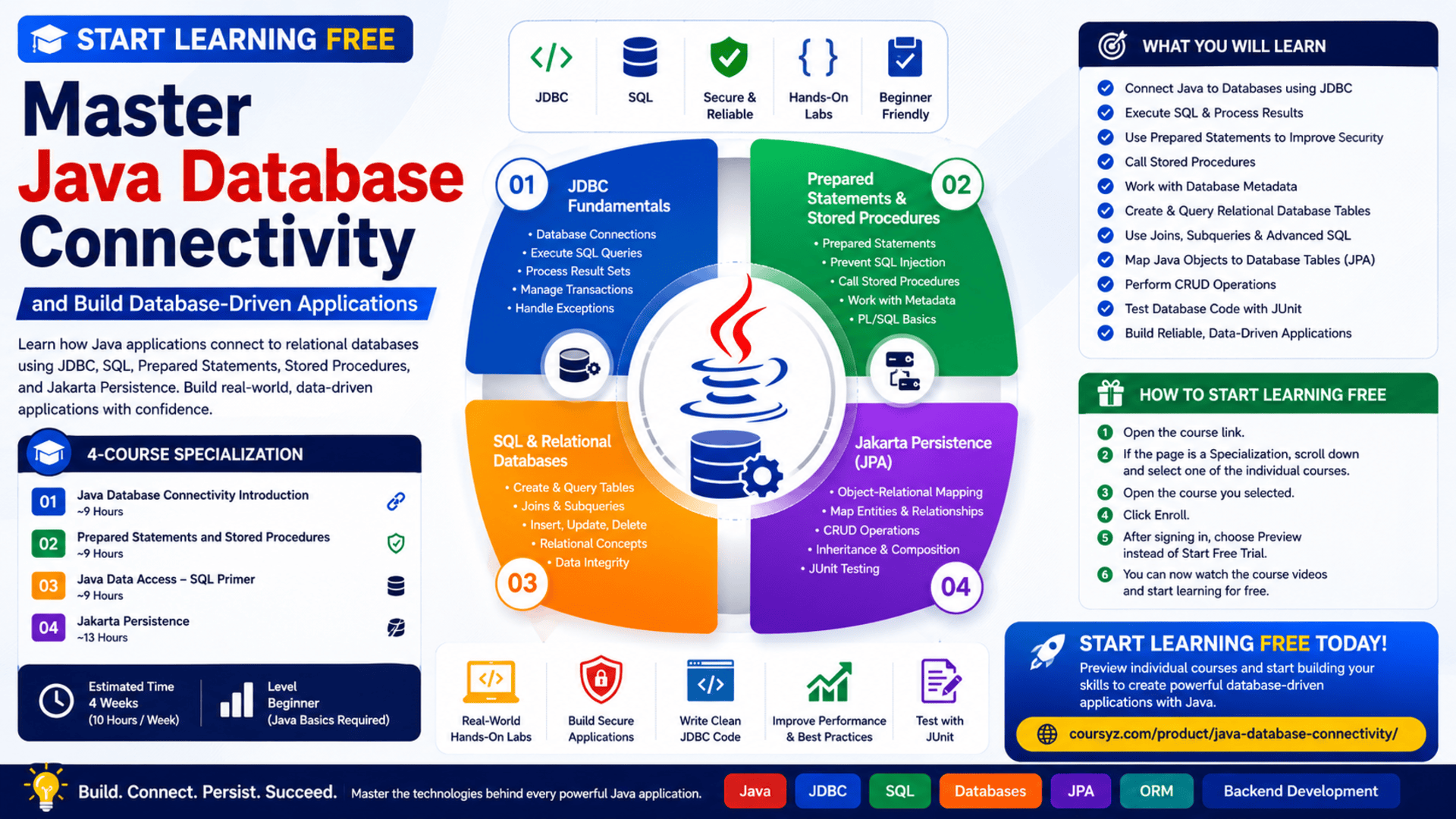
Start Learning Free: Master Java Database Connectivity and Build Database-Driven Applications

Modern software applications rarely operate without data.
Banking systems, e-commerce platforms, customer-management tools, enterprise applications, booking systems, inventory solutions, and online services all need reliable ways to store, retrieve, update, and manage information.
For Java developers, Java Database Connectivity—commonly known as JDBC—is one of the most important technologies for connecting Java applications to relational databases.
The Java Database Connectivity Specialization provides a structured learning path for developers who want to understand how Java applications communicate with databases, execute SQL statements, manage stored procedures, improve data security, and map Java objects to relational database tables.
You may be able to start learning free by opening an individual course and checking whether selected preview lessons or another no-cost access option is available.
The program combines Java programming, SQL, relational databases, prepared statements, stored procedures, metadata, Jakarta Persistence, object-relational mapping, data access, and hands-on labs.
Why Learn Java Database Connectivity?
A Java application may have a professional user interface and strong business logic, but it cannot provide a complete data-driven experience without an effective database layer.
Applications need databases to manage information such as:
- User accounts
- Product catalogs
- Orders and payments
- Customer records
- Employee information
- Inventory levels
- Reservations
- Reports
- Application settings
- Transaction history
- Business analytics
JDBC provides a standard API that allows Java programs to interact with relational databases.
Using JDBC, developers can:
- Open database connections
- Execute SQL commands
- Insert new records
- Retrieve stored information
- Update existing data
- Delete records
- Process query results
- Call stored procedures
- Inspect database metadata
- Manage database transactions
- Handle database errors
- Test data-access code
Understanding JDBC helps developers build applications that connect business logic with stored information.
About the Java Database Connectivity Specialization
The Java Database Connectivity Specialization is a beginner-level, four-course learning program.
It is designed for learners who already have a basic understanding of Java programming.
The recommended background is:
- Java fundamentals
- Variables and data types
- Conditional statements
- Loops
- Methods
- Classes and objects
- Basic object-oriented programming
The program is estimated to take approximately four weeks when studying around 10 hours each week.
It follows a flexible, self-paced structure, allowing learners to complete the lessons according to their own schedule.
The four courses are:
- Java Database Connectivity Introduction
- Prepared Statements and Stored Procedures
- Java Data Access — SQL Primer
- Jakarta Persistence
Together, these courses cover both direct database access through JDBC and object-relational persistence through Jakarta Persistence.
What You Will Learn
Throughout the program, you will explore how Java applications communicate with relational databases.
You will learn how to:
- Explain the purpose of JDBC
- Connect Java applications to databases
- Execute SQL statements from Java
- Retrieve and process query results
- Insert, update, and delete database records
- Work with relational database tables
- Use prepared statements
- Reduce SQL injection risks
- Call stored procedures
- Work with SQL and PL/SQL logic
- Query database metadata
- Handle differences between database systems
- Use JDBC escape syntax
- Create and query database tables
- Build joins and subqueries
- Map Java objects to database tables
- Apply object-relational mapping
- Use Jakarta Persistence
- Map class properties to database columns
- Perform CRUD operations
- Map inheritance and composition relationships
- Test Java database code with JUnit
- Debug data-access problems
Course 1: Java Database Connectivity Introduction
Estimated duration: 9 hours
The first course introduces the foundations of JDBC and explains why the API is important for Java developers.
The objective is not only to show how JDBC works but also to explain its design and purpose.
You will gain practical experience with the main steps involved in connecting a Java application to a database.
Topics may include:
- JDBC architecture
- Database drivers
- Database connections
- SQL statements
- Query execution
- Result sets
- Data access
- Relational databases
- Database integrity
- Database management
- Object-oriented design
- Java programming
- JUnit testing
- Database software
Understanding the JDBC Workflow
A typical JDBC workflow contains several stages.
1. Establish a Database Connection
The Java application creates a connection to the database using a JDBC driver and connection details.
These details may include:
- Database URL
- Server address
- Port
- Database name
- Username
- Password
2. Create a Statement
After establishing a connection, the application creates a statement object.
This statement is used to send SQL commands to the database.
3. Execute SQL
The application can execute operations such as:
SELECTINSERTUPDATEDELETE
4. Process the Results
A query may return a result set containing rows and columns.
The Java application reads the returned data and converts it into values that can be used by the program.
5. Close Resources
Connections, statements, and result sets should be closed properly.
This helps prevent resource leaks and application-performance problems.
Why Resource Management Matters
Database resources are limited.
If an application repeatedly opens connections without closing them, it may eventually become slow or unable to communicate with the database.
Professional JDBC code should manage resources carefully.
Developers should understand how to:
- Close database connections
- Close statement objects
- Close result sets
- Handle exceptions
- Use structured resource-management patterns
- Avoid connection leaks
- Protect transaction integrity
Modern Java supports patterns that make this process safer and easier.
Work with SQL from Java
SQL is the language used to communicate with relational databases.
JDBC enables Java applications to send SQL commands and receive results.
Examples include:
SELECT * FROM customers;
INSERT INTO customers (name, email)
VALUES ('Alex Smith', '[email protected]');
UPDATE customers
SET email = '[email protected]'
WHERE customer_id = 10;
DELETE FROM customers
WHERE customer_id = 10;
A developer must understand both Java and SQL to create reliable database-driven applications.
Course 2: Prepared Statements and Stored Procedures
Estimated duration: 9 hours
The second course builds on the JDBC fundamentals introduced in the first course.
It focuses on prepared statements, stored procedures, database metadata, and differences between SQL implementations.
You will explore:
- JDBC statements
- Prepared statements
- Parameterized SQL
- Stored procedures
- SQL and PL/SQL logic
- Database metadata
- Table structures
- JDBC escape syntax
- Database portability
- JUnit
- Database management systems
What Is a Prepared Statement?
A prepared statement is a precompiled SQL command that can accept parameter values.
Instead of building SQL by combining text and user input, developers define the SQL structure first and then provide values separately.
For example:
String sql = "SELECT * FROM customers WHERE email = ?";
The email value is then passed to the prepared statement.
This approach provides several advantages.
Improved Security
Prepared statements reduce the risk of SQL injection because user input is handled as data rather than executable SQL.
Better Readability
The SQL structure remains clear and separate from the parameter values.
Reusability
A prepared statement can be executed multiple times with different values.
Potential Performance Benefits
Some database systems can reuse the execution plan of a prepared statement.
Why SQL Injection Matters
SQL injection is a security vulnerability that can occur when an application combines untrusted input directly with SQL commands.
A malicious user may attempt to change the meaning of a query.
This can lead to:
- Unauthorized data access
- Deleted records
- Modified data
- Account compromise
- Application disruption
- Security breaches
Prepared statements are one of the most important techniques for reducing this risk.
Developers should also apply:
- Input validation
- Least-privilege database accounts
- Secure authentication
- Error handling
- Logging
- Access controls
- Database monitoring
What Are Stored Procedures?
A stored procedure is a named program stored and executed within a database system.
It may contain:
- SQL statements
- Conditions
- Loops
- Parameters
- Transactions
- Business rules
- Error handling
Stored procedures can be useful when a database operation is complex or needs to be reused by multiple applications.
JDBC allows Java applications to call stored procedures and process the returned values.
Benefits of Stored Procedures
Stored procedures can provide:
- Centralized database logic
- Reusable operations
- Reduced network communication
- Controlled database access
- Improved consistency
- Encapsulation of complex SQL
- Stronger permission management
However, stored procedures can also increase dependence on a particular database platform.
Developers should evaluate whether logic belongs in the database, the Java application, or a service layer.
Work with Database Metadata
Database metadata describes the structure and capabilities of a database.
Using JDBC metadata, an application may inspect:
- Table names
- Column names
- Column types
- Primary keys
- Supported SQL features
- Database-product details
- Driver information
- Stored procedures
Metadata is useful when building database tools, migration systems, reporting applications, and software that must support multiple database platforms.
Course 3: Java Data Access — SQL Primer
Estimated duration: 9 hours
The third course introduces the SQL knowledge required to work effectively with relational databases.
It is designed to provide the SQL foundation needed for JDBC and Jakarta Persistence.
The course covers:
- Relational database concepts
- Creating tables
- Querying tables
- Inserting rows
- Updating data
- Table relationships
- Joins
- Subqueries
- Data manipulation
- Query languages
- Database development
Understanding Relational Databases
A relational database stores information in tables.
Each table contains:
- Rows representing records
- Columns representing attributes
- Keys identifying records
- Relationships connecting tables
For example, an online store may contain:
- A customers table
- A products table
- An orders table
- An order-items table
- A payments table
The relationships between these tables allow the application to retrieve connected information efficiently.
Create Database Tables
Creating a table involves defining:
- Table name
- Column names
- Data types
- Primary keys
- Required fields
- Default values
- Constraints
- Relationships
For example:
CREATE TABLE customers (
    customer_id INTEGER PRIMARY KEY,
    name VARCHAR(100) NOT NULL,
    email VARCHAR(150) UNIQUE
);
A well-designed table structure improves data integrity and makes queries easier to maintain.
Use SQL Joins
Joins combine rows from multiple tables.
Common join types include:
- Inner join
- Left join
- Right join
- Full join
For example, an application may join customers and orders to show which customer placed each order.
SELECT customers.name, orders.order_date
FROM customers
INNER JOIN orders
ON customers.customer_id = orders.customer_id;
Understanding joins is essential for retrieving meaningful information from relational databases.
Use Subqueries
A subquery is a query placed inside another SQL statement.
Subqueries can be used to:
- Filter results
- Compare values
- Find aggregated information
- Select records based on another query
- Create more advanced reports
Developers should learn when a subquery is appropriate and when a join may be clearer or more efficient.
Insert and Update Records
Database-driven applications frequently need to add and modify information.
An application may insert:
- New user accounts
- New orders
- New products
- New messages
- New transaction records
It may update:
- Contact details
- Product prices
- Account status
- Inventory quantities
- Application preferences
These operations must be handled carefully to maintain data accuracy and consistency.
Course 4: Jakarta Persistence
Estimated duration: 13 hours
The fourth course introduces Jakarta Persistence, commonly known as JPA.
Jakarta Persistence provides a standard way to map Java objects to relational database tables.
Instead of writing SQL manually for every operation, developers can work with Java classes and objects while the persistence framework manages much of the database interaction.
The course covers:
- Object-relational mapping
- Java domain models
- Database tables
- Metadata annotations
- Entity classes
- Column mapping
- CRUD operations
- Query strategies
- Data persistence
- Class composition
- Class inheritance
- Database schemas
- JUnit testing
- Software versioning
What Is Object-Relational Mapping?
Object-relational mapping—commonly called ORM—is a technique for connecting object-oriented programs with relational databases.
In Java, an application may contain a class such as:
public class Customer {
    private Long id;
    private String name;
    private String email;
}
A relational database may contain a table called customers with matching columns.
ORM defines how the Java class corresponds to the database table.
This allows developers to work with Java objects while the persistence framework handles many SQL operations.
Map Java Classes to Database Tables
Jakarta Persistence uses annotations to describe how Java objects should be stored.
A simplified entity might look like:
@Entity
@Table(name = "customers")
public class Customer {

    @Id
    private Long id;

    @Column(name = "customer_name")
    private String name;

    private String email;
}
These annotations indicate:
- Which class represents a database entity
- Which table stores the data
- Which field is the primary key
- Which fields map to columns
Perform CRUD Operations
CRUD represents four essential data operations:
Create
Add a new record.
Read
Retrieve an existing record.
Update
Modify stored information.
Delete
Remove a record.
Jakarta Persistence allows these operations to be performed through entity-management APIs rather than manually writing SQL for every task.
Map Relationships Between Entities
Applications often contain related objects.
Examples include:
- A customer has many orders
- An order contains many products
- An employee belongs to a department
- A student enrolls in many courses
Jakarta Persistence can map relationships such as:
- One-to-one
- One-to-many
- Many-to-one
- Many-to-many
Understanding these mappings is essential for designing effective domain models.
Map Inheritance and Composition
Object-oriented applications may use inheritance and composition.
Inheritance allows one class to extend another.
Composition allows one object to contain another.
The course explores how these relationships can be represented in a relational database schema.
This is important because object-oriented structures do not always match relational table structures naturally.
ORM tools help bridge this difference.
JDBC vs. Jakarta Persistence
JDBC and Jakarta Persistence solve related but different problems.
JDBC
JDBC provides direct control over:
- Connections
- SQL statements
- Prepared statements
- Result sets
- Stored procedures
- Transactions
It is useful when developers need precise control over SQL and database behavior.
Jakarta Persistence
Jakarta Persistence allows developers to work with:
- Entities
- Java objects
- Annotations
- Object relationships
- Persistence contexts
- Query languages
It reduces the amount of repetitive database code required.
When to Use JDBC
JDBC may be appropriate for:
- Simple database operations
- Performance-sensitive queries
- Complex SQL
- Stored procedures
- Database-administration tools
- Existing SQL-heavy systems
When to Use Jakarta Persistence
Jakarta Persistence may be appropriate for:
- Enterprise applications
- Domain-driven applications
- Complex object models
- Applications with many related entities
- Projects that benefit from ORM
- Systems requiring less repetitive SQL code
Professional developers should understand both approaches.
Hands-On Learning and Practical Labs
The specialization includes hands-on labs designed around realistic JDBC scenarios.
Learners practise how to:
- Write JDBC code
- Debug database connections
- Execute queries
- Process results
- Work with prepared statements
- Call stored procedures
- Create SQL tables
- Use joins and subqueries
- Map Java entities
- Perform CRUD operations
- Test data-access code
Practical work is essential because database programming involves more than memorizing APIs.
Developers must learn how to diagnose:
- Connection errors
- Invalid SQL
- Data-type mismatches
- Incorrect mappings
- Transaction problems
- Missing drivers
- Resource leaks
- Constraint violations
- Failed tests
Skills You Can Develop
By completing the program and practising independently, you can build knowledge in:
- Java Database Connectivity
- Java programming
- SQL
- Relational databases
- Data access
- Data manipulation
- Database development
- Database management
- Database design
- Prepared statements
- Stored procedures
- PL/SQL
- Database metadata
- Object-oriented programming
- Object-oriented design
- Data integrity
- Data mapping
- Data persistence
- Object-relational mapping
- Jakarta Persistence
- JUnit
- Query languages
- Software versioning
Who Should Take This Specialization?
The program may be suitable for:
Java Beginners with Fundamental Knowledge
Learners who understand basic Java can use the program to move into database-driven application development.
Aspiring Back-End Developers
Back-end developers frequently work with databases, data-access layers, repositories, and persistence frameworks.
Enterprise Java Developers
JDBC and Jakarta Persistence are commonly used in business and enterprise software environments.
Software Engineering Students
Students can strengthen their understanding of how application code interacts with relational databases.
Database Developers Learning Java
Professionals with SQL experience can learn how Java applications execute and manage database operations.
Application Support Engineers
Support professionals can benefit from understanding how connection failures, SQL problems, and mapping errors affect applications.
QA and Test Engineers
Knowledge of SQL, databases, JDBC, and JUnit can support data validation and application testing.
Potential Projects to Build
After completing the lessons, consider building independent applications such as:
- Customer-management system
- Inventory application
- Library-management system
- Employee directory
- Expense tracker
- Reservation system
- Order-management application
- Student-record system
- Help-desk ticket application
- Banking transaction simulator
Each project should include:
- Database schema
- Java domain model
- JDBC data-access layer
- Prepared statements
- CRUD operations
- Exception handling
- Input validation
- Unit tests
- Documentation
You can then create a second version using Jakarta Persistence and compare the two approaches.
How to Start Learning Free
The complete specialization is not guaranteed to be available free.
However, you can check each individual course for preview lessons or another no-cost option.
Follow these steps:
- Open the program page using the call-to-action button in this article.
- Scroll down to the list of four individual courses.
- Select the course you want to explore.
- Open the individual course page.
- Click Enroll.
- Sign in or create an account.
- Look for Preview instead of starting a paid trial.
- Open any available videos or lessons and start learning free.
Important Access Notice
The Preview option may not be available for this program.
When it is not displayed, the complete course requires paid enrollment.
You can also check whether the page offers:
- Financial aid
- Scholarships
- Employer-sponsored access
- Educational institution access
- A limited subscription trial
Always read the current enrollment and payment terms before confirming.
How to Get the Best Results
Review Java Fundamentals First
Make sure you understand classes, methods, objects, interfaces, exceptions, and collections.
Practise SQL Separately
Create your own database and practise SQL commands outside the Java application.
Write JDBC Code Manually
Do not depend only on copied examples. Write the connection, statement, and result-processing code yourself.
Use Prepared Statements
Avoid building SQL commands by combining untrusted user input with strings.
Handle Exceptions Carefully
Do not ignore SQL exceptions. Log useful information without exposing passwords or sensitive data.
Close Resources
Make sure result sets, statements, and connections are properly managed.
Write Unit Tests
Use JUnit to test database operations and verify expected results.
Compare JDBC and JPA
Build the same small project using both approaches.
Document Your Database Design
Include entity relationships, table structures, keys, and constraints.
Build a Portfolio Project
Create a complete application that demonstrates Java, SQL, JDBC, JPA, testing, and database design.
Potential Career Paths
After developing sufficient Java, SQL, and database skills, learners may explore roles such as:
- Junior Java developer
- Back-end developer
- Java application developer
- Database application developer
- Enterprise software developer
- Software engineer
- Application support engineer
- Integration developer
- Data-access developer
- Junior full-stack developer
- QA automation engineer
Completing the specialization does not guarantee employment.
Employers may also evaluate:
- Java programming ability
- SQL proficiency
- Database-design knowledge
- Framework experience
- Testing skills
- Git and version control
- Problem-solving ability
- Application architecture
- Portfolio quality
- Technical interview performance
Frequently Asked Questions
Can I start learning free?
You can check the individual courses for preview lessons. However, the complete specialization is not officially available entirely free.
Is this program suitable for beginners?
It is classified as beginner level, but learners should already understand Java fundamentals.
How many courses are included?
The specialization contains four courses.
How long does it take?
The estimated completion time is around four weeks when studying approximately 10 hours per week.
What is JDBC?
JDBC is a Java API used to connect Java applications to relational databases, execute SQL commands, and process results.
Does the program teach SQL?
Yes. One course provides an SQL primer covering tables, queries, joins, subqueries, inserts, and updates.
Are prepared statements covered?
Yes. The second course focuses on prepared statements and explains their advantages over standard JDBC statements.
Are stored procedures included?
Yes. You will learn how stored procedures encapsulate SQL and PL/SQL logic in the database.
Does the program include JPA?
Yes. The final course covers Jakarta Persistence and object-relational mapping.
Will I learn object-relational mapping?
Yes. You will learn how to map Java classes and properties to database tables and columns.
Are practical labs included?
Yes. The program includes hands-on labs based on realistic JDBC and database-access scenarios.
Does free preview access include a certificate?
No. Preview access generally does not include graded work, the full program, or the certificate.
Start Learning Free and Build Database-Driven Java Applications
Explore JDBC, SQL, prepared statements, stored procedures, relational databases, Jakarta Persistence, object-relational mapping, CRUD operations, and JUnit testing.
Select an individual course and check whether Preview is available. Free preview access is not guaranteed. Complete courses, graded work, and the certificate require enrollment. Financial aid may be available.