Start Learning Free: Master iOS Development for Creative Entrepreneurs and Build Innovative Mobile Apps

Have you ever imagined turning a creative idea into a functional iPhone or iPad application?
Mobile apps have created new opportunities for entrepreneurs, designers, programmers, content creators, educators, and independent business owners. A successful application can solve a customer problem, deliver a digital service, support an existing business, or become the foundation of an entirely new startup.
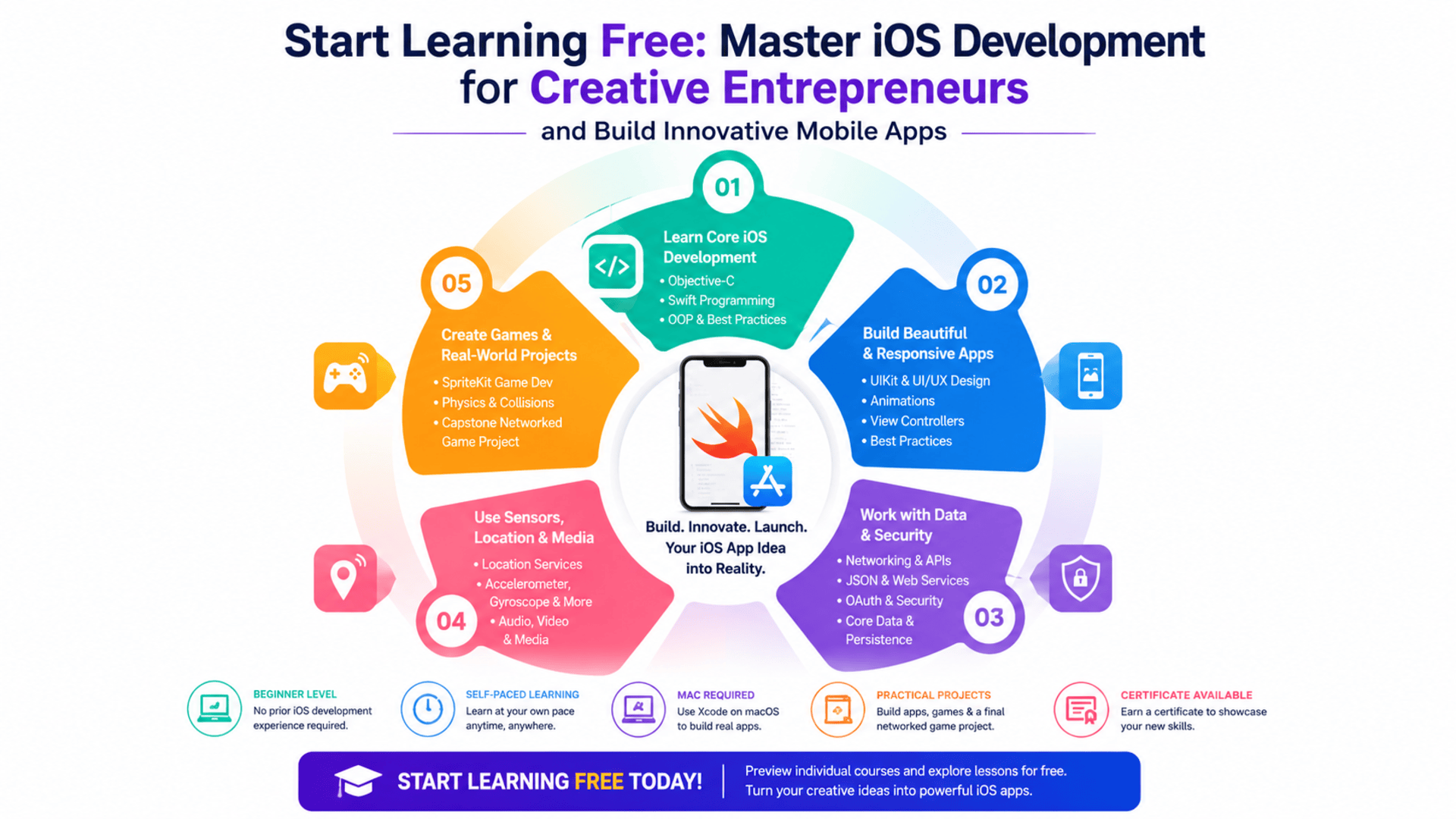
The iOS Development for Creative Entrepreneurs Specialization provides a structured introduction to designing and developing applications for Apple devices.
The program covers programming with Objective-C and Swift, user interface development, networking, application security, local data storage, animations, location services, mobile sensors, audio, video, game development, and application prototyping.
You may be able to start learning free by selecting one of the individual courses and checking whether a Preview option is currently available. This gives you an opportunity to explore selected lessons before deciding whether you need complete access to assignments, projects, the capstone, and the certificate.
Why iOS Development Matters for Creative Entrepreneurs
Entrepreneurs frequently begin with a problem they want to solve.
A restaurant owner may want a customer loyalty app. A fitness coach may want to offer training plans through a mobile platform. A content creator may want to build an interactive community. A game designer may want to turn an original concept into a playable experience.
Mobile development skills can help creative entrepreneurs understand what is technically possible and transform ideas into prototypes.
Learning iOS development can help you:
- Convert an app idea into a working prototype
- Understand the mobile product development process
- Communicate more effectively with programmers
- Create interactive experiences for Apple devices
- Test a business idea before making a larger investment
- Build applications for customers or clients
- Develop a technical portfolio
- Explore freelance mobile development opportunities
- Combine creativity with programming
- Understand application publishing requirements
Even when an entrepreneur eventually hires a development team, technical knowledge can improve decision-making, project planning, feature prioritization, and quality control.
About the iOS Development for Creative Entrepreneurs Specialization
This beginner-friendly specialization is designed to build a broad foundation in iOS application development.
It consists of six courses:
- Foundations of Objective-C App Development
- Networking and Security in iOS Applications
- Best Practices for iOS User Interface Design
- Games, Sensors and Media
- Toward the Future of iOS Development with Swift
- iOS Project: Transreality Game
The listed course durations total approximately 94 hours.
The program is self-paced, so your actual completion time will depend on your schedule, previous programming experience, and the time you spend practising and improving the projects.
The curriculum starts with Objective-C before introducing more advanced iOS concepts and Swift programming. It then progresses into networking, security, user interfaces, animations, location services, sensors, audio, graphics, game development, and a final networked-game project.
Is This Specialization Suitable for Beginners?
The program is classified as beginner level, and no previous professional iOS development experience is required.
However, familiarity with another programming language can be helpful.
Useful previous experience may include:
- Python
- Java
- C
- C++
- JavaScript
- Another object-oriented language
Learners without programming experience can still follow the program, but they may need additional time to understand variables, objects, functions, conditions, loops, data structures, and memory management.
You should also be comfortable using mobile applications and exploring how different interface elements work.
Hardware Requirements
A Mac computer is required to complete the full specialization.
The development tools and application-building activities are designed for the Apple development environment.
An iPhone or iPad can be helpful when testing device-specific features, but an Apple mobile device is optional when you are prepared to work through the simulator.
Before enrolling, confirm that your computer can support the development tools required by the individual courses.
Important Curriculum Age Notice
This specialization contains valuable programming, design, security, networking, and interaction-development concepts. However, parts of the curriculum reference older tools, APIs, operating-system versions, social-media integrations, and development practices.
For example, some course descriptions reference technologies or services associated with earlier generations of iOS development.
The curriculum also begins with Objective-C, while many modern Apple applications are now developed primarily with Swift and newer interface frameworks.
This does not mean the program has no educational value.
Objective-C can still help learners understand:
- The history of Apple development
- Existing legacy applications
- Object-oriented programming
- Memory management
- UIKit concepts
- The relationship between Objective-C and Swift
- How older applications are maintained or modernized
However, learners seeking current job-ready skills should supplement the specialization with updated resources covering modern Swift, current Xcode releases, SwiftUI, current Apple frameworks, privacy requirements, and the latest App Store publishing process.
What You Will Learn
Throughout the six-course specialization, you will develop knowledge across multiple areas of mobile application development.
You will explore how to:
- Read and write Objective-C code
- Apply object-oriented programming principles
- Organize code using objects and blocks
- Manage application memory
- Build entry-level app prototypes
- Connect applications to web services
- Process JSON data
- Implement OAuth authentication
- Use secure network connections
- Store information with Core Data
- Work with local and remote notifications
- Apply mobile security practices
- Design responsive iOS interfaces
- Use UIKit components
- Create animations
- Build mapping interfaces
- Restore application views
- Access location services
- Use accelerometers, gyroscopes, and magnetometers
- Play audio and other media
- Develop games with SpriteKit
- Add physics and collision detection
- Create particle effects
- Integrate Game Center features
- Read and write Swift code
- Combine Objective-C and Swift
- Build client-server applications
- Create a networked mobile game
- Test and improve application usability
Course 1: Foundations of Objective-C App Development
Estimated course length: 15 hours
The first course introduces Objective-C, one of the programming languages historically used to develop applications for Apple platforms.
You will explore the structure of Objective-C programs and learn how objects are used to organize application code.
Key topics include:
- Objective-C syntax
- Objects and classes
- Object-oriented programming
- Blocks
- Data structures
- Memory management
- Programming principles
- Professional code organization
- Entry-level application prototypes
- Apple development concepts
By the end of the course, you should be able to read and write basic Objective-C code and create several simple application prototypes.
Why Learn Objective-C?
Modern learners may wonder why they should study Objective-C when Swift is widely used for current Apple development.
Objective-C can still be valuable when:
- Maintaining an older iOS application
- Reading legacy code
- Migrating an app from Objective-C to Swift
- Working with established UIKit projects
- Understanding how Apple development evolved
- Collaborating with teams managing older products
For creative entrepreneurs, this knowledge can also help when evaluating an existing application or discussing modernization with developers.
Course 2: Networking and Security in iOS Applications
Estimated course length: 15 hours
Many useful mobile applications must communicate with online services.
An app may need to retrieve information, authenticate users, send notifications, store local data, or synchronize with a remote system.
This course introduces networking and security concepts for iOS applications.
Topics include:
- Web services
- HTTP and HTTPS
- JSON
- OAuth 2.0
- Authentication
- Single sign-on
- Application Transport Security
- Secure data transfer
- Cryptographic services
- Local notifications
- Remote push notifications
- Core Data
- Data persistence
- Secure local storage
- Beta distribution
- Application deployment
The course uses code tutorials to help learners develop reusable capabilities that can later be added to independent applications.
Work with JSON and Web Services
JSON is a widely used format for exchanging structured information between applications and servers.
A mobile app might use JSON to retrieve:
- Product information
- User profiles
- News articles
- Restaurant menus
- Game data
- Weather information
- Location details
- Application settings
You will learn how JSON data is structured and how an iOS application can process information received from a web service.
Understanding this process is essential for building applications that depend on external or frequently updated information.
Understand Authentication and OAuth
Applications often connect to external platforms or protected services.
OAuth allows users to authorize an application without directly giving it their account password.
This course introduces authentication concepts and demonstrates how applications can connect securely to supported services.
Although specific examples and integrations may have changed since the lessons were created, the underlying principles of authorization, access control, secure tokens, and protected resources remain important.
Store Application Data with Core Data
Mobile applications frequently need to retain information between sessions.
Core Data can help manage information stored locally on an Apple device.
Examples include:
- Saved user preferences
- Favorite content
- Offline records
- Application history
- Game progress
- Locally created content
- Cached information
Learning data persistence helps you build applications that offer a continuous experience instead of losing all information whenever the user closes the app.
Work with Local and Push Notifications
Notifications can help an application communicate with users even when it is not actively open.
Local notifications are scheduled by the application on the device.
Remote push notifications are sent through an external service.
Notifications can support:
- Appointment reminders
- New content alerts
- Order updates
- Game invitations
- Account notifications
- Promotional messages
- Activity reminders
Notifications should be useful, relevant, and respectful of the user’s preferences. Excessive or unnecessary notifications may cause users to disable them or uninstall the application.
Course 3: Best Practices for iOS User Interface Design
Estimated course length: 16 hours
A functional application is not automatically an effective application.
Users also expect clear navigation, readable content, responsive layouts, understandable actions, and consistent visual feedback.
This course focuses on developing more sophisticated iOS user interfaces.
You will explore:
- UI design principles
- User experience
- Human-computer interaction
- UIKit components
- Model-View-Controller
- Interface animations
- Responsive layouts
- Mapping interfaces
- View restoration
- Data persistence
- Software design
- Mobile usability
Design Interfaces Around User Needs
Creative entrepreneurs often begin with the features they want to offer.
However, users care about how easily they can achieve their goals.
A strong interface should help users understand:
- Where they are
- What they can do
- What will happen after an action
- How to return to a previous screen
- Whether an action succeeded
- How to correct an error
- Where to find important information
A beautiful interface can still fail when it is confusing.
Effective UI and UX design combine visual quality with usability, accessibility, consistency, and clear feedback.
Use Model-View-Controller Architecture
Model-View-Controller, commonly called MVC, separates an application into three main areas.
Model
The model manages data and application logic.
View
The view contains the visual elements that users see.
Controller
The controller connects the model and the view and responds to user actions.
Separating these responsibilities can make an application easier to understand, test, maintain, and expand.
Although modern applications may use other architectural patterns, understanding MVC remains useful for UIKit-based iOS development.
Build Responsive Mobile Interfaces
Apple devices come in different screen sizes and orientations.
An interface should adapt without overlapping, cutting off important content, or becoming difficult to use.
Responsive interface design involves:
- Flexible layouts
- Appropriate spacing
- Readable typography
- Screen-size adaptation
- Orientation support
- Touch-friendly controls
- Clear navigation
- Consistent interface components
These principles are important whether you are building a business app, a game, an educational tool, or a creative digital product.
Course 4: Games, Sensors and Media
Estimated course length: 17 hours
The fourth course explores interactive experiences using graphics, audio, location information, game features, and sensors built into Apple devices.
Topics include:
- 2D graphics
- SpriteKit
- Audio and sound effects
- Game Center
- Physics engines
- Device orientation
- Location services
- Reverse geocoding
- Geofencing
- Accelerometers
- Magnetometers
- Gyroscopes
- Multi-touch interaction
- Collision detection
- Animations
- Particle systems
- Leaderboards and achievements
This course is especially relevant for creative entrepreneurs interested in games, interactive media, fitness applications, location-based experiences, and entertainment products.
Create Location-Aware Applications
Location services can help applications provide information or features based on where the user is.
Examples include:
- Local business discovery
- Travel guides
- Delivery tracking
- Location-based reminders
- Fitness tracking
- Tourism experiences
- Event applications
- Interactive games
The course introduces reverse geocoding, which converts coordinates into recognizable location information, and geofencing, which allows an application to respond when a device enters or leaves a defined area.
Location data is sensitive. Modern applications must request permission clearly and collect only the information needed for the feature.
Use Motion and Orientation Sensors
Modern smartphones contain sensors that can detect movement, direction, rotation, and orientation.
These may include:
- Accelerometers
- Gyroscopes
- Magnetometers
Sensor data can support applications related to:
- Fitness
- Gaming
- Navigation
- Education
- Accessibility
- Augmented interaction
- Motion analysis
- Creative installations
The course demonstrates how these sensors can become part of an interactive application experience.
Develop Games with SpriteKit
SpriteKit is an Apple framework for creating 2D games and animated experiences.
You will explore concepts such as:
- Sprites
- Physics
- Collisions
- Multi-touch controls
- Animated sequences
- Particle effects
- Sound
- Game logic
- Leaderboards
- Achievements
Projects include concepts similar to classic games such as Pong and Breakout.
These exercises can help you understand how movement, physics, user input, graphics, and audio work together.
Course 5: Toward the Future of iOS Development with Swift
Estimated course length: 21 hours
After developing a foundation in Objective-C and iOS concepts, the fifth course introduces Swift.
You will learn how Swift relates to Objective-C and how both languages can exist within Apple application projects.
Topics include:
- Swift syntax
- Reading and writing Swift
- Object-oriented programming
- Data structures
- Application development
- Objective-C and Swift interoperability
- Apple Watch development concepts
- Apple TV development concepts
- Client-server applications
- Location services
- Portfolio development
A major project involves creating a client-server iPhone application that uses location services.
Why Swift Is Important
Swift was created to provide a modern language for Apple platform development.
It is designed to support:
- Readable syntax
- Strong type safety
- Modern programming practices
- Performance
- Application reliability
- Development across Apple platforms
Swift is now central to current iOS development.
However, because this specialization is an older learning program, you should compare all Swift examples with current official documentation and current versions of Xcode.
Course 6: iOS Project — Transreality Game
Estimated course length: 10 hours
The final course is a capstone project in which you apply knowledge from across the specialization.
You will create a networked game that uses real-world actions, device sensors, motion, location information, graphics, networking, and interface design.
The project combines:
- Game design
- Networking
- Device sensors
- Graphics
- Animations
- User interfaces
- Location information
- Testing
- Usability
- Iterative improvement
The course includes milestones and opportunities to receive peer feedback before completing the final version.
Why the Capstone Is Valuable
A completed application can show that you are able to combine multiple technical and design concepts.
The project may demonstrate your ability to:
- Plan an interactive experience
- Organize application code
- Use sensors
- Create graphics
- Add network functionality
- Design mobile interactions
- Test application behavior
- Respond to feedback
- Improve a product through iteration
You may be able to include the project in a portfolio when applying for jobs, internships, freelance opportunities, or entrepreneurial support.
To make your portfolio stronger, customize the final project with an original concept, visual identity, gameplay mechanic, or user experience.
Skills You Can Develop
The specialization covers skills related to:
- iOS development
- Objective-C
- Swift programming
- Mobile application development
- Object-oriented programming
- Memory management
- Application security
- Secure coding
- OAuth
- JSON
- Web services
- Core Data
- Data persistence
- Notifications
- UI design
- UX design
- UIKit
- Model-View-Controller
- Responsive interface design
- Animations
- Location services
- Geospatial mapping
- Mobile sensors
- SpriteKit
- Game development
- Audio and media
- Prototyping
- Usability testing
Who Should Consider This Program?
The specialization may be suitable for:
Creative Entrepreneurs
Entrepreneurs can develop a stronger understanding of how application ideas become functional products.
Aspiring iOS Developers
Learners interested in Apple development can build a broad foundation in programming, interfaces, networking, sensors, and game development.
Designers
UI and UX designers can strengthen their technical understanding and improve collaboration with mobile development teams.
Game Creators
The SpriteKit, physics, sensor, audio, and capstone content may interest learners who want to create interactive games.
Existing Programmers
Developers familiar with another programming language can expand into Objective-C, Swift, and Apple platform development.
Students
Students can use the projects to complement studies in computer science, digital media, game design, or entrepreneurship.
Freelancers
Freelancers may use the skills to explore mobile prototyping, interface development, application maintenance, or client projects.
How to Start Learning Free
The complete specialization, graded work, capstone, and certificate are not guaranteed to be available free.
However, an individual course may sometimes offer selected preview lessons.
Follow these steps to check:
- Open the learning-program page using the button in this article.
- Scroll down to the list of six individual courses.
- Select the course you want to explore.
- Open the individual course page.
- Click Enroll.
- Sign in or create an account.
- Look for Preview instead of beginning a paid trial.
- Open the available lessons and start learning free.
What Happens When Preview Is Not Available?
When the Preview option does not appear, the course cannot currently be accessed free through this method.
Review the enrollment page for other possible options, such as:
- Financial aid
- Scholarships
- A limited subscription trial
- Employer-sponsored access
- University-sponsored access
- Library or government learning programs
Read all payment and subscription conditions before enrolling.
How to Get the Best Results
Study the Courses in a Logical Order
Start with Objective-C foundations before progressing into networking, interfaces, sensors, Swift, and the capstone.
Practise Beyond the Videos
Recreate every code example and then modify it to behave differently.
Use Current Documentation
Compare older methods and APIs with current Apple development documentation.
Create Independent Projects
Build small applications such as:
- A location-based reminder
- A simple 2D game
- A personal media organizer
- A local event guide
- A habit-tracking app
- An interactive travel experience
- A sensor-based fitness activity
- A secure note application
Learn Modern Swift and SwiftUI
Use this specialization as a foundation, then expand your knowledge with current Swift, SwiftUI, modern concurrency, current data frameworks, testing, accessibility, and privacy practices.
Document Your Work
Each portfolio project should clearly explain:
- The problem it solves
- Its intended users
- Key features
- Technologies used
- Screenshots or demonstrations
- Installation requirements
- Challenges encountered
- Future improvements
Potential Career and Business Opportunities
After supplementing the program with current tools and building a strong portfolio, learners may explore opportunities such as:
- Junior iOS developer
- Mobile application developer
- Swift developer
- Objective-C maintenance developer
- Mobile game developer
- UI developer
- App prototyping specialist
- Freelance mobile developer
- Mobile application tester
- Application-development intern
- Technical entrepreneur
- Digital product creator
Completing the specialization does not guarantee a job or a successful app business.
Results will also depend on your current technical skills, independent projects, market research, product quality, communication skills, portfolio, and ability to use modern Apple development tools.
Frequently Asked Questions
Can I start learning free?
An individual course may offer selected Preview lessons. Free preview access is not guaranteed, and the complete specialization is not available entirely free.
Is this program suitable for beginners?
Yes. It is classified as beginner level, although previous exposure to a language such as Python, Java, C, or C++ can be helpful.
How many courses are included?
The specialization currently contains six courses, including the capstone project.
How long does the program take?
The six courses list approximately 94 hours of content. The program is self-paced, and completion time depends on your study schedule and previous experience.
Do I need a Mac?
Yes. A Mac computer is required to complete the development activities.
Do I need an iPhone?
An iOS device can be useful for testing, but learners may be able to complete many activities using the simulator.
Does the program teach Swift?
Yes. The fifth course introduces Swift and its relationship with Objective-C.
Why does the program begin with Objective-C?
The curriculum was designed to provide a foundation in Objective-C before moving toward Swift. This can be useful for understanding and maintaining legacy Apple applications.
Does the specialization cover mobile security?
Yes. It includes authentication, OAuth, secure networking, cryptographic services, secure storage, and application deployment concepts.
Will I build a game?
Yes. The final project involves creating a networked game that uses sensors, motion, location, graphics, and mobile interaction.
Does free preview include the certificate?
No. Preview access generally does not include the complete graded experience, capstone, or certificate.
Start Learning Free and Turn Your Creative App Idea into Reality
Explore Objective-C, Swift, UIKit, mobile security, networking, Core Data, UI design, animations, sensors, SpriteKit, and practical iOS application development.
Select an individual course and check whether Preview is available. Free preview access is not guaranteed. Complete courses, assignments, the capstone, and the certificate require enrollment. Financial aid may be available. A Mac computer is required.