

Cross-platform mobile development allows developers to create applications for multiple operating systems without maintaining entirely separate codebases.
Flutter has become an important framework for this approach because it allows developers to build attractive, interactive applications using one development environment and the Dart programming language.
However, building professional mobile apps requires more than learning a few widgets.
Developers need to understand programming fundamentals, application state, navigation, reusable user-interface components, JSON data, APIs, local storage, cloud databases, real-time updates, debugging, and performance.
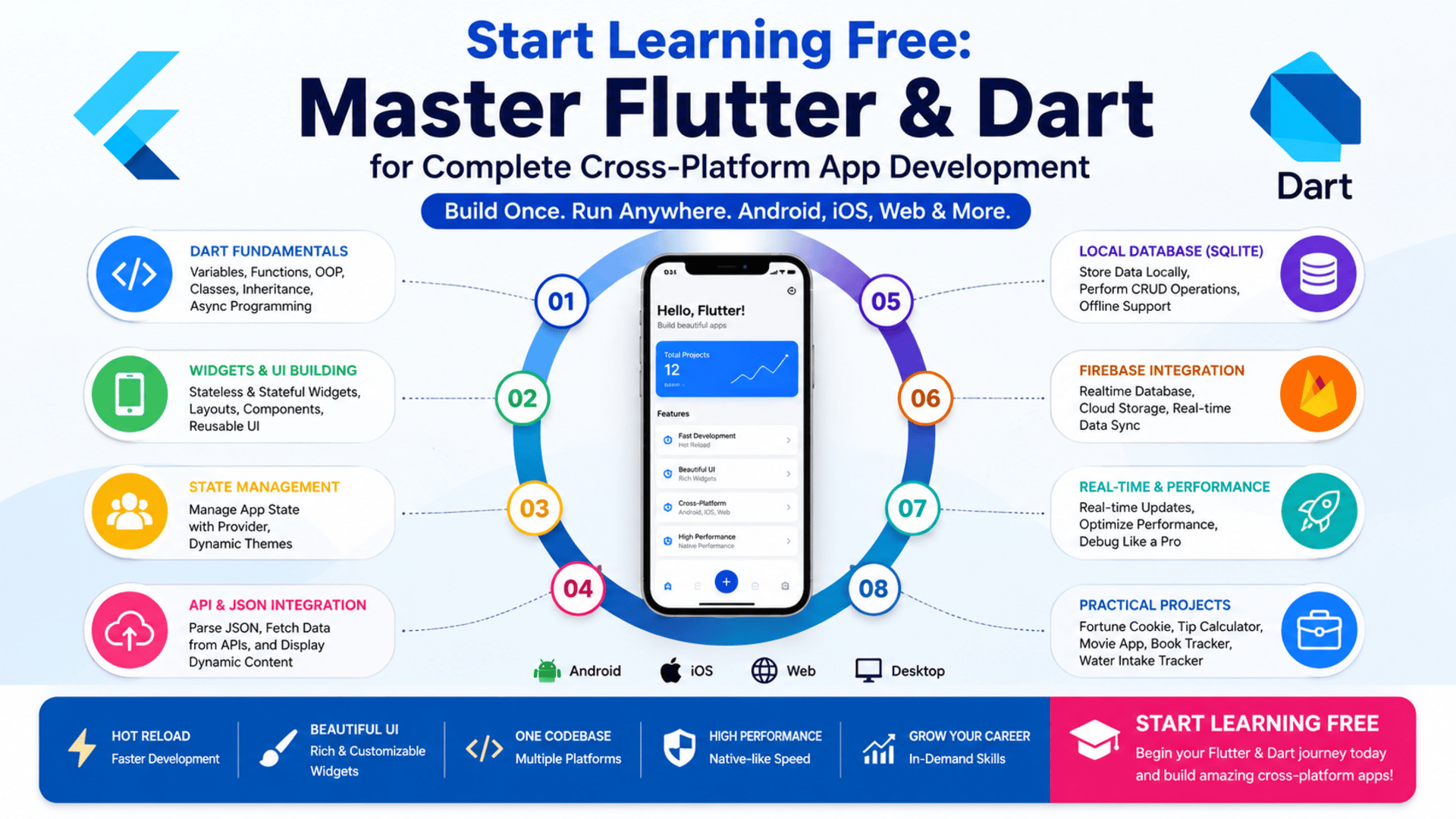
The Flutter & Dart – Complete App Development program brings these skills together through a structured three-course learning path.
Learners begin by configuring their development environment and creating their first Flutter application. They then progress to advanced interface development and state management before working with SQLite, Firebase, JSON, and real-time application data.
The program also includes practical projects such as a Fortune Cookie app, Tip Calculator, Movie App, Book Tracker, and Water Intake Tracker.
You can check an individual course to see whether selected Preview content is available and Start Learning Free before choosing a complete enrollment option.
What Is Flutter App Development?
Flutter is an open-source application framework used to create mobile, web, and desktop experiences from a shared codebase.
It uses Dart as its primary programming language and provides a large collection of customizable widgets.
Developers can use Flutter to create:
- Android applications
- iOS applications
- Web applications
- Desktop applications
- Business tools
- E-commerce platforms
- Productivity applications
- Data-driven mobile services
- Educational apps
- Health and fitness applications
Flutter uses a widget-based architecture.
Almost every visual or structural part of an application is represented by a widget, including text, buttons, forms, lists, navigation elements, layouts, and complete screens.
This structure helps developers create reusable interfaces and maintain consistent application designs.
Why Learn Flutter and Dart Together?
Flutter and Dart work together as one mobile-development ecosystem.
Flutter provides the application framework and interface tools, while Dart controls the program logic, data, objects, functions, and asynchronous operations behind the application.
Learning both technologies helps developers understand how to:
- Build mobile interfaces
- Process user input
- Organize application logic
- Create reusable components
- Manage changing information
- Connect applications to APIs
- Store data locally
- Synchronize information with cloud services
- Improve application performance
- Build Android and iOS apps from shared code
Dart also introduces important software-development concepts such as object-oriented programming, inheritance, method overriding, functions, variables, classes, and asynchronous operations.
These skills are valuable beyond one specific project because they support better software structure and maintainability.
About the Complete Flutter & Dart Program
This learning path contains three connected courses:
- Getting Started with Flutter & Dart
- Advanced Flutter UI and State Management
- Data Persistence and Firebase Integration
The individual courses provide approximately 25 hours of listed learning content:
- Course 1: 8 hours
- Course 2: 7 hours
- Course 3: 10 hours
The suggested completion schedule is approximately four weeks when studying for around ten hours each week.
The program is classified as intermediate level.
No previous mobile-development experience is required, but a basic understanding of programming concepts can make the learning journey easier.
The courses should preferably be completed in order because the later projects build on the Flutter, Dart, interface, and state-management concepts introduced earlier.
What Will You Learn?
The program covers several technical areas involved in creating functional cross-platform mobile applications.
Key learning outcomes include:
- Installing and configuring Flutter
- Setting up Visual Studio Code
- Preparing Flutter on Windows and macOS
- Using a mobile emulator
- Building and running a first Flutter application
- Understanding Dart variables and functions
- Applying object-oriented programming
- Working with classes and objects
- Using inheritance and method overriding
- Understanding asynchronous programming
- Building interfaces with Flutter widgets
- Using stateless widgets
- Using stateful widgets
- Creating reusable user-interface components
- Managing navigation
- Applying state-management techniques
- Using the Provider package
- Managing application themes
- Creating dynamic interface updates
- Working with lists and ListView
- Parsing JSON data
- Integrating external APIs
- Creating local databases with SQLite
- Managing structured mobile data
- Connecting applications to Firebase
- Using Firebase Realtime Database
- Synchronizing information in real time
- Improving application performance
- Debugging Flutter applications
- Building complete practical mobile projects
Course 1: Getting Started with Flutter & Dart
Estimated learning time: 8 hours
The first course establishes the technical foundation required for the rest of the program.
Learners configure Flutter, prepare their development tools, explore Dart programming, and create interactive mobile interfaces.
Setting Up the Flutter Development Environment
Before creating an application, developers need a working environment.
Learners explore how to:
- Install Flutter
- Configure Flutter on Windows
- Configure Flutter on macOS
- Set up Visual Studio Code
- Add required extensions
- Prepare an emulator
- Create a Flutter project
- Run an application
- Identify common setup problems
A correctly configured environment allows developers to write, test, and debug their applications efficiently.
Building Your First Flutter Application
The course introduces the structure of a basic Flutter project.
Learners examine how Flutter organizes:
- Application files
- Packages
- Source code
- Widgets
- Assets
- Configuration settings
- Dependencies
They then build and run a first application through an emulator.
This provides practical experience with the development workflow before moving into more complex application features.
Dart Programming Fundamentals
Dart controls the logic inside a Flutter application.
Learners study concepts such as:
- Variables
- Constants
- Data types
- Functions
- Parameters
- Return values
- Conditional logic
- Reusable code
- Classes
- Objects
- Object-oriented programming
Variables and Data Types
Variables store information used by the application.
Examples include:
- User names
- Product prices
- Task status
- Form input
- Selected settings
- API results
Understanding data types helps developers handle information correctly and avoid common programming errors.
Functions
Functions organize reusable application logic.
A function may:
- Calculate a value
- Validate form input
- Update an interface
- Process database information
- Request remote data
- Respond to a button press
Object-Oriented Programming
Object-oriented programming organizes software around classes and objects.
It can help developers create reusable, maintainable, and expandable application structures.
Stateless and Stateful Widgets
Flutter uses different widget types depending on whether the displayed information needs to change.
Stateless Widgets
A stateless widget displays information that does not manage changing internal state.
It may be suitable for:
- Static headings
- Icons
- Fixed text
- Reusable design elements
- Informational cards
Stateful Widgets
A stateful widget can update when the user interacts with the application or when the underlying data changes.
It may be used for:
- Counters
- Forms
- Switches
- Dynamic lists
- Loading indicators
- Interactive calculations
Understanding these widget types is essential for creating interactive Flutter applications.
Practical Projects in the First Course
The program introduces concepts through small applications rather than isolated theory.
Projects may include:
Fortune Cookie App
Build an application that displays changing messages or results when the user interacts with the interface.
This project can reinforce:
- Widget creation
- Button events
- State updates
- Randomized content
- Application structure
Tip Calculator
Create an application that calculates a tip based on user input.
This project can help learners practice:
- Dart calculations
- Form input
- State management
- Interface updates
- User interaction
These projects build confidence before learners move into more advanced state and data-management techniques.
Course 2: Advanced Flutter UI and State Management
Estimated learning time: 7 hours
The second course focuses on dynamic interfaces, Provider-based state management, JSON, lists, object-oriented programming, and reusable application design.
Why State Management Matters
State represents information that may change while an application is running.
Examples include:
- A logged-in user
- Selected products
- A shopping-cart total
- Application settings
- A theme choice
- Movie information
- Data retrieved from an API
Small applications may manage state inside individual widgets.
Larger applications need a clearer method for sharing and updating information across multiple screens and components.
Poor state management can lead to duplicated information, unpredictable behavior, and difficult maintenance.
Managing State with Provider
Provider is a package commonly used to organize and share application state.
It can help developers:
- Separate data from interface code
- Share information between widgets
- Reduce unnecessary rebuilds
- Manage application-wide settings
- Update the interface when data changes
- Create more maintainable projects
Learners use Provider to manage dynamic interface elements and application themes.
Dynamic Themes
Applications may allow users to switch between themes or visual settings.
A theme can control:
- Colors
- Typography
- Backgrounds
- Buttons
- App bars
- Input fields
- Light and dark modes
Managing themes through Provider allows several application screens to update consistently when the selected theme changes.
Working with JSON
JSON is a common format used to exchange data between applications and external services.
A movie API, for example, may return information such as:
- Movie title
- Release date
- Description
- Rating
- Poster image
- Category
The Flutter application must parse the JSON response and convert the information into usable Dart objects.
Learners explore how to process JSON data and display it through dynamic interfaces.
Creating Lists with ListView
Many mobile applications display collections of information.
Examples include:
- Movies
- Products
- Messages
- Books
- Tasks
- News articles
- User records
ListView allows Flutter developers to create scrollable lists efficiently.
Learners apply ListView and JSON parsing while developing a Movie App.
Advanced Dart Object-Oriented Programming
The course expands on Dart programming through concepts such as:
- Inheritance
- Method overriding
- Reusable classes
- Object modeling
- Custom widget behavior
- Code reusability
Inheritance allows one class to reuse or extend the functionality of another.
Method overriding allows a child class to provide its own implementation of inherited behavior.
These techniques can help developers create flexible application architectures.
Movie App Project
The Movie App combines several concepts from the second course.
The application may involve:
- JSON parsing
- Lists
- Movie records
- Dynamic user-interface elements
- Reusable models
- State management
- Navigation
- Object-oriented programming
This project demonstrates how programming, data, and interface components work together inside a practical application.
Course 3: Data Persistence and Firebase Integration
Estimated learning time: 10 hours
The third course focuses on storing application information and synchronizing data through local and cloud-based systems.
It covers SQLite, Firebase Realtime Database, APIs, JSON, state management, dynamic updates, and performance.
What Is Data Persistence?
Data persistence allows application information to remain available after the app is closed.
Without persistence, information stored only in temporary memory may disappear when the user exits the application.
Persistent data can include:
- Saved books
- User preferences
- Activity history
- Water-intake records
- Notes
- Tasks
- Favourites
- Offline content
Applications may store information locally, remotely, or through a combination of both approaches.
Using SQLite with Flutter
SQLite is a lightweight relational database that can operate directly on a mobile device.
It is useful for applications that need structured local storage.
Learners explore how to:
- Create a database
- Define data structures
- Insert records
- Retrieve records
- Update information
- Delete data
- Display stored records
- Manage offline information
These are commonly known as CRUD operations: Create, Read, Update, and Delete.
SQLite can support applications that need to operate when an internet connection is unavailable.
Book Tracker Project
A Book Tracker can use SQLite to store and manage information about books.
Possible features include:
- Adding a book
- Recording the author
- Updating reading status
- Viewing saved books
- Editing information
- Removing records
- Filtering stored content
This project helps learners understand how a mobile interface communicates with a structured local database.
Firebase Realtime Database
Firebase Realtime Database stores application information in the cloud and synchronizes updates across connected clients.
It can be used for:
- Shared information
- Real-time dashboards
- Activity tracking
- User-generated data
- Live updates
- Cloud-connected applications
When information changes, connected applications can receive the update without repeatedly refreshing the entire data set.
Learners explore how to connect Flutter applications to Firebase and manage real-time data.
Water Intake Tracker Project
A Water Intake Tracker may allow users to record and review their daily water consumption.
The project can involve:
- Custom interface design
- Data-entry controls
- Real-time information
- Charts
- Dynamic updates
- State management
- Cloud data
- Progress visualization
This application combines user-interface development, data storage, state changes, and real-time updates.
API and JSON Integration
The third course also reinforces API integration.
Applications can request information from external services and display it through Flutter widgets.
The development process may involve:
- Sending an API request
- Receiving a response
- Parsing JSON
- Converting data into Dart objects
- Updating application state
- Displaying the information
- Handling errors
Professional applications should account for loading states, empty results, network problems, and invalid responses.
Performance Optimization
Dynamic applications may process lists, database records, API responses, and frequent interface updates.
Developers need to avoid unnecessary work that can slow the application.
Performance improvements may involve:
- Efficient state management
- Rebuilding only necessary widgets
- Optimized database queries
- Structured data models
- Controlled API requests
- Effective list rendering
- Error management
- Debugging
The program introduces techniques that support smoother and more maintainable Flutter apps.
Applied Learning Projects
The practical projects are a major part of this learning path.
Learners can apply Flutter and Dart concepts through applications such as:
- Fortune Cookie app
- Tip Calculator
- Movie App
- Book Tracker
- Water Intake Tracker
Together, these projects cover:
- Interface development
- Flutter widgets
- Dart programming
- Application state
- Provider
- Navigation
- JSON parsing
- APIs
- Object-oriented programming
- SQLite
- Firebase
- Real-time updates
- Charts
- Dynamic application behavior
Projects also provide material that learners can expand into a personal mobile-development portfolio.
Skills You Can Develop
Flutter Development
Create cross-platform mobile applications using Flutter’s widget-based framework.
Dart Programming
Write application logic with variables, functions, classes, inheritance, and asynchronous operations.
Mobile UI Development
Create interactive and reusable application screens.
State Management
Manage changing information using stateful widgets and Provider.
Object-Oriented Programming
Use classes, objects, inheritance, and method overriding to organize application logic.
JSON Parsing
Convert external JSON responses into usable Dart objects.
API Integration
Connect mobile applications to external services and display remote information.
SQLite Development
Create and manage structured local mobile databases.
Firebase Integration
Store and synchronize cloud data through Firebase Realtime Database.
Data Persistence
Keep application information available between sessions.
Real-Time Data
Update application interfaces when cloud information changes.
Debugging
Identify development, interface, database, and data-processing problems.
Performance Optimization
Improve dynamic updates, data access, and interface behavior.
Tools and Technologies Covered
The program introduces tools and technologies used in cross-platform application development:
- Flutter
- Dart
- Visual Studio Code
- Flutter emulators
- Stateful widgets
- Stateless widgets
- Provider
- ListView
- JSON
- APIs
- SQLite
- Firebase
- Firebase Realtime Database
- Object-oriented programming
- Mobile interface components
- Database tools
- Debugging tools
- Package-management tools
Who Should Take This Program?
This Flutter and Dart learning path may be suitable for:
Aspiring Mobile Developers
Learners who want to build Android and iOS applications from a shared codebase.
Developers with Basic Programming Knowledge
People who understand basic programming and want to expand into Flutter development.
Frontend Developers
Developers interested in moving from browser-based interfaces into mobile applications.
Software Engineering Students
Students who want experience with programming, interfaces, state, APIs, and databases.
Freelancers
Professionals interested in creating mobile applications for clients.
Entrepreneurs
Founders who want to understand how cross-platform mobile products are developed.
Career Changers
Professionals preparing to move toward software or mobile application development.
Is This Program Suitable for Beginners?
The program is classified as intermediate level, but it is also described as suitable for beginners through intermediate learners.
Previous mobile-development experience is not required.
However, learners will benefit from understanding basic programming concepts such as:
- Variables
- Functions
- Conditions
- Classes
- Objects
- Application logic
Complete programming beginners may need additional time to understand Dart and object-oriented programming.
Regular practice is essential.
Learners should write code, rebuild demonstrations, debug problems, and add independent features to the course projects.
How Long Does the Program Take?
The program contains approximately 25 hours of listed content:
- Getting Started with Flutter & Dart: 8 hours
- Advanced Flutter UI and State Management: 7 hours
- Data Persistence and Firebase Integration: 10 hours
The suggested schedule is approximately four weeks at ten hours per week.
Actual completion time may vary depending on:
- Previous programming experience
- Weekly availability
- Time spent practicing
- Debugging requirements
- Project customization
- Additional portfolio work
Learners who expand the course projects may require longer, but the additional practice can strengthen their development skills.
Should You Complete the Courses in Order?
Yes.
The recommended sequence is:
- Getting Started with Flutter & Dart
- Advanced Flutter UI and State Management
- Data Persistence and Firebase Integration
The first course establishes Flutter and Dart fundamentals.
The second introduces advanced user-interface development, Provider, JSON, and object-oriented programming.
The third adds SQLite, Firebase, APIs, real-time data, and performance optimization.
Following this order provides a clear progression from a first Flutter application to more complete data-driven mobile projects.
How to Start Learning Free
The complete three-course program is not currently offered as an entirely free specialization.
However, you can check an individual course to see whether a Preview option is displayed.
Follow these steps:
- Open the program link.
- Scroll down until you find the three individual courses.
- Select the course you want to explore.
- Open the individual course page.
- Click Enroll.
- Sign in or create an account when requested.
- Check whether Preview appears instead of selecting Start Free Trial or a paid enrollment plan.
- When Preview is available, open the accessible course videos or materials and begin learning.
Preview availability may vary according to the selected course, account, location, and current enrollment settings.
Selected Preview access may not include:
- Every lesson
- Complete hands-on projects
- Graded assignments
- Assessments
- The full specialization
- A shareable certificate
When Preview is unavailable, check whether financial aid or a scholarship is offered for the selected learning program.
“Start Learning Free” refers to checking for an available no-cost entry option. It does not mean that the entire specialization and certificate are guaranteed to be free.
Can You Earn a Certificate?
A shareable career certificate is available to learners who complete the required content and assessments through an eligible certificate enrollment.
The certificate may be added to:
- A LinkedIn profile
- A resume
- A CV
- A development portfolio
- A personal learning record
- A performance review
Preview access does not provide the complete certificate.
Practical applications and clearly documented code can provide additional evidence of development ability.
How to Build a Strong Flutter Portfolio
After completing the learning path, consider expanding the included projects or creating new applications such as:
- An expense tracker
- A habit tracker
- A task-management app
- A weather app
- A movie-discovery application
- A reading tracker
- A health-monitoring app
- A product catalog
- A booking application
- A real-time team dashboard
Each portfolio project should include:
- A clear project purpose
- Application screenshots
- Flutter and Dart code
- Reusable widgets
- Navigation
- State management
- Local storage
- API integration
- Firebase or SQLite
- Error handling
- A source-code repository
- Technical documentation
A complete and well-documented project makes it easier for employers and clients to evaluate practical development skills.
Frequently Asked Questions
Can I Start Learning Free?
You can check an individual course for a Preview option. When displayed, Preview may provide selected videos or learning materials.
Is the complete Flutter and Dart program free?
No. The complete specialization, projects, graded assessments, and certificate are not currently presented as entirely free.
How many courses are included?
The program contains three courses covering Flutter and Dart fundamentals, advanced UI and state management, SQLite, Firebase, APIs, and data persistence.
Is previous mobile-development experience required?
No. Previous mobile-development experience is not required, but basic programming knowledge is helpful.
Will I learn Dart programming?
Yes. The program covers variables, functions, object-oriented programming, inheritance, method overriding, and asynchronous concepts.
Will I learn Provider?
Yes. The second course uses Provider for state management, dynamic interface updates, and application themes.
Does the program cover APIs and JSON?
Yes. Learners parse JSON data, integrate APIs, and display external information in Flutter applications.
Will I learn SQLite?
Yes. The third course covers local structured data storage and database operations with SQLite.
Will I learn Firebase?
Yes. Learners integrate Firebase Realtime Database for cloud storage and real-time updates.
What projects will I build?
Projects include a Fortune Cookie app, Tip Calculator, Movie App, Book Tracker, and Water Intake Tracker.
How long does the program take?
The three courses contain approximately 25 hours of listed content, with a suggested schedule of four weeks at ten hours per week.
Can I receive a certificate through Preview access?
No. Preview access does not include the complete shareable certificate.
Start Building Cross-Platform Mobile Apps
Flutter and Dart provide a complete environment for developing interactive, data-driven, and cross-platform applications.
This three-course learning path begins with development setup and programming fundamentals before progressing to Provider, JSON, APIs, SQLite, Firebase, and real-time data.
The practical projects help learners apply each concept while building experience with real application features.
Open one of the individual courses and check whether selected Preview materials are available.
Start Learning Free today and begin developing the Flutter and Dart skills needed to create professional Android and iOS applications.
Complete Cross-Platform Mobile Development
Master Flutter & Dart App Development
Learn Flutter, Dart, stateful and stateless widgets, Provider, JSON, APIs, SQLite, Firebase, real-time data, and professional cross-platform mobile development through practical projects.
Start Learning FreePreview availability and included materials may vary. Selected Preview access may not include the complete program, practical projects, graded assessments, or the shareable certificate. Financial aid may be available for eligible learners. This page may contain a promotional link.





