

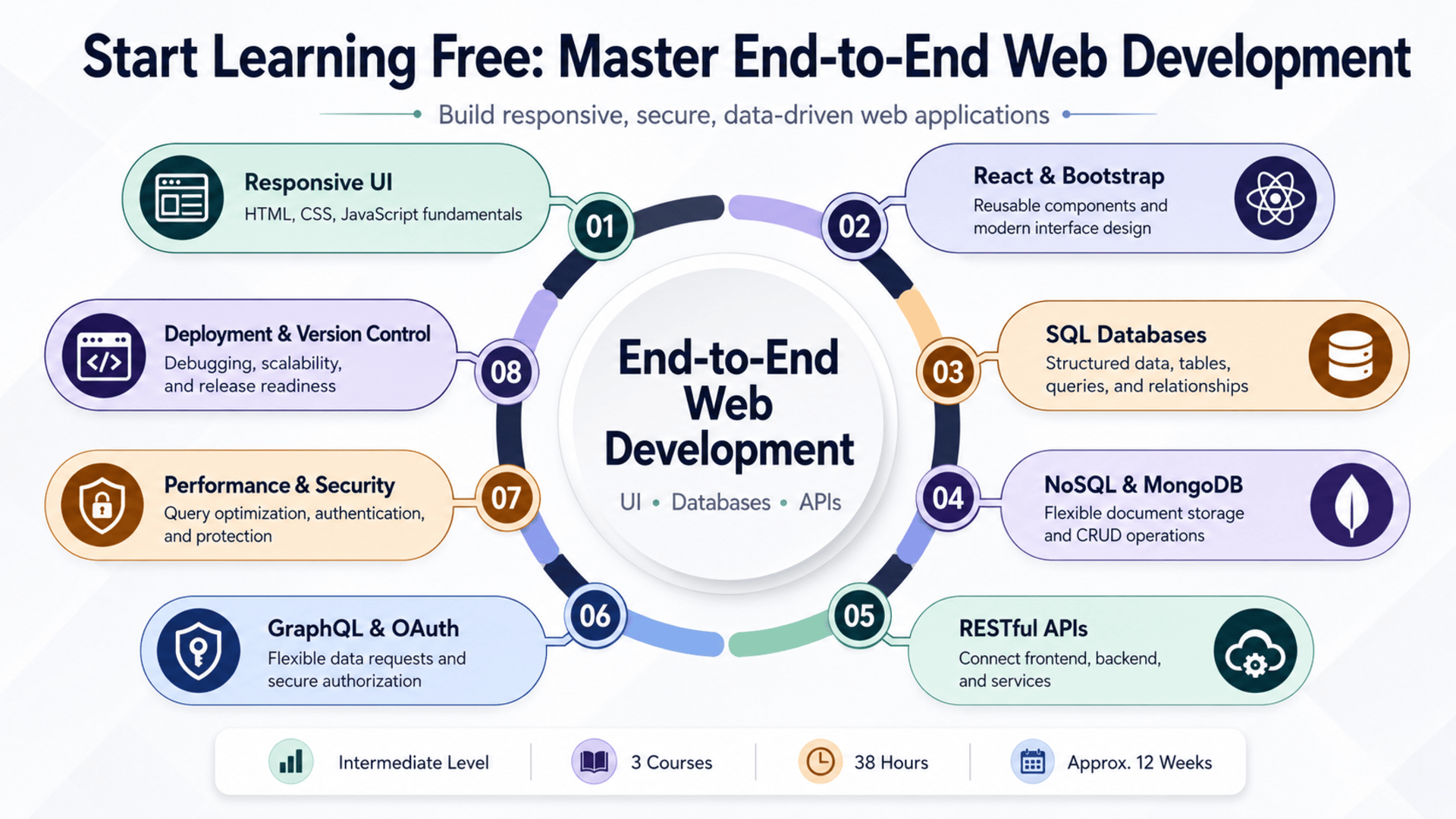
Modern web applications depend on several technologies working together.
A professional application needs an attractive and responsive interface, a reliable database, secure communication between systems, clear application logic, and an effective deployment process.
Learning only HTML and CSS may help you create static pages, but it does not provide the complete knowledge needed to develop a dynamic web application.
Similarly, learning databases without understanding user interfaces and APIs can make it difficult to build a complete digital product.
The End-to-End Web Development: UI, Databases, and APIs program brings these areas together in one structured learning path.
Across three connected courses, learners explore responsive user-interface development, React, Bootstrap, SQL, NoSQL, MongoDB, database operations, RESTful APIs, GraphQL, authentication, authorization, performance optimization, version control, and deployment.
The program is designed for learners who already understand basic web-development concepts and want to develop more complete full-stack skills.
You may also be able to Start Learning Free by opening one of the individual courses and checking whether a Preview option is displayed before selecting a full enrollment plan.
What Is End-to-End Web Development?
End-to-end web development covers the complete process of creating a web application.
It includes the user-facing interface, the data-management layer, communication between systems, application security, testing, optimization, and deployment.
The major areas include:
Frontend Development
The frontend is the part of the application users see and interact with.
It includes:
- Page layouts
- Navigation
- Buttons
- Forms
- Search features
- Dashboards
- Responsive behavior
- Interactive components
- Error messages
- User feedback
Frontend developers use technologies such as HTML, CSS, JavaScript, Bootstrap, and React to create these experiences.
Database Management
Databases store and organize the information used by an application.
They may contain:
- User accounts
- Products
- Orders
- Messages
- Transactions
- Application settings
- Content
- Activity records
Developers need to understand how to design database structures, create records, retrieve information, update data, delete records, protect sensitive information, and improve query performance.
API Development and Integration
An API allows different application components and services to communicate.
For example, a frontend application may use an API to:
- Retrieve products
- Create a new account
- Submit a form
- Update a profile
- Display real-time information
- Process an order
- Delete a record
RESTful APIs and GraphQL provide different approaches to exchanging application data.
Deployment and Performance
A web application must eventually move from a local development environment to a live server.
Developers also need to consider:
- Version control
- Configuration
- Scalability
- Error handling
- Security
- Database performance
- Application speed
- Technical documentation
End-to-end development connects all these responsibilities into one complete workflow.
About the End-to-End Web Development Program
This intermediate-level specialization contains three courses:
- Crafting User Interface – End-to-End Web Development
- Managing Databases – End-to-End Web Development
- API Integration – End-to-End Web Development
The three courses provide approximately 38 hours of listed learning material:
- User-interface development: 14 hours
- Database management: 13 hours
- API integration: 11 hours
The recommended schedule is approximately 12 weeks at four hours per week.
The learning experience is flexible, allowing learners to progress according to their available study time.
The courses should be completed in order because the sequence moves from frontend development to databases and then to API integration.
Basic web-development knowledge is recommended before starting.
Who Should Take This Program?
This learning path may be suitable for several groups.
Frontend Developers
Developers who understand HTML, CSS, or JavaScript and want to add databases, APIs, authentication, and backend integration to their skill set.
Backend Development Beginners
Learners who understand programming concepts but need more experience with user interfaces and complete application development.
Aspiring Full-Stack Developers
People who want to understand how frontend interfaces, databases, and APIs work together.
Software Engineering Students
Students who want practical experience with responsive interfaces, React, data modeling, MongoDB, APIs, security, and deployment.
Career Changers
Professionals with basic web knowledge who want a structured route into more advanced web development.
Freelance Developers
Freelancers who want to create complete websites, dashboards, portals, business systems, and data-driven applications.
Entrepreneurs
Founders who want to understand the technologies required to create and operate a modern web product.
UI and UX Professionals
Designers who want to understand how responsive interfaces are implemented and connected to application data.
Recommended Knowledge Before Starting
The program is classified as intermediate level.
Learners should ideally have basic knowledge of:
- HTML
- CSS
- JavaScript
- Website structure
- Browser-based applications
- Basic programming concepts
Previous experience building simple web pages will make the first course easier.
Basic familiarity with databases or APIs can also be useful, but the program introduces their essential concepts.
Complete beginners may benefit from studying HTML, CSS, and JavaScript fundamentals before beginning this specialization.
What Will You Learn?
The program develops practical knowledge across the main layers of a web application.
Key learning outcomes include:
- Applying user-interface design principles
- Creating responsive web layouts
- Writing semantic HTML
- Styling interfaces with CSS
- Adding dynamic behavior with JavaScript
- Using Bootstrap
- Creating reusable React components
- Managing complex UI states
- Evaluating interface patterns
- Understanding SQL databases
- Understanding NoSQL databases
- Selecting appropriate database technologies
- Designing database structures
- Using MongoDB
- Creating database records
- Reading and filtering stored information
- Updating records
- Deleting records
- Applying database security
- Using indexing
- Optimizing queries
- Designing RESTful APIs
- Exploring GraphQL
- Applying authentication and authorization
- Using OAuth concepts
- Connecting frontend applications to APIs
- Managing API errors
- Documenting application services
- Using version control
- Debugging web applications
- Improving scalability and performance
- Preparing web applications for deployment
Course 1: Crafting User Interface – End-to-End Web Development
Estimated learning time: 14 hours
The first course focuses on designing and developing the user-facing layer of a web application.
A strong user interface should be visually clear, responsive, accessible, and easy to navigate.
Learners study the technologies and design practices required to build engaging web experiences.
User-Interface Design Principles
User-interface design determines how information and controls are presented to the user.
A well-designed interface helps users understand:
- Where they are
- What actions are available
- What information is important
- How to complete a task
- Whether an action succeeded
- How to recover from an error
Important design considerations include:
- Visual hierarchy
- Consistency
- Spacing
- Typography
- Color
- Navigation
- Feedback
- Accessibility
- Mobile usability
Learners explore how design patterns can improve the effectiveness of a web interface.
HTML for Web Application Structure
HTML defines the structure and meaning of web content.
Learners use HTML to create elements such as:
- Headings
- Paragraphs
- Links
- Images
- Forms
- Tables
- Navigation
- Buttons
- Page sections
- Lists
Semantic HTML makes content easier for browsers, search engines, developers, and accessibility tools to understand.
It can also improve maintainability because the purpose of each page element is clearer.
CSS and Responsive Web Design
CSS controls the appearance and layout of the application.
It can be used to manage:
- Colors
- Fonts
- Borders
- Backgrounds
- Margins
- Padding
- Alignment
- Positioning
- Responsive layouts
- Mobile presentation
Responsive design allows the same application to remain usable across desktop computers, tablets, and smartphones.
Learners explore techniques for building layouts that adapt to different screen sizes.
Bootstrap
Bootstrap is a frontend framework that provides responsive layouts and reusable interface components.
Developers may use Bootstrap to create:
- Navigation bars
- Buttons
- Cards
- Forms
- Alerts
- Tables
- Modals
- Grid layouts
Using a framework can accelerate development while helping teams maintain a consistent visual system.
Learners also need to understand how to customize framework components rather than relying entirely on default designs.
JavaScript for Interactive Interfaces
JavaScript adds behavior and application logic to a web page.
It allows developers to respond when users:
- Click a button
- Submit a form
- Select an option
- Search for information
- Open a menu
- Update a setting
- Load new content
JavaScript can also modify page elements and communicate with APIs.
Learners apply more advanced JavaScript techniques to create dynamic web pages.
React for Complex User Interfaces
React supports component-based user-interface development.
A component can represent a reusable section of an application, such as:
- A navigation menu
- A product card
- A search form
- A user profile
- A dashboard panel
- A notification
- A data table
Component reuse can improve consistency and reduce duplicated code.
React also helps developers manage changing application information and more complex user interactions.
By the end of the first course, learners should better understand how to design and build responsive, dynamic, and component-based web interfaces.
Course 2: Managing Databases – End-to-End Web Development
Estimated learning time: 13 hours
The second course focuses on the data layer of a web application.
Applications need reliable systems for storing, retrieving, organizing, securing, and updating information.
Learners compare relational and non-relational database approaches and gain practical experience with data operations and API design.
Understanding SQL Databases
SQL databases organize information into structured tables.
Tables contain rows and columns, and relationships can connect information across different tables.
SQL databases may be useful for:
- Financial systems
- Customer records
- Orders
- Inventory
- Transactional applications
- Structured business information
Common operations include:
- Creating data
- Reading data
- Updating data
- Deleting data
- Filtering records
- Joining tables
- Sorting results
- Applying constraints
SQL databases are valuable when the application requires well-defined relationships and consistent data structures.
Understanding NoSQL Databases
NoSQL databases provide alternative ways to store information.
They can be useful when:
- Data structures change frequently
- Applications handle large amounts of information
- Rapid scaling is important
- Flexible documents are preferred
- Information does not fit naturally into tables
Different NoSQL systems may store data as:
- Documents
- Key-value pairs
- Graphs
- Wide-column records
The course helps learners compare SQL and NoSQL approaches and select an appropriate technology for different application requirements.
MongoDB
MongoDB is a document-oriented NoSQL database.
It stores information in flexible documents that resemble JSON structures.
MongoDB may be useful for:
- Content platforms
- Product catalogs
- User profiles
- Rapidly changing application data
- Flexible web services
- Modern JavaScript applications
Learners practice database operations such as:
- Creating documents
- Reading documents
- Updating information
- Deleting records
- Filtering results
- Organizing collections
These operations are commonly described as CRUD: Create, Read, Update, and Delete.
Database Design
A database should reflect the real information requirements of an application.
Good database design involves decisions about:
- Entities
- Fields
- Relationships
- Required information
- Unique values
- Data types
- Indexes
- Access patterns
- Security
Poor design can create duplicated information, slow queries, inconsistent records, and difficult maintenance.
Learners develop a stronger understanding of how database architecture affects the entire application.
Database Security
Applications often store sensitive information.
Database security may involve:
- User management
- Access permissions
- Authentication
- Authorization
- Data encryption
- Input validation
- Secure connections
- Activity monitoring
- Backup strategies
Developers should provide each user or service with only the level of access required to perform its function.
Database Performance
As an application grows, database operations may become slower.
Performance can be improved through:
- Indexing
- Query optimization
- Efficient data models
- Limiting unnecessary requests
- Monitoring slow operations
- Caching
- Selecting appropriate database technologies
Understanding performance is important for applications that must serve more users or manage larger data sets.
RESTful API Design
The second course also introduces RESTful API design.
A RESTful API organizes application resources through structured endpoints and standard request methods.
Common methods include:
- GET to retrieve information
- POST to create information
- PUT or PATCH to update information
- DELETE to remove information
Learners explore how to design clear endpoint structures and apply security through authentication and authorization.
They also study how APIs exchange information between a database, backend service, and frontend application.
Course 3: API Integration – End-to-End Web Development
Estimated learning time: 11 hours
The third course focuses on connecting the different parts of a web application.
APIs allow frontend interfaces, databases, backend systems, and external services to exchange information.
Learners explore API design, authentication, authorization, data communication, debugging, documentation, and integration.
What Is an API?
An application programming interface defines how software systems communicate.
A frontend application may send a request to an API.
The API processes the request, interacts with a database or another service, and returns a response.
For example:
- A user opens a product page.
- The frontend requests product information.
- The API receives the request.
- The backend retrieves the product from a database.
- The API returns the information.
- The frontend displays the product.
APIs make it possible to separate the visual interface from the application’s data and business logic.
RESTful APIs
REST is a widely used approach to API design.
RESTful APIs commonly use:
- Resource-based URLs
- Standard HTTP methods
- Structured responses
- Status codes
- Authentication tokens
- Clear error messages
A well-designed REST API should be predictable and easy for developers to understand.
GraphQL
GraphQL provides another approach to requesting application data.
Instead of receiving a fixed response, a client can request specific fields.
This may reduce unnecessary information and support more flexible frontend requirements.
Learners explore the role of GraphQL in modern application architecture and compare it with RESTful services.
Authentication and Authorization
Authentication confirms the identity of a user or service.
Authorization determines what that user or service is allowed to do.
For example:
- A visitor may view public information.
- A registered user may update a profile.
- A manager may approve records.
- An administrator may manage accounts.
The program introduces security concepts connected to authenticated API access.
OAuth
OAuth is commonly used to authorize access to protected resources without asking users to share their main passwords with every application.
It may be used for:
- Social login
- Third-party integrations
- Account connections
- Access tokens
- Delegated permissions
Understanding OAuth concepts helps developers create safer integrations between services.
Frontend and API Integration
A frontend application needs to handle several possible API states.
These include:
- Loading
- Success
- Empty results
- Validation errors
- Authorization errors
- Server problems
- Lost internet connections
Professional integration requires more than sending a request.
Developers must also provide helpful feedback and ensure that the interface remains usable when something goes wrong.
API Documentation
Documentation explains how other developers can use an API.
Useful API documentation may include:
- Available endpoints
- Request methods
- Required parameters
- Authentication rules
- Example requests
- Example responses
- Error codes
- Data formats
Clear documentation makes APIs easier to test, maintain, and integrate.
Version Control and Debugging
Version control allows development teams to track changes to application code.
It helps developers:
- Review changes
- Work in branches
- Restore earlier versions
- Collaborate
- Document development history
- Manage releases
Debugging is also essential when integrating several application layers.
Developers may need to examine:
- Network requests
- Response data
- Database queries
- Authentication tokens
- Frontend state
- Server logs
- Error messages
These skills help identify where a problem is occurring and how it can be corrected.
Practical Learning and Applied Projects
The specialization uses tutorials, readings, and realistic web-development scenarios to reinforce the curriculum.
Learners apply skills across three connected areas:
User-Interface Development
Create responsive and interactive interfaces using:
- HTML
- CSS
- JavaScript
- Bootstrap
- React
Database Management
Work with:
- SQL
- NoSQL
- MongoDB
- CRUD operations
- Database design
- Security
- Performance optimization
API Integration
Develop and integrate:
- RESTful APIs
- GraphQL services
- Authentication
- Authorization
- OAuth
- Frontend data exchange
- Error handling
- Documentation
The end-to-end approach helps learners understand how a change in one application layer may affect the others.
Skills You Can Develop
User-Interface Design
Create clear and usable application experiences.
Responsive Web Development
Build layouts that work across desktop and mobile devices.
HTML and CSS
Structure and style professional interfaces.
JavaScript
Create interactive application behavior.
React Development
Build reusable and state-driven interface components.
Database Design
Organize application information effectively.
SQL and NoSQL
Understand different data-storage approaches and their use cases.
MongoDB
Create and manage document-based application data.
CRUD Operations
Create, read, update, and delete database information.
RESTful API Development
Design structured application endpoints.
GraphQL
Explore flexible API-based data queries.
Authentication and Authorization
Protect application resources and user information.
OAuth
Understand secure authorization between connected services.
Performance Optimization
Improve database queries and application behavior.
Frontend Integration
Connect responsive interfaces to backend services.
Version Control
Track code changes and collaborate more effectively.
Software Documentation
Explain how systems and APIs should be used.
Application Deployment
Prepare web applications for real users.
Tools and Technologies Covered
The program introduces tools and technologies used across modern web-development projects:
- HTML
- CSS
- JavaScript
- Bootstrap
- React
- Node.js
- SQL
- NoSQL
- MongoDB
- RESTful APIs
- GraphQL
- OAuth
- API gateways
- Version-control tools
- Web-development tools
- Database-management tools
- Debugging tools
- Deployment concepts
How Long Does the Program Take?
The recommended learning schedule is approximately 12 weeks at four hours per week.
The three courses contain around 38 hours of listed content:
- Crafting User Interface: 14 hours
- Managing Databases: 13 hours
- API Integration: 11 hours
The program FAQ estimates that many learners may complete it in approximately two to three months.
Actual completion time will depend on:
- Previous web-development experience
- Weekly study time
- Project complexity
- Debugging requirements
- Additional coding practice
- Time spent building portfolio projects
Should You Complete the Courses in Order?
Yes.
The recommended sequence is:
- Crafting User Interface
- Managing Databases
- API Integration
The first course develops the user-facing layer.
The second focuses on application data and database operations.
The third connects the frontend, backend, databases, and external services through APIs.
Following the sequence provides a logical progression through the web-application architecture.
How to Start Learning Free
The complete three-course program is not currently presented as entirely free.
However, an individual course page may display a Preview or temporary trial option.
Follow these steps:
- Open the program link.
- Scroll down until you find the three individual courses.
- Choose the course you want to explore.
- Open the individual course page.
- Click Enroll.
- Sign in or create an account when requested.
- Check whether a Preview option appears instead of selecting Start Free Trial or a paid enrollment plan.
- When Preview is available, open the accessible videos or learning materials and begin studying.
Preview availability can vary according to the course, account, location, and current enrollment settings.
Selected Preview access may not include:
- Every lesson
- Complete projects
- Graded assignments
- Assessments
- Full specialization access
- The shareable certificate
When a Preview option is unavailable, learners may review the current free-trial terms or check whether financial aid is offered.
“Start Learning Free” refers to using an available no-cost entry option. It does not mean that the full specialization and certificate are guaranteed to be free.
Can You Earn a Certificate?
A shareable career certificate is available after completing the required courses and assessments through an eligible enrollment option.
The certificate may be added to:
- A LinkedIn profile
- A resume
- A CV
- A professional portfolio
- A performance review
- A personal development record
Preview access does not provide the complete certificate.
Practical projects, code repositories, and deployed applications can provide additional evidence of technical ability.
How to Build a Strong Web-Development Portfolio
A strong portfolio should demonstrate the connection between user interfaces, data, and APIs.
Consider creating projects such as:
- An e-commerce application
- A task-management system
- A customer portal
- An inventory application
- A booking platform
- A business dashboard
- A product catalog
- A support-ticket system
- A content-management application
- A real-time data dashboard
Each project should include:
- A responsive interface
- Reusable components
- Form validation
- A database
- CRUD operations
- Authentication
- Authorization
- API endpoints
- Error handling
- Technical documentation
- A version-control repository
- A deployed demonstration when possible
A complete application demonstrates more value than an isolated interface or database exercise.
Frequently Asked Questions
Can I Start Learning Free?
You can check individual course pages for a Preview option. When available, Preview may provide selected videos or learning materials.
Is the complete web-development program free?
No. The full specialization, graded assignments, projects, and certificate are not currently presented as entirely free.
Is this program suitable for complete beginners?
The program is intermediate level. Basic knowledge of web development is recommended before starting.
How many courses are included?
The specialization contains three courses covering user interfaces, databases, and API integration.
Will I learn React?
Yes. The user-interface course includes React for creating reusable components and managing complex interface states.
Will I learn SQL and NoSQL?
Yes. The database course compares SQL and NoSQL systems and explains their appropriate use cases.
Will I learn MongoDB?
Yes. Learners practice CRUD operations and data management with MongoDB.
Does the program cover APIs?
Yes. The curriculum includes RESTful APIs, GraphQL, API design, integration, authentication, authorization, and documentation.
Will I learn OAuth?
OAuth is included among the tools and security concepts connected to API integration.
Does the program include database security?
Yes. The curriculum covers user management, authorization, encryption, and secure database practices.
How long does the program take?
The recommended schedule is approximately 12 weeks at four hours per week.
Can I earn a certificate through Preview access?
No. Preview access does not include the complete career certificate.
Complete Web Application Development
Master End-to-End Web Development
Learn responsive UI development, React, SQL, NoSQL, MongoDB, RESTful APIs, GraphQL, authentication, OAuth, database security, performance optimization, and deployment.
Start Learning FreePreview and trial availability may vary. Selected free access may not include the complete program, all projects, graded assessments, or the shareable certificate. Financial aid may be available for eligible learners. This page may contain a promotional link.





