

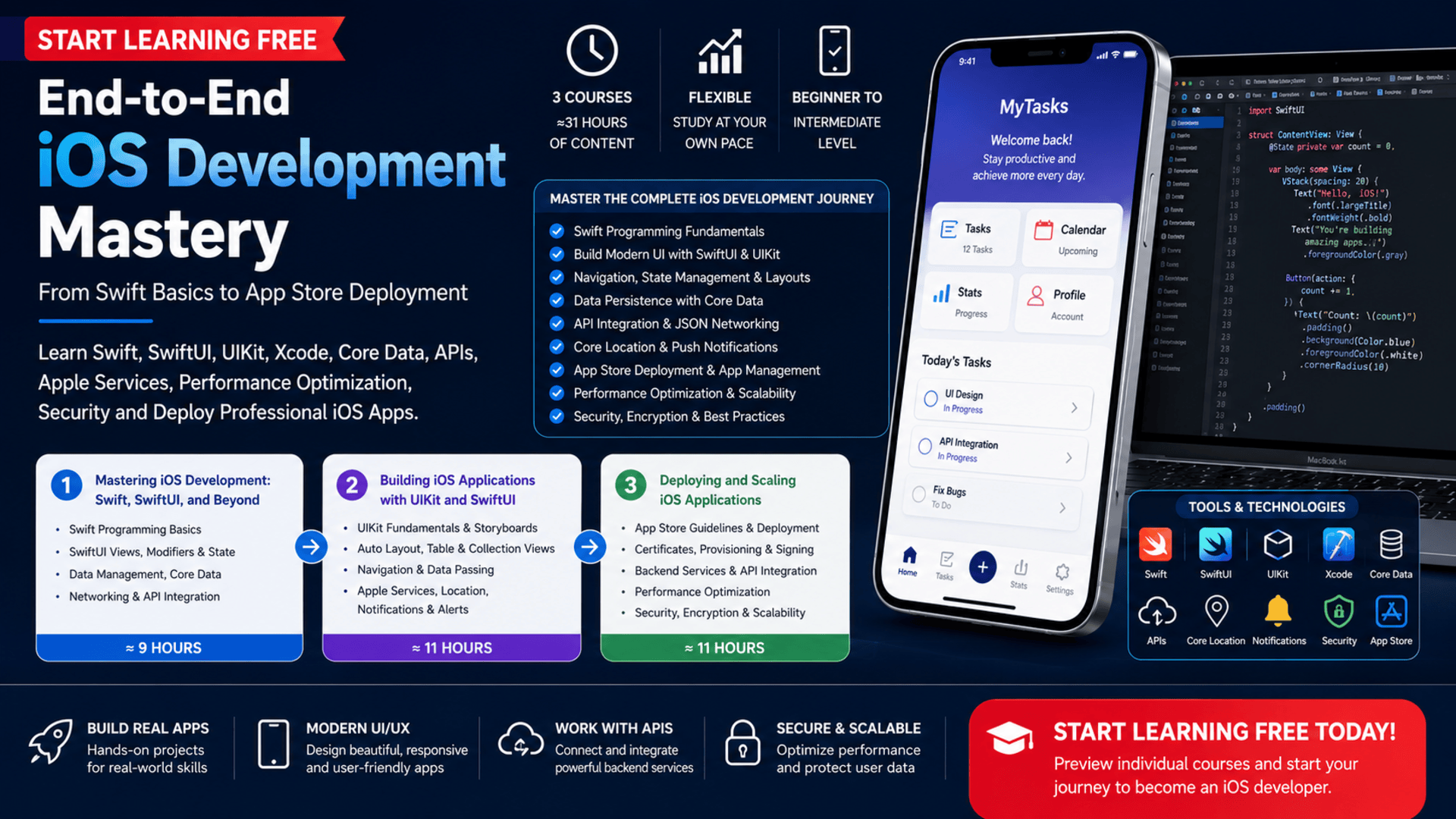
Successful iOS applications require much more than an attractive screen or a few lines of Swift code.
Professional developers must understand programming, interface design, navigation, data persistence, networking, device services, testing, performance, security, application signing, and App Store deployment.
The End-to-End iOS Development Mastery program provides a structured learning path through these important stages.
Across three connected courses, learners begin with Swift programming and SwiftUI, advance to application development with both UIKit and SwiftUI, and finish by integrating backend services, optimizing performance, securing application data, and preparing an app for distribution.
The curriculum is designed to connect individual technical concepts into a complete iOS development workflow.
You may also be able to Start Learning Free by opening an individual course and checking whether a Preview, Full Course—No Certificate, or free-trial option is currently available.
What Is End-to-End iOS Development?
End-to-end iOS development covers the complete process of creating an application, from the first line of code to publishing and maintaining the finished product.
The process may include:
- Planning application functionality
- Writing Swift code
- Creating interfaces
- Managing navigation
- Storing information
- Connecting to APIs
- Using device services
- Testing application behavior
- Debugging errors
- Improving performance
- Protecting sensitive information
- Signing application builds
- Configuring marketplace information
- Submitting an app for review
- Releasing updates and bug fixes
Learning these stages together can help developers understand how a professional iOS application moves from an initial concept to a production-ready product.
About the End-to-End iOS Development Program
The specialization contains three connected courses developed by Board Infinity.
The course sequence is:
- Mastering iOS Development: Swift, SwiftUI, and Beyond
- Building iOS Applications with UIKit and SwiftUI
- Deploying and Scaling iOS Applications
The individual course estimates provide approximately 31 hours of learning content:
- Course 1: 9 hours
- Course 2: 11 hours
- Course 3: 11 hours
The program offers a flexible schedule, allowing learners to study according to their own availability.
The first course begins at a beginner level, introducing Swift and SwiftUI fundamentals. The second and third courses move into intermediate iOS development, Apple services, application deployment, optimization, scalability, and security.
Completing the courses in order provides the clearest progression from foundational programming to professional app delivery.
What Will You Learn?
The specialization covers technical skills from across the iOS application lifecycle.
Key learning outcomes include:
- Understanding Swift programming fundamentals
- Setting up and using Xcode
- Working with variables, constants, and data types
- Applying conditional statements and loops
- Writing functions and closures
- Debugging Swift code
- Building user interfaces with SwiftUI
- Using views and modifiers
- Creating interactive UI components
- Managing application state
- Creating navigation systems
- Working with UIKit
- Using storyboards and XIB files
- Building responsive layouts with Auto Layout
- Working with table views and collection views
- Passing data between view controllers
- Managing local data
- Using UserDefaults and FileManager
- Creating persistent storage with Core Data
- Making network requests
- Integrating APIs
- Handling authentication
- Parsing JSON responses
- Using Core Location
- Implementing local and push notifications
- Preparing applications for marketplace submission
- Managing certificates and provisioning profiles
- Configuring App Store Connect
- Improving application performance
- Reducing load time
- Managing memory usage
- Protecting sensitive data
- Applying secure coding practices
- Preparing apps to scale reliably
Course 1: Mastering iOS Development — Swift, SwiftUI, and Beyond
Estimated learning time: 9 hours
The first course introduces the programming, interface, data, and networking foundations required for iOS application development.
It contains three modules:
- Foundations of Swift Programming
- Building User Interfaces with SwiftUI
- Data Management and Networking in SwiftUI
Module 1: Foundations of Swift Programming
The first module introduces Swift and the Xcode development environment.
Swift is the primary programming language used throughout the learning path.
Learners explore:
- Swift Playgrounds
- Variables
- Constants
- Data types
- Conditional statements
- Loops
- Functions
- Closures
- Higher-order functions
- Capturing values
- Escaping closures
Variables and Constants
Variables store information that may change while an application runs.
Constants store information that should remain unchanged.
Understanding when to use each type helps developers write clearer and safer code.
Control Structures
Conditional statements allow applications to make decisions.
Loops allow code to repeat based on defined conditions.
These concepts are essential for handling user input, processing data, and controlling application behavior.
Functions and Closures
Functions organize reusable logic.
Closures are self-contained blocks of functionality that can be passed around and used in flexible ways.
They are particularly important in modern Swift development, including asynchronous operations, event handling, and collection processing.
By the end of this module, learners should be more comfortable writing, organizing, and debugging Swift code in Xcode.
Module 2: Building User Interfaces with SwiftUI
SwiftUI is a declarative framework for creating interfaces across Apple platforms.
Instead of describing every manual step required to update a screen, developers describe what the interface should display for the current application state.
Learners study:
- SwiftUI fundamentals
- Declarative interface development
- Views
- Modifiers
- Interactive components
- State
- Bindings
- Navigation
Views and Modifiers
Views represent the visible elements of an interface.
They may include:
- Text
- Images
- Buttons
- Forms
- Lists
- Navigation elements
- Input controls
Modifiers change how a view looks or behaves.
Developers can use them to control:
- Colors
- Fonts
- Spacing
- Alignment
- Frames
- Backgrounds
- Interactions
State and Bindings
Interactive applications need to update when data changes.
State allows SwiftUI to track changing information.
Bindings create a connection between interface elements and the data they display or modify.
These tools help developers create screens that react immediately to user actions.
Navigation
Most mobile applications contain several screens.
Learners explore how SwiftUI navigation can help users move between views and access different parts of an application.
Module 3: Data Management and Networking in SwiftUI
Modern applications frequently need to save information and communicate with external services.
The third module introduces:
- Local data handling
- UserDefaults
- FileManager
- Core Data
- Networking fundamentals
- Network requests
- API integration
- API authentication
UserDefaults
UserDefaults can store small pieces of application information, such as:
- User preferences
- Selected themes
- Simple settings
- Feature states
FileManager
FileManager helps applications create, read, update, and manage files stored on a device.
Core Data
Core Data supports persistent and structured data management.
It can help developers manage:
- Application records
- Relationships
- Saved content
- Offline information
- User-generated data
API Integration
APIs allow mobile applications to communicate with external systems.
An app may use an API to:
- Retrieve product information
- Load weather data
- Display news
- Submit forms
- Access user accounts
- Update remote records
Learners explore how to make requests, receive information, and integrate external data into SwiftUI applications.
Course 2: Building iOS Applications with UIKit and SwiftUI
Estimated learning time: 11 hours
The second course expands interface-development skills by covering both UIKit and SwiftUI.
It contains three modules:
- UIKit Fundamentals
- SwiftUI for iOS Applications
- Working with Apple Services
This combined approach helps learners understand both traditional and modern iOS application-development methods.
Module 1: UIKit Fundamentals
UIKit has supported iOS application interfaces for many years and remains important in existing and new projects.
Learners explore:
- Creating a UIKit application
- View hierarchies
- Storyboards
- XIB files
- Buttons
- Labels
- Text fields
- Auto Layout
- Constraints
- Table views
- Collection views
- Navigation controllers
- Modals
- Segues
- Passing information between controllers
Storyboards and XIB Files
Storyboards visually represent application screens and the navigation between them.
XIB files can define individual interface components or screens.
Understanding these tools can help developers work with existing UIKit projects.
Auto Layout
Auto Layout helps interfaces adapt to different screen sizes and orientations.
Developers use constraints to define relationships between interface elements.
A responsive layout should remain usable across multiple iPhone and iPad sizes.
Table Views and Collection Views
Table views display vertically organized information.
They are commonly used for:
- Settings
- Messages
- Contacts
- News articles
- Product lists
Collection views provide more flexible layouts and may be used for:
- Galleries
- Product grids
- Dashboards
- Card-based interfaces
Navigation Controllers and Segues
Navigation controllers organize screen-to-screen movement.
Segues define transitions between view controllers.
Learners also study how to pass information when moving from one screen to another.
Module 2: SwiftUI for iOS Applications
The second module returns to SwiftUI and introduces more advanced interface and state-management techniques.
Learners explore:
- Horizontal stacks
- Vertical stacks
- Layered stacks
- Lists
- Forms
- Adaptive layouts
- Navigation views
- Navigation links
- State management
- Bindings
- Environment objects
- Observed objects
SwiftUI Layouts
SwiftUI includes several layout containers:
- HStack organizes views horizontally.
- VStack organizes views vertically.
- ZStack layers views over one another.
These tools can be combined to create complex mobile interfaces.
Lists and Forms
Lists display structured collections of content.
Forms organize settings, inputs, selections, and controls.
Advanced State Management
The module covers tools such as:
@State@Binding@EnvironmentObject@ObservedObject
These tools help developers decide where information should live and how it should be shared across an application.
Effective state management is important for building predictable and maintainable interfaces.
Module 3: Working with Apple Services
Professional applications often use capabilities provided by the device and operating system.
This module covers:
- Core Location
- User-location access
- Reverse geocoding
- Permission handling
- Local notifications
- Push notifications
- Alerts
- Action sheets
Core Location
Core Location allows an application to access location-related information when the user grants permission.
It can support:
- Maps
- Delivery tracking
- Location-based recommendations
- Travel applications
- Nearby services
- Fitness tracking
Permission Handling
Applications must request access before using sensitive device capabilities.
Clear and responsible permission handling can improve user trust.
Notifications
Notifications help applications communicate with users outside the main app interface.
Local notifications are scheduled or generated by the application.
Push notifications are usually delivered through a remote service.
They may be used for:
- Reminders
- New messages
- Order updates
- Account alerts
- Scheduled events
Alerts and Action Sheets
Alerts communicate important information or ask the user to confirm an action.
Action sheets present a list of choices related to the current task.
Course 3: Deploying and Scaling iOS Applications
Estimated learning time: 11 hours
The final course focuses on the transition from a functional application to a production-ready product.
It contains three modules:
- Preparing Your App for Deployment
- Integrating Backend Services
- App Optimization and Scaling
Module 1: Preparing Your App for Deployment
Publishing an iOS application requires more than uploading code.
Learners explore:
- App Store guidelines
- The review process
- Policy compliance
- Application metadata
- Screenshots
- Certificates
- Provisioning profiles
- Signing applications
- Creating builds with Xcode
- Testing builds
- Debugging deployment problems
- Configuring App Store Connect
- Uploading application builds
- Setting release dates
- Managing updates
- Fixing bugs after release
Application Metadata
Marketplace information can include:
- Application title
- Description
- Category
- Keywords
- Screenshots
- Privacy information
- Version details
Clear metadata helps users understand what the application does.
Certificates and Provisioning Profiles
Certificates and provisioning profiles connect the application, developer account, devices, and distribution method.
Learning how to manage them is important for testing and production deployment.
App Store Connect
App Store Connect is used to manage application records, builds, releases, and updates.
Learners explore how to configure a listing and submit a build for review.
Module 2: Integrating Backend Services
Many iOS applications depend on remote services and persistent data.
This module covers:
- URLSession
- API calls
- JSON responses
- Error handling
- Core Data
- Entities
- Attributes
- Data fetching
- Saving information
- Updating records
- Deleting records
URLSession
URLSession supports network communication in iOS applications.
Developers can use it to send requests and receive remote information.
JSON Parsing
APIs commonly return data in JSON format.
The application must convert that information into objects or structures it can use.
Error Handling
Network requests may fail because of:
- Lost connectivity
- Server problems
- Invalid responses
- Authentication errors
- Timeout issues
Applications should respond gracefully and provide useful feedback.
Core Data Operations
Learners explore create, read, update, and delete operations for persistent application information.
These capabilities can support both offline and data-driven experiences.
Module 3: App Optimization and Scaling
An application that works during development may still experience problems when used by more people or when processing larger amounts of data.
The final module focuses on:
- Profiling tools
- Performance bottlenecks
- Application load time
- Memory usage
- Sensitive information
- Data encryption
- Secure coding
- Scalability
Performance Profiling
Profiling tools help developers identify areas where an application uses too much time, memory, processing power, or energy.
Reducing Load Time
Faster loading can improve user satisfaction and reduce abandonment.
Developers may need to improve:
- Data requests
- Image loading
- Database operations
- View initialization
- Background processing
Memory Management
Poor memory management can cause slow performance or application crashes.
Developers need to understand how resources are created, retained, and released.
Application Security
Mobile applications may handle:
- Personal information
- Account credentials
- Payment-related data
- Private messages
- Location information
The course introduces practices for handling sensitive information, encrypting user data, and reducing security risks.
Practical Learning and Real-World Application Development
The specialization emphasizes practical scenarios rather than isolated theory.
Learners apply their skills by creating iOS application features that combine:
- Swift programming
- SwiftUI interfaces
- UIKit components
- Navigation
- State management
- Data persistence
- API integration
- Core Location
- Notifications
- Backend communication
- Performance optimization
- Security
- Deployment preparation
This end-to-end perspective can help learners understand how individual tools contribute to a complete product.
Skills You Can Develop
Swift Programming
Write organized Swift code using variables, control structures, functions, and closures.
Xcode Development
Create, build, test, debug, and prepare iOS applications inside Xcode.
SwiftUI Development
Build modern declarative interfaces with reusable views and state-driven behavior.
UIKit Development
Create iOS interfaces using view controllers, storyboards, Auto Layout, and UI components.
Mobile UI Design
Develop adaptive and user-friendly application interfaces.
State Management
Control how data changes and how those changes update the interface.
Core Data
Store, retrieve, modify, and delete persistent application information.
API Integration
Connect iOS applications to external services and remote data.
Apple Services
Use location services, notifications, alerts, and other device capabilities.
Application Deployment
Prepare, sign, configure, and submit an app for marketplace review.
Performance Optimization
Identify bottlenecks, reduce loading time, and manage memory usage.
Secure Coding
Protect sensitive information and apply security-focused development practices.
Application Scalability
Prepare applications to remain stable and efficient as their usage grows.
Tools and Technologies Covered
The learning path introduces tools and technologies used throughout professional iOS development:
- Swift
- SwiftUI
- UIKit
- Xcode
- Swift Playgrounds
- Core Data
- UserDefaults
- FileManager
- URLSession
- JSON
- APIs
- Core Location
- Local notifications
- Push notifications
- Storyboards
- XIB files
- Auto Layout
- Table views
- Collection views
- Navigation controllers
- App Store Connect
- Application profiling tools
- Certificates
- Provisioning profiles
- Encryption and security controls
Who Should Take This Program?
This specialization may be suitable for:
Aspiring iOS Developers
Learners who want a structured path from Swift programming to application deployment.
Beginner Swift Programmers
People who want to build a stronger foundation in Swift, Xcode, and SwiftUI.
Mobile App Developers
Developers who want to expand into the Apple application ecosystem.
Software Engineering Students
Students who want practical experience with programming, interfaces, networking, data, security, and deployment.
UIKit Developers
Developers who want to add modern SwiftUI knowledge to their existing interface skills.
SwiftUI Developers
Learners who want to understand UIKit and traditional iOS application architecture.
Freelance and Independent Developers
Professionals who plan to design, build, and publish their own applications.
Career Changers
People exploring a transition into iOS or mobile software development.
Is This Program Suitable for Beginners?
The specialization overview is classified as beginner level, and the first course introduces essential Swift and SwiftUI concepts.
However, the second and third courses are classified as intermediate.
Learners will benefit from:
- Basic computer literacy
- Familiarity with mobile applications
- A willingness to practice programming
- Regular access to the development tools required for iOS work
The program’s FAQ also recommends some familiarity with iOS.
Complete programming beginners should expect to spend additional time practicing Swift and reviewing programming concepts.
How Long Does the Program Take?
The three individual courses contain approximately 31 hours of listed learning content:
- Mastering iOS Development: 9 hours
- Building iOS Applications: 11 hours
- Deploying and Scaling iOS Applications: 11 hours
Actual completion time will depend on:
- Previous programming experience
- Weekly availability
- Time spent practicing
- Debugging requirements
- Project complexity
- Additional application development
- Deployment preparation
The schedule is flexible, and learners may progress at their own pace.
Should You Complete the Courses in Order?
Yes.
The recommended sequence is:
- Mastering iOS Development: Swift, SwiftUI, and Beyond
- Building iOS Applications with UIKit and SwiftUI
- Deploying and Scaling iOS Applications
The first course establishes the Swift, SwiftUI, data, and networking foundation.
The second adds UIKit, advanced SwiftUI state management, Core Location, and notifications.
The final course focuses on backend integration, performance, security, scaling, and App Store deployment.
Following this order creates a logical path from writing Swift code to launching a professional application.
How to Start Learning Free
The complete three-course specialization is not currently presented as entirely free.
However, an individual course may offer a Preview, Full Course—No Certificate, or free-trial option.
Follow these steps:
- Open the program link.
- Scroll down until you find the three individual courses.
- Select the course you want to explore.
- Open its individual course page.
- Click Enroll.
- Sign in or create an account when requested.
- Check whether Preview or Full Course—No Certificate appears as an enrollment option.
- When one of these options is available, select it and begin accessing the included materials.
- When only a free trial is displayed, review its terms before starting.
- If no free-access option is available, check whether financial aid or a scholarship is offered.
Free-access options may vary by course, location, account, and current enrollment settings.
They may not include:
- The complete specialization
- Every graded assignment
- Full project access
- The shareable certificate
- All instructor or learner services
- Permanent access after a trial ends
“Start Learning Free” therefore refers to exploring the available no-cost entry option—not a guarantee that the entire specialization and certificate are free.
Can You Earn a Certificate?
A shareable certificate is available to learners who complete the required course content and assessments through an eligible certificate enrollment.
It may be added to:
- A LinkedIn profile
- A resume
- A CV
- A development portfolio
- A performance review
- A personal learning record
Preview or no-certificate access does not provide the complete career certificate.
How to Build a Strong iOS Development Portfolio
A professional portfolio should demonstrate complete application-development ability.
Consider creating projects such as:
- A task-management app
- A weather app using an API
- A location-based service
- A personal finance application
- A booking system
- A news reader
- A fitness tracker
- An inventory application
- A reminder app with notifications
- A data-driven business application
Each portfolio project should include:
- A clear problem statement
- Application screenshots
- Swift code
- SwiftUI or UIKit interfaces
- Navigation
- State management
- Data persistence
- API integration
- Error handling
- Security considerations
- Performance notes
- A source-code repository
- Deployment information when available
A complete project demonstrates more value than isolated exercises because it shows how several technical areas work together.
Frequently Asked Questions
Can I Start Learning Free?
You can check an individual course page for a Preview, Full Course—No Certificate, or free-trial option. Availability and included content may vary.
Is the complete iOS specialization free?
No. The complete specialization, graded assignments, and certificate are not currently presented as entirely free.
How many courses are included?
The specialization contains three courses covering Swift, SwiftUI, UIKit, Apple services, data, networking, performance, security, and deployment.
Will I learn Swift?
Yes. The first course introduces Swift variables, data types, conditional statements, loops, functions, and closures.
Will I learn SwiftUI?
Yes. SwiftUI is covered across the first and second courses, including views, modifiers, navigation, bindings, layouts, and advanced state management.
Will I learn UIKit?
Yes. The second course covers UIKit, storyboards, view hierarchies, Auto Layout, table views, collection views, and navigation controllers.
Does the program cover Core Data?
Yes. Core Data is used for persistent application data and backend integration.
Will I learn API integration?
Yes. The curriculum covers network requests, authentication, URLSession, JSON responses, and error handling.
Does the program include notifications?
Yes. Learners explore both local and push notifications.
Will I learn how to publish an app?
Yes. The final course covers application signing, provisioning profiles, App Store Connect, submission, release dates, updates, and bug fixes.
Does the program cover security?
Yes. The final module includes sensitive-data handling, encryption, secure coding, and application security.
Can I receive a certificate through Preview access?
No. Preview or Full Course—No Certificate access does not include the shareable certificate.
Start Building Professional iOS Applications
Professional iOS development requires programming, interface design, data management, networking, Apple services, performance optimization, security, and deployment knowledge.
This three-course specialization connects these areas in one structured learning path.
You can begin with Swift and SwiftUI, expand into UIKit and Apple services, and finish by preparing secure, scalable applications for marketplace deployment.
Open an individual course and check which no-cost access option is available.
Start Learning Free today and begin developing the end-to-end iOS skills needed to design, build, optimize, secure, and deploy professional mobile applications.
Complete iOS Application Development
Master End-to-End iOS Development
Learn Swift, SwiftUI, UIKit, Xcode, Core Data, APIs, state management, Apple services, performance optimization, secure coding, and App Store deployment through practical iOS development.
Start Learning FreePreview, no-certificate, and free-trial availability may vary. Selected free access may not include the complete specialization, all assessments, permanent access, or the shareable certificate. Financial aid may be available for eligible learners. This page may contain a promotional link.





