

Python is widely used for automation, data analysis, artificial intelligence, software development, and web applications.
However, understanding Python alone does not automatically prepare someone to build a complete website.
Professional web applications require developers to understand how browsers, servers, databases, templates, user accounts, sessions, forms, and frontend technologies work together.
Django brings these elements into one structured Python web framework.
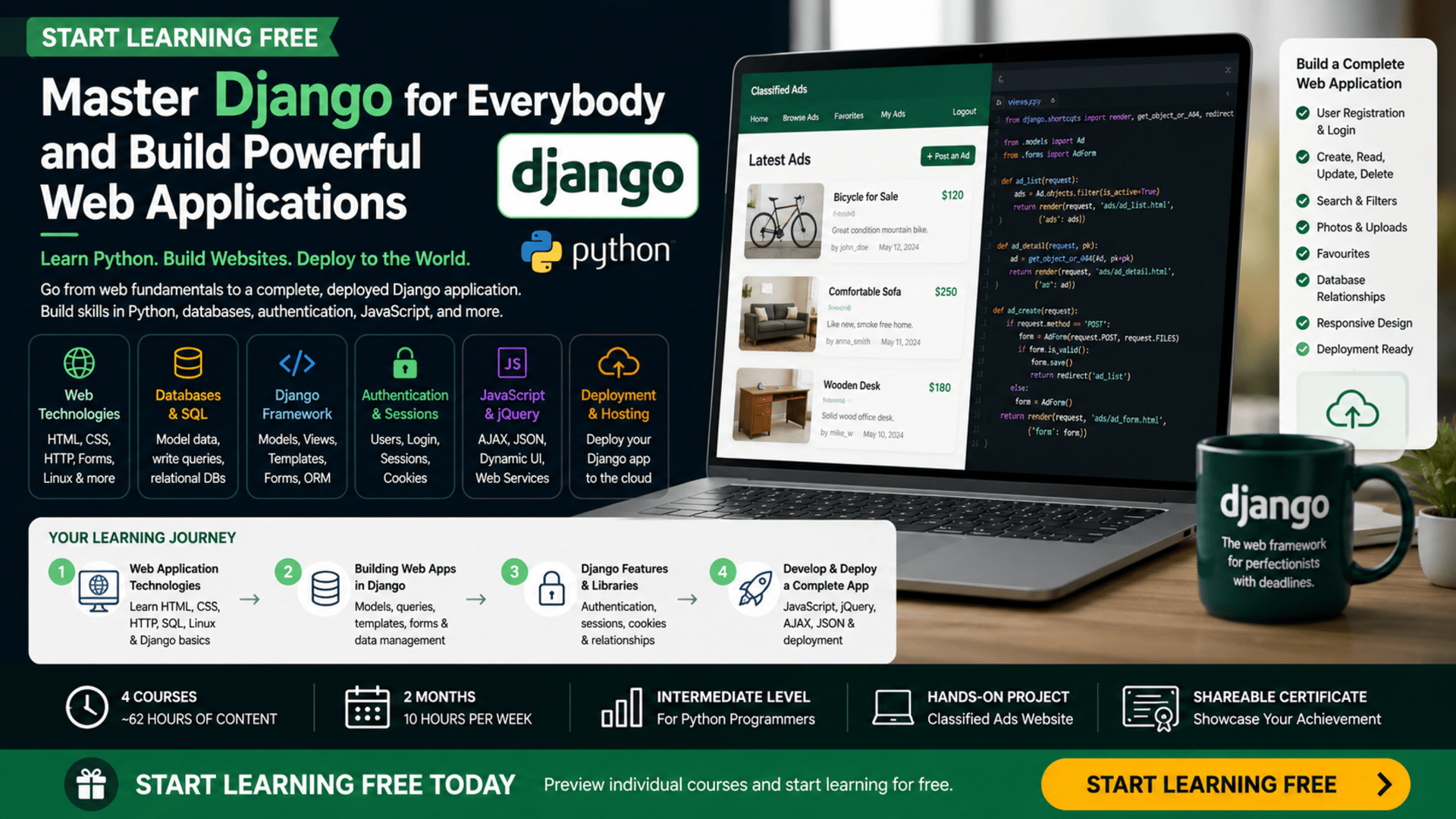
The Django for Everybody program helps Python programmers progress from basic web concepts to building and deploying complete data-driven web applications.
Across four connected courses, learners explore HTML, CSS, SQL, the Django framework, data models, templates, forms, authentication, sessions, cookies, JavaScript, jQuery, AJAX, and JSON web services.
The program concludes with a working classified-ads website containing features such as photos, search, and favourites.
You can begin by checking an individual course page to see whether selected Preview materials are available and Start Learning Free before choosing a complete enrollment option.
What Is Django?
Django is a Python framework used to develop web applications.
It provides built-in tools that help developers manage common application requirements, including:
- URL routing
- Database models
- HTML templates
- Forms
- User authentication
- Sessions
- Cookies
- Security
- Administration
- Database queries
- Application deployment
Without a framework, developers may need to build many of these capabilities from the beginning.
Django offers an organized structure that helps developers create secure and maintainable applications more efficiently.
It is commonly used for:
- Business websites
- Content platforms
- Classified-ads websites
- Customer portals
- Internal systems
- Educational platforms
- Data-management applications
- Online communities
- Booking systems
- Administrative dashboards
Learning Django also helps Python programmers understand how backend application development works in a real web environment.
Why Learn Django Web Development?
A modern website is more than a collection of static pages.
Many applications need to:
- Store information in databases
- Display different content to different users
- Process forms
- Create user accounts
- Maintain login sessions
- Search stored information
- Upload photos
- Create relationships between records
- Update content dynamically
- Communicate with external services
- Run on a production server
Django provides a structured way to develop these capabilities with Python.
Learning Django can help you develop skills in:
- Backend web development
- Database design
- Model-View-Controller architecture
- Object-relational mapping
- User authentication
- Application deployment
- Server-side programming
- Data validation
- Web security
- Frontend-backend integration
These skills can support careers in Python development, backend engineering, full-stack development, and web application development.
About the Django for Everybody Program
Django for Everybody is a four-course specialization offered by the University of Michigan and taught by Charles Russell Severance.
It is designed primarily for learners who already understand Python programming.
The recommended completion schedule is approximately two months when studying for around ten hours each week.
The program contains approximately 62 hours of listed learning content:
- Web Application Technologies and Django — 12 hours
- Building Web Applications in Django — 14 hours
- Django Features and Libraries — 17 hours
- Developing and Deploying a Complete Django Web Application — 19 hours
The courses are designed to be completed in order because each stage builds on the concepts and application structure introduced earlier.
Recommended Knowledge Before Starting
This specialization is classified as intermediate level.
It is not designed as a first introduction to programming.
Learners should already understand important Python concepts such as:
- Variables
- Conditional statements
- Loops
- Functions
- Classes
- Objects
- Methods
- Data structures
- File handling
- Basic debugging
Completing a foundational Python learning program—or having equivalent programming experience—is recommended.
Some understanding of basic web design may also be helpful, although the program introduces the HTML and CSS concepts needed for its projects.
What Will You Learn?
The program covers the complete journey from basic web technologies to a deployed Django application.
Major learning outcomes include:
- Understanding how web applications work
- Explaining HTTP and the request-response cycle
- Installing Django
- Creating and deploying Django applications
- Building HTML pages
- Styling pages with CSS
- Understanding basic SQL operations
- Working with the command line
- Applying Model-View-Controller principles
- Building Django data models
- Querying application data
- Using Django Template Language
- Creating HTML forms
- Understanding classes, instances, and methods
- Managing sessions and cookies
- Applying Django’s built-in login functionality
- Creating user accounts
- Building one-to-many relationships
- Building many-to-many relationships
- Creating, editing, and deleting records
- Applying data validation
- Writing JavaScript
- Debugging JavaScript
- Building JavaScript objects
- Using jQuery
- Working with AJAX
- Using JSON web services
- Deploying a complete Django application
Course 1: Web Application Technologies and Django
Estimated learning time: 12 hours
The first course introduces the technologies that support modern web applications.
It explains what happens when a user opens a website, submits a form, or requests information from a server.
HTTP and the Request-Response Cycle
HTTP is the protocol used for communication between web browsers and servers.
When a user opens a page, the browser sends a request.
The server processes that request and returns a response containing content such as HTML, CSS, images, or JSON data.
Understanding this cycle is essential because Django applications operate by receiving requests and producing responses.
HTML and CSS
HTML defines the structure of a page, while CSS controls its appearance.
Learners explore how to create and style:
- Headings
- Paragraphs
- Links
- Lists
- Images
- Forms
- Sections
- Navigation
- Page layouts
These technologies provide the user-facing layer of a Django application.
SQL and Databases
SQL is used to create, read, update, and delete information in relational databases.
Learners are introduced to basic database operations and how web applications store structured information.
Command-Line and Linux Concepts
Backend developers often use command-line tools to install software, manage files, run servers, and deploy applications.
The course introduces the commands and development practices required to work with Django.
Installing and Deploying Django
Learners create a basic Django application and explore how an application is moved from a local development environment to an online server.
By the end of the course, learners should understand the major technologies involved in delivering a web application.
Course 2: Building Web Applications in Django
Estimated learning time: 14 hours
The second course focuses more deeply on Django’s application-development features.
Learners study how Django represents data, processes requests, and generates HTML pages.
Django Data Models
A data model defines the information an application stores.
For example, a classified-ads application may contain models for:
- Users
- Advertisements
- Categories
- Comments
- Photos
- Favourites
Each model contains fields that represent important information.
An advertisement model might include:
- Title
- Description
- Price
- Owner
- Publication date
- Category
- Image
Object-Relational Mapping
Django includes an object-relational mapping system.
It allows developers to work with database records through Python objects rather than writing every SQL query manually.
This makes it easier to:
- Create records
- Retrieve records
- Filter data
- Update records
- Delete records
- Define relationships
Django Queries
Learners explore how to search, filter, sort, and retrieve application information.
Queries can be used to display:
- All advertisements
- Advertisements created by one user
- Records in a specific category
- Recently published content
- Search results
Django Template Language
Django Template Language allows developers to combine HTML with dynamic application data.
Templates can display:
- User names
- Database records
- Conditional content
- Lists
- Form errors
- Navigation links
Template tags and variables help transform backend data into user-facing pages.
HTML Forms
Forms allow users to submit information.
Learners explore how forms can be used to:
- Create records
- Update information
- Submit searches
- Enter account details
- Provide feedback
By the end of the course, learners should understand how Django models, queries, templates, and forms work together.
Course 3: Django Features and Libraries
Estimated learning time: 17 hours
The third course introduces important features required for multi-user web applications.
These include sessions, cookies, login functionality, database relationships, and reusable editing workflows.
Sessions and Cookies
HTTP does not automatically remember previous requests.
Sessions allow an application to maintain information as a user moves between pages.
Cookies help the browser identify a session.
Sessions may be used to:
- Keep users logged in
- Save preferences
- Maintain temporary information
- Track user activity
- Store application state
Django Authentication
Django provides built-in functionality for managing user authentication.
Learners explore how to:
- Create user accounts
- Log users in
- Log users out
- Restrict pages
- Identify the current user
- Associate content with an owner
- Manage users inside views
Authentication is essential for applications that contain private information or user-generated content.
One-to-Many Relationships
A one-to-many relationship occurs when one record can be connected to several other records.
Examples include:
- One user can create many advertisements
- One category can contain many listings
- One advertisement can receive many comments
Understanding relationships helps developers create realistic database structures.
Generic Edit Views
Django provides reusable tools for common create, edit, and delete operations.
Learners explore workflows for:
- Creating records
- Editing records
- Deleting records
- Validating submitted information
- Redirecting users after an action
These capabilities can reduce repeated code and make applications easier to maintain.
Course 4: Developing and Deploying a Complete Django Web Application
Estimated learning time: 19 hours
The final course combines Django backend development with more advanced data relationships and frontend programming.
Learners complete and deploy a full web application.
Many-to-Many Relationships
A many-to-many relationship occurs when multiple records can connect to multiple other records.
For example:
- A user can favourite many advertisements
- An advertisement can be favourited by many users
This type of modeling is useful for tags, memberships, favourites, permissions, and shared categories.
JavaScript
JavaScript adds dynamic behavior to web pages.
Learners study how to:
- Create variables
- Write functions
- Build objects
- Respond to events
- Update content
- Debug code
- Control user interactions
jQuery
jQuery provides tools for working with page elements, events, and asynchronous requests.
Although modern projects may use other JavaScript libraries, understanding jQuery remains useful when maintaining existing applications.
AJAX
AJAX allows a web page to communicate with the server without reloading the entire page.
It can support features such as:
- Favourite buttons
- Dynamic searches
- Form submissions
- Live updates
- Loading additional records
JSON Web Services
JSON is a common format for exchanging structured data between applications.
Learners explore how Django applications can send and receive JSON information.
Application Deployment
The completed application is moved into a production environment where it can be accessed online.
Deployment gives learners experience with the difference between developing an application locally and operating it as a real website.
Build a Portfolio-Ready Classified-Ads Website
The applied project is one of the most valuable parts of the specialization.
By the end of the program, learners build a working classified-ads website.
The project may include features such as:
- User registration
- Login and logout
- Advertisement creation
- Advertisement editing
- Advertisement deletion
- Photo uploads
- Search
- Favourites
- User-owned content
- Database relationships
- Dynamic page behavior
- Production deployment
This project combines backend development, databases, templates, authentication, frontend programming, and deployment.
A completed application can be added to a development portfolio and used to demonstrate practical Django skills.
Skills You Can Develop
Python Web Development
Apply Python programming concepts inside a complete web framework.
Django Development
Create applications using models, views, templates, forms, authentication, and reusable libraries.
HTML and CSS
Build and style the pages users see inside a Django application.
SQL and Relational Databases
Understand how application information is structured, stored, queried, and connected.
Data Modeling
Design models and relationships that represent real application requirements.
Object-Relational Mapping
Work with database records through Django’s Python-based interface.
Authentication
Create secure login, logout, user-account, and content-ownership features.
Sessions and Cookies
Maintain user information across multiple requests.
JavaScript and jQuery
Add interactive behavior to Django templates.
AJAX and JSON
Exchange data between browser interfaces and backend services.
Application Deployment
Publish Django applications to a production environment.
Debugging
Identify and correct problems in Python, Django, JavaScript, and database logic.
Tools and Technologies Covered
The program introduces a range of technologies used in web application development:
- Python
- Django
- HTML
- CSS
- SQL
- Linux
- Command-line tools
- Django Template Language
- Object-relational mapping
- JavaScript
- jQuery
- AJAX
- JSON
- Relational databases
- Web servers
- Cloud deployment tools
Understanding how these technologies work together gives learners a broader view of full web application development.
Who Should Take This Program?
The program may be suitable for:
Python Programmers
Developers who understand Python and want to apply it to backend web development.
Aspiring Django Developers
Learners who want a structured path from web fundamentals to a deployed application.
Backend Development Beginners
People who understand programming but have limited experience creating server-side applications.
Software Engineering Students
Students who want practical experience with databases, authentication, application architecture, and deployment.
Career Changers
Professionals who already understand Python and are considering web development roles.
Freelancers
Developers interested in creating business websites, portals, content systems, and database applications.
Entrepreneurs
Founders who want to understand how data-driven web products are developed.
Front-End Developers
Developers who want to add Python backend and database skills to their frontend knowledge.
Is This Django Program Suitable for Beginners?
The specialization is classified as intermediate level.
It can be suitable for beginners in web development, but it is not intended for people who have never programmed before.
Learners should understand Python before starting.
Someone who already knows Python but has never built a website may find the program a logical introduction to Django and backend web development.
Complete programming beginners should study Python fundamentals first.
How Long Does the Program Take?
The recommended schedule is approximately two months at ten hours per week.
The four courses contain about 62 hours of listed learning content:
- Web Application Technologies and Django: 12 hours
- Building Web Applications in Django: 14 hours
- Django Features and Libraries: 17 hours
- Developing and Deploying a Complete Django Web Application: 19 hours
Actual completion time depends on:
- Previous Python experience
- Weekly study availability
- Time spent debugging
- Project complexity
- Additional coding practice
- Deployment requirements
- Portfolio customization
Learners who add more features to the final application may need additional time.
Should You Complete the Courses in Order?
Yes.
The recommended sequence is:
- Web Application Technologies and Django
- Building Web Applications in Django
- Django Features and Libraries
- Developing and Deploying a Complete Django Web Application
The first course introduces web technologies and Django.
The second focuses on models, templates, queries, and forms.
The third introduces authentication, sessions, relationships, and editing workflows.
The final course adds JavaScript, jQuery, AJAX, JSON, advanced relationships, and deployment.
Following this order provides a logical progression from foundational web concepts to a complete application.
How to Start Learning Free
The complete four-course specialization is not presented as entirely free.
However, you can check an individual course page to see whether selected Preview materials are available.
Follow these steps:
- Open the program link.
- Because this program is a Specialization, scroll down until you find the four individual courses.
- Select the individual course you want to explore.
- Open its course page.
- Click Enroll.
- Sign in or create an account when requested.
- Look for a Preview option instead of selecting Start Free Trial or a paid enrollment plan.
- When Preview is available, open the accessible videos or materials and begin learning.
Preview availability may vary by course, account, location, and current enrollment options.
Selected Preview access may not include:
- Every course module
- Complete programming assignments
- Graded Django websites
- The final classified-ads project
- Instructor feedback
- The complete specialization
- A shareable certificate
Learners who cannot afford enrollment should check whether financial aid or a scholarship is available.
Can You Earn a Certificate?
A shareable career certificate is available after completing the required courses, assignments, and projects through an eligible enrollment option.
The certificate may be added to:
- A LinkedIn profile
- A resume
- A CV
- A development portfolio
- A performance review
- A personal learning record
Preview access does not provide the complete certificate.
For stronger career results, combine the credential with a live Django website, a public code repository, screenshots, and clear project documentation.
How to Build a Strong Django Portfolio
A strong Django portfolio should demonstrate more than isolated coding exercises.
Consider creating projects such as:
- A classified-ads platform
- A blog with user accounts
- A task-management system
- A customer portal
- An inventory application
- A job board
- A booking system
- A discussion forum
- A learning-management application
- A business directory
Each project should include:
- A clear project description
- User authentication
- Database models
- Create, read, update, and delete operations
- Search or filtering
- Responsive templates
- Data validation
- Security considerations
- A live deployment
- A code repository
- Installation instructions
- Screenshots
A well-documented portfolio helps employers and clients understand what you built and how the application works.
Frequently Asked Questions
Can I Start Learning Free?
You can check individual course pages for a Preview option. When available, Preview may provide selected videos or learning materials.
Is the complete Django program free?
No. The complete specialization, graded projects, final website, and certificate are not presented as entirely free.
Is previous Python experience required?
Yes. Learners are encouraged to understand Python programming before beginning the specialization.
How many courses are included?
The program contains four courses covering web technologies, Django models and templates, authentication and databases, JavaScript, jQuery, JSON, and deployment.
What project will I build?
Learners build and deploy a classified-ads website with features such as photos, search, favourites, user accounts, and database relationships.
Will I learn SQL?
Yes. The program introduces SQL and relational database concepts used by Django applications.
Will I learn authentication?
Yes. Learners explore Django’s built-in login functionality, sessions, cookies, user accounts, and content ownership.
Does the program include JavaScript?
Yes. The final course covers JavaScript, debugging, objects, events, jQuery, AJAX, and JSON web services.
Will I deploy a Django application?
Yes. Application installation, cloud deployment, and production deployment are included in the learning path.
How long does the program take?
The recommended schedule is approximately two months at ten hours per week.
Can I earn a certificate through Preview access?
No. Preview access does not include the complete certificate.
Start Building Powerful Web Applications with Django
Django helps Python programmers move from writing scripts to developing complete, database-driven web applications.
This four-course specialization combines Python, Django, HTML, CSS, SQL, authentication, sessions, JavaScript, jQuery, AJAX, JSON, and application deployment.
The portfolio project gives learners an opportunity to turn these concepts into a working online application.
Begin by opening one of the individual courses and checking whether selected Preview materials are available.
Start Learning Free today and begin developing the Django skills needed to build, manage, and deploy powerful web applications.
Intermediate Python Web Development
Master Django and Build Powerful Web Applications
Learn Django, Python web development, HTML, CSS, SQL, data models, authentication, sessions, JavaScript, jQuery, AJAX, JSON services, and application deployment through practical projects.
Start Learning FreePreview availability and included materials may vary. Selected Preview access may not include the complete program, graded websites, assignments, final portfolio project, or certificate. Financial aid may be available for eligible learners. This page may contain a promotional link.





