

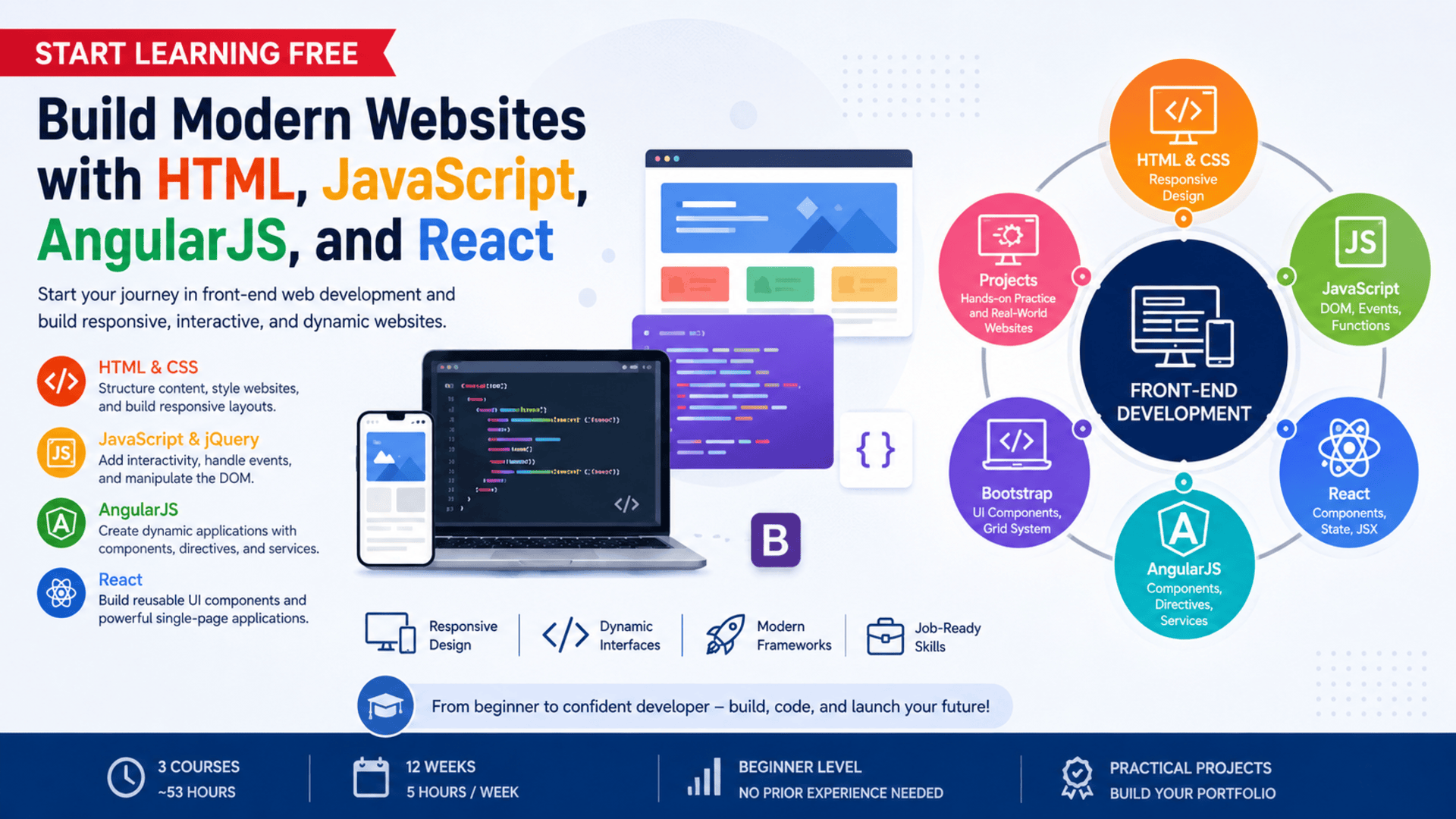
Modern websites are expected to be fast, responsive, accessible, visually attractive, and easy to use on different devices.
Creating these experiences requires more than knowing how to place text and images on a page.
Front-end developers must understand how to structure content with HTML, control layouts and visual design with CSS, add interactions with JavaScript, and organize more complex interfaces with libraries and frameworks such as React and AngularJS.
The Build Website with HTML, JavaScript, AngularJS, and React program offers a structured path for beginners who want to develop practical front-end web development skills.
Across three connected courses, learners progress from foundational web-page construction to JavaScript programming and then to component-based application development.
You may also be able to Start Learning Free by opening an individual course and using selected preview materials when a Preview option is available.
What Is Front-End Web Development?
Front-end web development focuses on the part of a website or web application that users can see and interact with.
It includes elements such as:
- Page layouts
- Navigation menus
- Buttons
- Forms
- Images
- Typography
- Animations
- Interactive content
- Responsive designs
- User-interface components
A front-end developer combines structure, design, programming, and user-experience principles to create functional digital experiences.
The main technologies introduced in this program include:
HTML
HTML defines the structure and meaning of web content.
It is used to create headings, paragraphs, links, forms, tables, lists, images, navigation sections, and other page elements.
CSS
CSS controls the presentation of a website.
It is used to manage colors, fonts, spacing, alignment, layouts, responsiveness, and visual styling.
JavaScript
JavaScript adds logic and interaction to web pages.
It allows developers to respond to user actions, modify page content, validate forms, create animations, communicate with services, and build more dynamic experiences.
React
React supports the development of reusable user-interface components.
It helps developers organize complex interfaces, manage changing data, and create interactive web applications.
AngularJS and Angular Concepts
Angular-based development introduces structured approaches to components, directives, services, application logic, and scalable front-end architecture.
Together, these technologies provide a broad foundation for modern website and web-application development.
About the Website Development Program
This beginner-friendly specialization contains three courses covering the major stages of front-end development.
The recommended completion period is approximately 12 weeks when studying for around five hours each week.
The flexible online schedule allows learners to progress according to their own availability.
The program begins with HTML and CSS before moving into JavaScript, DOM manipulation, event handling, jQuery, React, AngularJS, reusable UI components, and frontend integration.
Its project-focused structure gives learners opportunities to apply concepts instead of only reading about them.
The three courses are:
- Build a Webpage with HTML and CSS
- JavaScript for Web Development
- Libraries and Frameworks for Frontend Development
Together, they provide approximately 53 hours of listed learning material.
Who Should Take This Program?
This website development program may be suitable for several types of learners.
Complete Beginners
People with little or no front-end development experience can begin with HTML and CSS fundamentals before progressing to programming and frameworks.
Aspiring Front-End Developers
Learners who want a structured introduction to the technologies used to create modern website interfaces.
Career Changers
Professionals considering a move into website development, software development, digital design, or related technology roles.
Students
Students who want to supplement their academic studies with practical projects and widely used front-end technologies.
Designers
UI and UX designers who want to understand how their designs are converted into functional web pages.
Entrepreneurs and Small-Business Owners
People who want to understand the process of building, styling, and maintaining business websites.
Freelancers
Professionals interested in offering website design, landing-page development, front-end customization, or interface-development services.
What Will You Learn?
The program introduces the technologies and techniques required to create responsive and interactive web experiences.
Major learning outcomes include:
- Structuring pages with HTML
- Applying semantic HTML elements
- Styling websites with CSS
- Creating responsive layouts
- Working with colors, typography, spacing, and positioning
- Using Bootstrap components and its grid system
- Improving usability and accessibility
- Writing JavaScript variables and functions
- Using operators and data types
- Manipulating the Document Object Model
- Responding to user events
- Building interactive page features
- Applying jQuery
- Creating reusable React components
- Working with JSX
- Managing application state
- Understanding Angular components and directives
- Using Angular services
- Developing dynamic user interfaces
- Integrating front-end technologies into practical projects
Course 1: Build a Webpage with HTML and CSS
Estimated learning time: 23 hours
The first course introduces the foundations of website construction.
Learners begin by exploring how HTML elements and attributes define the structure of a web page.
They study how to create:
- Headings
- Paragraphs
- Links
- Images
- Lists
- Forms
- Tables
- Navigation areas
- Content sections
Understanding structure is important because well-organized HTML supports accessibility, search visibility, usability, and maintainability.
The course then introduces CSS for controlling website presentation.
Learners explore how to manage:
- Colors
- Fonts
- Borders
- Margins
- Padding
- Width and height
- Alignment
- Positioning
- Page layouts
- Responsive behavior
Responsive Website Design
Responsive design helps a website adapt to different screen sizes.
A page should remain usable whether it is opened on a desktop computer, tablet, or smartphone.
Learners explore techniques for creating layouts that respond to the available screen width instead of relying on one fixed design.
Bootstrap
The course also introduces Bootstrap.
Bootstrap provides reusable interface components and a responsive grid system that can accelerate website development.
Learners can use it to create:
- Navigation bars
- Buttons
- Cards
- Forms
- Alerts
- Responsive columns
- Mobile-friendly layouts
Accessibility and Usability
Professional websites should be usable by as many people as possible.
The course introduces modern design practices related to accessibility, cross-device compatibility, usability, and clear content presentation.
By the end of this course, learners should be able to build and style a responsive website page using HTML, CSS, and Bootstrap.
Course 2: JavaScript for Web Development
Estimated learning time: 14 hours
The second course introduces JavaScript for creating dynamic and interactive web experiences.
HTML provides structure and CSS provides presentation, but JavaScript controls behavior.
Learners begin with important programming concepts, including:
- Variables
- Data types
- Operators
- Functions
- Conditional statements
- Loops
- Arrays
- Objects
- Program logic
These concepts allow developers to create instructions that respond to different conditions and user actions.
Document Object Model Manipulation
The Document Object Model represents the elements of a web page in a form JavaScript can access and modify.
Using DOM manipulation, developers can:
- Change text
- Update styles
- Add new elements
- Remove existing elements
- Show or hide content
- Validate user input
- Modify page sections without reloading the entire page
Event Handling
Events occur when users interact with a web page.
Common events include:
- Clicking a button
- Submitting a form
- Moving a mouse
- Typing into a field
- Selecting an option
- Loading a page
JavaScript event handling allows the website to respond to these actions.
jQuery
The course also introduces jQuery as a tool for simplifying common JavaScript tasks.
It can help developers work with page elements, events, animations, and dynamic content using concise syntax.
Hands-On JavaScript Project
Learners apply JavaScript and jQuery concepts in a practical project.
This helps connect programming concepts with realistic website behavior instead of treating JavaScript as an isolated theory subject.
By the end of the course, learners should understand how to add meaningful interaction to a website.
Course 3: Libraries and Frameworks for Frontend Development
Estimated learning time: 16 hours
The third course moves into front-end libraries and frameworks.
As web applications become larger, maintaining all interface logic through basic scripts can become difficult.
Libraries and frameworks help developers organize code into reusable, manageable parts.
React Development
React introduces a component-based approach to user-interface development.
A component represents a reusable section of an interface, such as:
- A navigation menu
- A product card
- A profile panel
- A search form
- A notification
- A dashboard widget
Learners explore:
- React components
- JSX
- State management
- Reusable interface elements
- Interactive user experiences
- Component-based architecture
Component reuse can improve consistency and reduce duplicate code.
AngularJS and Angular Architecture
The course also explores Angular-based application concepts.
Topics include:
- Components
- Directives
- Services
- Application organization
- Dynamic content
- Scalable architecture
- Frontend logic
Understanding more than one framework approach can help learners compare different methods of building web applications.
Frontend Integration
Learners bring together multiple technologies to create dynamic interfaces.
This may include combining:
- HTML
- CSS
- JavaScript
- React
- AngularJS
- UI components
- Responsive layouts
- Event-driven features
The course concludes with practical front-end development work designed to reinforce the complete learning path.
Practical Projects and Applied Learning
The program emphasizes learning by building.
Practical work is important because front-end development requires more than memorizing syntax.
Developers need experience turning requirements into working website features.
Projects may involve:
Building a Webpage from Scratch
Create the structure of a web page using HTML and style it with CSS.
Creating a Responsive Layout
Design a page that adapts to desktop, tablet, and mobile screen sizes.
Using Bootstrap Components
Apply prebuilt components and the Bootstrap grid to improve layout efficiency.
Adding JavaScript Interactions
Create dynamic page behavior through functions, events, and DOM manipulation.
Building with jQuery
Use jQuery to simplify page updates and interactive functionality.
Creating React Components
Develop reusable interface components and manage changing information.
Applying AngularJS Concepts
Use structured framework concepts to organize application features and dynamic content.
Developing an Integrated Front-End Project
Combine different technologies into a complete, interactive website experience.
These projects can also provide starting points for a personal development portfolio.
Skills You Can Develop
The specialization covers a wide range of front-end development capabilities.
Webpage Structure
Use HTML elements and attributes to organize content clearly.
Website Styling
Apply CSS to control appearance, layouts, fonts, spacing, and responsive behavior.
Responsive Web Design
Create interfaces that remain usable across different devices and screen sizes.
JavaScript Programming
Use variables, functions, logic, events, and data structures to control website behavior.
DOM Manipulation
Update page elements and content dynamically.
Event-Driven Programming
Build interfaces that respond to clicks, form submissions, and other user actions.
User-Interface Development
Create clear, engaging, and reusable web interface elements.
React Development
Develop component-based interfaces and manage application state.
AngularJS Development
Understand framework architecture, services, directives, and dynamic interfaces.
Frontend Integration
Combine structure, design, logic, and reusable components in one application.
Accessibility
Apply practices that make web content more usable for people with different needs.
Maintainability
Organize front-end code so that it is easier to understand, modify, and expand.
Tools and Technologies Covered
The program introduces several tools and technologies used in front-end development:
- HTML
- CSS
- JavaScript
- Bootstrap
- jQuery
- React
- AngularJS
- JSX
- DOM APIs
- UI components
- Responsive layouts
- Application frameworks
- Frontend integration techniques
Learning how these technologies work together can help beginners understand the complete front-end development process.
Why Learn HTML and CSS First?
HTML and CSS are the foundation of front-end development.
Frameworks may change, but web applications still depend on structured content and visual styling.
A developer who understands HTML and CSS can more effectively:
- Reproduce interface designs
- Create accessible page structures
- Troubleshoot layout problems
- Build responsive pages
- Customize framework components
- Improve website usability
- Maintain consistent visual systems
Beginning with these technologies creates a strong base for JavaScript and framework development.
Why Learn JavaScript?
JavaScript is central to modern web development.
It allows websites to respond to users and update content dynamically.
JavaScript can be used to create:
- Interactive forms
- Search features
- Image galleries
- Drop-down menus
- Tabs
- Modals
- Calculators
- Dynamic dashboards
- Real-time interface updates
- Single-page applications
React, AngularJS, and many other front-end technologies also depend heavily on JavaScript concepts.
Understanding the language itself makes it easier to learn and use these tools effectively.
Why Learn React?
React is designed around reusable components.
This approach can help developers divide a complex interface into smaller, manageable sections.
Learning React can help you understand:
- Component architecture
- Reusable UI development
- State-driven interfaces
- JSX syntax
- Dynamic rendering
- Frontend application structure
React knowledge is valuable for learners interested in interactive web applications and modern user-interface development.
Why Learn AngularJS Concepts?
AngularJS introduced many developers to structured front-end application development.
Learning its concepts can help learners understand:
- Directives
- Services
- Data-driven interfaces
- Application organization
- Reusable logic
- Framework-based development
It may also be useful when working with existing applications that use AngularJS or when comparing different front-end architecture approaches.
Is This Program Suitable for Beginners?
Yes.
The program is classified as beginner level and starts with foundational HTML and CSS.
Learners are not expected to begin with advanced framework experience.
However, web development still requires practice.
Beginners should allow time to:
- Write code independently
- Repeat exercises
- Test layouts
- Debug JavaScript
- Experiment with responsive designs
- Build small personal projects
- Review concepts that are initially difficult
Consistent practice is more important than rushing through the lessons.
How Long Does the Program Take?
The recommended schedule is approximately 12 weeks at five hours per week.
The individual courses contain about 53 hours of listed material:
- Build a Webpage with HTML and CSS: 23 hours
- JavaScript for Web Development: 14 hours
- Libraries and Frameworks for Frontend Development: 16 hours
Actual completion time may vary according to:
- Previous technical experience
- Weekly availability
- Time spent practicing
- Project complexity
- Debugging requirements
- Additional portfolio work
Learners who build extra projects may take longer, but the additional practice can strengthen their skills.
Should You Complete the Courses in Order?
Following the recommended order is beneficial.
The sequence moves logically from foundational technologies to more advanced tools:
- HTML and CSS
- JavaScript and jQuery
- React and AngularJS
HTML and CSS help learners understand page structure and presentation.
JavaScript introduces programming and interaction.
React and AngularJS then show how front-end code can be organized into more scalable application structures.
How to Start Learning Free
You may be able to Start Learning Free by previewing selected materials from an individual course.
Follow these steps:
- Open the program link.
- Scroll down until you find the individual courses included in the program.
- Select one of the three courses.
- Open the individual course page.
- Click Enroll.
- Sign in or create an account when requested.
- Look for a Preview option instead of selecting Start Free Trial or a paid enrollment plan.
- When Preview is available, open the accessible course videos or materials and begin learning.
Preview availability may depend on the course, location, account, and current enrollment options.
Selected preview access may not include:
- Every lesson
- Complete projects
- Graded assignments
- Assessments
- Instructor feedback
- The complete specialization
- A shareable certificate
The complete three-course program is not currently presented as entirely free.
Learners who cannot afford the enrollment fee may check whether financial aid or another supported assistance option is available.
Can You Earn a Certificate?
A shareable career certificate is available after completing the required program content and assessments through an eligible enrollment option.
A certificate may be added to:
- A LinkedIn profile
- A resume
- A CV
- A professional portfolio
- A performance review
- A personal development record
Preview access does not provide the complete certificate.
A strong career portfolio should combine credentials with practical projects that demonstrate what you can build.
How to Build a Front-End Development Portfolio
A portfolio helps employers and clients evaluate practical ability.
After completing the program, learners can improve their portfolio by creating projects such as:
- A responsive personal website
- A business landing page
- A product showcase
- An interactive form
- A task-management interface
- A simple React application
- A responsive dashboard
- A portfolio website
- A dynamic content page
- A small AngularJS application
Each project should include:
- A clear project description
- Screenshots
- Technologies used
- Key features
- Responsive behavior
- Problems solved
- Code documentation
- A working demonstration when possible
Employers often want to see evidence that a candidate can apply knowledge, solve problems, and explain technical decisions.
Frequently Asked Questions
Can I Start Learning Free?
You may be able to preview selected videos or learning materials when an individual course displays a Preview option. Availability and accessible content may vary.
Is the complete website development program free?
No. The full three-course series, complete assignments, assessments, and certificate are not currently presented as entirely free.
Is the program suitable for beginners?
Yes. It is designed for beginners and begins with foundational HTML and CSS concepts.
How many courses are included?
The program contains three courses covering HTML and CSS, JavaScript and jQuery, and front-end libraries and frameworks.
Will I learn React?
Yes. The third course introduces React components, JSX, state management, and interactive user-interface development.
Will I learn AngularJS?
Yes. The program includes Angular-based concepts such as components, directives, services, and scalable application structure.
Does the program include practical projects?
Yes. The courses use practical activities to help learners build responsive pages, interactive JavaScript features, and framework-based interfaces.
How long does the program take?
The recommended completion schedule is approximately 12 weeks when studying for five hours per week.
Can I earn a certificate through Preview access?
No. Preview access does not provide the complete certificate.
What skills will I develop?
You can develop skills in HTML, CSS, responsive design, Bootstrap, JavaScript, DOM manipulation, event handling, jQuery, React, AngularJS, UI development, and frontend integration.
Start Building Modern Websites
Modern front-end development combines structure, design, programming, accessibility, responsiveness, and reusable interface components.
This beginner-friendly learning path introduces each of these areas progressively.
You can begin with HTML and CSS, add dynamic behavior through JavaScript, and then explore component-based development with React and AngularJS.
Start by opening one of the individual courses and checking whether selected Preview materials are available.
Start Learning Free today and begin building the practical front-end skills needed to create modern, responsive, and interactive websites.
Beginner-Friendly Front-End Development
Build Modern Websites with HTML, JavaScript, AngularJS, and React
Learn responsive web design, JavaScript interactions, DOM manipulation, React components, AngularJS concepts, Bootstrap, jQuery, and practical front-end development through hands-on projects.
Start Learning FreePreview availability and included materials may vary. Selected preview access may not include the complete program, all projects, graded assignments, assessments, or the certificate. This page may contain a promotional link.





