
Start Learning Free: Master Meta Web Development Fundamentals and Build Job-Ready Website Skills

Web development powers the digital experiences people use every day.
From business websites and online stores to customer portals, booking platforms, dashboards, and data-driven applications, nearly every modern organization needs professionals who understand how websites are designed, developed, tested, secured, and maintained.
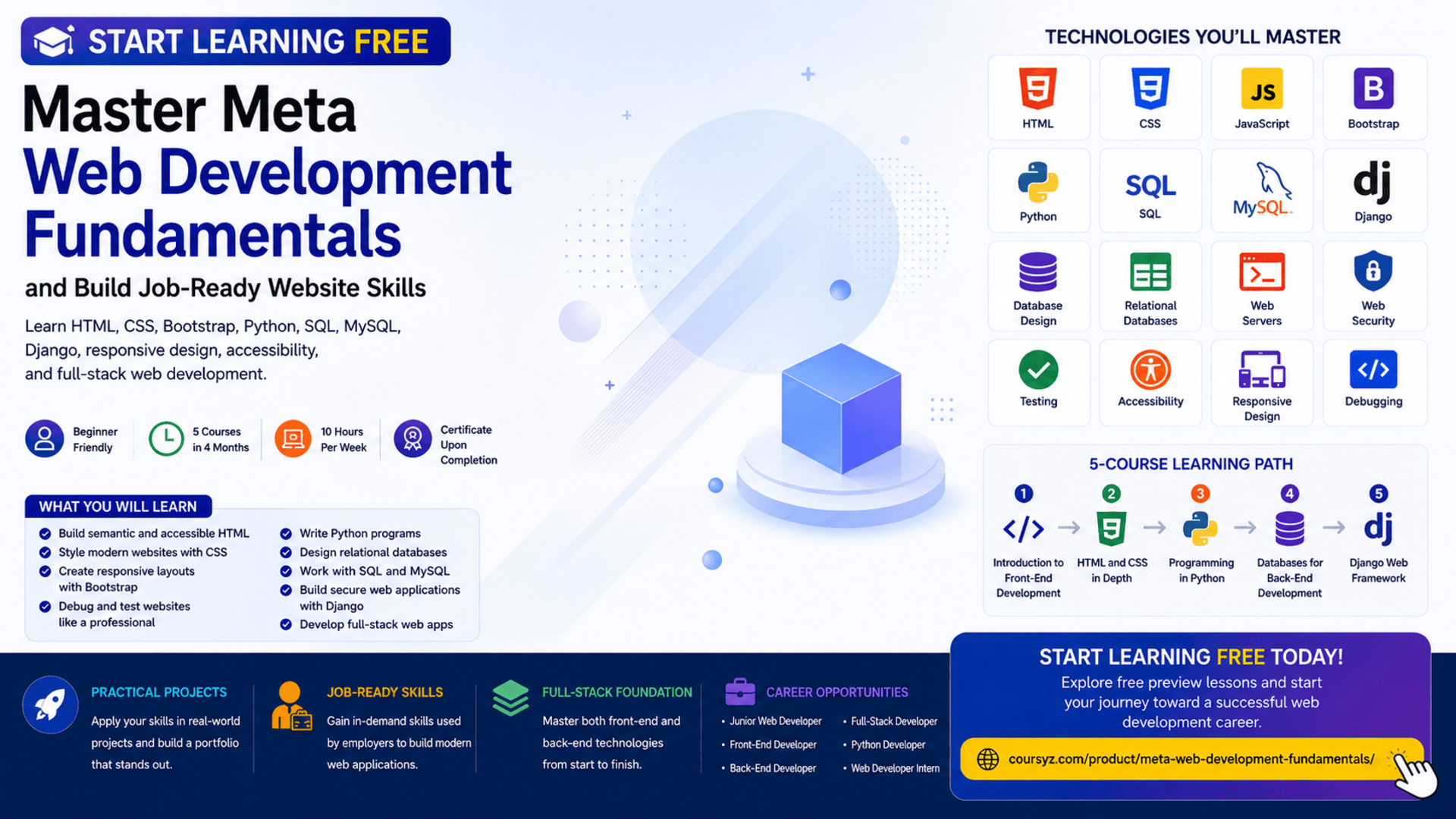
The Meta Web Development Fundamentals Specialization provides a structured learning path for beginners who want to build practical front-end and back-end development skills.
The program begins with HTML, CSS, Bootstrap, and responsive design before progressing into Python, SQL, databases, MySQL, Django, and secure web application development.
You may be able to start learning free by selecting an individual course and checking whether Preview lessons are currently available. This can help you explore selected videos and learning materials before deciding whether you need complete access to assessments, projects, and the certificate.
Why Learn Web Development Fundamentals?
A successful website involves more than attractive colors and layouts.
Modern web applications must be:
- Responsive across different devices
- Easy to navigate
- Accessible to different users
- Connected to reliable databases
- Protected against security risks
- Structured for future updates
- Tested for errors
- Designed around real user needs
- Fast enough to provide a good experience
Learning both front-end and back-end fundamentals gives you a clearer understanding of how complete websites work.
The front end controls what users see and interact with.
The back end manages application logic, databases, security, and data processing.
This specialization introduces both areas, helping learners move beyond basic webpage creation and understand the complete web development process.
About the Meta Web Development Fundamentals Specialization
The Meta Web Development Fundamentals Specialization is a beginner-friendly, five-course learning program.
It is designed to be completed in approximately four months when studying around 10 hours per week.
The program follows a flexible, self-paced structure, allowing learners to progress according to their schedules.
The five courses are:
- Introduction to Front-End Development
- HTML and CSS in Depth
- Programming in Python
- Introduction to Databases for Back-End Development
- Django Web Framework
Together, these courses build a foundation in:
- Front-end development
- Responsive web design
- Python programming
- Relational databases
- SQL
- MySQL
- Back-end development
- Django
- Application security
- Full-stack web development
What You Will Learn
By completing the program and practising independently, you can learn how to:
- Explain the difference between front-end, back-end, and full-stack development
- Create webpage structures with HTML
- Style interfaces with CSS
- Build responsive layouts
- Use Bootstrap components
- Create accessible web forms
- Apply browser debugging tools
- Improve website compatibility
- Understand basic web analytics and SEO
- Write Python programs
- Use variables, functions, loops, and conditions
- Apply object-oriented programming
- Work with classes, objects, and methods
- Write unit tests
- Apply test-driven development
- Design relational databases
- Write SQL queries
- Use MySQL
- Create tables and relationships
- Protect data integrity
- Build applications with Django
- Create web servers
- Model application data
- Use object-relational mapping
- Apply secure coding practices
- Connect front-end and back-end technologies
Course 1: Introduction to Front-End Development
Estimated duration: 19 hours
The first course introduces the main roles and technologies involved in web development.
You will learn the differences between:
- Front-end developers
- Back-end developers
- Full-stack developers
You will also explore how websites operate and how browsers communicate with servers.
Major topics include:
- HTML
- CSS
- Bootstrap
- Responsive web design
- User-interface principles
- Web-development tools
- General networking concepts
- Web applications
- Front-end frameworks
- Website structure
By the end of the course, you will be able to create and style a basic webpage.
Build Webpage Structure with HTML
HTML provides the structure of a webpage.
It defines elements such as:
- Headings
- Paragraphs
- Links
- Images
- Forms
- Tables
- Lists
- Buttons
- Navigation areas
- Page sections
A professional webpage should use clear and meaningful HTML structure.
Semantic HTML helps browsers, search engines, assistive technologies, and other developers understand the purpose of the content.
For example, using a navigation element for the main menu is more meaningful than placing every part of the page inside generic containers.
Style Websites with CSS
CSS controls the visual appearance of a webpage.
Developers use CSS to manage:
- Colors
- Typography
- Spacing
- Borders
- Backgrounds
- Layouts
- Positioning
- Responsive behavior
- Visual hierarchy
- Component appearance
CSS transforms a basic HTML document into a professional interface.
Good CSS should also remain organized, reusable, and easy to maintain.
Understand Responsive Web Design
People access websites from many different devices.
A responsive website should work effectively on:
- Desktop computers
- Laptops
- Tablets
- Smartphones
- Screens with different orientations
Responsive design allows webpage elements to adapt to available space.
This can involve:
- Flexible layouts
- Responsive images
- Mobile-friendly navigation
- Media queries
- Flexible typography
- Touch-friendly buttons
- Reorganized page sections
Responsive design improves usability and reduces the need to create separate websites for every screen size.
Use Bootstrap to Build Interfaces Faster
Bootstrap is a front-end framework that provides reusable layout and interface components.
Developers can use Bootstrap to create:
- Navigation bars
- Buttons
- Forms
- Cards
- Grids
- Alerts
- Modals
- Responsive layouts
Bootstrap can accelerate development and help maintain visual consistency.
However, developers should still understand HTML and CSS so they can customize components and solve layout problems independently.
Course 2: HTML and CSS in Depth
Estimated duration: 30 hours
The second course expands your knowledge of front-end structure, styling, forms, responsiveness, accessibility, browser compatibility, debugging, analytics, and performance.
The course covers:
- Advanced HTML5
- Semantic HTML
- CSS layouts
- Responsive interfaces
- Forms
- Bootstrap
- UI components
- Accessibility
- Browser compatibility
- Debugging tools
- Front-end performance
- Web analytics
- Search-engine fundamentals
Build Professional HTML Forms
Forms allow users to interact with websites.
They are used for:
- Registration
- Login
- Contact requests
- Checkout
- Search
- Surveys
- Account settings
- Data entry
- Booking requests
A professional form should include:
- Clear labels
- Appropriate field types
- Logical organization
- Helpful instructions
- Validation
- Understandable error messages
- Keyboard accessibility
- Mobile-friendly controls
Developers should avoid relying only on placeholder text because it may disappear as soon as a user starts typing.
Apply Semantic HTML
Semantic elements describe the purpose of content.
Examples include elements representing:
- Headers
- Navigation
- Main content
- Articles
- Sections
- Footers
Semantic HTML can improve:
- Accessibility
- Code readability
- Search-engine understanding
- Website maintenance
- Collaboration between developers
It also helps screen readers identify important sections of a webpage.
Improve Website Accessibility
Accessible websites can be used by people with different abilities and assistive technologies.
Important accessibility practices include:
- Providing alternative text for meaningful images
- Using sufficient color contrast
- Supporting keyboard navigation
- Adding visible focus indicators
- Writing clear form labels
- Using meaningful headings
- Creating understandable error messages
- Avoiding unnecessary animation
- Structuring content logically
Accessibility is not only a technical requirement. It is part of creating a better user experience.
Use Browser Debugging Tools
Browser developer tools help developers inspect and troubleshoot websites.
They can be used to:
- Inspect HTML elements
- Review CSS styles
- Identify JavaScript errors
- Test responsive layouts
- Monitor network requests
- Measure website performance
- Modify styles temporarily
- Find layout problems
Debugging is an essential skill because professional developers spend significant time identifying and fixing issues.
Understand Browser Compatibility
A feature may behave differently across browsers or devices.
Developers should test websites across major environments and verify that important functionality remains available.
Compatibility testing may reveal:
- Layout differences
- Unsupported CSS features
- Form inconsistencies
- Font problems
- Responsive-design issues
- JavaScript errors
Progressive enhancement can help ensure that essential functionality remains available even when newer features are unsupported.
Learn Basic Web Analytics and SEO Principles
Web analytics can help organizations understand how visitors interact with a website.
Common measurements include:
- Page views
- Visitor sources
- Device types
- Time on page
- Navigation paths
- Conversion actions
Basic search-engine optimization principles may include:
- Clear page titles
- Useful headings
- Descriptive content
- Semantic HTML
- Mobile responsiveness
- Fast loading
- Accessible images
- Organized website structure
Technical development and content quality work together to improve search visibility.
Course 3: Programming in Python
Estimated duration: 45 hours
The third course introduces Python programming.
Python is widely used in:
- Web development
- Automation
- Data analysis
- Artificial intelligence
- Testing
- Scripting
- Back-end applications
The course covers:
- Python syntax
- Variables
- Data types
- Operators
- Conditional statements
- Loops
- Functions
- Data structures
- Classes
- Objects
- Methods
- Object-oriented programming
- Debugging
- Unit testing
- Test-driven development
- Packages
- Development environments
Why Python Is Valuable for Web Development
Python is known for its readable syntax and large development ecosystem.
Back-end developers can use Python to:
- Process web requests
- Apply business logic
- Validate information
- Work with databases
- Build server-side applications
- Automate repetitive tasks
- Create APIs
- Test application logic
- Develop Django applications
A strong Python foundation is necessary before progressing into Django.
Learn Variables, Functions, and Conditions
Variables store information used by a program.
Functions organize reusable logic.
Conditional statements help the application make decisions.
For example, a web application may use conditions to:
- Verify whether a user is signed in
- Check whether a form is valid
- Decide whether an order can be processed
- Determine which content should be displayed
Functions make this logic easier to reuse and test.
Work with Python Data Structures
Python includes several structures for organizing data.
These may include:
- Lists
- Dictionaries
- Tuples
- Sets
A list may contain multiple products.
A dictionary may store information about one user.
Choosing an appropriate data structure can make an application easier to understand and more efficient.
Apply Object-Oriented Programming
Object-oriented programming organizes software around classes and objects.
Important concepts include:
Encapsulation
Encapsulation protects internal data and controls how it is accessed.
Inheritance
Inheritance allows one class to reuse or extend another class.
Polymorphism
Polymorphism allows related objects to behave differently through a shared interface.
Abstraction
Abstraction hides unnecessary complexity and exposes only the features another part of the application needs.
These principles can help developers build reusable and maintainable applications.
Use Unit Testing and Test-Driven Development
Unit testing verifies that individual parts of a program behave correctly.
A test may confirm that:
- A function returns the expected result
- Invalid information is rejected
- A calculation is accurate
- An error is handled
- A class method updates information correctly
Test-driven development is an approach in which developers write tests before or alongside the application code.
The general cycle is:
- Write a test.
- Run it and confirm it fails.
- Write enough code to pass the test.
- Improve the code while keeping the test successful.
Testing can increase confidence when applications change.
Course 4: Introduction to Databases for Back-End Development
Estimated duration: 27 hours
Most web applications depend on databases.
Databases store information such as:
- User accounts
- Products
- Orders
- Payments
- Messages
- Reservations
- Customer records
- Application settings
The course introduces:
- Relational databases
- SQL
- MySQL
- Database design
- Tables
- Rows and columns
- Primary keys
- Foreign keys
- Data integrity
- Database relationships
- Query languages
- Database-management systems
- NoSQL concepts
Understand Relational Databases
A relational database organizes information into connected tables.
For example, an online store may have separate tables for:
- Customers
- Products
- Orders
- Order items
- Payments
Relationships between these tables allow the application to retrieve connected information without placing everything in one large table.
Learn SQL
SQL is used to communicate with relational databases.
Developers use SQL to:
- Create tables
- Insert records
- Retrieve information
- Update data
- Delete records
- Filter results
- Sort results
- Join related tables
- Generate summaries
Example:
SELECT name, email
FROM customers
WHERE account_status = 'active';
SQL is one of the most important skills for back-end and full-stack developers.
Understand Primary and Foreign Keys
A primary key uniquely identifies a record.
A foreign key connects one table to another.
For example, an order table may include a customer identifier that connects each order with the correct customer.
Keys help maintain relationships and protect data integrity.
Design Reliable Database Structures
Good database design can improve:
- Data accuracy
- Query performance
- Maintainability
- Security
- Scalability
- Reporting
Developers should avoid unnecessary duplication and use constraints to prevent invalid information.
A well-designed database makes application development easier.
Course 5: Django Web Framework
Estimated duration: 45 hours
The final course introduces Django, a Python framework for building secure and maintainable web applications.
The course covers:
- Django projects
- Django applications
- Web servers
- Models
- Views
- Templates
- Forms
- Data modeling
- MySQL
- Database migrations
- Object-relational mapping
- Application security
- Secure coding
- Maintainability
- Code reusability
Why Learn Django?
Django provides tools for solving common web-development problems.
Developers can use it to build:
- Business websites
- Booking systems
- Customer portals
- E-commerce platforms
- Content-management applications
- Data dashboards
- Internal business tools
- Database-driven services
Django supports organized project structures, database access, forms, authentication, administration, and security.
Understand Django Models
Models describe the data used by an application.
A model may represent:
- Customer
- Product
- Order
- Employee
- Booking
- Article
Django can map these models to relational database tables.
This process is called object-relational mapping.
Developers can work with Python objects while Django manages many of the underlying SQL operations.
Work with Views and Templates
Views process requests and determine what response should be returned.
Templates control how information is displayed in the browser.
For example:
- A user requests a product page.
- A Django view retrieves the product information.
- The view sends the data to a template.
- The template displays the information as HTML.
This separation makes applications easier to organize and maintain.
Build a Web Server
A web server receives requests and returns responses.
Within a Django application, developers configure URLs, views, templates, and models to control this process.
Understanding request and response cycles helps learners see how the browser, server, application code, and database work together.
Apply Web Security Best Practices
Web applications may manage sensitive information.
Developers should protect:
- User credentials
- Customer records
- Administrative functions
- Database information
- Form submissions
- Session data
Important security practices include:
- Input validation
- Secure authentication
- Authorization
- Protected credentials
- Safe database queries
- Encrypted connections
- Controlled permissions
- Secure error handling
- Regular updates
Security should be considered throughout development rather than added only before launch.
Practical Projects and Applied Learning
The program includes practice-based assessments that simulate real web-development scenarios.
You may complete activities involving:
- Responsive webpages
- HTML and CSS layouts
- Bootstrap interfaces
- Accessible forms
- Python programs
- Unit tests
- SQL queries
- Database design
- MySQL
- Django models
- Django views and templates
- Secure web applications
- Front-end and back-end integration
These activities can help you build practical experience rather than only memorizing concepts.
Suggested Portfolio Projects
After completing the program, consider building independent projects such as:
- Restaurant website
- Booking application
- Customer-management system
- Personal portfolio
- Inventory-management tool
- Learning platform
- Blog application
- Expense tracker
- Help-desk system
- Product catalog
A strong project could include:
- Responsive HTML and CSS interface
- Bootstrap components
- Python business logic
- Django back end
- MySQL database
- User authentication
- Forms
- CRUD operations
- Testing
- Accessibility
- Project documentation
Who Should Take This Specialization?
The program may be suitable for:
Complete Beginners
The courses begin with fundamental website-development concepts.
Career Changers
Professionals interested in entering technology can follow a structured front-end and back-end learning path.
Students and Recent Graduates
Students can combine academic knowledge with practical website projects.
Aspiring Front-End Developers
Learners can build HTML, CSS, Bootstrap, accessibility, and responsive-design skills.
Aspiring Back-End Developers
The program introduces Python, SQL, databases, MySQL, and Django.
Freelancers
Freelancers can develop skills for building complete websites and web applications.
Entrepreneurs
Entrepreneurs can better understand how digital products are planned, developed, secured, and maintained.
How to Start Learning Free
The complete specialization is not guaranteed to be available free.
However, an individual course may sometimes provide selected Preview lessons.
Follow these steps:
- Open the program page using the call-to-action button in this article.
- Scroll down to the list of individual courses.
- Select the course you want to explore.
- Open the selected course page.
- Click Enroll.
- Sign in or create an account.
- Look for Preview instead of beginning a paid trial.
- Open any available lessons and start learning free.
Important Access Notice
Preview availability may vary depending on:
- The individual course
- Your account
- Your country
- Your device
- Current enrollment conditions
When Preview is not available, check whether the page provides:
- Financial aid
- Scholarships
- Employer-sponsored access
- University access
- A limited subscription trial
Complete courses, graded assessments, projects, and the certificate may require paid enrollment.
Always review the enrollment and payment terms before confirming.
How to Get the Best Results
Practise Every Day
Consistent practice is more effective than watching many lessons without writing code.
Build Each Example Yourself
Recreate the HTML, CSS, Python, SQL, and Django examples in your own development environment.
Create Independent Projects
Modify course examples and build applications based on your own ideas.
Use Version Control
Store your projects in Git repositories and document major updates.
Test Responsive Layouts
Review your websites on desktop, tablet, and mobile screens.
Focus on Accessibility
Use semantic HTML, labels, alternative text, keyboard support, and appropriate contrast.
Practise SQL Separately
Create sample databases and write your own queries.
Test Your Python Code
Write unit tests for important functions and business rules.
Document Your Work
Each portfolio project should include:
- Project overview
- Features
- Technologies
- Installation instructions
- Database information
- Screenshots
- Testing instructions
- Known limitations
- Future improvements
Potential Career Opportunities
After developing sufficient skills and completing independent projects, learners may explore roles such as:
- Junior web developer
- Junior front-end developer
- Junior back-end developer
- Python developer
- Django developer
- Website developer
- Web application developer
- Application-support developer
- Full-stack development intern
- Freelance website developer
Completing the specialization does not guarantee employment.
Employers may also evaluate:
- HTML and CSS skills
- Python knowledge
- SQL ability
- Django experience
- Portfolio quality
- Git knowledge
- Testing skills
- Problem-solving
- Communication
- Technical-interview performance
Frequently Asked Questions
Can I start learning free?
You can check individual courses for available Preview lessons. Complete free access is not guaranteed.
Is the program suitable for beginners?
Yes. It is classified as beginner level.
How many courses are included?
The specialization currently contains five courses.
How long does it take?
The suggested completion time is approximately four months at around 10 hours per week.
Does it cover both front-end and back-end development?
Yes. It covers HTML, CSS, Bootstrap, Python, SQL, databases, MySQL, and Django.
Will I learn Python?
Yes. One complete course focuses on Python programming.
Are databases included?
Yes. The program covers relational databases, SQL, MySQL, database design, and data integrity.
Will I learn Django?
Yes. The final course focuses on Django web development.
Does the program cover accessibility?
Yes. The HTML and CSS course covers web accessibility practices.
Are projects included?
Yes. The program includes practice-based assessments and applied web-development activities.
Does Preview access include the certificate?
No. Preview access generally does not include the full graded experience or certificate.
Start Learning Free and Build Job-Ready Web Development Skills
Learn HTML, CSS, Bootstrap, responsive design, Python, object-oriented programming, SQL, relational databases, MySQL, Django, testing, accessibility, and web security.
Open an individual course and check whether Preview is available. Free preview access is not guaranteed. Complete courses, graded activities, projects, and the certificate may require paid enrollment. Financial aid may be available.





