

Mobile applications have become essential to how people communicate, shop, learn, work, travel, manage money, and access digital services.
Businesses increasingly need mobile applications that can reach users on both Android and iOS without requiring completely separate development processes.
React Native helps developers create cross-platform mobile applications using JavaScript and React. It combines familiar web-development concepts with native mobile capabilities, allowing developers to build responsive and interactive experiences for multiple operating systems.
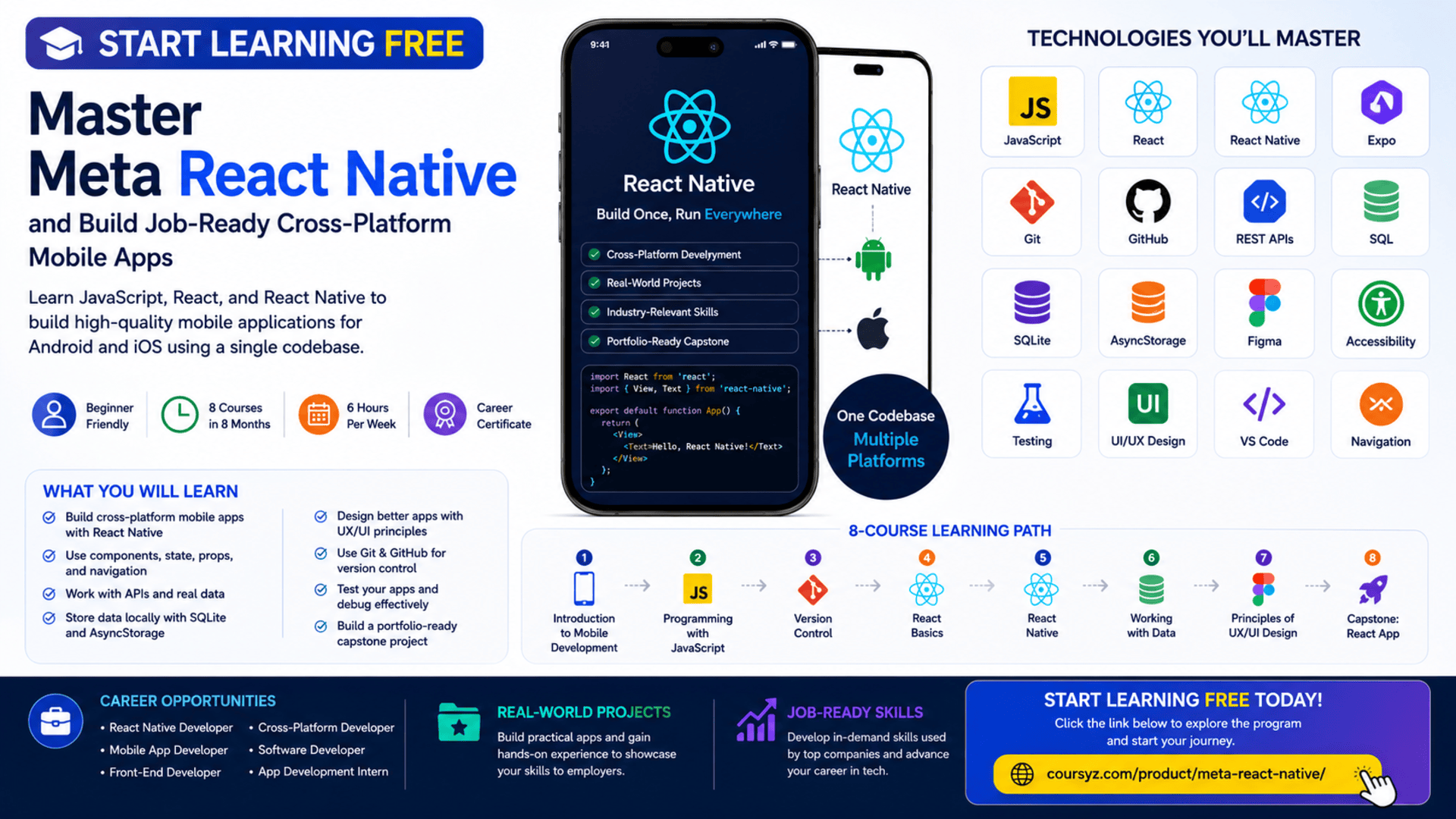
The Meta React Native Specialization provides a structured learning path for beginners who want to develop practical cross-platform mobile application skills.
You may be able to start learning free by opening one of the individual courses and checking whether the Preview option is available. Preview access may allow you to explore selected videos and learning materials before deciding whether you need full access to assignments, projects, the capstone, and the career certificate.
Throughout the program, you will study HTML, CSS, JavaScript, React, React Native, Git, GitHub, REST APIs, SQL, SQLite, AsyncStorage, UX and UI design, Figma, accessibility, testing, data persistence, and mobile application development.
Why Learn React Native?
Developing separate native applications for Android and iOS can require different languages, tools, and development teams.
React Native offers another approach.
It allows developers to use JavaScript and React concepts to create applications that can run across multiple mobile operating systems.
React Native can help development teams:
- Share code between Android and iOS
- Build reusable mobile components
- Create responsive user interfaces
- Manage application navigation
- Handle user input
- Connect to APIs
- Store application data
- Test mobile features
- Reduce duplicated development effort
- Maintain applications more efficiently
React Native is especially valuable for developers who already understand JavaScript or React and want to expand into mobile application development.
What Is Cross-Platform Mobile Development?
Cross-platform mobile development involves creating applications that work on more than one operating system from a shared development approach.
Instead of maintaining completely separate applications, developers can reuse significant parts of the codebase.
A cross-platform developer may work on:
- User interfaces
- Mobile navigation
- Forms and user input
- API connections
- Data storage
- Authentication
- Application testing
- Performance
- Accessibility
- Deployment preparation
React Native uses native mobile capabilities while allowing developers to write much of the application logic in JavaScript.
This makes it different from simply placing a website inside a mobile application.
About the Meta React Native Specialization
The Meta React Native Specialization is a beginner-friendly program designed to build practical mobile development knowledge.
The program currently includes eight courses and is designed to be completed in approximately eight months when studying around six hours per week.
It follows a flexible, self-paced structure, allowing learners to progress according to their schedules.
No previous professional web or mobile development experience is required.
The recommended course sequence is:
- Introduction to Mobile Development
- Programming with JavaScript
- Version Control
- React Basics
- React Native
- Working with Data
- Principles of UX/UI Design
- Capstone: React App
The courses progress from foundational web and programming concepts into React, React Native, data management, interface design, and a complete mobile application project.
What You Will Learn
By completing the learning path and practising independently, you can develop skills in:
- Cross-platform mobile development
- HTML5
- CSS3
- JavaScript
- React
- React Native
- JSX
- Git
- GitHub
- Linux and Unix commands
- Expo
- Visual Studio Code
- React Navigation
- Mobile UI components
- Lists and forms
- REST APIs
- SQL
- Relational databases
- AsyncStorage
- SQLite
- Data persistence
- User authentication
- UX research
- UI design
- Figma
- Wireframing
- Prototyping
- Accessibility
- Usability testing
- Jest
- Unit testing
- Portfolio development
Course 1: Introduction to Mobile Development
Estimated duration: 12 hours
The first course introduces cross-platform mobile development and explains the technologies used to create modern applications.
You will explore:
- The role of a cross-platform mobile developer
- Mobile application development
- HTML5
- CSS
- JavaScript concepts
- React
- React Native
- Responsive design
- Application frameworks
- Browser compatibility
- User-interface components
- Web-development tools
You will also create and style a basic webpage.
Understand the Role of a Cross-Platform Developer
Cross-platform developers create applications that operate across multiple mobile systems.
Their responsibilities may include:
- Building application screens
- Writing reusable components
- Managing navigation
- Processing user input
- Connecting applications to services
- Managing local data
- Testing features
- Debugging problems
- Improving usability
- Maintaining applications after release
They often work with designers, back-end developers, testers, product managers, and security specialists.
Learn HTML and CSS Foundations
Although React Native does not use traditional HTML elements in the same way as a browser, understanding HTML and CSS provides a useful foundation.
HTML helps learners understand content structure.
CSS introduces concepts such as:
- Layout
- Spacing
- Typography
- Colors
- Responsive design
- Visual hierarchy
These concepts transfer into component-based mobile interface development.
Course 2: Programming with JavaScript
Estimated duration: 48 hours
JavaScript is the main programming language used throughout the specialization.
The course introduces:
- Variables
- Data types
- Operators
- Conditional statements
- Loops
- Functions
- Objects
- Arrays
- JSON
- Event-driven programming
- Functional programming
- Object-oriented programming
- Node.js
- Package management
- Debugging
- Unit testing
- Jest
Why JavaScript Is Important for React Native
React Native applications depend heavily on JavaScript.
Developers use JavaScript to:
- Control application logic
- Manage state
- Process user actions
- Handle data
- Call APIs
- Validate input
- Create reusable functions
- Transform information
- Respond to events
A strong JavaScript foundation makes React and React Native easier to understand.
Work with Objects and Arrays
Objects and arrays are used to organize application data.
An object may represent a user:
const user = {
  name: "Alex",
  role: "Mobile Developer",
  active: true
};
An array may store a list of products:
const products = ["Phone", "Tablet", "Laptop"];
React Native applications frequently use these structures when displaying lists, processing API responses, and managing user information.
Test JavaScript with Jest
Jest is a JavaScript testing framework.
Developers can use it to verify that:
- Functions return correct results
- Invalid input is rejected
- Calculations work properly
- Objects are updated correctly
- Errors are handled
- Application logic remains reliable
Testing can help prevent problems when applications are changed or expanded.
Course 3: Version Control
Estimated duration: 15 hours
Version control helps developers manage project changes and collaborate safely.
This course introduces:
- Git
- GitHub
- Repositories
- Commits
- Branches
- Merging
- Code revisions
- Command-line interfaces
- Linux commands
- Unix commands
- File management
- Collaborative workflows
Why Git and GitHub Matter
Git allows developers to track the history of a project.
GitHub provides an online environment for storing repositories, reviewing code, and collaborating.
These tools can help you:
- Save code changes
- Restore previous versions
- Create development branches
- Collaborate with other programmers
- Review proposed updates
- Resolve merge conflicts
- Publish projects
- Build a visible portfolio
A professional GitHub profile can demonstrate your work to employers and clients.
Course 4: React Basics
Estimated duration: 30 hours
React is a JavaScript library used to create reusable and interactive user-interface components.
This course introduces:
- Components
- JSX
- Props
- State
- Forms
- Events
- Data flow
- Reusable code
- Project organization
- Dynamic interfaces
You will build an application using React.
Create Reusable Components
A component represents a reusable part of an application.
Examples include:
- Navigation menu
- Product card
- Search field
- Login form
- User profile
- Dashboard widget
- Notification panel
- Checkout section
Reusable components reduce repetition and help developers maintain consistent interfaces.
Work with Props and State
Props pass data between components.
State stores information that changes while the application is running.
Examples of state include:
- User input
- Selected options
- Loading status
- Search results
- Shopping-cart contents
- Authentication status
Understanding props and state is essential before progressing into React Native.
Course 5: React Native
Estimated duration: 38 hours
This course moves from React fundamentals into cross-platform mobile development.
React Native is an open-source framework that allows developers to build mobile applications using React and native platform capabilities.
Topics include:
- React Native components
- Application styling
- JSX
- Lists
- User input
- Pressable components
- Navigation
- Multiple screens
- Mobile interaction
- Expo
- Visual Studio Code
- Application structure
Build React Native Interfaces
React Native provides components designed for mobile applications.
You may work with elements such as:
- View
- Text
- Image
- ScrollView
- FlatList
- TextInput
- Pressable
- Button
These components help developers create responsive mobile interfaces.
Create Lists and Handle User Input
Mobile applications often display lists such as:
- Products
- Messages
- Contacts
- Articles
- Menu items
- Search results
React Native includes tools for building efficient lists.
You will also learn how to collect input through forms and text fields.
User input may be used for:
- Login
- Registration
- Search
- Settings
- Orders
- Feedback
- Profile information
Add Navigation Between Screens
Most mobile applications contain multiple screens.
Examples include:
- Home
- Login
- Profile
- Settings
- Product details
- Checkout
- Search results
React Navigation helps developers move between these screens and manage navigation history.
A clear navigation structure improves the overall user experience.
Use Expo and Visual Studio Code
Expo provides tools that can simplify React Native development and testing.
It can help developers:
- Create projects
- Run applications
- Test on devices
- Access supported mobile features
- Manage development workflows
Visual Studio Code is commonly used for editing JavaScript and React Native code.
Course 6: Working with Data
Estimated duration: 21 hours
Modern mobile applications need to retrieve, store, update, and display information.
This course focuses on data management in React Native.
You will explore:
- REST APIs
- Network requests
- Server responses
- SQL
- Relational databases
- SQLite
- AsyncStorage
- Data persistence
- Authentication
- API best practices
- Mobile data management
Connect React Native Applications to REST APIs
REST APIs allow mobile applications to communicate with online services.
An app may use an API to retrieve:
- Products
- User profiles
- News
- Weather data
- Restaurant menus
- Financial information
- Booking availability
- Messages
The application sends a network request and receives a server response.
Developers must then process the response and display the information clearly.
Work with SQL and Relational Databases
SQL is used to create, read, update, and delete information stored in relational databases.
A relational database organizes information into tables.
For example, a mobile shopping application may have tables for:
- Users
- Products
- Orders
- Payments
- Reviews
Understanding database relationships helps developers design more reliable data-driven applications.
Store Data with AsyncStorage
AsyncStorage can be used to store simple local information in a React Native application.
Examples include:
- User preferences
- Login state
- Theme settings
- Recently viewed items
- Basic application settings
It is useful when information must remain available after the application closes.
Sensitive data may require stronger storage and security solutions.
Use SQLite for Structured Local Data
SQLite is a relational database that can be used locally on a mobile device.
It may be appropriate for:
- Offline records
- Saved content
- Product catalogs
- Task lists
- Activity history
- Structured application data
Developers can use SQL to create tables and manage information stored within the mobile application.
Course 7: Principles of UX/UI Design
Estimated duration: 23 hours
A successful mobile application should be useful, understandable, accessible, and visually consistent.
This course introduces:
- User experience design
- User interface design
- User research
- Personas
- Empathy
- Accessibility
- Wireframes
- Prototypes
- Figma
- Usability testing
- Design reviews
- Interaction design
Understand UI and UX
User interface design focuses on the visible and interactive parts of an application.
This includes:
- Colors
- Typography
- Buttons
- Icons
- Layouts
- Spacing
- Components
User experience design focuses on how easy and effective the application is to use.
It considers:
- User goals
- Navigation
- Clarity
- Efficiency
- Feedback
- Accessibility
- Error prevention
A visually attractive application may still provide a poor experience when users cannot complete tasks easily.
Create Wireframes and Prototypes in Figma
Figma allows developers and designers to:
- Create wireframes
- Design mobile screens
- Build clickable prototypes
- Test user flows
- Share design files
- Collaborate with teams
- Review interface components
Prototyping allows a team to test an application idea before completing full development.
Apply Accessibility Principles
Accessible mobile applications can be used by more people.
Important considerations include:
- Clear labels
- Readable typography
- Sufficient contrast
- Logical navigation
- Descriptive buttons
- Touch-friendly controls
- Screen-reader support
- Understandable error messages
- Reduced-motion preferences
Accessibility should be planned from the beginning of a project.
Course 8: Capstone — React App
Estimated duration: 14 hours
The capstone brings together the main skills developed throughout the specialization.
You will create a cross-platform mobile application using React Native.
The project may include:
- React Native components
- Responsive UI design
- User flows
- Navigation
- Data access
- Local storage
- SQL
- Git
- GitHub
- UX and UI principles
- Wireframes
- Testing
- Clean code
Build a Portfolio-Ready Mobile Application
The capstone can demonstrate that you understand how to:
- Plan application features
- Design a responsive interface
- Create reusable components
- Manage user input
- Navigate between screens
- Retrieve remote data
- Store local information
- Apply accessibility
- Use version control
- Test and debug an application
To make the project more valuable, customize it with:
- Original branding
- Additional screens
- Better accessibility
- Real API data
- Authentication
- Offline functionality
- Professional documentation
- A short demonstration video
Hands-On Projects
The specialization emphasizes applied learning.
You may complete activities such as:
- Creating responsive webpages
- Writing JavaScript applications
- Testing code with Jest
- Managing projects in GitHub
- Building React components
- Creating a React Native application
- Adding navigation
- Retrieving API data
- Storing local information
- Creating Figma prototypes
- Completing a mobile capstone
These projects can help you build a portfolio for job applications or freelance opportunities.
Tools and Technologies Covered
The program introduces:
- HTML5
- CSS3
- JavaScript
- JSON
- React
- React Native
- JSX
- Git
- GitHub
- Linux commands
- Unix commands
- Jest
- Node.js
- Expo
- Visual Studio Code
- React Navigation
- REST APIs
- SQL
- SQLite
- AsyncStorage
- Figma
- Mobile UI components
- Testing and debugging tools
Who Should Take This Specialization?
The program may be suitable for:
Complete Beginners
No previous professional web or mobile development experience is required.
JavaScript Developers
Developers who already understand JavaScript can expand into mobile application development.
React Developers
React developers can apply familiar component concepts to Android and iOS applications.
Career Changers
Professionals interested in mobile development can follow a structured learning path.
Students and Recent Graduates
Students can complement academic studies with practical projects.
Freelancers
Freelancers can develop cross-platform application skills for client work.
Entrepreneurs
Entrepreneurs can learn how mobile application ideas are designed, built, tested, and improved.
UX and UI Designers
Designers can strengthen their understanding of how mobile interfaces are implemented.
How to Start Learning Free
You may be able to explore selected lessons from an individual course before paying for complete access.
Follow these steps:
- Open the specialization page using the call-to-action button in this article.
- Scroll down to the list of individual courses.
- Select the course you want to explore.
- Open the selected course page.
- Click Enroll.
- Sign in or create an account.
- Choose Preview instead of Start Free Trial, when available.
- Open the included lessons and start learning free.
Important Access Notice
Preview availability may vary depending on:
- The course selected
- Your account
- Your country
- Your device
- Current enrollment options
Preview access may not include graded assignments, all projects, the capstone, instructor support, or the career certificate.
Always review the enrollment and payment details before confirming.
How to Get the Best Results
Practise JavaScript Regularly
Write small programs involving functions, objects, arrays, events, and data transformations.
Build React Projects First
Make sure you understand components, props, state, and forms before progressing deeply into React Native.
Create Independent Mobile Screens
Do not only copy examples. Design and build your own interfaces.
Use GitHub from the Beginning
Publish each project with clear documentation.
Connect to Real APIs
Practise retrieving and presenting live information.
Test on Multiple Devices
Review your applications across different screen sizes and operating systems.
Apply Accessibility
Use clear labels, readable text, sufficient contrast, and touch-friendly controls.
Customize the Capstone
Add original features and a professional visual identity.
Document Your Work
Include:
- Project overview
- Features
- Technologies
- Installation steps
- Screenshots
- Data sources
- Test instructions
- Known limitations
- Future improvements
Potential Career Opportunities
After developing sufficient skills and building a strong portfolio, learners may explore roles such as:
- Junior React Native developer
- Cross-platform mobile developer
- Mobile application developer
- React developer
- JavaScript developer
- Android application developer
- iOS application developer
- Mobile UI developer
- Application-development intern
- Freelance mobile developer
Completing the specialization does not guarantee employment.
Employers may also evaluate:
- JavaScript proficiency
- React knowledge
- React Native ability
- API integration
- Data-management skills
- Git experience
- Testing knowledge
- Portfolio quality
- Problem-solving
- Technical interview performance
Frequently Asked Questions
Can I start learning free?
You may be able to preview selected lessons by opening an individual course and choosing Preview when that option appears.
Is previous experience required?
No. The specialization is designed for beginners.
How many courses are included?
The current specialization contains eight courses.
How long does the program take?
The suggested completion time is approximately eight months at around six hours per week.
Does the program teach JavaScript?
Yes. JavaScript programming is a major part of the learning path.
Will I learn React?
Yes. One course focuses on React fundamentals before you begin React Native.
Does it include React Native navigation?
Yes. You will learn how to configure navigation and move between mobile screens.
Are APIs and databases included?
Yes. The program covers REST APIs, SQL, SQLite, AsyncStorage, data persistence, and authentication.
Does the program include UX and UI design?
Yes. It covers user research, accessibility, Figma, wireframes, prototypes, and usability testing.
Will I build a complete mobile application?
Yes. The capstone requires you to create a cross-platform mobile app using React Native.
Does Preview access include the certificate?
No. Preview access generally does not include the complete graded experience, capstone, or career certificate.
Start Learning Free and Build Cross-Platform Mobile Apps
Learn JavaScript, React, React Native, Expo, Git, GitHub, mobile navigation, REST APIs, SQL, SQLite, AsyncStorage, UX/UI design, Figma, testing, and data persistence.
Open an individual course and look for the Preview option. Availability and included materials may vary. Complete courses, graded assignments, the capstone, and the career certificate may require paid enrollment.





