
Start Learning Free: Become an IBM Front-End Developer and Build Job-Ready Web Development Skills

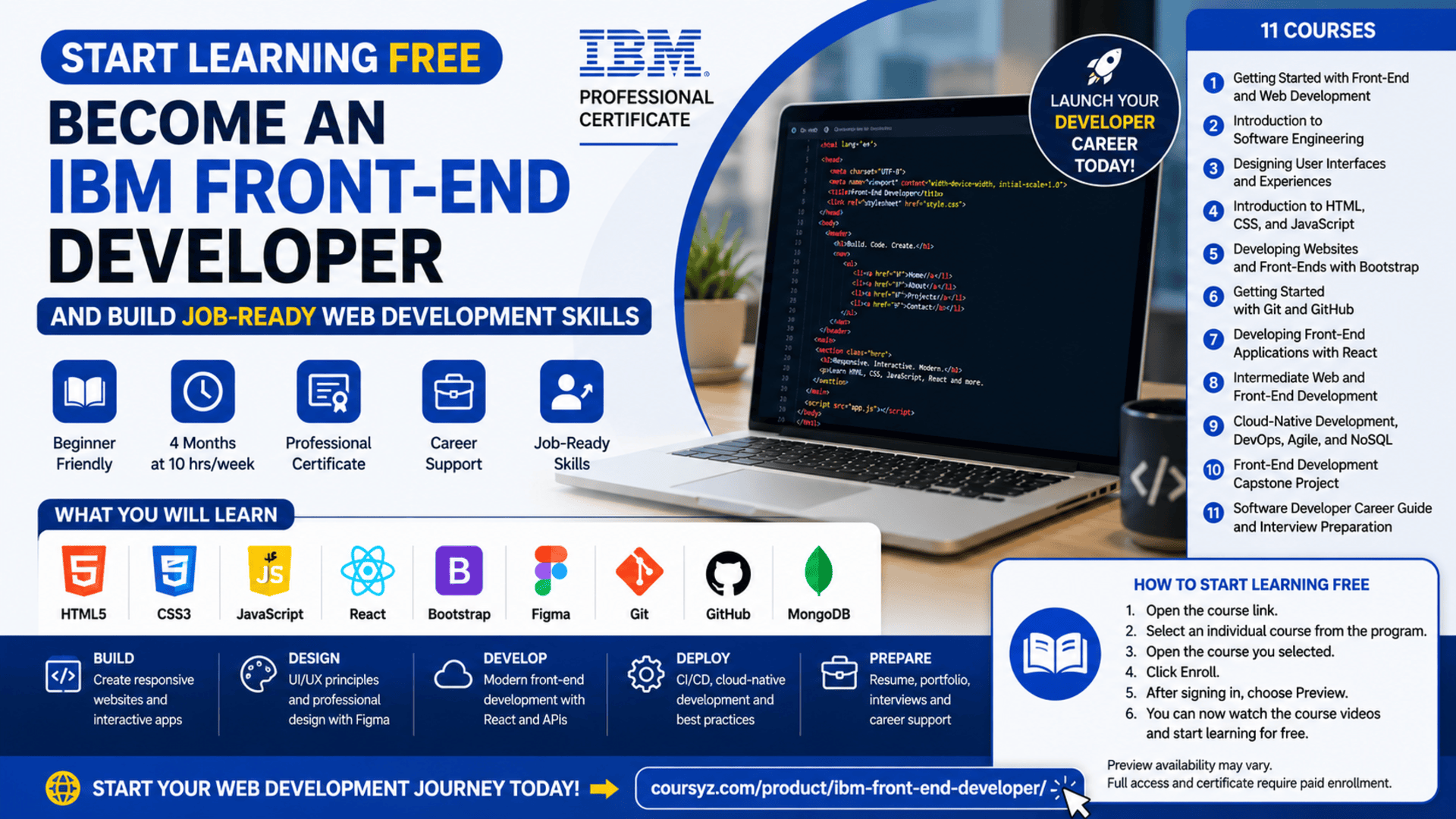
Modern businesses depend on websites and digital applications to connect with customers, deliver services, generate sales, and build their brands. As demand for accessible, responsive, and interactive digital experiences continues to grow, front-end development remains an important skill for anyone interested in technology.
The IBM Front-End Developer Professional Certificate provides a structured path for beginners who want to learn how websites and web applications are designed, developed, tested, and deployed.
You can start learning free by previewing available lessons from an individual course inside the program. This allows you to explore selected videos and learning resources before deciding whether you need full access to assignments, projects, assessments, or the professional certificate.
The program goes beyond basic website creation. It introduces HTML, CSS, JavaScript, React, Bootstrap, UI and UX design, Figma, Git, GitHub, cloud-native development, Agile practices, testing, deployment, and career preparation.
Why Become a Front-End Developer?
Front-end developers build the parts of websites and applications that users see and interact with.
They transform designs and business requirements into functional digital experiences. Their responsibilities may include creating webpage layouts, building navigation systems, developing reusable interface components, improving performance, testing browser compatibility, and ensuring websites work across different devices.
Front-end development combines:
- Creative design
- Programming
- User experience
- Problem-solving
- Testing
- Collaboration
- Accessibility
- Continuous improvement
It can be an attractive career path for people who enjoy both technology and visual creativity.
Learning front-end development can also benefit entrepreneurs, marketers, designers, project managers, content creators, and other professionals who regularly work with websites or digital products.
About the IBM Front-End Developer Professional Certificate
The IBM Front-End Developer Professional Certificate is a beginner-friendly program created to help learners develop practical and job-ready web development skills.
The program currently includes 11 courses and can be completed in approximately four months when studying for around 10 hours per week. It follows a flexible, self-paced structure, allowing learners to study according to their own schedules.
No previous professional programming experience is required.
The learning path begins with an introduction to front-end development and software engineering. It then progresses into UI and UX design, HTML, CSS, JavaScript, Bootstrap, Git, GitHub, React, testing, cloud-native development, DevOps, Agile, NoSQL databases, and application deployment.
Toward the end of the program, learners complete a capstone project and explore practical strategies for preparing résumés, searching for jobs, networking, and handling technical interviews.
What You Will Learn
The certificate covers the complete front-end development process, from understanding how websites work to building and deploying a functional web application.
You will learn how to:
- Explain the role of a front-end developer
- Understand the website development lifecycle
- Build structured webpages with HTML
- Style responsive websites with CSS
- Add interactivity with JavaScript
- Create responsive layouts with Bootstrap
- Design user experiences with Figma
- Build reusable components with React
- Manage source code using Git and GitHub
- Work with APIs and external services
- Understand cloud-native application development
- Apply Agile and DevOps principles
- Store and retrieve data using MongoDB
- Test, debug, and optimize websites
- Build and deploy a professional capstone project
- Prepare for front-end development interviews
Course 1: Getting Started with Front-End and Web Development
The first course introduces the front-end development profession and explains how modern websites and applications are created.
You will learn about the responsibilities of front-end developers, back-end developers, full-stack developers, designers, and other members of a digital product team.
The course introduces:
- Front-end development roles
- Web browsers and servers
- Website hosting
- Web development frameworks
- Content management systems
- No-code development tools
- Search engine optimization principles
- Website accessibility
- Responsive design
- Cloud technology
- WordPress and plugins
- Developer portfolios
- Front-end career paths
This course provides important context before you begin writing code.
Course 2: Introduction to Software Engineering
Professional web development involves more than learning programming languages. Developers must understand how software is planned, designed, built, tested, released, and maintained.
This course introduces the principles of software engineering and the Software Development Life Cycle.
You will explore:
- Software engineering fundamentals
- Development tools and technologies
- Programming languages
- Software architecture
- Design patterns
- Deployment approaches
- Documentation
- Development methodologies
- Loops, functions, and conditional logic
- Basic Python programming concepts
- Software engineering career paths
These concepts help you understand how front-end development fits into larger software projects.
Course 3: Designing User Interfaces and Experiences
A successful website should not only work correctly. It should also be easy to understand, visually appealing, responsive, and enjoyable to use.
The UI and UX course introduces the principles used to design effective digital experiences.
You will learn about:
- User interface design
- User experience design
- User-centered design
- Design thinking
- Visual design principles
- Typography
- Color and layout
- Wireframing
- Prototyping
- Responsive web design
- Progressive web development
- Figma
- Bootstrap
- Website and application layouts
Figma is introduced as a tool for designing and prototyping interfaces before development begins.
Understanding UI and UX can help you build websites that meet both user needs and business goals.
Course 4: Introduction to HTML, CSS, and JavaScript
HTML, CSS, and JavaScript form the foundation of front-end web development.
HTML defines the structure and content of a webpage.
CSS controls its design, layout, typography, colors, spacing, and responsiveness.
JavaScript adds functionality and interactivity.
During this course, you will learn how to:
- Create and structure webpages with HTML
- Style webpages with CSS
- Use development tools and online editors
- Understand front-end and back-end terminology
- Build interactive webpages with JavaScript
- Manipulate webpage elements
- Validate forms
- Respond to user actions
- Apply client-side scripting
- Test websites in a browser
By combining these three technologies, you can begin creating complete and interactive website experiences.
Course 5: Developing Websites and Front-Ends with Bootstrap
Websites must work across smartphones, tablets, laptops, and desktop computers.
Bootstrap is a popular front-end framework that helps developers create responsive layouts and reusable interface components.
In this course, you will learn how to:
- Understand the Bootstrap framework
- Use responsive grid systems
- Create flexible website layouts
- Build mobile-friendly pages
- Use Bootstrap components
- Improve browser compatibility
- Style interface elements efficiently
- Develop responsive front-end experiences
Bootstrap can reduce the time required to create common website components while maintaining a consistent design.
Course 6: Getting Started with Git and GitHub
Version control is an essential skill for professional developers.
Git allows developers to track code changes, return to previous versions, and work safely on new features. GitHub provides an online environment where developers can store repositories, collaborate, review code, and publish projects.
You will learn how to:
- Understand distributed version control
- Create Git repositories
- Clone existing repositories
- Create and manage branches
- Commit code changes
- Merge branches
- Fork open-source projects
- Create pull requests
- Collaborate with development teams
- Publish projects
- Build a visible development portfolio
A strong GitHub portfolio can help demonstrate your practical abilities to potential clients and employers.
Course 7: Developing Front-End Applications with React
React is a widely used JavaScript library for building interactive user interfaces and web applications.
Instead of creating every interface element from the beginning, React allows developers to build reusable components that can be combined across an application.
The React course introduces:
- React components
- JSX
- JavaScript ES6
- Properties
- State management
- React hooks
- Forms
- Event handling
- Reusable interface elements
- Data flow
- Redux
- Application programming interfaces
- Interactive web applications
You will complete practical exercises and build front-end applications such as a shopping cart.
Learning React can help you move from basic webpages to more advanced and dynamic applications.
Course 8: Intermediate Web and Front-End Development
After learning the main front-end technologies, you will explore tools and practices used to improve website quality, performance, maintainability, and visibility.
This course covers:
- Content management systems
- Search engine optimization
- Web analytics
- Webpack
- Build tools
- Functional testing
- Usability testing
- JavaScript testing frameworks
- Mocha
- Jasmine
- Debugging
- Performance optimization
- Front-end monitoring
- Test automation
These skills are important because professional developers must be able to identify problems, improve application performance, and verify that features work correctly.
Course 9: Cloud-Native Development, DevOps, Agile, and NoSQL
Modern web applications often use cloud services, automated deployment pipelines, Agile workflows, and flexible databases.
This course introduces:
- Cloud-native applications
- DevOps culture
- Continuous integration
- Continuous delivery
- Continuous deployment
- CI/CD pipelines
- Agile development
- Scrum
- Test-driven development
- Behavior-driven development
- User stories
- Zenhub
- NoSQL databases
- MongoDB
- CRUD operations
You will learn how development teams organize work, automate software delivery, and manage data in modern applications.
Course 10: Front-End Development Capstone Project
The capstone gives you an opportunity to combine the knowledge and skills developed throughout the certificate.
You will apply UI and UX principles to plan and design a responsive website. You will then convert those designs into functional pages using HTML, CSS, JavaScript, React, Git, and GitHub.
The capstone may involve:
- Creating interface designs in Figma
- Planning responsive website layouts
- Building static website pages
- Developing reusable React components
- Integrating multiple pages
- Managing code with GitHub
- Reviewing and improving code
- Deploying a functional website
- Updating the application after deployment
This project can become an important addition to your professional portfolio.
Rather than simply stating that you understand front-end development, you will have a completed project that demonstrates your ability to design, build, and deploy an application.
Course 11: Software Developer Career Guide and Interview Preparation
Technical ability is essential, but candidates also need to communicate their experience effectively during the job search.
The final course focuses on career preparation.
You will explore:
- Software development career paths
- Finding suitable job opportunities
- Researching companies
- Reading and evaluating job descriptions
- Building a professional résumé
- Presenting your portfolio
- Professional networking
- Preparing for technical interviews
- Answering behavioral questions
- Completing coding challenges
- Following up after interviews
- Communicating professionally
The objective is to help you connect your newly developed skills with real career opportunities.
Hands-On Projects and Portfolio Development
One of the most valuable aspects of this certificate is its focus on applied learning.
Instead of only watching lessons, you will complete practical exercises and projects that help demonstrate your understanding.
Projects and activities may include:
- Creating a single-page portfolio website
- Building pages with HTML and CSS
- Adding functionality with JavaScript
- Creating responsive Bootstrap layouts
- Designing interfaces with Figma
- Building reusable React components
- Creating a shopping cart application
- Creating and managing GitHub repositories
- Working with branches and pull requests
- Communicating with RESTful APIs
- Connecting an application to MongoDB
- Creating a CI/CD pipeline
- Deploying application updates
- Completing a responsive capstone website
Publishing your strongest projects on GitHub can help potential employers review your practical development skills.
Tools and Technologies Covered
The program introduces a broad collection of professional technologies and development practices.
Key tools and technologies include:
- HTML5
- CSS3
- JavaScript
- React
- JSX
- Redux
- Bootstrap
- Figma
- Git
- GitHub
- WordPress
- Webpack
- RESTful APIs
- MongoDB
- NoSQL
- CI/CD
- DevOps
- Agile
- Scrum
- Cloud-native development
- Testing frameworks
- Debugging tools
- Browser development tools
This combination gives learners exposure to more than basic webpage creation.
Who Should Join This Program?
The IBM Front-End Developer Professional Certificate may be suitable for:
Complete Beginners
The program begins with introductory concepts and does not require previous professional programming experience.
Career Changers
Professionals interested in moving into technology can use the structured curriculum to build foundational and practical development skills.
Students and Recent Graduates
Students can use the program to complement their academic education with practical projects and an online portfolio.
Freelancers
Freelancers can apply front-end skills to create portfolios, landing pages, business websites, online stores, and interactive website features.
UI and UX Designers
Designers who understand HTML, CSS, JavaScript, Bootstrap, and React can communicate more effectively with development teams.
Entrepreneurs and Business Owners
Learning front-end fundamentals can help entrepreneurs understand the process of building and managing digital products.
Marketing Professionals
Marketers often work with landing pages, tracking scripts, forms, website content, analytics tools, and search engine optimization.
How to Start Learning Free
You can explore available course content before committing to the complete paid certificate experience.
Follow these steps:
- Open the program page using the call-to-action button in this article.
- Scroll down to the list of individual courses included in the Professional Certificate.
- Choose one of the individual courses.
- Open the course page.
- Click Enroll.
- Sign in or create an account.
- Select Preview instead of starting a paid free trial.
- Open the available lessons and start learning free.
The preview option may provide access to selected videos and course materials.
Important: Preview availability can vary depending on the individual course, account, country, device, or current enrollment options. Preview access may not include graded assignments, all projects, assessments, instructor feedback, or the professional certificate.
Always review the enrollment information before confirming a payment or starting a subscription.
How to Get the Best Results from the Program
Watching lessons is only the beginning. Consistent practice is essential for developing professional coding skills.
Code Along with the Lessons
Open your code editor and recreate the examples demonstrated in each lesson.
Build Independent Projects
After completing a guided exercise, create your own version without copying the instructor’s code.
Use GitHub Regularly
Upload your projects, write clear project descriptions, and document what each application does.
Practise Responsive Design
Test every website on desktop, tablet, and mobile screen sizes.
Improve Accessibility
Use semantic HTML, descriptive labels, keyboard-friendly navigation, and appropriate color contrast.
Review and Refactor Your Code
Return to earlier projects and improve the structure, naming conventions, responsiveness, and performance.
Build a Professional Portfolio
Choose three to five strong projects that demonstrate different skills, such as HTML and CSS, JavaScript, React, API integration, and responsive design.
Potential Career Opportunities
After building sufficient skills and a strong portfolio, learners may explore opportunities such as:
- Junior front-end developer
- Front-end web developer
- React developer
- UI developer
- Web developer
- JavaScript developer
- Website designer
- WordPress developer
- Email developer
- Landing-page developer
- Web content specialist
- Front-end development intern
- Freelance website developer
Completing the certificate alone does not guarantee employment. Employers may also evaluate your projects, technical knowledge, communication skills, problem-solving ability, and interview performance.
Frequently Asked Questions
Can I start learning free?
You may be able to start learning free by selecting an individual course and choosing the Preview option. The lessons and resources included in preview access can vary.
Do I need previous programming experience?
The program is designed for beginners, and no previous professional front-end development experience is required.
How many courses are included?
The current Professional Certificate consists of 11 courses covering development fundamentals, software engineering, UI and UX, HTML, CSS, JavaScript, Bootstrap, Git, GitHub, React, cloud-native technologies, a capstone project, and career preparation.
How long does the certificate take?
The suggested completion time is approximately four months when studying for around 10 hours each week. You may finish sooner or take longer depending on your schedule.
Will I build practical projects?
Yes. The program includes hands-on labs, website development activities, GitHub projects, React applications, API work, database activities, deployment exercises, and a capstone project.
Does free preview access include the certificate?
Free preview access generally does not include the complete certificate experience. Graded assignments, assessments, projects, and the official credential may require paid enrollment.
Is React included?
Yes. The curriculum includes React, JSX, reusable components, props, state, hooks, forms, Redux, and interactive application development.
Start Learning Free and Build Job-Ready Front-End Development Skills
Learn HTML, CSS, JavaScript, React, Bootstrap, Figma, Git, GitHub, responsive design, UI/UX, cloud development, and more through a structured beginner-friendly learning path.
Select an individual course and look for the Preview option. Availability and included learning materials may vary. Full projects, graded assignments, and the professional certificate may require paid enrollment.





