
Start Learning Free: Become a Microsoft Front-End Developer and Build Job-Ready Web Development Skills

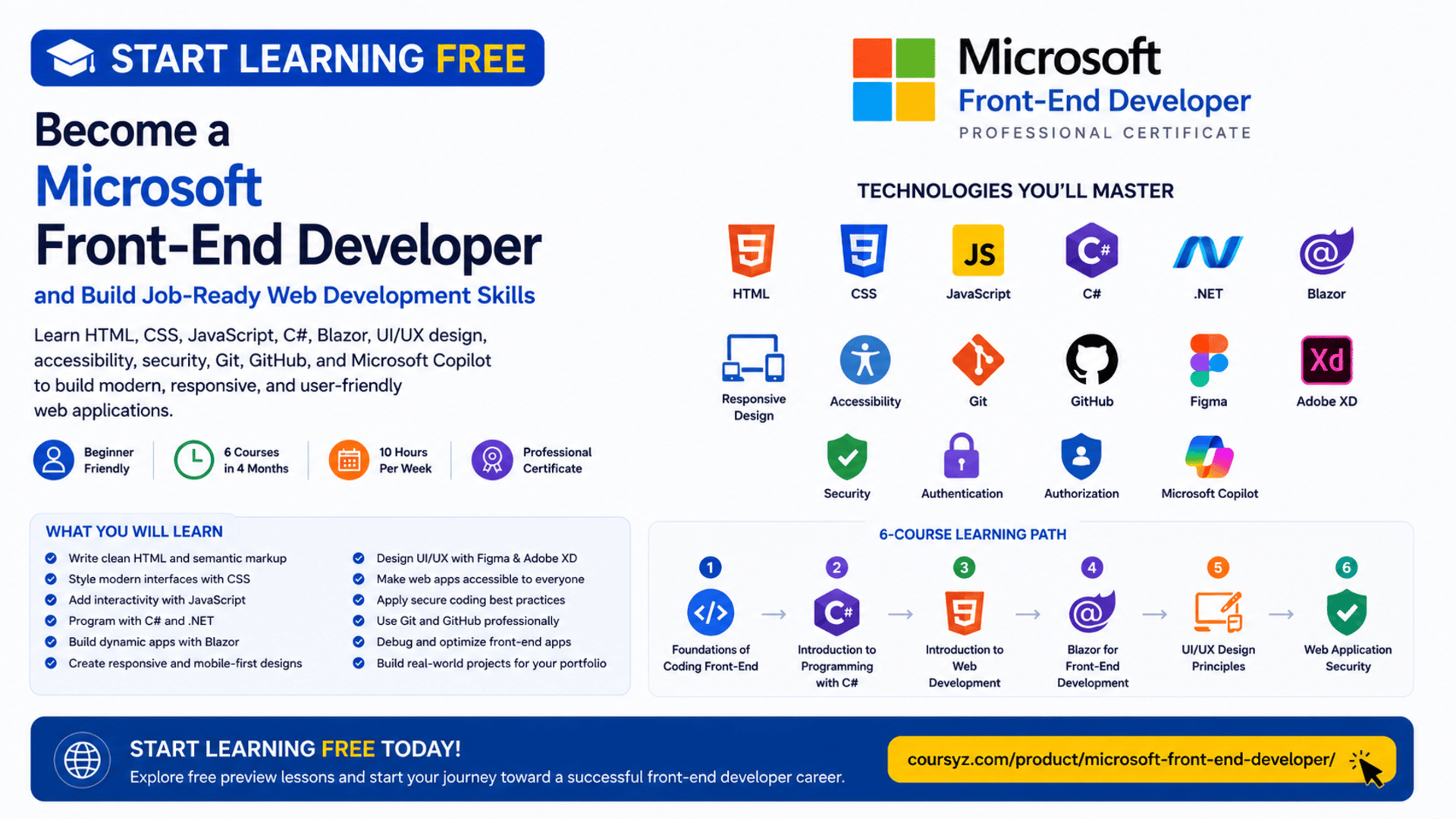
Modern businesses rely on websites and web applications to communicate with customers, sell products, deliver services, manage information, and support daily operations.
The visible and interactive part of these digital products is created by front-end developers.
Front-end development combines programming, responsive design, accessibility, usability, performance, security, and user-interface design to create websites that look professional and work effectively across devices.
The Microsoft Front-End Developer Professional Certificate provides a structured learning path for beginners who want to build practical web-development skills and prepare for entry-level front-end opportunities.
You may be able to start learning free by opening one of the individual courses and checking whether a Preview option or another no-cost access method is currently available.
Throughout the program, you will learn HTML, CSS, JavaScript, C#, .NET, Blazor, Git, GitHub, responsive web design, UI and UX principles, accessibility, secure coding, Microsoft Copilot, and modern front-end development practices.
Why Learn Front-End Development?
The front end is the part of a website or web application that users directly interact with.
It includes:
- Page layouts
- Navigation menus
- Forms
- Buttons
- Product cards
- Dashboards
- Search tools
- Interactive components
- Responsive mobile layouts
- User account screens
- Data displays
- Visual feedback
A front-end developer turns designs, business requirements, and user needs into working digital experiences.
Typical front-end responsibilities may include:
- Structuring webpages with HTML
- Styling layouts with CSS
- Adding interactivity with JavaScript
- Building reusable components
- Creating responsive interfaces
- Improving accessibility
- Testing across browsers
- Debugging visual and functional issues
- Applying security practices
- Managing code with Git
- Collaborating with designers and back-end developers
- Improving performance
Learning front-end development can support careers in web development, UI development, software engineering, freelancing, and digital product creation.
About the Microsoft Front-End Developer Professional Certificate
The Microsoft Front-End Developer Professional Certificate is a beginner-friendly, six-course learning program.
It is designed to be completed in approximately four months when studying around 10 hours per week.
No previous professional programming or web-development experience is required.
The program follows a flexible, self-paced structure, allowing learners to study according to their schedules.
The six courses are:
- Foundations of Coding Front-End
- Introduction to Programming with C#
- Introduction to Web Development
- Blazor for Front-End Development
- UI/UX Design Principles
- Web Application Security
The curriculum progresses from programming logic and web fundamentals into interactive applications, user-centered design, accessibility, security, and portfolio development.
What You Will Learn
By following the complete program and practising independently, you can develop skills in:
- Front-end development principles
- Computational thinking
- Problem-solving
- Algorithms
- Flowcharts
- C# programming
- Object-oriented programming
- Asynchronous programming
- HTML
- CSS
- JavaScript
- Responsive web design
- Semantic HTML
- DOM manipulation
- Version control
- Git
- GitHub
- Blazor
- UI components
- Data binding
- Routing
- State management
- UI and UX design
- Wireframing
- Prototyping
- Figma
- Adobe XD
- Accessibility
- Mobile-first design
- Secure coding
- Input validation
- Authentication
- Authorization
- Cross-site scripting prevention
- SQL injection prevention
- Microsoft Copilot
- Debugging
- Performance optimization
Course 1: Foundations of Coding Front-End
Estimated duration: 41 hours
The first course introduces the foundational principles of programming and front-end development.
It helps learners develop the logical thinking and problem-solving skills required before progressing into C#, JavaScript, Blazor, and advanced application development.
Topics include:
- Front-end development principles
- Computational thinking
- Problem-solving
- Algorithms
- Pseudocode
- Flowcharts
- Variables
- Conditions
- Loops
- Functions
- Methods
- Modular programming
- Code reusability
- Debugging
- Git
- GitHub
- Microsoft Copilot
Understand Computational Thinking
Computational thinking is a structured method for solving complex problems.
It typically includes:
Decomposition
Breaking a large problem into smaller and more manageable parts.
Pattern Recognition
Identifying repeated structures or similarities between problems.
Abstraction
Focusing on the most important information while removing unnecessary details.
Algorithm Design
Creating a sequence of steps that solves the problem.
These skills help developers plan an application before writing code.
Design Algorithms and Flowcharts
An algorithm explains the steps required to complete a task.
For example, a login process may include:
- Receive a username and password.
- Check whether both fields are complete.
- Validate the credentials.
- Grant access when the details are correct.
- Display an error when authentication fails.
A flowchart provides a visual representation of this logic.
Flowcharts can help developers:
- Understand program flow
- Identify missing steps
- Explain logic to others
- Review conditions
- Reduce coding mistakes
Build Modular and Reusable Code
Modular programming divides an application into smaller functions or methods.
This can make code:
- Easier to read
- Easier to test
- Easier to debug
- More reusable
- Simpler to maintain
- Less repetitive
For example, a form-validation function can be reused across several pages instead of rewriting the same logic each time.
Use Git and GitHub
Git is a version-control system used to track changes.
GitHub provides an online environment for storing repositories and collaborating with other developers.
These tools allow you to:
- Save project history
- Restore earlier versions
- Work with branches
- Review code changes
- Collaborate with others
- Publish projects
- Build a professional portfolio
Course 2: Introduction to Programming with C#
Estimated duration: 30 hours
The second course introduces C# programming within the .NET environment.
C# is used to build web applications, APIs, enterprise systems, cloud services, desktop software, and other Microsoft-based solutions.
Topics include:
- C# syntax
- Variables
- Data types
- Operators
- Conditions
- Loops
- Methods
- Classes
- Objects
- Inheritance
- Polymorphism
- Object-oriented design
- Asynchronous programming
- Debugging
- .NET project structure
- Visual Studio
- Microsoft Copilot
Understand C# and .NET
C# is a modern programming language used across the Microsoft development ecosystem.
.NET provides the libraries, runtime, and development tools required to build and run applications.
A .NET project may include:
- Source files
- Dependencies
- Project configuration
- Application settings
- Tests
- Build instructions
- Environment-specific files
Understanding this structure helps developers manage larger and more complex projects.
Learn Core C# Programming Concepts
The course introduces important concepts such as:
- Variables
- Constants
- Data types
- Operators
- Conditional logic
- Loops
- Methods
- Collections
- Exception handling
These tools allow an application to store information, make decisions, repeat actions, and organize reusable logic.
Apply Object-Oriented Programming
Object-oriented programming organizes software around classes and objects.
Important principles include:
Encapsulation
Encapsulation protects internal data and controls how other parts of the application can access it.
Inheritance
Inheritance allows one class to reuse or extend another class.
Polymorphism
Polymorphism allows related objects to respond differently to the same operation.
Abstraction
Abstraction hides unnecessary implementation details and exposes only the features another component needs.
These principles support scalable and maintainable software.
Use Asynchronous Programming
Web applications often need to wait for data from APIs, files, databases, or external services.
Asynchronous programming helps an application continue handling other tasks while waiting for an operation to complete.
This can improve:
- Responsiveness
- Resource usage
- Performance
- User experience
- Scalability
Course 3: Introduction to Web Development
Estimated duration: 38 hours
The third course introduces the essential building blocks of modern websites and web applications.
You will learn:
- HTML
- CSS
- JavaScript
- Responsive design
- Semantic HTML
- Accessibility
- DOM manipulation
- Asynchronous JavaScript
- Git
- GitHub
- JSON
- Browser tools
- Microsoft Copilot
Build Page Structure with HTML
HTML defines the structure and content of a webpage.
It is used to create:
- Headings
- Paragraphs
- Images
- Links
- Forms
- Tables
- Lists
- Buttons
- Navigation menus
- Page sections
Semantic HTML improves readability and helps search engines, browsers, developers, and assistive technologies understand the purpose of each section.
Style Interfaces with CSS
CSS controls how webpages look and respond visually.
It manages:
- Colors
- Typography
- Spacing
- Borders
- Backgrounds
- Positioning
- Layouts
- Responsive behavior
- Visual hierarchy
- Animations
Professional CSS should be organized, reusable, and maintainable.
Add Interactivity with JavaScript
JavaScript allows webpages to respond to users.
It can be used to:
- Validate forms
- Respond to clicks
- Update content
- Display messages
- Control menus
- Process user input
- Manipulate webpage elements
- Communicate with APIs
- Manage dynamic data
JavaScript transforms a static page into an interactive web application.
Understand DOM Manipulation
The Document Object Model represents webpage content as a structure that JavaScript can access and modify.
Developers can use DOM manipulation to:
- Change text
- Add or remove elements
- Update styles
- Respond to events
- Show and hide content
- Display validation messages
This is a fundamental front-end skill.
Build Responsive Websites
Responsive design allows websites to adapt to different screen sizes.
A responsive website should work effectively on:
- Desktop computers
- Laptops
- Tablets
- Smartphones
Responsive techniques may include:
- Flexible layouts
- Media queries
- Responsive images
- Mobile-first design
- Flexible typography
- Touch-friendly controls
- Adaptive navigation
Apply Web Accessibility
Accessible websites can be used by people with different abilities and assistive technologies.
Important practices include:
- Semantic HTML
- Clear labels
- Keyboard navigation
- Visible focus states
- Alternative text
- Sufficient color contrast
- Logical headings
- Accessible form errors
- Screen-reader support
Accessibility improves usability for everyone.
Course 4: Blazor for Front-End Development
Estimated duration: 33 hours
Blazor is a Microsoft framework for building interactive web applications with C# and .NET.
Instead of relying only on JavaScript for interface logic, Blazor allows developers to create dynamic user experiences using C#.
Topics include:
- Blazor projects
- Components
- Data binding
- Rendering models
- Routing
- Navigation
- Event handling
- Component communication
- Lifecycle methods
- State management
- Hybrid rendering
- Debugging
- Performance optimization
- Microsoft Copilot
What Is Blazor?
Blazor is a framework used to build interactive web interfaces.
It allows developers to:
- Create reusable components
- Handle user events
- Bind data to interfaces
- Manage navigation
- Share C# code
- Build single-page applications
- Integrate with .NET services
Blazor can be useful for developers and organizations already working within the Microsoft ecosystem.
Build Reusable Blazor Components
A Blazor component may represent:
- Navigation menu
- Product card
- Login form
- Dashboard widget
- Search field
- User profile
- Data table
- Notification panel
Reusable components reduce duplication and help maintain visual consistency.
Work with Data Binding
Data binding connects application data with the user interface.
It allows the screen to update when information changes.
Blazor supports concepts such as:
- One-way binding
- Two-way binding
- Event binding
- Form binding
For example, information entered into a form can update an application model automatically.
Configure Routing and Navigation
Routing connects a URL with a page or component.
Examples include:
/home/products/dashboard/account/settings
Blazor routing helps create smooth application navigation without requiring a full page reload for every interaction.
Manage Component State
State represents information that changes while an application runs.
Examples include:
- Logged-in user
- Form values
- Selected products
- Search results
- Cart contents
- Current filters
State management helps keep interfaces consistent and predictable.
Course 5: UI/UX Design Principles
Estimated duration: 29 hours
Professional front-end developers should understand not only code, but also how people interact with digital products.
This course introduces:
- User-interface design
- User-experience design
- User-centered design
- Responsive design
- Wireframing
- Prototyping
- High-fidelity mockups
- Mobile-first design
- Accessibility
- Figma
- Adobe XD
- Design testing
- Microsoft Copilot
Understand UI and UX
User interface design focuses on what users see and interact with.
It includes:
- Typography
- Colors
- Icons
- Buttons
- Layouts
- Spacing
- Components
- Visual hierarchy
User experience design focuses on the complete experience of using a product.
It considers:
- User goals
- Navigation
- Clarity
- Efficiency
- Feedback
- Accessibility
- Error prevention
- Ease of use
A beautiful interface can still provide a poor experience when users cannot complete tasks easily.
Create Wireframes
Wireframes provide a basic visual plan for an interface.
They show:
- Page structure
- Navigation
- Content placement
- Form fields
- Buttons
- User flow
Wireframes help teams test ideas before spending time on full visual design and development.
Build Interactive Prototypes
A prototype simulates how an interface will work.
It can help teams:
- Test navigation
- Review user flows
- Collect feedback
- Identify usability problems
- Improve layouts
- Validate ideas
Figma and Adobe XD can be used to create wireframes, mockups, and interactive prototypes.
Apply Mobile-First Design
Mobile-first design begins with the smallest screen and then expands the experience for larger devices.
This approach encourages developers to focus on:
- Essential content
- Clear navigation
- Touch-friendly controls
- Readable text
- Fast loading
- Simple layouts
Course 6: Web Application Security
Estimated duration: 36 hours
Security is an essential part of front-end and web application development.
This course introduces common vulnerabilities, secure coding practices, input protection, authentication, authorization, and safe data handling.
Topics include:
- Secure coding
- Input validation
- Output encoding
- Sanitization
- SQL injection
- Cross-site scripting
- Cross-site request forgery
- Authentication
- Authorization
- Data protection
- Secure storage
- Secure transmission
- Microsoft Copilot
Understand Cross-Site Scripting
Cross-site scripting can occur when unsafe content is inserted into a webpage and executed as code.
Developers can reduce the risk through:
- Output encoding
- Input validation
- Sanitization
- Safe DOM methods
- Content security policies
- Framework security features
Understand SQL Injection
SQL injection occurs when untrusted input changes the meaning of a database query.
Although database logic is usually handled on the back end, front-end developers should understand how unsafe data can create security risks.
Prevention may include:
- Parameterized queries
- Input validation
- Least-privilege accounts
- Safe server-side processing
- Avoiding direct query construction
Protect Against Cross-Site Request Forgery
Cross-site request forgery attempts to make an authenticated user perform an unwanted action.
Protection may include:
- Anti-forgery tokens
- SameSite cookies
- Reauthentication for sensitive actions
- Secure request validation
Apply Authentication and Authorization
Authentication verifies who a user is.
Authorization determines what that user can access.
For example:
- A customer may access their own profile
- An employee may update records
- An administrator may manage permissions
Front-end developers must also ensure that sensitive features are supported by secure server-side authorization.
Use Microsoft Copilot Responsibly
Microsoft Copilot is used throughout the learning path as an AI-assisted development tool.
It may help with:
- Code suggestions
- Debugging
- CSS improvements
- Responsive design suggestions
- C# development
- Blazor components
- Security reviews
- Code explanations
- Project organization
AI-generated code should always be reviewed and tested.
Developers remain responsible for:
- Correctness
- Security
- Accessibility
- Performance
- Maintainability
- Privacy
- Business requirements
Hands-On Projects and Portfolio Development
The program includes applied projects designed to help you practise the skills covered in the courses.
Possible activities include:
- Creating algorithms and flowcharts
- Writing C# programs
- Building HTML and CSS pages
- Adding JavaScript interactions
- Managing code with GitHub
- Creating a responsive web project
- Building a Blazor application
- Designing wireframes and prototypes
- Applying accessibility principles
- Detecting and fixing security issues
- Using Microsoft Copilot to improve code
By the end, you can develop portfolio projects that demonstrate both technical and design skills.
Suggested Portfolio Projects
Consider building projects such as:
- Responsive business website
- Customer portal
- Personal portfolio
- Product catalog
- Booking interface
- Task-management application
- Blazor dashboard
- Learning platform
- Secure login interface
- Data-driven web application
A strong project could include:
- Semantic HTML
- Modern CSS
- JavaScript
- C#
- Blazor
- Responsive design
- Accessibility
- Security practices
- GitHub documentation
- Automated testing
- Professional UI/UX design
Who Should Take This Program?
The program may be suitable for:
Complete Beginners
No previous programming experience is required.
Career Changers
Professionals interested in entering web development can follow a structured learning path.
Aspiring Front-End Developers
Learners can develop skills in HTML, CSS, JavaScript, C#, and Blazor.
UI and UX Designers
Designers can strengthen their programming and implementation knowledge.
Students and Recent Graduates
Students can complement academic studies with practical portfolio projects.
Back-End Developers
Back-end developers can expand into responsive interfaces and user-experience design.
Freelancers
Freelancers can use the skills to build websites, interfaces, and web applications.
Entrepreneurs
Entrepreneurs can better understand how professional web applications are designed, secured, and developed.
How to Start Learning Free
You may be able to explore selected lessons before paying for complete access.
Follow these steps:
- Open the program page using the call-to-action button in this article.
- Scroll down to the six individual courses.
- Select the course you want to explore.
- Open the selected course page.
- Click Enroll.
- Sign in or create an account.
- Choose Preview instead of Start Free Trial, when that option appears.
- Open the available lessons and start learning free.
Important Access Notice
Preview availability may vary based on:
- The individual course
- Your account
- Your country
- Your device
- Current enrollment options
Preview access may not include:
- All course videos
- Graded assignments
- Hands-on projects
- Assessments
- Instructor support
- The professional certificate
Always review the enrollment and payment information before confirming.
How to Get the Best Results
Practise Every Coding Concept
Do not only watch the lessons. Recreate each example in your own development environment.
Build Small Projects
Create simple projects before attempting a large application.
Use GitHub Consistently
Publish your work and write clear README documentation.
Test Responsive Layouts
Review your projects on desktop, tablet, and mobile screen sizes.
Apply Accessibility Early
Do not treat accessibility as a final adjustment.
Learn Blazor Through Practice
Create reusable components, forms, routing, and state-management examples.
Review Security Regularly
Check user input, data handling, authentication flows, and third-party dependencies.
Use Copilot as an Assistant
Review every suggestion and make sure you understand the code.
Document Your Portfolio
Include:
- Project description
- Features
- Technologies
- Screenshots
- Installation instructions
- Accessibility features
- Security considerations
- Known limitations
- Future improvements
Potential Career Opportunities
After developing sufficient skills and building a strong portfolio, learners may explore roles such as:
- Junior front-end developer
- C# front-end developer
- Blazor developer
- UI developer
- Web developer
- Responsive web developer
- Junior software developer
- Web application developer
- Application-development intern
- Freelance front-end developer
Completing the certificate does not guarantee employment.
Employers may also evaluate:
- HTML and CSS ability
- JavaScript knowledge
- C# skills
- Blazor experience
- UI/UX understanding
- Accessibility awareness
- Security knowledge
- Git experience
- Portfolio quality
- Technical interview performance
Frequently Asked Questions
Can I start learning free?
You may be able to preview selected lessons by opening an individual course and choosing Preview when the option is available.
Is previous experience required?
No. The certificate is designed for beginners.
How many courses are included?
The program currently includes six courses.
How long does the program take?
The suggested completion time is approximately four months at around 10 hours per week.
Does the program teach HTML, CSS, and JavaScript?
Yes. These technologies are covered in the web-development course.
Does it teach C#?
Yes. The program includes a dedicated C# programming course.
Will I learn Blazor?
Yes. One course focuses on building interactive web applications with Blazor.
Does the program include UI and UX design?
Yes. It covers user-centered design, wireframing, prototyping, Figma, Adobe XD, accessibility, and mobile-first design.
Is web security included?
Yes. The final course covers secure coding, XSS, SQL injection, CSRF, authentication, authorization, validation, and secure data handling.
Does the program use Microsoft Copilot?
Yes. Microsoft Copilot is integrated throughout the learning path.
Are practical projects included?
Yes. The certificate includes hands-on coding, design, Blazor, security, and portfolio activities.
Does Preview access include the certificate?
No. Preview access generally does not include the complete graded experience or the professional certificate.
Start Learning Free and Build Job-Ready Front-End Development Skills
Learn C#, .NET, HTML, CSS, JavaScript, responsive design, Git, GitHub, Blazor, UI/UX design, Figma, accessibility, web security, and Microsoft Copilot.
Open an individual course and look for the Preview option. Availability and included materials may vary. Complete courses, graded projects, and the professional certificate may require paid enrollment.





