Start Learning Free: Become a Meta Front-End Developer and Build Job-Ready Web Development Skills

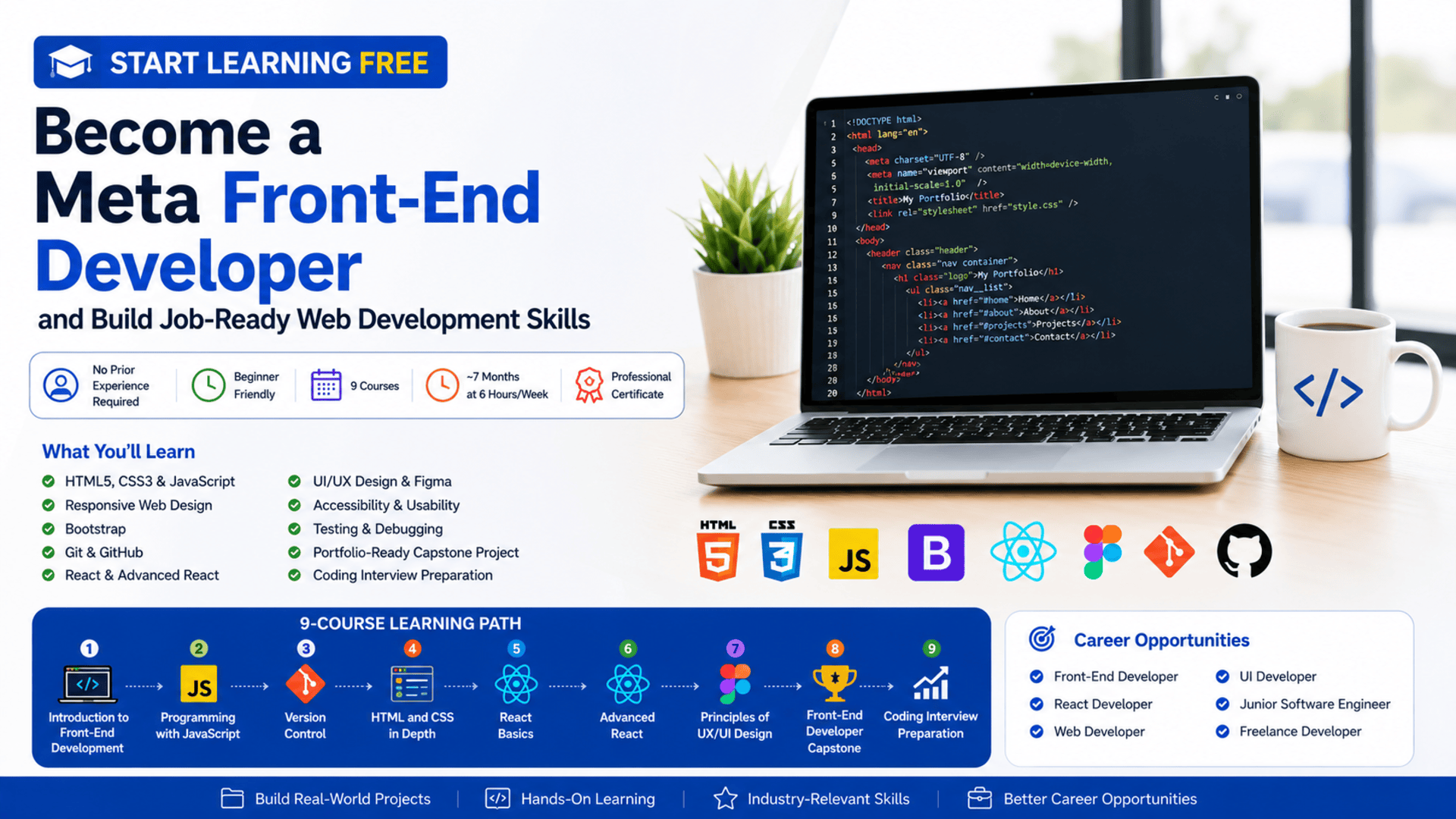
Websites and web applications shape how people shop, communicate, learn, work, access services, and interact with organizations.
Every responsive page, navigation menu, online form, product card, dashboard, and interactive interface depends on front-end development.
Front-end developers turn designs and business requirements into digital experiences that users can see and interact with. They combine webpage structure, visual design, programming, accessibility, usability, testing, and performance to create professional applications.
The Meta Front-End Developer Professional Certificate offers a structured learning path for beginners who want to build practical web development skills and prepare for entry-level front-end opportunities.
You may be able to start learning free by opening one of the individual courses and selecting the Preview option when it is available. This allows you to explore selected course videos and learning resources before deciding whether you need complete access to assignments, practical projects, the capstone, and the professional certificate.
Throughout the program, you will explore HTML, CSS, JavaScript, Bootstrap, Git, GitHub, React, advanced React concepts, UI and UX design, Figma, accessibility, testing, portfolio development, and coding-interview preparation.
Why Learn Front-End Development?
The front end is the part of a website or application that users directly experience.
It includes:
- Page layouts
- Navigation menus
- Forms
- Buttons
- Images
- Search tools
- Product listings
- Dashboards
- User profiles
- Interactive components
- Responsive mobile layouts
A front-end developer must understand how to make these elements functional, accessible, visually consistent, and easy to use.
Learning front-end development can help you build:
- Business websites
- Landing pages
- Online portfolios
- E-commerce interfaces
- Booking applications
- Customer portals
- Analytics dashboards
- Educational platforms
- Interactive web applications
- Responsive mobile-first experiences
These skills can support employment, freelancing, entrepreneurship, and collaboration with designers or back-end developers.
About the Meta Front-End Developer Professional Certificate
The Meta Front-End Developer Professional Certificate is a beginner-friendly learning program designed to develop practical and career-focused web development skills.
The current program contains nine courses and is designed to be completed in approximately seven months when studying around six hours per week.
It follows a flexible, self-paced structure, allowing learners to study according to their own schedules.
No previous professional programming or web development experience is required.
The learning path progresses through:
- Front-end development fundamentals
- JavaScript programming
- Version control
- Advanced HTML and CSS
- React fundamentals
- Advanced React development
- UX and UI design
- A front-end capstone project
- Coding-interview preparation
The program combines technical coding skills with design, usability, accessibility, testing, portfolio development, and career preparation.
What You Will Learn
By following the complete learning path, you can develop skills in:
- HTML5
- CSS3
- JavaScript
- Responsive web design
- Bootstrap
- Git
- GitHub
- Linux and Unix commands
- React
- Reusable components
- Props and state
- React hooks
- Forms
- API integration
- React Testing Library
- Jest
- UX and UI design
- Figma
- Wireframing
- Prototyping
- User research
- Accessibility
- Usability testing
- Debugging
- Code review
- Portfolio development
- Algorithms
- Data structures
- Coding-interview preparation
Course 1: Introduction to Front-End Development
Estimated duration: 19 hours
The first course introduces the roles involved in modern web development and explains how websites work.
You will learn the differences between:
- Front-end developers
- Back-end developers
- Full-stack developers
You will also explore the technologies used to build webpages and web applications.
Major topics include:
- HTML
- CSS
- Responsive web design
- Bootstrap
- React concepts
- Web browsers
- Web servers
- User interfaces
- Web-development tools
- General networking concepts
By the end of the course, you will create and style webpages using HTML and CSS.
Build Webpage Structure with HTML
HTML provides the structure of a webpage.
It defines elements such as:
- Headings
- Paragraphs
- Images
- Links
- Navigation
- Tables
- Forms
- Lists
- Buttons
- Page sections
Semantic HTML helps browsers, search engines, developers, and assistive technologies understand the purpose of webpage content.
A clear HTML structure also makes a website easier to style, maintain, and improve.
Style Websites with CSS
CSS controls the appearance and layout of webpages.
It can manage:
- Colors
- Fonts
- Spacing
- Borders
- Backgrounds
- Positioning
- Grid layouts
- Flexible layouts
- Responsive behavior
- Visual hierarchy
Front-end developers use CSS to turn basic webpage structures into professional digital experiences.
Build Responsive Pages
Users access websites from different devices and screen sizes.
A responsive website should work effectively on:
- Desktop computers
- Laptops
- Tablets
- Smartphones
Responsive design helps elements resize, move, or reorganize based on the available screen space.
This improves usability and reduces the need to create separate websites for different devices.
Course 2: Programming with JavaScript
Estimated duration: 48 hours
JavaScript allows developers to add logic and interaction to webpages.
This course introduces:
- Variables
- Data types
- Operators
- Conditional statements
- Loops
- Functions
- Objects
- Arrays
- Event-driven programming
- Functional programming
- Object-oriented programming
- JSON
- Node.js
- Package management
- Unit testing
- Jest
- Debugging
You will write JavaScript programs and test them using Jest.
Add Interactivity with JavaScript
JavaScript can be used to:
- Respond to button clicks
- Validate forms
- Display messages
- Update content
- Filter lists
- Create interactive menus
- Process user input
- Work with application data
- Communicate with APIs
Without JavaScript, many websites would remain static and unable to respond dynamically to users.
Work with Objects and Arrays
Objects and arrays help developers organize information.
An object might represent a user:
const user = {
  name: "Alex",
  role: "Developer",
  active: true
};
An array might store several products:
const products = ["Laptop", "Phone", "Tablet"];
These structures are essential when working with application data, APIs, and React components.
Test JavaScript with Jest
Testing helps confirm that code behaves as expected.
A unit test can verify:
- A function returns the correct value
- Invalid data is rejected
- An object is updated correctly
- A calculation works
- An error is handled
Jest is a popular JavaScript testing framework used to organize and run automated tests.
Testing can improve confidence when changing or expanding an application.
Course 3: Version Control
Estimated duration: 15 hours
Professional development teams use version control to manage changes and collaborate.
This course introduces:
- Git
- GitHub
- Repositories
- Branches
- Commits
- Merging
- Command-line tools
- Linux commands
- Unix commands
- File management
- Collaborative workflows
You will create a GitHub repository and learn how to manage code revisions.
Why Git and GitHub Matter
Version control allows developers to:
- Save project history
- Restore earlier versions
- Experiment safely
- Work on separate branches
- Collaborate with teams
- Review changes
- Resolve conflicts
- Publish projects
- Build an online portfolio
A professional GitHub profile can demonstrate your development skills to employers or clients.
Course 4: HTML and CSS in Depth
Estimated duration: 30 hours
The fourth course expands your knowledge of webpage structure, styling, responsiveness, accessibility, and browser tools.
Topics include:
- Semantic HTML
- Advanced CSS
- Responsive layouts
- Forms
- Bootstrap
- Browser compatibility
- Debugging
- Accessibility
- Web analytics
- Search-engine fundamentals
- Front-end performance
- UI components
You will build responsive layouts and professional user interfaces.
Build Professional Forms
Forms are essential to many applications.
They can be used for:
- Registration
- Login
- Checkout
- Contact requests
- Search
- Surveys
- Account settings
- Data entry
Professional forms should include:
- Clear labels
- Useful instructions
- Appropriate input types
- Validation
- Accessible error messages
- Logical keyboard navigation
Apply Accessibility Standards
Accessible websites can be used by a wider range of people, including users who rely on assistive technologies.
Important considerations include:
- Semantic HTML
- Alternative text
- Keyboard navigation
- Screen-reader labels
- Color contrast
- Visible focus states
- Clear headings
- Accessible forms
- Readable typography
Accessibility improves usability and helps organizations create more inclusive digital experiences.
Improve Browser Compatibility
A webpage may behave differently across browsers.
Front-end developers should test applications in multiple environments and identify layout, styling, or JavaScript issues.
Browser development tools can help developers inspect:
- HTML
- CSS
- Network requests
- JavaScript errors
- Performance
- Responsive layouts
Course 5: React Basics
Estimated duration: 30 hours
React is a JavaScript library for building interactive user interfaces.
Instead of creating an entire interface as one large file, React allows developers to divide it into reusable components.
This course introduces:
- React components
- Props
- State
- Forms
- Events
- Data flow
- JSX
- Reusable code
- Project organization
- Dynamic interfaces
You will build an interactive application using React.
Create Reusable Components
A React component may represent:
- Navigation bar
- Product card
- Search box
- Login form
- Dashboard widget
- User profile
- Notification
- Checkout section
Reusable components can reduce duplication and keep an interface consistent.
They also make large applications easier to maintain.
Work with Props and State
Props pass data from one component to another.
State stores information that can change while the application is running.
State may include:
- Form input
- Selected product
- Cart contents
- Loading status
- User preferences
- Search results
Understanding props and state is essential for creating interactive React applications.
Course 6: Advanced React
Estimated duration: 26 hours
The sixth course moves into advanced React techniques and application architecture.
Topics include:
- Advanced component patterns
- Code reusability
- API integration
- Remote data
- Context management
- Testing
- React Testing Library
- Jest
- Design patterns
- Common React libraries
You will learn how to build more maintainable and scalable React applications.
Connect React Applications to APIs
Modern applications often retrieve information from remote services.
A React application may use an API to load:
- Products
- Users
- Articles
- Messages
- Financial data
- Weather information
- Booking availability
The application sends a request, receives data, and displays it through reusable components.
Test React Applications
React Testing Library helps developers test interfaces from a user-focused perspective.
Tests may verify that:
- A button appears
- A form submits correctly
- A message is displayed
- API data renders
- An error state appears
- A component responds to user interaction
Testing helps reduce regressions when applications change.
Course 7: Principles of UX/UI Design
Estimated duration: 23 hours
Front-end development is not only about code.
Developers must also understand how people interact with digital interfaces.
This course introduces:
- User experience design
- User interface design
- User research
- Personas
- Empathy
- Accessibility
- Wireframes
- Prototypes
- Figma
- Usability testing
- Design reviews
- Interaction design
You will create wireframes and prototypes in Figma.
Understand the Difference Between UI and UX
User interface design focuses on the visual and interactive elements users see.
This includes:
- Colors
- Typography
- Buttons
- Icons
- Spacing
- Layouts
- Components
User experience design focuses on the complete experience of using the product.
It considers:
- User goals
- Navigation
- Clarity
- Efficiency
- Accessibility
- Feedback
- Ease of use
A visually attractive interface can still provide a poor experience when users cannot complete their tasks easily.
Use Figma for Wireframes and Prototypes
Figma allows designers and developers to:
- Create wireframes
- Design interface screens
- Build clickable prototypes
- Test user flows
- Share designs
- Collaborate with teams
- Review component systems
Understanding Figma helps front-end developers communicate more effectively with designers.
Course 8: Front-End Developer Capstone
Estimated duration: 27 hours
The capstone combines the main skills developed throughout the program.
You will create a responsive web application using:
- HTML
- CSS
- JavaScript
- React
- Components
- Multiple views
- UI and UX principles
- Accessibility
- Git
- Code review
- Testing
The project provides an opportunity to demonstrate your ability to build a complete front-end experience.
Build a Portfolio-Ready Project
The capstone can demonstrate that you understand how to:
- Plan an interface
- Create responsive layouts
- Build React components
- Manage application data
- Apply accessibility principles
- Test functionality
- Review code
- Use version control
- Improve usability
To make your project more valuable, customize it with:
- Original branding
- Additional features
- Improved accessibility
- Real API data
- Better performance
- Professional documentation
- A live deployment
Course 9: Coding Interview Preparation
Estimated duration: 11 hours
The final course helps learners prepare for technical interviews.
Topics include:
- Data structures
- Algorithms
- Pseudocode
- Problem-solving
- Computational thinking
- Software design patterns
- Graph concepts
- Technical communication
- Coding exercises
- Interview strategies
You will practise explaining your reasoning and solving technical problems with code.
Hands-On Projects
The program includes practical activities and projects across the learning path.
You may complete tasks such as:
- Editing a personal bio page
- Building responsive webpages
- Managing a project in GitHub
- Writing JavaScript applications
- Creating unit tests
- Building React components
- Fetching API data
- Creating Figma prototypes
- Developing a complete front-end capstone
These projects can help you build a portfolio for job applications or freelance opportunities.
Tools and Technologies Covered
The program introduces:
- HTML5
- CSS3
- JavaScript
- React
- Bootstrap
- Git
- GitHub
- Linux commands
- Unix commands
- Node.js
- JSON
- Jest
- React Testing Library
- Figma
- Browser development tools
- Responsive design
- Accessibility standards
Who Should Take This Program?
The certificate may be suitable for:
Complete Beginners
No previous professional development experience is required.
Career Changers
Professionals interested in moving into technology can follow a structured learning path.
Students and Recent Graduates
Students can complement academic studies with practical portfolio projects.
Designers
UI and UX designers can strengthen their coding knowledge.
Freelancers
Freelancers can use front-end skills to build websites, landing pages, and web applications.
Entrepreneurs
Entrepreneurs can learn how digital product interfaces are designed and developed.
Back-End Developers
Back-end developers can expand their skills into user-interface development.
How to Start Learning Free
You may be able to preview selected lessons from an individual course.
Follow these steps:
- Open the program page using the call-to-action button in this article.
- Scroll down to the list of individual courses.
- Choose the course you want to explore.
- Open the individual course page.
- Click Enroll.
- Sign in or create an account.
- Choose Preview instead of Start Free Trial, when available.
- Open the included videos and start learning free.
Important Access Notice
Preview availability can vary depending on:
- The individual course
- Your account
- Your country
- Your device
- Current enrollment options
Preview access may not include graded assignments, all projects, the capstone, instructor support, or the professional certificate.
Always review the current enrollment details before beginning a subscription or confirming payment.
How to Get the Best Results
Code Along with Every Lesson
Do not only watch demonstrations. Recreate the examples in your own environment.
Build Independent Projects
Create projects such as:
- Portfolio website
- Product catalog
- Booking interface
- Task-management app
- Restaurant website
- Analytics dashboard
- E-commerce front end
Use GitHub Regularly
Upload projects and write clear README files.
Practise Responsive Design
Test your work on desktop, tablet, and mobile layouts.
Focus on Accessibility
Use semantic HTML, labels, keyboard navigation, and appropriate contrast.
Connect to APIs
Build applications using live or mock data.
Write Automated Tests
Test JavaScript functions and React components.
Customize the Capstone
Add original features and a professional visual identity.
Prepare for Interviews
Practise algorithms, data structures, and explaining your technical decisions.
Potential Career Opportunities
After developing sufficient skills and building a strong portfolio, learners may explore roles such as:
- Junior front-end developer
- React developer
- JavaScript developer
- Web developer
- UI developer
- Front-end engineer
- Website developer
- Application-development intern
- Freelance web developer
- Junior full-stack developer
Completing the certificate does not guarantee employment.
Employers may also evaluate:
- JavaScript knowledge
- React skills
- HTML and CSS ability
- Portfolio quality
- Git experience
- Testing knowledge
- Accessibility awareness
- Problem-solving
- Communication
- Technical interview performance
Frequently Asked Questions
Can I start learning free?
You may be able to preview selected lessons by opening an individual course and choosing Preview when the option is available.
Is previous experience required?
No. The certificate is designed for beginners.
How many courses are included?
The current program contains nine courses.
How long does the program take?
The suggested completion time is approximately seven months at around six hours per week.
Does the program teach JavaScript?
Yes. JavaScript is a major part of the curriculum.
Will I learn React?
Yes. The program includes React Basics and Advanced React.
Are HTML and CSS included?
Yes. You will study both introductory and advanced HTML and CSS.
Does the program cover UX and UI design?
Yes. It includes user research, accessibility, Figma, wireframes, prototypes, and usability testing.
Will I build a capstone project?
Yes. You will develop a responsive front-end web application using React and JavaScript.
Is interview preparation included?
Yes. The final course covers algorithms, data structures, coding problems, and technical communication.
Does Preview access include the certificate?
No. Preview access generally does not include the complete graded experience or the professional certificate.
Start Learning Free and Build Job-Ready Front-End Development Skills
Learn HTML, CSS, JavaScript, Bootstrap, React, Git, GitHub, Figma, UX/UI design, accessibility, testing, portfolio development, and coding-interview preparation.
Open an individual course and look for the Preview option. Availability and included materials may vary. Complete courses, graded projects, the capstone, and the professional certificate may require paid enrollment.