Start Learning Free: Become a Meta Android Developer and Build Job-Ready Mobile App Development Skills

Mobile applications have become essential to how people communicate, shop, learn, work, manage money, access services, and enjoy entertainment.
Businesses across nearly every industry need Android applications that are reliable, responsive, secure, and easy to use. This growing dependence on mobile technology has created opportunities for professionals who understand how to design, build, test, and improve Android applications.
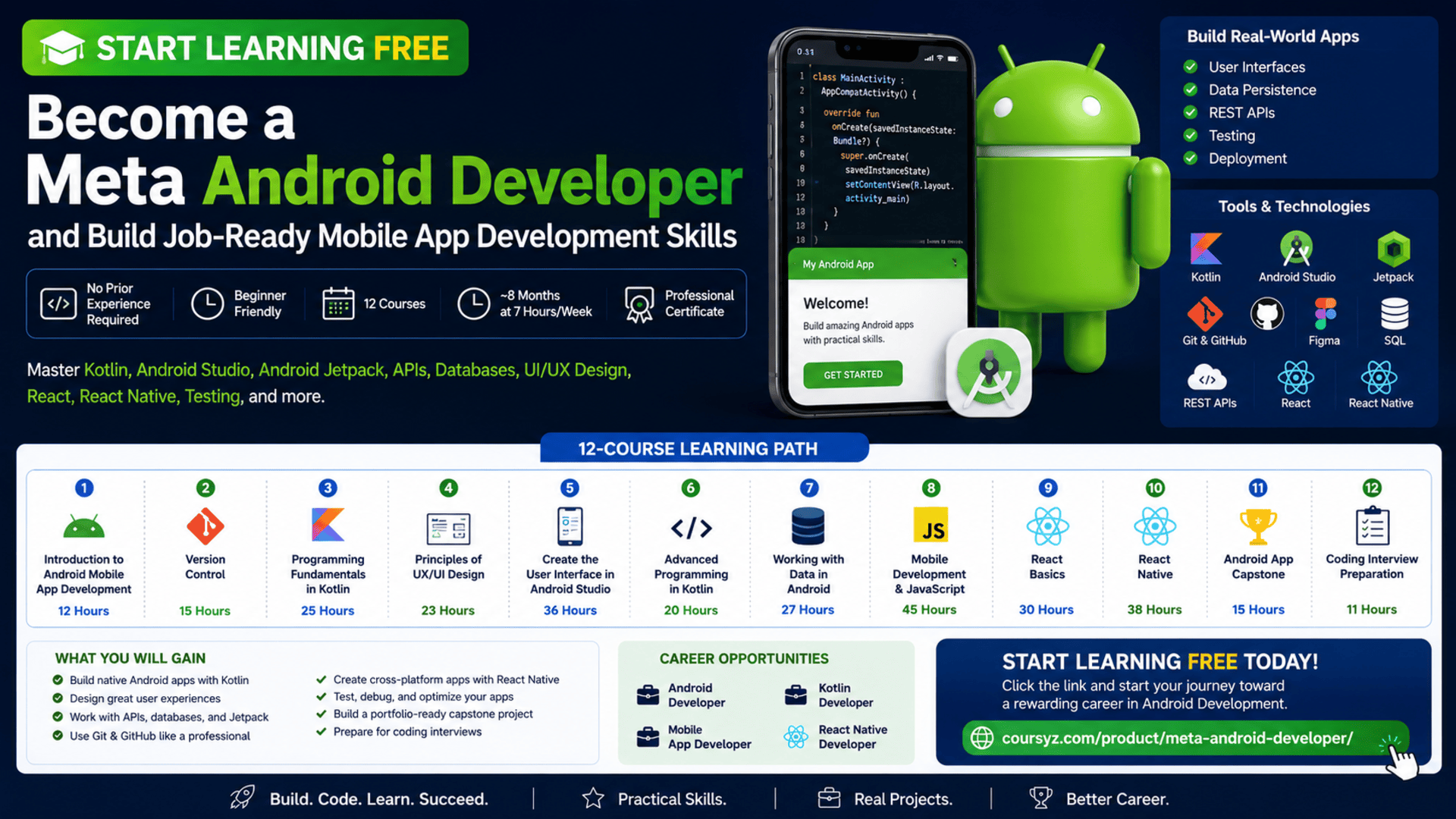
The Meta Android Developer Professional Certificate provides a structured path for beginners who want to develop practical mobile application skills and prepare for entry-level Android development opportunities.
You can start learning free by opening one of the individual courses inside the program and checking whether the Preview option is available. Preview access may allow you to explore selected videos and learning resources before deciding whether you need full access to graded assignments, projects, the capstone, and the professional certificate.
Throughout the program, you will study Kotlin, Android Studio, Android Jetpack, UX and UI design, Git, GitHub, databases, REST APIs, React, React Native, testing, application architecture, and technical interview preparation.
Why Learn Android App Development?
Android powers a broad range of smartphones, tablets, connected devices, and business applications.
Organizations need Android applications for:
- E-commerce
- Banking and financial services
- Education
- Transportation
- Healthcare
- Entertainment
- Productivity
- Customer service
- Travel
- Food delivery
- Social networking
- Business operations
Android developers turn product ideas and interface designs into functional applications.
Their work may include:
- Designing application screens
- Writing Kotlin code
- Connecting applications to APIs
- Managing local data
- Handling user interactions
- Testing application features
- Improving performance
- Fixing bugs
- Managing code with version control
- Preparing applications for release
Learning Android development can help you understand how complete mobile products are planned, built, tested, and maintained.
About the Meta Android Developer Professional Certificate
The Meta Android Developer Professional Certificate is a beginner-friendly program designed to build practical, job-ready mobile development skills.
The current program contains 12 courses and is designed to be completed in approximately eight months when studying around seven hours per week.
The program is flexible and self-paced, allowing you to study according to your own schedule.
No previous professional programming experience is required.
The learning path begins with Android development fundamentals before progressing into:
- Version control
- Kotlin programming
- UX and UI design
- Android interface creation
- Advanced Kotlin
- Data-driven Android applications
- JavaScript
- React
- React Native
- An Android capstone project
- Coding interview preparation
This combination gives learners exposure to both native Android development and cross-platform mobile development.
What You Will Learn
By completing the learning path and practising independently, you can develop skills in:
- Android application development
- Kotlin programming
- Android Studio
- Android Jetpack
- XML layouts
- Mobile user interfaces
- Object-oriented programming
- Data structures
- Functional programming
- Git and GitHub
- Command-line tools
- UX and UI research
- Figma
- Wireframing
- Prototyping
- Usability testing
- Data persistence
- SQL
- Relational databases
- JSON
- RESTful APIs
- Coroutines
- Unit testing
- Test-driven development
- JavaScript
- React
- React Native
- Application architecture
- MVVM
- LiveData
- Coding interview preparation
Course 1: Introduction to Android Mobile Application Development
Estimated duration: 12 hours
The first course introduces Android development and the tools used to create mobile applications.
You will explore:
- Fundamental Android development concepts
- Android Studio
- Android project structure
- Development configurations
- Built-in tools
- Kotlin Playground
- User interface basics
- XML
- Gradle
- Application build tools
- Android virtual devices
You will also create a simple Android application.
Learn to Use Android Studio
Android Studio is the primary integrated development environment used throughout the program.
It provides tools for:
- Writing Kotlin code
- Creating layouts
- Running applications
- Testing on virtual devices
- Debugging errors
- Managing dependencies
- Building application packages
- Inspecting performance
Becoming comfortable with Android Studio is an important step toward professional Android development.
Understand the Android Application Structure
An Android project contains several connected parts, including:
- Kotlin source files
- XML layout files
- Application resources
- Configuration files
- Gradle build files
- Images and icons
- Application permissions
Understanding this structure helps you locate code, manage resources, and organize an application correctly.
Course 2: Version Control
Estimated duration: 15 hours
Professional developers use version control to track changes and collaborate safely.
This course introduces:
- Git
- GitHub
- Repositories
- Branches
- Commits
- Merging
- Command-line tools
- Linux and Unix commands
- File management
- Collaborative software development
You will learn how to create and manage a GitHub repository and track revisions to your code.
Why Git and GitHub Matter
Version control allows you to:
- Save the history of a project
- Return to previous versions
- Experiment in separate branches
- Collaborate with other developers
- Review code changes
- Resolve conflicts
- Publish projects
- Build a professional portfolio
A well-organized GitHub profile can also help recruiters and clients review your practical work.
Course 3: Programming Fundamentals in Kotlin
Estimated duration: 25 hours
Kotlin is the main programming language used for modern Android development.
This course introduces:
- Variables
- Data types
- Functions
- Operators
- Conditions
- Loops
- Collections
- Object-oriented programming
- Data structures
- Code reusability
- Programming principles
You will apply Kotlin to coding exercises and programming challenges.
Why Learn Kotlin?
Kotlin offers concise syntax and modern programming features.
It can help developers:
- Write readable code
- Reduce repetitive syntax
- Handle null values more safely
- Create reusable functions
- Work with collections
- Apply object-oriented principles
- Develop Android applications efficiently
A strong Kotlin foundation makes the advanced Android courses easier to understand.
Course 4: Principles of UX/UI Design
Estimated duration: 23 hours
A technically functional application can still fail if users find it confusing or difficult to navigate.
This course introduces:
- User experience design
- User interface design
- User research
- User personas
- Accessibility
- Empathy
- Wireframing
- Prototyping
- Usability testing
- Figma
- Design reviews
- Interaction design
You will practise creating wireframes and prototypes in Figma.
Design Applications Around User Needs
Strong mobile design begins with understanding the user.
Developers and designers should consider:
- Who will use the application?
- What problem are they trying to solve?
- Which tasks matter most?
- What information do they need?
- What could confuse them?
- How can the interface remain accessible?
User-centered design helps teams build applications that are useful as well as visually appealing.
Course 5: Create the User Interface in Android Studio
Estimated duration: 36 hours
This course focuses on creating Android interfaces.
You will learn how to:
- Use UI component libraries
- Build layouts in Android Studio
- Work with XML
- Use the Layout Editor
- Create Kotlin UI views
- Add UI components
- Manage events
- Add animations
- Build responsive mobile screens
The course connects interface design principles with practical Android implementation.
Build Reusable Interface Components
Android applications commonly contain:
- Buttons
- Text fields
- Lists
- Menus
- Images
- Cards
- Navigation controls
- Forms
- Dialogs
Developers should structure these components so they remain consistent, responsive, and easy to maintain.
Course 6: Advanced Programming in Kotlin
Estimated duration: 20 hours
The sixth course moves into more advanced Kotlin and Android programming concepts.
Topics include:
- Android activities
- Advanced object-oriented programming
- Lambda expressions
- Collection processing
- Functional programming
- Unit testing
- Mocks and fakes
- Test-driven development
- Software testing
You will learn how to create more reliable Android code and test application logic.
Understand Unit Testing
Unit tests verify that individual pieces of code behave as expected.
For example, a test might confirm that:
- A calculation returns the correct value
- Invalid input is rejected
- A function updates application state
- A data transformation works correctly
Mocks and fakes allow developers to test code without depending on real services or databases.
Course 7: Working with Data in Android
Estimated duration: 27 hours
Many Android applications depend on stored or remote data.
This course covers:
- Kotlin tools and packages
- Coroutines
- RESTful APIs
- JSON
- SQL
- Relational databases
- Data persistence
- Data access
- Database applications
- Android Jetpack
- Data-driven application development
You will learn how to retrieve, process, store, and display application data.
Connect Android Applications to APIs
APIs allow mobile applications to exchange data with external systems.
An Android application may use an API to retrieve:
- Product information
- User profiles
- News
- Weather
- Restaurant menus
- Financial data
- Booking availability
- Location details
The application receives data, often in JSON format, and converts it into information the user can view and interact with.
Work with Coroutines
Network and database operations may take time.
Kotlin coroutines help applications perform these tasks without freezing the user interface.
They can support:
- API requests
- Database queries
- File operations
- Background processing
- Asynchronous tasks
Understanding coroutines is essential for creating responsive Android applications.
Course 8: Mobile Development and JavaScript
Estimated duration: 45 hours
The program also introduces JavaScript to prepare learners for React and React Native.
Topics include:
- JavaScript syntax
- Variables
- Objects
- Arrays
- Functions
- Event-driven programming
- Functional programming
- Node.js
- Package management
- Jest testing
- Unit testing
You will learn how to write JavaScript and test code using Jest.
Course 9: React Basics
Estimated duration: 30 hours
React is a JavaScript library for building reusable user-interface components.
This course covers:
- React components
- Props
- Forms
- State
- Data flow
- Reusable code
- Dynamic interfaces
- Event handling
- Application organization
You will create interactive web applications and build a foundation for React Native.
Course 10: React Native
Estimated duration: 38 hours
React Native allows developers to create cross-platform mobile applications using React and JavaScript.
You will explore:
- React Native components
- Styling
- Lists
- User input
- Pressable components
- Navigation
- Multiple screens
- JSX
- Expo
- Visual Studio Code
- Interactive mobile design
This course expands your skills beyond native Android development and introduces cross-platform application development.
Native Android vs. React Native
The certificate covers two different mobile development approaches.
Native Android Development
Native Android applications use Android-specific tools and technologies such as:
- Kotlin
- Android Studio
- Android Jetpack
- XML
- Android APIs
Cross-Platform Development
React Native allows developers to create applications using:
- JavaScript
- React
- React Native
- JSX
- Shared code
Learning both approaches helps you compare their advantages and choose an appropriate method for different projects.
Course 11: Android App Capstone
Estimated duration: 15 hours
The capstone brings together the main skills developed throughout the certificate.
You will create an Android application using:
- Kotlin
- Android Studio
- Fragments
- Views
- MVVM architecture
- APIs
- LiveData
- User flows
- UI and UX principles
- Git
- Android Jetpack
The project gives you an opportunity to demonstrate your practical development skills.
Build a Portfolio-Ready Android Application
Your capstone can show that you understand how to:
- Plan application features
- Design user flows
- Build an interface
- Structure Kotlin code
- Connect to an API
- Manage application data
- Apply MVVM architecture
- Use LiveData
- Test and debug features
- Optimize the user experience
To make the project stronger, customize it with your own branding, features, design choices, and documentation.
Course 12: Coding Interview Preparation
Estimated duration: 11 hours
The final course focuses on preparing for technical interviews.
You will practise:
- Coding problems
- Algorithms
- Data structures
- Pseudocode
- Computational thinking
- Technical communication
- Software design patterns
- Interview strategies
You will also explore preparation for Meta-style technical interviews.
Hands-On Projects and Portfolio Development
The certificate emphasizes applied learning.
Throughout the courses, you may complete activities involving:
- Kotlin coding
- Android interfaces
- GitHub repositories
- UX research
- Figma prototypes
- Unit tests
- API integration
- Database operations
- React applications
- React Native applications
- A complete Android capstone
These projects can help you begin building a portfolio for employment or freelance opportunities.
Tools and Technologies Covered
The program introduces:
- Kotlin
- Android Studio
- Android Jetpack
- XML
- Gradle
- Git
- GitHub
- Linux and Unix commands
- Figma
- SQL
- JSON
- REST APIs
- Coroutines
- JavaScript
- Jest
- Node.js
- React
- React Native
- Expo
- MVVM
- LiveData
- Unit testing
Who Should Take This Program?
The certificate may be suitable for:
Complete Beginners
No previous professional Android development experience is required.
Career Changers
Professionals who want to enter software or mobile development can follow a structured learning path.
Students and Recent Graduates
Students can use the practical projects to complement their studies.
Web Developers
Developers familiar with web technologies can expand into Android and React Native.
Freelancers
Freelancers can develop skills for building, maintaining, or prototyping mobile applications.
Entrepreneurs
Entrepreneurs can better understand how mobile application ideas become functional products.
UI and UX Designers
Designers can strengthen their technical knowledge and improve collaboration with development teams.
How to Start Learning Free
You may be able to preview selected lessons from one of the individual courses.
Follow these steps:
- Open the program page using the call-to-action button in this article.
- Scroll down to the list of individual courses.
- Select the course you want to explore.
- Open the course page.
- Click Enroll.
- Sign in or create an account.
- Choose Preview instead of Start Free Trial, when available.
- Open the included videos and start learning free.
Important Access Notice
Preview availability can vary.
It may depend on:
- The individual course
- Your account
- Your location
- The device you use
- Current enrollment options
Preview access may not include graded assignments, all projects, the capstone, instructor support, or the professional certificate.
Always review the enrollment details before beginning a subscription or confirming payment.
How to Get the Best Results
Practise Kotlin Regularly
Write small programs involving functions, objects, collections, and conditions.
Build Your Own Interfaces
Do not only copy course examples. Create original Android screens.
Use GitHub from the Beginning
Upload every major project and write clear documentation.
Test on Multiple Devices
Use Android emulators with different screen sizes and configurations.
Build with Real APIs
Practise retrieving and displaying live data.
Improve Accessibility
Use clear labels, readable text, sufficient contrast, and touch-friendly controls.
Customize Your Capstone
Add original features and a professional design.
Practise Coding Interviews
Solve data-structure and algorithm problems consistently.
Potential Career Opportunities
After building sufficient skills and a strong portfolio, learners may explore roles such as:
- Junior Android developer
- Android application developer
- Kotlin developer
- Mobile application developer
- React Native developer
- Mobile UI developer
- Junior software developer
- Application development intern
- Mobile application tester
- Freelance Android developer
Completing the certificate does not guarantee employment.
Employers may also evaluate:
- Kotlin knowledge
- Android Studio experience
- Portfolio quality
- API integration skills
- Testing ability
- Git experience
- Problem-solving
- Communication
- Technical interview performance
Frequently Asked Questions
Can I start learning free?
You may be able to preview selected lessons by choosing an individual course and selecting Preview when that option appears.
Is previous programming experience required?
No. The certificate is designed for beginners.
How many courses are included?
The current program contains 12 courses.
How long does the program take?
The suggested completion time is approximately eight months at around seven hours per week.
Does it teach Kotlin?
Yes. Kotlin programming is a major part of the curriculum.
Does it include Android Studio?
Yes. You will use Android Studio to create, test, and debug applications.
Will I learn UX and UI design?
Yes. The program covers user research, accessibility, personas, wireframes, prototypes, Figma, and interface implementation.
Are databases and APIs covered?
Yes. You will study SQL, relational databases, JSON, REST APIs, data persistence, and coroutines.
Does it include React Native?
Yes. The curriculum includes JavaScript, React, and React Native.
Will I build a complete Android application?
Yes. The capstone requires you to design and build an Android application.
Is coding interview preparation included?
Yes. The final course covers algorithms, data structures, coding problems, and technical communication.
Does free preview include the certificate?
No. Preview access generally does not include the complete graded experience or the professional certificate.
Start Learning Free and Build Job-Ready Android Development Skills
Learn Kotlin, Android Studio, Android Jetpack, UI/UX design, GitHub, REST APIs, SQL, data persistence, testing, React Native, application architecture, and coding interview preparation.
Open an individual course and look for the Preview option. Availability and included materials may vary. Full assignments, projects, the capstone, and the professional certificate may require paid enrollment.