
Start Learning Free: Become a Microsoft Full-Stack Developer and Build Job-Ready Web Application Skills

Modern businesses depend on web applications to communicate with customers, manage operations, process transactions, deliver online services, and support employees.
Behind every complete web application are two major technical layers.
The front end controls everything users see and interact with, including layouts, forms, navigation, buttons, dashboards, and responsive interfaces.
The back end manages application logic, databases, APIs, authentication, security, cloud services, and server-side processing.
A full-stack developer understands how both layers work and how to connect them into one complete, secure, and scalable application.
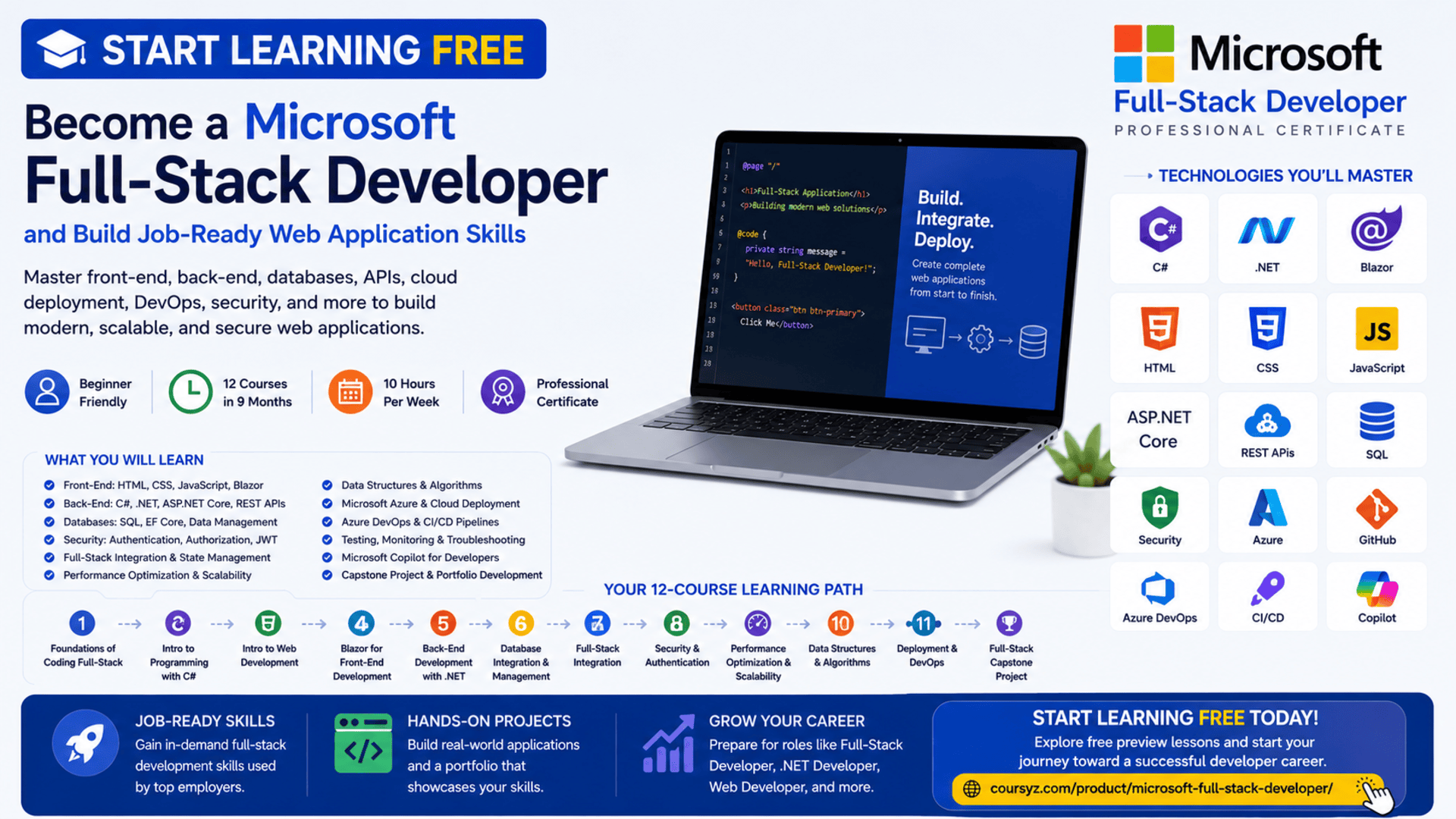
The Microsoft Full-Stack Developer Professional Certificate provides a structured learning path for beginners who want to build practical front-end, back-end, database, security, integration, and cloud-development skills.
You may be able to start learning free by opening one of the individual courses and checking whether a Preview option is available. This allows you to explore selected lessons before deciding whether you need complete access to assignments, projects, assessments, the capstone, and the professional certificate.
Throughout the program, you will study C#, .NET, HTML, CSS, JavaScript, Blazor, ASP.NET Core, REST APIs, SQL, relational databases, security, application integration, data structures, algorithms, Microsoft Azure, Azure DevOps, CI/CD, and Microsoft Copilot.
Why Learn Microsoft Full-Stack Development?
Organizations increasingly need developers who understand complete application systems rather than only one technical layer.
A full-stack developer may contribute to:
- Website structure and design
- Interactive user interfaces
- Business logic
- REST API development
- Database design
- Authentication
- Authorization
- Application security
- Performance optimization
- Cloud deployment
- Automated testing
- CI/CD pipelines
- Production monitoring
- System integration
For example, when a customer submits an online order:
- The front-end interface collects the order information.
- JavaScript or Blazor validates the form.
- The application sends a request to an API.
- ASP.NET Core processes the request.
- The back end applies business rules.
- The database stores the order.
- Security controls verify the user’s permissions.
- The server returns a response.
- The front end displays a confirmation.
Learning the complete workflow helps you understand how modern web applications operate from the user interface to the database and cloud infrastructure.
About the Microsoft Full-Stack Developer Professional Certificate
The Microsoft Full-Stack Developer Professional Certificate is a beginner-level, 12-course learning program.
It is designed to be completed in approximately nine months when studying around 10 hours per week.
No previous programming experience is required.
The learning path progresses from foundational programming and front-end development into back-end systems, databases, security, full-stack integration, performance, algorithms, DevOps, and cloud deployment.
The 12 courses are:
- Foundations of Coding Full-Stack
- Introduction to Programming with C#
- Introduction to Web Development
- Blazor for Front-End Development
- Back-End Development with .NET
- Database Integration and Management
- Full-Stack Integration
- Security and Authentication
- Performance Optimization and Scalability
- Data Structures and Algorithms
- Deployment and DevOps
- Full-Stack Developer Capstone Project
The courses are designed to be completed in sequence because each course builds on knowledge developed earlier in the program.
What You Will Learn
By following the complete learning path and practising independently, you can develop skills in:
- Computational thinking
- Programming logic
- C# programming
- Object-oriented programming
- Asynchronous programming
- HTML
- CSS
- JavaScript
- Responsive design
- Accessibility
- Blazor
- ASP.NET Core
- REST API development
- JSON
- Dependency injection
- Middleware
- SQL
- Relational databases
- Entity Framework Core
- Data modeling
- Object-relational mapping
- Authentication
- Authorization
- JSON Web Tokens
- Role-based access control
- Encryption
- Secure data storage
- Full-stack system integration
- State management
- API consumption
- Caching
- Query optimization
- Load balancing
- Data structures
- Algorithms
- Microsoft Azure
- Azure DevOps
- CI/CD
- Monitoring
- Microsoft Copilot
- Full-stack portfolio development
Course 1: Foundations of Coding Full-Stack
Estimated duration: 39 hours
The first course introduces the principles of full-stack development and the problem-solving methods used by professional developers.
You will explore:
- Front-end and back-end development
- Programming logic
- Computational thinking
- Algorithms
- Flowcharts
- Variables
- Conditions
- Loops
- Functions
- Methods
- Modular programming
- Debugging
- Git
- GitHub
- Microsoft Copilot
Understand Computational Thinking
Computational thinking provides a structured way to solve complex problems.
It usually includes:
Decomposition
Breaking a large application problem into smaller tasks.
Pattern Recognition
Identifying repeated structures or common solutions.
Abstraction
Focusing on essential information and removing unnecessary details.
Algorithm Design
Creating a logical series of steps that completes a task.
These techniques help developers design solutions before writing code.
Create Algorithms and Flowcharts
An algorithm describes the steps required to complete a process.
For example, an online registration algorithm may:
- Receive the submitted information.
- Check whether required fields are complete.
- Verify the email format.
- Confirm that the account does not already exist.
- Create the account.
- Return a success response.
Flowcharts visually represent this process and can help teams review application logic before implementation.
Build Modular Code
Modular development divides application logic into smaller, reusable functions or methods.
This can make applications:
- Easier to test
- Easier to debug
- Easier to maintain
- Less repetitive
- More scalable
- Simpler to understand
Course 2: Introduction to Programming with C#
Estimated duration: 30 hours
The second course introduces programming with C# inside the .NET development environment.
Topics include:
- C# syntax
- Variables
- Data types
- Operators
- Conditions
- Loops
- Methods
- Classes
- Objects
- Inheritance
- Polymorphism
- Exception handling
- Asynchronous programming
- Debugging
- .NET project structure
- Microsoft Visual Studio
- Microsoft Copilot
Why Learn C#?
C# is a widely used programming language within the Microsoft development ecosystem.
It can be used to build:
- Web applications
- APIs
- Cloud services
- Enterprise systems
- Desktop software
- Mobile applications
- Business tools
C# provides the programming foundation needed for Blazor, ASP.NET Core, database integration, security, and cloud development.
Apply Object-Oriented Programming
Object-oriented programming organizes applications around classes and objects.
Important principles include:
Encapsulation
Protecting internal information and controlling how it is accessed.
Inheritance
Allowing one class to reuse or extend another class.
Polymorphism
Allowing related objects to respond differently to the same operation.
Abstraction
Hiding implementation complexity and exposing only required functionality.
These principles support reusable, modular, and maintainable code.
Use Asynchronous Programming
Modern applications frequently communicate with APIs, databases, files, and cloud services.
These operations may take time.
Asynchronous programming allows the application to continue performing other tasks while waiting for an operation to complete.
This can improve:
- Responsiveness
- Request handling
- Resource usage
- Scalability
- Performance
Course 3: Introduction to Web Development
Estimated duration: 38 hours
The third course introduces the core technologies used to create modern websites and web applications.
You will study:
- HTML
- CSS
- JavaScript
- Responsive design
- Semantic HTML
- Accessibility
- DOM manipulation
- Asynchronous JavaScript
- Git
- GitHub
- Microsoft Copilot
Structure Pages with HTML
HTML provides the structure of a webpage.
It defines:
- Headings
- Paragraphs
- Images
- Links
- Forms
- Tables
- Lists
- Buttons
- Navigation
- Page sections
Semantic HTML improves accessibility, maintainability, and search-engine understanding.
Style Applications with CSS
CSS controls the visual presentation of webpages.
It manages:
- Colors
- Typography
- Spacing
- Borders
- Backgrounds
- Positioning
- Grid layouts
- Flexible layouts
- Responsive behavior
- Visual hierarchy
Add Interactivity with JavaScript
JavaScript allows applications to respond to users.
It can be used to:
- Validate forms
- Respond to clicks
- Update content dynamically
- Display notifications
- Manage menus
- Process user input
- Communicate with APIs
- Control webpage elements
Build Responsive and Accessible Interfaces
Responsive interfaces adapt to desktops, laptops, tablets, and smartphones.
Accessible interfaces support people using keyboards, screen readers, alternative input methods, and other assistive technologies.
Important practices include:
- Semantic HTML
- Alternative text
- Clear labels
- Keyboard navigation
- Visible focus states
- Sufficient contrast
- Responsive layouts
- Touch-friendly controls
Course 4: Blazor for Front-End Development
Blazor is a Microsoft framework for creating interactive web interfaces with C# and .NET.
Instead of writing all interface logic in JavaScript, developers can use C# to build reusable web components.
Topics include:
- Blazor projects
- Components
- Data binding
- Events
- Routing
- Navigation
- Component lifecycle
- State management
- Rendering models
- Performance
- Debugging
- Microsoft Copilot
Build Reusable Blazor Components
A Blazor component may represent:
- Navigation menu
- Product card
- Registration form
- Data table
- User profile
- Dashboard widget
- Search field
- Notification panel
Reusable components reduce duplication and support consistent interface design.
Work with Data Binding
Data binding connects interface elements with application data.
It can be used to:
- Display dynamic values
- Process form information
- Update the interface
- Handle user selections
- Synchronize application state
Configure Routing and Navigation
Routing connects URLs with components or pages.
Examples include:
/home/products/orders/account/dashboard
Blazor routing helps create smooth single-page application experiences.
Course 5: Back-End Development with .NET
This course focuses on server-side application development using .NET and ASP.NET Core.
You will explore:
- ASP.NET Core
- REST APIs
- Routing
- Middleware
- Dependency injection
- JSON
- Serialization
- Deserialization
- Error handling
- Back-end architecture
- API documentation
- Microsoft Copilot
Build REST APIs
REST APIs allow front-end and back-end systems to communicate.
Common operations include:
- GET
- POST
- PUT
- PATCH
- DELETE
These operations often represent create, read, update, and delete actions.
For example, an online store may include endpoints such as:
/api/products/api/customers/api/orders/api/accounts/login
Understand Middleware
Middleware processes requests and responses as they move through the application.
Middleware may manage:
- Authentication
- Error handling
- Logging
- Routing
- Security headers
- Response compression
- Request timing
Apply Dependency Injection
Dependency injection supplies components with the services they need.
This can make applications:
- Easier to test
- More modular
- Less tightly coupled
- Easier to maintain
- More flexible
Course 6: Database Integration and Management
This course introduces relational databases, SQL, Entity Framework Core, data modeling, and database performance.
Topics include:
- SQL
- Relational databases
- Database tables
- Data modeling
- Primary keys
- Foreign keys
- Entity Framework Core
- Object-relational mapping
- Transactions
- Concurrency
- Data integrity
- Query optimization
- Microsoft Copilot
Learn SQL
SQL allows applications to communicate with relational databases.
Developers use SQL to:
- Create tables
- Insert records
- Retrieve information
- Update records
- Delete data
- Join related tables
- Filter results
- Create reports
Example:
SELECT CustomerName, Email
FROM Customers
WHERE AccountStatus = 'Active';
Use Entity Framework Core
Entity Framework Core allows developers to work with C# classes while the framework manages many database operations.
It supports:
- Querying data
- Creating records
- Updating information
- Deleting records
- Managing relationships
- Database migrations
- Change tracking
Understanding SQL remains important even when using object-relational mapping.
Manage Transactions
Transactions group several database operations into one controlled process.
For example, processing a payment may require:
- Creating a payment record.
- Updating the order.
- Reducing inventory.
- Saving the transaction.
When one operation fails, the transaction may need to be reversed to protect data integrity.
Course 7: Full-Stack Integration
Estimated duration: 35 hours
This course connects the front-end and back-end layers.
You will learn how to:
- Configure a full-stack development environment
- Connect Blazor to APIs
- Process API responses
- Manage application state
- Handle asynchronous API requests
- Integrate front-end and back-end components
- Debug system-integration problems
- Optimize communication between layers
- Use Microsoft Copilot during integration
Understand the Full-Stack Request Flow
A typical full-stack interaction may work as follows:
- A user submits a form.
- Blazor collects the form data.
- The front end sends an API request.
- ASP.NET Core processes the request.
- The back end validates the data.
- Entity Framework Core updates the database.
- The API returns a JSON response.
- The interface displays the result.
Understanding this workflow is one of the most important skills in full-stack development.
Manage Application State
State represents information that changes while an application runs.
Examples include:
- Logged-in user
- Cart contents
- Search filters
- Form values
- API results
- Current page
- Loading status
Good state management helps keep the front end predictable and consistent.
Course 8: Security and Authentication
This course focuses on protecting full-stack applications.
Topics include:
- Authentication
- Authorization
- ASP.NET Identity
- JSON Web Tokens
- Role-based access control
- Encryption
- Secure data storage
- Secure API endpoints
- Input validation
- Application security
- Microsoft Copilot
Authentication vs. Authorization
Authentication verifies the identity of a user.
Authorization determines what that user is permitted to access.
For example:
- Customers may view their own orders.
- Employees may update records.
- Managers may view reports.
- Administrators may manage accounts.
Secure Applications with JWT
JSON Web Tokens can be used to represent authenticated users.
A common process is:
- The user submits credentials.
- The server verifies them.
- The server creates a token.
- The client sends the token with protected requests.
- The server validates the token.
- Authorized information is returned.
Tokens must be handled through secure connections and protected storage.
Apply Role-Based Access Control
Role-based access control assigns permissions according to roles.
Possible roles include:
- Customer
- Employee
- Manager
- Administrator
This prevents users from accessing functions outside their responsibilities.
Course 9: Performance Optimization and Scalability
Applications must continue working effectively as users and data increase.
This course covers:
- Caching
- Query optimization
- Database indexing
- Load balancing
- Performance testing
- Traffic management
- Scalable architecture
- Distributed systems
- Application monitoring
- Microsoft Copilot
Improve Performance with Caching
Caching stores frequently requested information so it can be retrieved quickly.
Examples include:
- Product information
- User preferences
- Application settings
- Reports
- Reference data
Caching can reduce database traffic and improve response time.
Optimize Database Queries
Query optimization may involve:
- Retrieving only required columns
- Adding indexes
- Reducing unnecessary joins
- Avoiding repeated requests
- Reviewing execution plans
- Improving data models
- Applying caching
Performance should be measured using real data rather than assumptions.
Understand Load Balancing
Load balancing distributes incoming traffic across several application instances.
It can improve:
- Availability
- Fault tolerance
- Performance
- Reliability
- Scalability
Course 10: Data Structures and Algorithms
This course develops problem-solving skills that support efficient application development.
Topics include:
- Arrays
- Linked lists
- Trees
- Graphs
- Searching
- Sorting
- Traversal
- Complexity analysis
- Algorithm optimization
- Scalable processing
Why Data Structures Matter
Different problems require different ways of organizing information.
Arrays are useful for indexed data.
Trees are useful for hierarchical information.
Graphs are useful for connected relationships.
Choosing the right structure can improve application speed, readability, and scalability.
Analyze Algorithm Efficiency
Developers should consider how processing time and memory usage change as the data grows.
A solution that works with 100 records may become inefficient with one million records.
Complexity analysis helps compare different approaches.
Course 11: Deployment and DevOps
This course focuses on delivering applications to production and managing them after release.
Topics include:
- Microsoft Azure
- Azure DevOps
- CI/CD
- Continuous integration
- Continuous deployment
- Deployment automation
- Cloud security
- Monitoring
- Scaling
- Production troubleshooting
- Microsoft Copilot
Build a CI/CD Pipeline
A continuous integration pipeline may automatically:
- Download the latest code.
- Install dependencies.
- Build the application.
- Run tests.
- Check code quality.
- Report failures.
A continuous deployment pipeline may then:
- Create a production build.
- Deploy to Azure.
- Apply configuration.
- Run validation checks.
- Monitor the release.
- Roll back failed changes.
Automation makes deployment more consistent and repeatable.
Deploy Applications to Azure
Microsoft Azure can provide services for:
- Hosting applications
- Running APIs
- Managing databases
- Storing files
- Monitoring performance
- Scaling resources
- Applying cloud security
- Managing production environments
Course 12: Full-Stack Developer Capstone Project
Estimated duration: 5 hours
The final capstone brings together the major skills developed throughout the program.
You will complete a comprehensive full-stack application involving:
- Front-end components
- Back-end services
- API integration
- Data models
- Database operations
- Authentication
- Application security
- Performance optimization
- Development workflows
- Cloud deployment
The capstone can become an important portfolio project for demonstrating your practical abilities.
How Microsoft Copilot Supports the Program
Microsoft Copilot appears throughout the learning path as an AI-assisted development tool.
It may help you:
- Generate code suggestions
- Explain programming concepts
- Debug errors
- Improve C# code
- Create HTML, CSS, and JavaScript
- Build Blazor components
- Design APIs
- Improve database queries
- Review security
- Optimize performance
- Create deployment scripts
- Support CI/CD workflows
AI-generated code must always be reviewed and tested.
Developers remain responsible for:
- Accuracy
- Security
- Accessibility
- Performance
- Maintainability
- Privacy
- Business requirements
Hands-On Projects and Portfolio Development
The certificate includes practical projects covering the full application lifecycle.
You may complete activities involving:
- Algorithms and flowcharts
- C# programs
- HTML, CSS, and JavaScript projects
- Blazor applications
- REST APIs
- SQL databases
- Entity Framework Core
- Authentication
- Secure back-end systems
- Full-stack integration
- Performance optimization
- Azure deployment
- CI/CD pipelines
- A final capstone application
These projects can help you build a portfolio for job applications, freelance work, or career development.
Suggested Portfolio Projects
Consider building:
- E-commerce platform
- Customer-management system
- Appointment-booking application
- Inventory-management system
- Employee portal
- Help-desk application
- Learning-management platform
- Project-management dashboard
- Expense tracker
- Restaurant-ordering system
A complete project could include:
- Blazor front end
- ASP.NET Core back end
- REST API
- SQL database
- Entity Framework Core
- Authentication
- Role-based permissions
- Automated testing
- Caching
- Logging
- Azure deployment
- CI/CD pipeline
- GitHub documentation
Who Should Take This Program?
The certificate may be suitable for:
Complete Beginners
No previous programming experience is required.
Career Changers
Professionals interested in moving into software development can follow a structured path.
Aspiring Full-Stack Developers
Learners can build skills across front-end, back-end, databases, security, and cloud deployment.
Front-End Developers
Front-end developers can expand into APIs, databases, and server-side systems.
Back-End Developers
Back-end developers can strengthen their UI, responsive-design, and Blazor skills.
Students and Graduates
Students can complement academic studies with practical portfolio projects.
Freelancers
Freelancers can learn how to deliver complete web applications.
Entrepreneurs
Entrepreneurs can develop a stronger understanding of how digital products are designed, developed, secured, and deployed.
How to Start Learning Free
You may be able to explore selected lessons before paying for complete access.
Follow these steps:
- Open the program page using the call-to-action button in this article.
- Scroll down to the 12 individual courses.
- Select the course you want to explore.
- Open the selected course page.
- Click Enroll.
- Sign in or create an account.
- Choose Preview instead of Start Free Trial, when available.
- Open the included lessons and start learning free.
Important Access Notice
Preview availability may vary depending on:
- The individual course
- Your account
- Your country
- Your device
- Current enrollment options
Preview access may not include:
- All course videos
- Graded assignments
- Complete projects
- Assessments
- The capstone
- The professional certificate
Always review the current enrollment and payment information before confirming.
How to Get the Best Results
Practise Every Technology
Do not only watch lessons. Write code and rebuild each example.
Build Front-End and Back-End Projects Together
Practise connecting Blazor interfaces to ASP.NET Core APIs.
Learn SQL Alongside Entity Framework Core
Understand the database operations beneath the ORM.
Apply Security Early
Include authentication, authorization, validation, and encryption from the beginning.
Use GitHub Consistently
Publish projects with clear documentation and commit history.
Write Automated Tests
Test components, APIs, business logic, database operations, and security rules.
Build a CI/CD Pipeline
Automate the build, testing, and deployment of at least one project.
Document Your Portfolio
Include:
- Project overview
- Features
- Architecture
- Technologies
- Database schema
- API endpoints
- Authentication process
- Installation instructions
- Testing instructions
- Deployment information
- Known limitations
- Future improvements
Potential Career Opportunities
After developing sufficient skills and building a strong portfolio, learners may explore roles such as:
- Junior full-stack developer
- C# developer
- .NET developer
- Blazor developer
- ASP.NET Core developer
- Front-end developer
- Back-end developer
- API developer
- Web application developer
- Junior software engineer
- Cloud application developer
- DevOps development intern
Completing the certificate does not guarantee employment.
Employers may also evaluate:
- C# knowledge
- HTML, CSS, and JavaScript ability
- Blazor experience
- ASP.NET Core knowledge
- SQL proficiency
- API development
- Security awareness
- Azure experience
- Testing skills
- Portfolio quality
- Technical interview performance
Frequently Asked Questions
Can I start learning free?
You may be able to preview selected lessons by opening an individual course and selecting Preview when the option appears.
Is previous programming experience required?
No. The program is designed for beginners.
How many courses are included?
The current program includes 12 courses.
How long does it take?
The suggested completion time is approximately nine months at around 10 hours per week.
Does the program teach front-end and back-end development?
Yes. It covers HTML, CSS, JavaScript, Blazor, C#, .NET, ASP.NET Core, APIs, databases, and cloud deployment.
Will I learn C#?
Yes. C# programming is a central part of the program.
Does it cover Blazor?
Yes. One course focuses on creating interactive front-end applications with Blazor.
Are databases included?
Yes. The program covers SQL, relational databases, Entity Framework Core, transactions, and data modeling.
Does it include application security?
Yes. It covers authentication, authorization, JWT, RBAC, encryption, and secure data storage.
Will I learn Azure and DevOps?
Yes. The program includes Microsoft Azure, Azure DevOps, CI/CD, monitoring, and cloud deployment.
Is Microsoft Copilot included?
Yes. Microsoft Copilot is integrated across the learning path.
Is there a capstone?
Yes. The final course requires a comprehensive full-stack development project.
Does Preview access include the certificate?
No. Preview access generally does not include the full graded experience or professional certificate.
Start Learning Free and Build Job-Ready Full-Stack Development Skills
Learn C#, .NET, HTML, CSS, JavaScript, Blazor, ASP.NET Core, REST APIs, SQL, Entity Framework Core, security, Microsoft Azure, Azure DevOps, CI/CD, and Microsoft Copilot.
Open an individual course and look for the Preview option. Availability and included materials may vary. Complete courses, graded assignments, projects, the capstone, and the professional certificate may require paid enrollment.





