
Modern organizations depend on fast, responsive, and scalable web applications to deliver services, manage customers, process information, and create better digital experiences.
Angular is a powerful front-end framework used to build structured, interactive, and maintainable web applications. It gives developers a complete ecosystem for creating reusable components, managing data, building forms, organizing navigation, testing application behavior, optimizing performance, and preparing projects for production deployment.
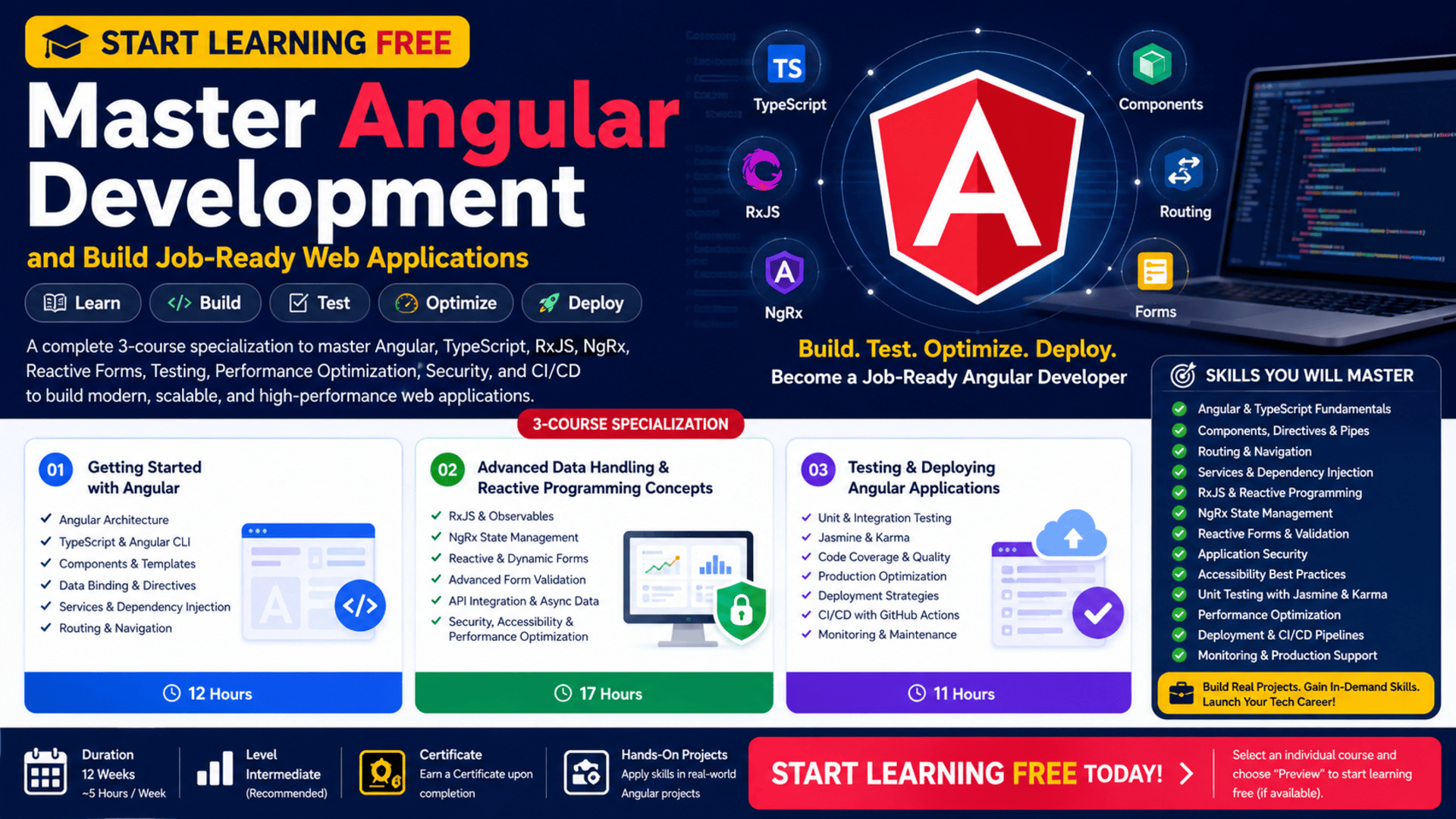
The Mastering Angular Development Specialization provides a structured learning path for developers who want to progress from Angular foundations to advanced reactive programming, state management, testing, performance optimization, and automated deployment.
You may be able to start learning free by selecting one of the individual courses and checking whether Preview lessons, financial aid, a scholarship, or another no-cost access option is currently available.
The program combines Angular, TypeScript, Angular CLI, RxJS, NgRx, reactive forms, Jasmine, Karma, GitHub, CI/CD, application security, accessibility, performance optimization, deployment, and system monitoring.
Why Learn Angular Development?
Modern web applications must do more than display static information.
Users expect applications to:
- Load quickly
- Respond immediately to actions
- Work across desktop and mobile devices
- Display updated information dynamically
- Validate forms clearly
- Provide seamless navigation
- Protect user data
- Remain accessible to different users
- Handle complex data flows
- Perform reliably at scale
Angular helps developers address these requirements through a structured and component-based architecture.
Instead of building an application as one large collection of scripts, Angular allows developers to separate the user interface into reusable components, services, modules, routes, and data-management layers.
This structure can make applications easier to:
- Develop
- Test
- Maintain
- Scale
- Debug
- Secure
- Update
- Deploy
About the Mastering Angular Development Specialization
The Mastering Angular Development Specialization is an intermediate-level program consisting of three progressive courses.
It is designed to be completed in approximately 12 weeks when studying for around five hours per week.
The three courses are:
- Getting Started with Angular
- Advanced Data Handling and Reactive Programming Concepts
- Testing and Deploying Angular Applications
The recommended order begins with Angular foundations before progressing into reactive programming, state management, testing, performance, and deployment.
The program is particularly suitable for:
- Front-end developers
- Web developers
- Software engineers
- JavaScript developers
- Developers moving from another framework
- Learners with basic Angular experience
- Professionals preparing for Angular-related roles
Previous knowledge of HTML, CSS, JavaScript, Bootstrap, and basic Angular concepts is recommended.
What You Will Learn
Throughout the program, you will learn how to:
- Understand Angular architecture
- Work with TypeScript
- Use Angular CLI
- Create reusable components
- Build and organize templates
- Apply data binding
- Use directives and pipes
- Handle user events
- Create Angular services
- Apply dependency injection
- Configure routing
- Build single-page applications
- Create dynamic and reactive forms
- Apply advanced form validation
- Manage asynchronous data using RxJS
- Manage complex application state with NgRx
- Integrate APIs
- Improve application security
- Apply accessibility standards
- Write unit and integration tests
- Use Jasmine and Karma
- Measure code coverage
- Optimize application performance
- Prepare Angular projects for production
- Deploy applications across different environments
- Automate build, testing, and deployment processes
- Create CI/CD pipelines
- Monitor production applications
Course 1: Getting Started with Angular
Estimated duration: 12 hours
The first course introduces the core concepts and tools used in Angular development.
It establishes the foundation needed to create dynamic single-page applications and prepares learners for more advanced Angular topics.
The course covers:
- Angular fundamentals
- TypeScript
- Angular CLI
- Angular architecture
- Components
- Templates
- Modules
- Data binding
- Directives
- Pipes
- Event handling
- Services
- Dependency injection
- Routing
- Development environments
- Bootstrap
- Application structure
Understand Angular Architecture
Angular applications are organized around several connected building blocks.
These may include:
- Components
- Templates
- Services
- Routes
- Modules
- Directives
- Pipes
- Forms
- Data models
Each part has a specific responsibility.
A component controls a section of the user interface. A service manages reusable logic or data. A route controls navigation. A template defines what users see.
Separating these responsibilities helps developers create cleaner and more maintainable applications.
Work with TypeScript
TypeScript is the primary programming language used in Angular development.
It extends JavaScript with features such as:
- Static typing
- Interfaces
- Classes
- Access modifiers
- Generics
- Type checking
- Better development-tool support
TypeScript can help developers identify certain errors before the application runs.
For example, when a function expects a number but receives a string, TypeScript can warn the developer during development.
This can improve code quality and make large applications easier to maintain.
Use Angular CLI
Angular CLI is a command-line tool that helps developers create, configure, test, build, and manage Angular projects.
Developers can use it to:
- Create a new application
- Generate components
- Generate services
- Run a development server
- Execute tests
- Build production files
- Manage project configuration
Using Angular CLI can reduce repetitive setup work and encourage a consistent project structure.
Build Reusable Angular Components
Components are central to Angular development.
A component may represent:
- Navigation menu
- Product card
- Login form
- Dashboard widget
- User profile
- Search box
- Notification panel
- Data table
- Checkout section
Each component typically combines:
- TypeScript logic
- HTML template
- CSS styling
- Metadata
Reusable components reduce duplication and help development teams create consistent user interfaces.
Understand Templates and Data Binding
Angular templates describe how information appears in the browser.
Data binding connects application data with the interface.
Angular supports several forms of binding, including:
- Interpolation
- Property binding
- Event binding
- Two-way binding
Data binding allows the interface to update when application data changes.
It also allows the application to respond to user actions such as button clicks, text input, selections, and form submissions.
Use Directives and Pipes
Directives modify the structure or behavior of HTML elements.
They can be used to:
- Display content conditionally
- Repeat elements
- Change element behavior
- Apply dynamic styling
Pipes transform information before it appears in the interface.
A pipe may format:
- Dates
- Currency
- Percentages
- Text
- Numbers
Developers can also create custom directives and pipes for application-specific needs.
Build Services with Dependency Injection
Services contain reusable logic that should not be repeated across multiple components.
A service may:
- Retrieve API data
- Manage authentication
- Store application settings
- Process business rules
- Share data
- Log application activity
Dependency injection allows Angular to provide services to components and other classes automatically.
This approach improves modularity and can make code easier to test.
Configure Angular Routing
Routing enables navigation between application views without requiring a complete browser refresh.
Routes can connect URLs to specific components.
For example:
/home/products/customers/dashboard/settings
Angular routing helps developers create smooth single-page application experiences.
It can also support:
- Route parameters
- Nested routes
- Redirects
- Route guards
- Lazy loading
Course 2: Advanced Data Handling and Reactive Programming Concepts
Estimated duration: 17 hours
The second course moves beyond Angular fundamentals and focuses on managing complex data, asynchronous operations, forms, application state, security, accessibility, and performance.
Major topics include:
- RxJS
- Observables
- Reactive programming
- NgRx
- State management
- Dynamic forms
- Reactive forms
- Advanced validation
- Asynchronous data
- API integration
- Performance optimization
- Secure coding
- Accessibility
Understand Reactive Programming
Modern applications handle many events and data sources.
These may include:
- User actions
- API responses
- Search input
- Notifications
- Timers
- Form changes
- Live updates
- Authentication events
Reactive programming provides a structured way to respond to data as it changes over time.
Angular uses RxJS to support reactive programming.
Work with RxJS and Observables
An Observable represents a stream of information that may produce values over time.
Developers can use Observables to manage:
- HTTP responses
- User input
- Live data
- Route changes
- Authentication status
- Application events
RxJS provides operators that can transform, filter, combine, delay, or control data streams.
This can help developers manage asynchronous behavior without creating deeply nested or difficult-to-maintain code.
Manage State with NgRx
Large applications may contain information that must be shared across many components.
Examples include:
- Signed-in user
- Shopping cart
- Product list
- Application settings
- Selected filters
- Dashboard data
- Notifications
NgRx provides a structured state-management approach inspired by Redux principles.
It can help teams manage:
- Application state
- Actions
- Reducers
- Selectors
- Effects
- Asynchronous operations
A predictable state-management system can make complex applications easier to understand, test, and debug.
Build Dynamic and Reactive Forms
Forms are essential to many web applications.
They are used for:
- Registration
- Login
- Checkout
- Search
- Account settings
- Customer records
- Surveys
- Data entry
Angular reactive forms allow developers to define form structure and validation rules in TypeScript.
This can provide more control over:
- Field values
- Validation
- Error messages
- Dynamic fields
- Conditional rules
- Submission logic
Apply Advanced Form Validation
Validation helps ensure that users provide acceptable information.
Examples include:
- Required fields
- Minimum length
- Maximum length
- Valid email format
- Password requirements
- Number ranges
- Matching fields
- Custom business rules
Strong validation improves data quality and gives users clearer feedback.
Validation should be applied both in the front end and on the server because client-side validation alone is not a complete security solution.
Optimize Angular Application Performance
Poorly optimized applications may become slow as they grow.
Performance problems may result from:
- Unnecessary rendering
- Large bundles
- Excessive API requests
- Inefficient state updates
- Memory leaks
- Expensive calculations
- Unoptimized images
- Incorrect change detection
Developers can improve performance through:
- Lazy loading
- Efficient data handling
- Code splitting
- Bundle optimization
- Caching
- Track-by functions
- Subscription management
- Production builds
Performance optimization creates a smoother user experience and can improve retention.
Apply Security Best Practices
Angular includes protections for several common front-end risks, but developers must still follow secure coding practices.
Security considerations include:
- Input validation
- Output encoding
- Authentication
- Authorization
- Secure token handling
- Protected routes
- Safe API communication
- Dependency updates
- Cross-site scripting prevention
- Avoiding sensitive data in client code
Security should be considered throughout the development lifecycle rather than added only before deployment.
Build Accessible Web Applications
Accessibility helps people with different abilities use web applications.
An accessible Angular application should consider:
- Semantic HTML
- Keyboard navigation
- Screen-reader support
- Clear labels
- Color contrast
- Focus management
- Descriptive error messages
- Alternative text
- Reduced motion
- Logical content structure
Accessibility can improve usability for everyone and help applications serve a broader audience.
Course 3: Testing and Deploying Angular Applications
Estimated duration: 11 hours
The final course focuses on application reliability, testing, production optimization, deployment, automation, monitoring, and maintenance.
Topics include:
- Jasmine
- Karma
- Unit testing
- Integration testing
- Code coverage
- Performance tuning
- Production builds
- GitHub
- Application deployment
- Cloud deployment
- CI/CD
- Automated testing
- System monitoring
- Application lifecycle management
Why Angular Testing Matters
Applications can contain hundreds of components, services, routes, and forms.
Changes to one area may unexpectedly affect another.
Testing helps development teams verify that features continue to work correctly.
Testing can improve:
- Reliability
- Code quality
- Maintainability
- Refactoring confidence
- Error detection
- Release consistency
Write Unit Tests with Jasmine
Unit tests focus on individual pieces of code.
A unit test may verify:
- Component method
- Service function
- Validation rule
- Data transformation
- Conditional behavior
Jasmine provides tools for organizing tests, defining expectations, and checking results.
Well-written unit tests help developers detect problems early.
Use Karma to Run Tests
Karma is a test runner commonly associated with Angular testing workflows.
It can run tests in browser environments and display the results.
Developers can use it to:
- Execute test suites
- Identify failed tests
- Test browser behavior
- Integrate tests into automated workflows
Understand Integration Testing
Integration testing checks whether multiple parts of an application work together.
For example, a test may verify that:
- A component calls a service.
- The service returns data.
- The component displays the result.
- An error message appears when the request fails.
Integration tests help identify problems that may not appear when each unit is tested independently.
Measure Code Coverage
Code coverage indicates how much application code is executed during testing.
It can reveal areas without tests.
However, high coverage does not automatically mean strong testing.
A useful test suite should evaluate important behavior, edge cases, error conditions, and expected outcomes.
Prepare Angular Applications for Production
Development builds are optimized for debugging and rapid changes.
Production builds are prepared for performance and deployment.
Production preparation may include:
- Minification
- Tree shaking
- Bundle optimization
- Environment configuration
- Error handling
- Security review
- Asset optimization
- Performance testing
Developers should test production builds before releasing them to users.
Automate Delivery with CI/CD
Continuous integration and continuous delivery help teams automate software workflows.
A CI/CD pipeline may automatically:
- Download the latest code.
- Install dependencies.
- Run unit tests.
- Run integration tests.
- Build the application.
- Check code quality.
- Deploy to an environment.
- Report the result.
Automation reduces repetitive manual work and can make releases more consistent.
Monitor Production Applications
Deployment is not the end of application development.
Production applications should be monitored for:
- Errors
- Performance
- Availability
- Failed requests
- Slow pages
- User-impacting problems
- Resource usage
Monitoring helps teams identify issues and improve the application over time.
Hands-On Projects
The specialization emphasizes practical learning.
Learners may work on projects involving:
- Angular components
- Dynamic user interfaces
- Routing
- Reactive forms
- RxJS data flows
- NgRx state management
- API integration
- Performance optimization
- Unit testing
- Integration testing
- Production builds
- Automated deployment
These projects can help you create portfolio examples that demonstrate more than theoretical knowledge.
Who Should Take This Specialization?
This program may be useful for:
Front-End Developers
Developers can strengthen their knowledge of Angular architecture, state management, testing, and deployment.
JavaScript Developers
JavaScript developers can expand into TypeScript and structured enterprise front-end development.
Web Developers
Web developers can learn how to create scalable single-page applications.
Software Engineers
Software engineers can improve their understanding of application architecture, testing, automation, and production maintenance.
Developers Moving from React or Vue
Professionals familiar with another framework can learn Angular’s component, dependency-injection, routing, and state-management approaches.
Full-Stack Developers
Full-stack developers can use Angular to build professional front-end applications that integrate with APIs.
Recommended Knowledge Before Starting
The program is classified as intermediate.
Recommended knowledge includes:
- HTML
- CSS
- JavaScript
- Bootstrap
- Basic Angular concepts
- Basic programming logic
- Web application fundamentals
Complete beginners may benefit from learning HTML, CSS, JavaScript, and TypeScript before starting.
How to Start Learning Free
The complete specialization is not officially available entirely free.
However, an individual course may display Preview lessons, financial aid, scholarships, or another limited no-cost access option.
Follow these steps:
- Open the program using the call-to-action button in this article.
- Scroll down to the three individual courses.
- Select the course you want to explore.
- Open the individual course.
- Click Enroll.
- Sign in or create an account.
- Look for Preview instead of starting a paid trial.
- Open any available videos and start learning free.
Important Access Notice
The Preview option may not appear for this program.
When Preview is unavailable, full access may require paid enrollment.
Review the enrollment page for:
- Financial aid
- Scholarships
- Subscription trials
- Employer-sponsored learning
- University access
- Government learning programs
Always read the enrollment and payment terms before confirming.
How to Get the Best Results
Practise TypeScript
Build small TypeScript programs before creating complex Angular applications.
Recreate Every Example
Do not only watch lessons. Build each component, service, form, and route yourself.
Create Independent Projects
Develop applications such as:
- Task-management dashboard
- Customer portal
- Inventory interface
- Booking application
- E-commerce front end
- Analytics dashboard
- Employee directory
Use Git and GitHub
Store projects in repositories and document your progress.
Build with APIs
Connect Angular applications to public or private APIs.
Write Tests Early
Do not wait until a project is finished before testing.
Measure Performance
Use browser development tools to identify slow rendering, large bundles, and unnecessary requests.
Build a CI/CD Pipeline
Automate testing and deployment for at least one portfolio project.
Document Your Projects
Include:
- Project overview
- Features
- Technologies
- Screenshots
- Installation instructions
- Test instructions
- Deployment details
- Known limitations
- Future improvements
Potential Career Opportunities
After developing sufficient Angular knowledge and practical experience, learners may explore roles such as:
- Junior Angular developer
- Front-end developer
- Web application developer
- TypeScript developer
- UI developer
- JavaScript developer
- Full-stack developer
- Software engineer
- Front-end application engineer
- Web development consultant
Completing the specialization does not guarantee employment.
Employers may also evaluate:
- Programming ability
- TypeScript knowledge
- Portfolio quality
- Angular architecture knowledge
- Testing experience
- API integration
- Git skills
- Accessibility awareness
- Performance optimization
- Technical interview performance
Frequently Asked Questions
Can I start learning free?
You can check each individual course for Preview lessons or another no-cost option. Full free access is not guaranteed.
How many courses are included?
The specialization contains three courses.
How long does it take?
It is designed for approximately 12 weeks at around five hours per week.
Is it suitable for complete beginners?
The program is classified as intermediate. Knowledge of HTML, CSS, JavaScript, Bootstrap, and basic Angular concepts is recommended.
Does it cover TypeScript?
Yes. TypeScript is used throughout Angular development.
Will I learn RxJS?
Yes. The curriculum includes Observables, reactive programming, and asynchronous data handling with RxJS.
Does it include NgRx?
Yes. The second course covers NgRx and application state management.
Are Angular forms covered?
Yes. You will study reactive forms, dynamic forms, and advanced validation.
Does the program teach testing?
Yes. It covers unit and integration testing using Jasmine and Karma.
Is deployment included?
Yes. The third course includes production optimization, deployment strategies, cloud deployment, and CI/CD.
Does free preview include the certificate?
No. Preview access generally does not include graded assignments, the complete program, or the certificate.
Start Learning Free and Build Job-Ready Angular Applications
Learn Angular, TypeScript, Angular CLI, RxJS, NgRx, reactive forms, testing, performance optimization, application security, accessibility, deployment, and CI/CD.
Select an individual course and check for Preview, financial aid, scholarships, or other available access options. Complete courses, graded projects, and the certificate may require paid enrollment.