

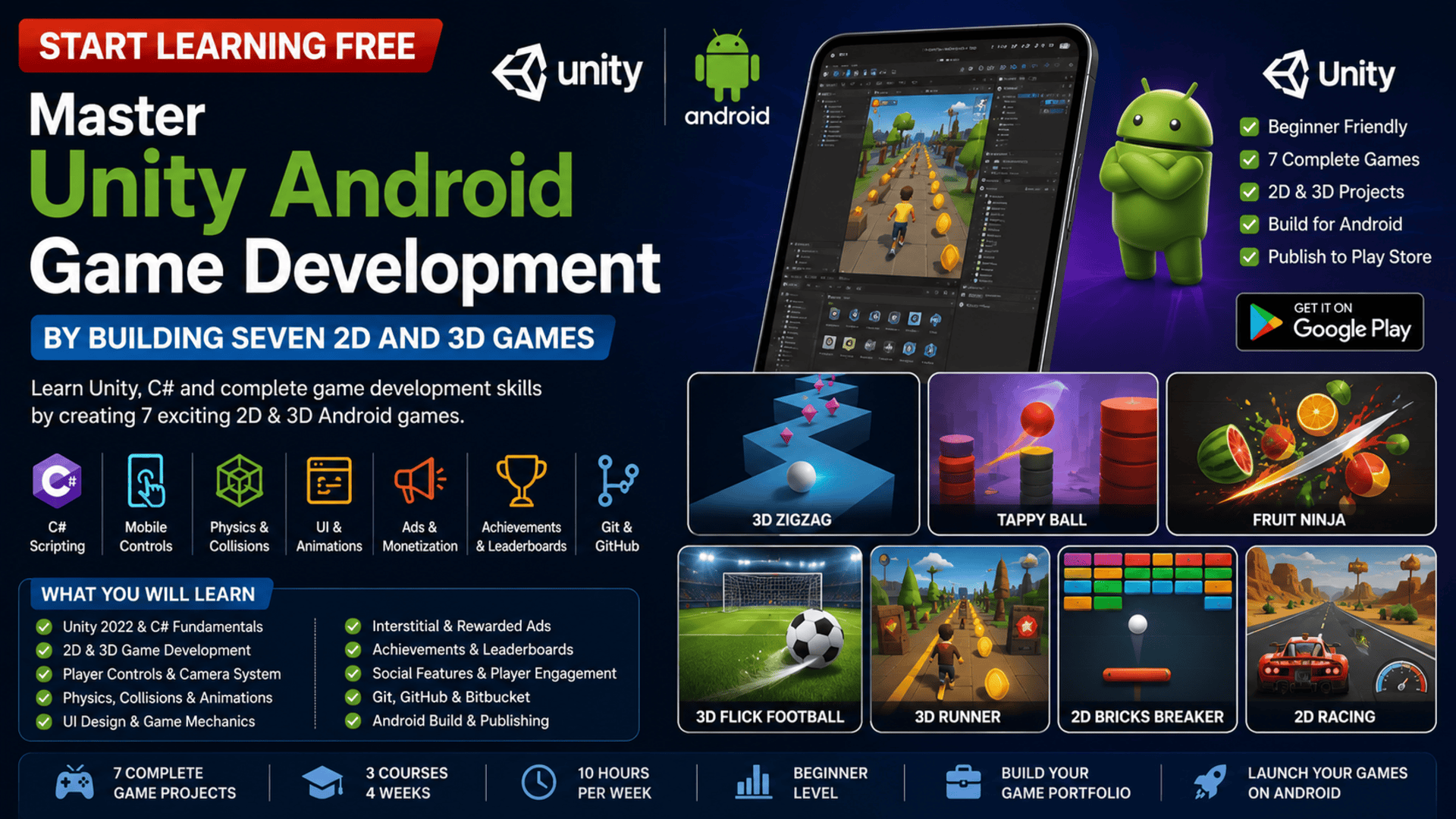
Android gaming offers aspiring developers an exciting opportunity to combine programming, creativity, storytelling, animation, interface design, and mobile publishing.
However, becoming a game developer requires more than watching demonstrations or memorizing code. You need to understand how player controls, physics, cameras, scoring, animations, sound, user interfaces, achievements, advertising, and mobile deployment work together inside a complete game.
The Unity Android Game Development specialization provides a practical learning path built around seven different 2D and 3D Android game projects.
You may be able to start learning free by opening an individual course and checking whether selected Preview lessons are available. This can help you explore the teaching style and selected course content before deciding whether you need complete access.
Throughout the program, you will use Unity and C# to create playable Android games, develop advanced mechanics, add social and achievement features, integrate advertising, manage source code, prepare builds, and understand how mobile games are published.
Why Learn Unity Android Game Development?
Mobile games combine several technical and creative disciplines.
A professional mobile game may need:
- Player movement
- Touch controls
- Physics
- Collisions
- Cameras
- Scoring
- Levels
- Menus
- Animations
- Sound effects
- Achievement systems
- Leaderboards
- Advertisements
- Saving and loading
- Android deployment
- Performance optimization
Unity provides a visual development environment for bringing these systems together.
C# provides the programming logic behind player actions, gameplay rules, scoring, enemies, interfaces, achievements, and game progression.
Learning both Unity and C# can prepare you to build:
- Arcade games
- Racing games
- Sports games
- Platform games
- Puzzle games
- Endless runners
- Casual mobile games
- Educational games
- Prototype game concepts
About the Unity Android Game Development Specialization
This is a three-course, project-based learning program designed to introduce Android game development through practical examples.
The current structure includes:
- Fundamentals of Unity Android Game Development
- Monetization, Advanced Techniques, and Game Art Creation
- Advanced Game Projects, C# Scripting, and Social Features
The suggested learning schedule is approximately:
- Three courses
- Four weeks
- Around 10 hours per week
- Flexible, self-paced study
- Beginner-level progression
Although it is classified as beginner level, familiarity with the Unity interface and basic C# scripting can make the more advanced project sections easier to follow.
The Seven Games You Will Build
The program uses seven different projects to teach a broad selection of game-development skills.
1. 3D Zigzag
A 3D Zigzag project can introduce:
- Player movement
- Direction changes
- Platform generation
- Collision detection
- Camera follow
- Scoring
- Game-over logic
This type of project helps you understand how simple mechanics can create an engaging endless game.
2. Tappy Ball
Tappy Ball introduces touch-based input and timing.
You may practise:
- Tap controls
- Physics forces
- Obstacles
- Collision handling
- Score tracking
- Restart systems
- Mobile-friendly UI
3. Fruit Ninja-Style Game
A slicing-style game can teach:
- Touch detection
- Object spawning
- Visual feedback
- Particle effects
- Scoring combinations
- Game timing
- Object destruction
4. 3D Flick Football
A football project can develop skills involving:
- Swipe or flick mechanics
- Ball physics
- Goal detection
- Camera placement
- Scoring systems
- 3D environments
- User feedback
5. 3D Runner
An endless-runner project may include:
- Automatic movement
- Player controls
- Obstacles
- Track generation
- Collectible items
- Increasing difficulty
- Score progression
6. 2D Bricks Breaker
A brick-breaking game introduces:
- 2D physics
- Paddle movement
- Ball reflection
- Brick health
- Level completion
- Lives
- Score systems
7. 2D Racing
A 2D racing project can cover:
- Vehicle controls
- Track design
- Opponent behavior
- Checkpoints
- Lap systems
- Speed management
- Mobile interface design
Together, these seven projects provide experience across arcade, sports, racing, physics, endless-runner, and casual game mechanics. (Coursera)
Course 1: Fundamentals of Unity Android Game Development
Estimated duration: 13 hours
The first course introduces the Unity Android development environment and the main concepts required to build and publish mobile games.
You will explore:
- Unity 2022 installation
- Java Development Kit configuration
- Android SDK setup
- Unity project creation
- Scenes
- GameObjects
- Components
- Player controls
- Camera follow
- UI elements
- Animations
- Android builds
- Game publishing concepts
The course focuses on creating working mechanics and understanding how Unity organizes a game project.
Understand the Unity Interface
Unity includes several important panels.
Scene View
The Scene view is where you arrange objects, environments, cameras, lighting, and gameplay elements.
Game View
The Game view displays what the player will see.
Hierarchy
The Hierarchy contains the GameObjects inside the active scene.
Inspector
The Inspector allows you to review and change components, scripts, positions, materials, and settings.
Project Window
The Project window stores:
- Scripts
- Scenes
- Images
- Audio
- Prefabs
- Materials
- Animations
- Models
Understanding these areas helps you navigate projects efficiently.
Learn GameObjects and Components
Unity games are built using GameObjects.
A GameObject may represent:
- Player
- Enemy
- Ball
- Camera
- Platform
- Collectible
- Button
- Background
- Light
Components add functionality to GameObjects.
Common components include:
- Transform
- Rigidbody
- Collider
- Sprite Renderer
- Mesh Renderer
- Animator
- Audio Source
- Custom C# scripts
For example, a player GameObject may include a Transform, Rigidbody, Collider, Animator, and movement script.
Use Physics and Collisions
Unity physics can simulate:
- Gravity
- Movement
- Impact
- Bouncing
- Friction
- Collision
- Forces
A Rigidbody allows an object to participate in physics.
A Collider defines the area used for collision detection.
Collision scripts can trigger:
- Game over
- Score changes
- Item collection
- Sound effects
- Animations
- Object destruction
Create Camera-Follow Systems
The camera should keep important gameplay visible.
A camera-follow script can track the player while maintaining a fixed distance.
using UnityEngine;

public class CameraFollow : MonoBehaviour
{
    [SerializeField] private Transform target;
    [SerializeField] private Vector3 offset;

    private void LateUpdate()
    {
        transform.position = target.position + offset;
    }
}
Smooth camera behavior improves readability and player comfort.
Design the User Interface
Mobile games need clear interfaces for:
- Score
- Lives
- Pause
- Restart
- Main menu
- Level selection
- Settings
- Game-over screen
- Achievements
A good mobile interface should use:
- Large touch targets
- Readable text
- Clear icons
- Consistent spacing
- Strong contrast
- Simple navigation
Add Animations
Animations make gameplay feel more polished.
They may be used for:
- Character movement
- Buttons
- Menus
- Collectibles
- Explosions
- Goals
- Game-over effects
- Achievement popups
Unity’s Animator system can manage transitions between animation states.
Course 2: Monetization, Advanced Techniques, and Game Art Creation
Estimated duration: nine hours
The second course introduces monetization, advanced game mechanics, game-art workflows, and version control.
Topics include:
- Interstitial advertisements
- Rewarded video advertisements
- Advanced game mechanics
- Project organization
- Game art
- Git
- GitHub
- Bitbucket
- Version control
- Mobile monetization
- Advanced Unity projects
The course teaches how to develop games that can be prepared for distribution and monetization.
Understand Mobile Game Monetization
Mobile developers may monetize games through:
- Advertising
- Rewarded videos
- In-app purchases
- Premium downloads
- Subscriptions
- Cosmetic items
The specialization focuses on video-ad integration.
Interstitial Ads
Interstitial ads appear between gameplay moments, such as:
- After a level
- After game over
- Between sessions
- Before returning to the menu
They should not interrupt important player actions.
Rewarded Video Ads
Rewarded videos give players an optional benefit for watching an advertisement.
Rewards may include:
- Extra life
- Bonus coins
- Power-up
- Continue option
- Additional level access
Rewarded ads should clearly explain what the player will receive.
Build Ethical Monetization
Monetization should not damage the player experience.
Good practices include:
- Avoiding excessive interruptions
- Making rewarded ads optional
- Clearly explaining rewards
- Protecting younger users
- Following app-store policies
- Respecting privacy requirements
- Testing ad placement carefully
A sustainable game should balance business goals with player satisfaction.
Use Version Control
Version control tracks changes to your game project.
Git can help you:
- Save project history
- Restore previous versions
- Create branches
- Test new features safely
- Collaborate with developers
- Review changes
- Protect work from accidental loss
GitHub and Bitbucket provide online repository hosting.
A useful Unity .gitignore file should exclude generated folders such as:
- Library
- Temp
- Logs
- Build
- UserSettings
Version control is especially important when projects contain multiple scripts and scenes.
Create and Manage Game Art
Game art includes:
- Sprites
- Textures
- Backgrounds
- UI graphics
- 3D models
- Materials
- Particle effects
- Icons
Developers should consider:
- Visual consistency
- File size
- Mobile performance
- Resolution
- Compression
- Copyright and licensing
- Animation requirements
Optimized art helps games run efficiently on Android devices.
Course 3: Advanced Game Projects, C# Scripting, and Social Features
Estimated duration: 18 hours
The final course develops advanced scripting and engagement features.
You will study:
- Advanced C# scripting
- Complex game mechanics
- 2D and 3D project development
- Game publishing
- Achievement systems
- Leaderboards
- Social features
- Player interaction
- Retention systems
- Mobile deployment
The goal is to help you build complete Android games with stronger gameplay and player-engagement systems.
Develop Advanced C# Game Logic
C# scripts may control:
- Player movement
- Enemy behavior
- Scoring
- Level progression
- Game state
- Power-ups
- Spawning
- Achievements
- Saving and loading
- UI updates
A simple score manager might look like this:
using UnityEngine;
using TMPro;

public class ScoreManager : MonoBehaviour
{
    [SerializeField] private TMP_Text scoreText;

    private int score;

    public void AddScore(int amount)
    {
        score += amount;
        scoreText.text = $"Score: {score}";
    }
}
Separating responsibilities into different scripts can make the project easier to maintain.
Use Game-State Management
A game may move through several states:
- Main menu
- Playing
- Paused
- Game over
- Level complete
- Loading
A central game manager can control these transitions.
This helps coordinate:
- Time scale
- UI screens
- Player input
- Score
- Level loading
- Restart behavior
Create Achievement Systems
Achievements reward players for completing specific goals.
Examples include:
- Reach 1,000 points
- Finish five levels
- Collect 100 items
- Complete a level without losing
- Play for seven days
- Unlock every vehicle
Achievement systems can improve motivation and replay value.
A professional achievement system should:
- Track progress
- Save completion status
- Display clear descriptions
- Avoid duplicate rewards
- Show unlock notifications
Add Leaderboards
Leaderboards allow players to compare performance.
They may rank players by:
- Score
- Completion time
- Level
- Wins
- Distance
- Collected items
Leaderboards can increase competition and engagement, but they should also include protection against manipulated scores.
Add Social Features
Social features may include:
- Achievements
- Leaderboards
- Score sharing
- Invitations
- Player profiles
- Challenges
These features can encourage users to return and interact with the game.
The official course outcomes specifically include designing social features intended to improve player interaction and retention.
Prepare Android Builds
Before publishing a game, test:
- Screen resolution
- Touch input
- Performance
- Memory usage
- Audio
- Advertisements
- Menus
- Loading
- Pause behavior
- Device orientation
You may also need to configure:
- Package name
- App icon
- Version number
- Minimum Android version
- Screen orientation
- Signing settings
- Build format
Publish to the Google Play Store
A release workflow may include:
- Test the game on real Android devices.
- Optimize images, audio, and scripts.
- Fix errors and crashes.
- Configure the Android package.
- Create a signed release build.
- Prepare store graphics and screenshots.
- Write the game description.
- Add privacy information.
- Upload the build.
- Complete store testing and review.
Publishing requirements can change, so always review the latest app-store policies before releasing a game.
Applied Learning Projects
The program’s seven games allow you to practise different technical areas:
| Game | Main Skills |
|---|---|
| 3D Zigzag | Movement, platforms, camera, scoring |
| Tappy Ball | Touch controls, physics, obstacles |
| Fruit Ninja | Spawning, slicing, effects, scoring |
| 3D Flick Football | Swipe input, ball physics, goals |
| 3D Runner | Endless movement, obstacles, difficulty |
| 2D Bricks Breaker | 2D physics, levels, collision |
| 2D Racing | Vehicle control, tracks, checkpoints |
By completing several distinct projects, you can demonstrate wider experience than a portfolio containing only one game type.
Tools and Technologies Covered
The specialization introduces or uses:
- Unity 2022
- C#
- Android SDK
- Java Development Kit
- Unity UI
- 2D physics
- 3D physics
- Animations
- GameObjects
- Prefabs
- Colliders
- Rigidbodies
- Mobile controls
- Git
- GitHub
- Bitbucket
- Advertisements
- Achievement systems
- Leaderboards
- Android deployment
Who Should Take This Program?
The specialization may be suitable for:
Aspiring Game Developers
Learners can develop practical experience through seven complete projects.
C# Beginners
The projects provide a reason to practise C# in a visual and interactive environment.
Mobile Developers
Developers can expand into Android game creation.
Students
Students can build several games for a portfolio.
Designers and Artists
Creative professionals can learn how visual assets are implemented inside Unity.
Freelancers
Freelancers can develop prototypes and casual games for clients.
Entrepreneurs
Independent creators can explore building and monetizing mobile games.
How to Start Learning Free
The complete specialization is not officially available entirely free.
However, an individual course may sometimes display selected Preview lessons.
Follow these steps:
- Open the program page using the call-to-action button in this article.
- Scroll down to the three individual courses.
- Select the course you want to explore.
- Open the selected course page.
- Click Enroll.
- Sign in or create an account.
- Choose Preview instead of Start Free Trial, when Preview appears.
- Open any available lessons and start learning free.
Important Access Notice
The Preview option may not be available for every course, account, location, or device.
The official program information states that complete access is not free. When Preview is unavailable, check whether the enrollment page provides:
- Financial aid
- Scholarships
- Employer-sponsored access
- Educational-institution access
- A limited subscription trial
Complete lessons, graded projects, assignments, and the certificate may require paid enrollment. (Coursera)
How to Get the Best Results
Build Along with Every Lesson
Create the projects in your own Unity environment rather than only watching videos.
Change the Game Designs
Customize:
- Characters
- Colors
- Levels
- UI
- Obstacles
- Scoring
- Audio
- Visual effects
Learn C# Independently
Practise classes, methods, conditions, loops, collections, events, and object-oriented programming.
Test on Real Android Devices
The Unity Editor cannot perfectly reproduce every mobile-device behavior.
Use Version Control
Commit your project after completing each major feature.
Optimize Performance
Review:
- Draw calls
- Texture size
- Physics calculations
- Object spawning
- Garbage collection
- Audio files
- Particle effects
Create a Portfolio
For each game, include:
- Screenshots
- Gameplay video
- Project description
- Technologies
- Your contributions
- Challenges solved
- Download or demo link
Potential Career Opportunities
After building sufficient experience and additional projects, learners may explore roles such as:
- Junior Unity developer
- Mobile game developer
- C# game developer
- Android game developer
- Gameplay programmer
- Unity technical designer
- Game-development intern
- Independent game creator
- Unity freelancer
- Mobile application developer
Completing the specialization does not guarantee employment.
Employers and clients may also evaluate:
- C# proficiency
- Unity knowledge
- Gameplay mechanics
- Mobile optimization
- Portfolio quality
- Version-control experience
- Debugging
- UI design
- Communication
- Ability to complete projects
Frequently Asked Questions
Can I start learning free?
You can check each individual course for selected Preview lessons. Free access is not guaranteed.
Is the program suitable for beginners?
It is listed as beginner level, although basic familiarity with Unity and C# can be helpful.
How many courses are included?
The specialization contains three courses.
How long does it take?
The estimated completion time is approximately four weeks at around 10 hours per week.
How many games will I build?
The program includes seven 2D and 3D game projects.
Does it teach C#?
Yes. C# scripting is a major part of the learning path.
Does it cover Android development?
Yes. The program focuses on creating, building, and publishing games for Android.
Are 2D and 3D games included?
Yes. The projects include both 2D and 3D games.
Does it include advertising?
Yes. The curriculum covers interstitial and rewarded video advertisements.
Are achievements and leaderboards included?
Yes. Player-engagement and social features are covered.
Does it teach Git and GitHub?
Yes. Git, GitHub, Bitbucket, and version-control practices are included.
Will I learn to publish games?
Yes. Android build and publishing processes are part of the program.
Does Preview access include the certificate?
No. Preview access generally does not include complete graded activities or the certificate.
Start Learning Free and Build Seven 2D and 3D Android Games
Master Unity, C#, Android development, player controls, physics, animations, mobile UI, advertisements, achievements, leaderboards, Git, GitHub, and Android game publishing.
Open an individual course and check whether Preview is available. Free preview access is not guaranteed. Complete courses, graded projects, and the certificate may require paid enrollment. Financial aid may be available for eligible learners.





