

Modern web development requires more than building static pages.
Businesses need fast, responsive, data-driven applications that can process payments, authenticate users, retrieve information from APIs, manage content, store data, and deploy reliably to the cloud.
Svelte 5 and SvelteKit provide a modern development approach for creating interactive front-end experiences and complete full-stack web applications.
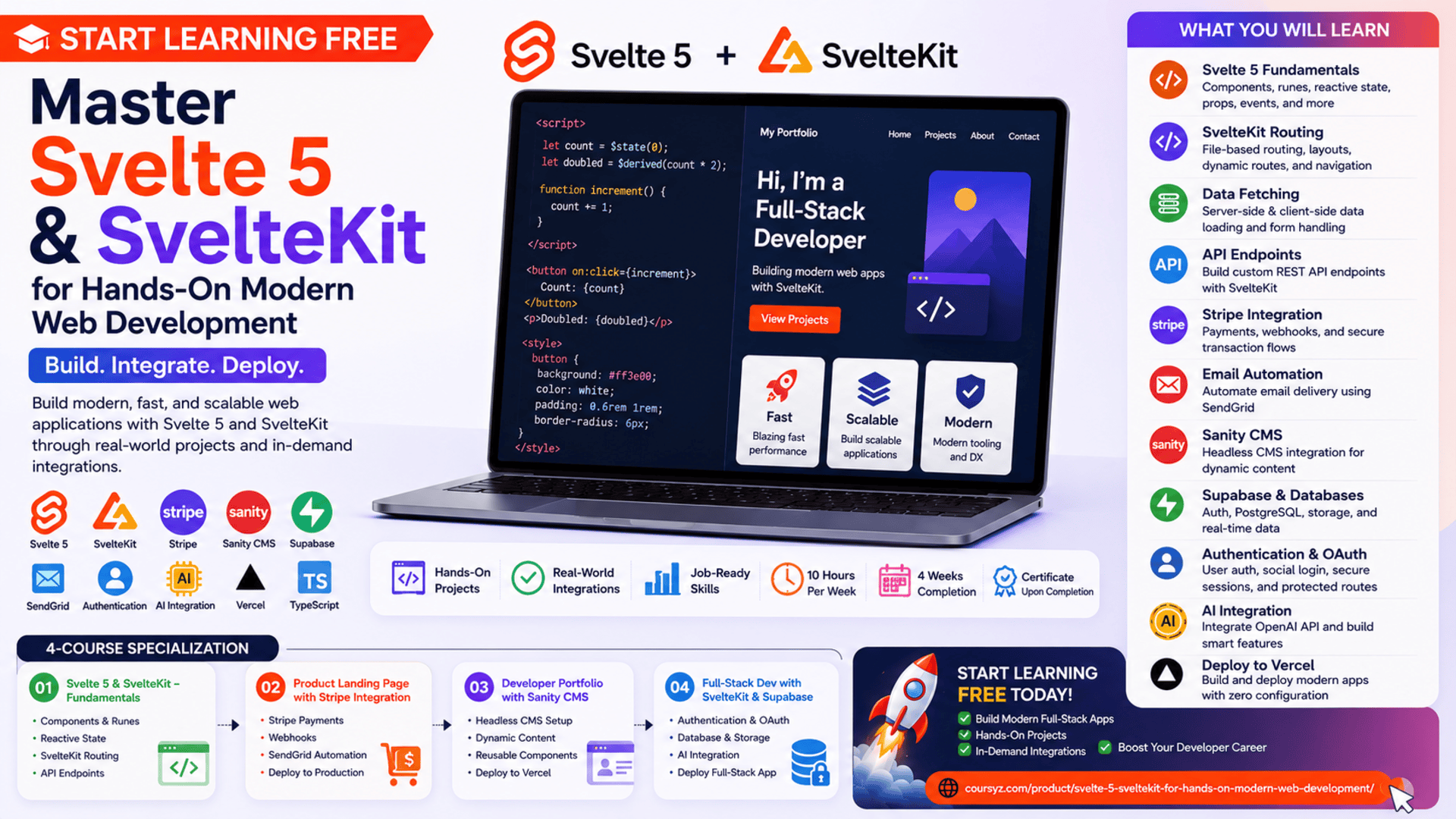
The Svelte 5 & SvelteKit for Hands-On Modern Web Development Specialization offers a project-focused learning path for developers who want to move beyond isolated tutorials and build complete, functional applications.
You may be able to start learning free by opening one of the individual courses and checking whether selected Preview lessons are available.
Throughout the program, you will create practical projects involving Svelte 5, SvelteKit, reactive state, routing, APIs, Stripe payments, automated email delivery, Sanity CMS, Supabase, user authentication, OAuth, databases, artificial intelligence features, and cloud deployment.
Why Learn Svelte 5 and SvelteKit?
Modern web applications must respond quickly to user actions while managing increasingly complex data and business logic.
A professional application may need to:
- Display dynamic content
- Manage user input
- Update the interface automatically
- Retrieve information from APIs
- Process payments
- Authenticate users
- Store application data
- Protect private routes
- Deliver digital products
- Manage content through a CMS
- Support server-side logic
- Deploy to a production environment
Svelte helps developers create interactive interfaces using reusable components and a reactive programming model.
SvelteKit expands those capabilities by providing a complete framework for routing, server-side rendering, data loading, API endpoints, form handling, and deployment.
Together, they can support both front-end and full-stack application development.
What Makes Svelte Different?
Many front-end frameworks perform significant work inside the browser.
Svelte takes a different approach by compiling much of the application during the build process.
This can help developers create applications with:
- Smaller amounts of browser-side framework code
- Direct and readable component syntax
- Built-in reactivity
- Reusable UI components
- Efficient updates
- Clear HTML, CSS, and JavaScript integration
A Svelte component can include its logic, interface, and styling in one organized file.
This can make components easier to understand and maintain.
What Is SvelteKit?
SvelteKit is an application framework built around Svelte.
It provides features needed for production web development, including:
- File-based routing
- Server-side rendering
- Client-side navigation
- Data loading
- API endpoints
- Form processing
- Error handling
- Layouts
- Dynamic routes
- Authentication workflows
- Deployment adapters
SvelteKit allows developers to use the same project for front-end interfaces and server-side functionality.
This makes it useful for building full-stack applications without maintaining completely separate projects for every layer.
About the Svelte 5 & SvelteKit Specialization
The program currently includes four courses and is designed for learners with basic JavaScript knowledge.
The estimated study plan is:
- Four courses
- Approximately four weeks
- Around 10 hours per week
- Flexible, self-paced learning
- Intermediate level
The four courses are:
- Svelte 5 & SvelteKit – The Complete Fundamentals Guide
- Build a Product Landing Page with Stripe Integration
- Build a Developer Portfolio with SvelteKit & Sanity CMS
- Full-Stack Web Development with SvelteKit & Supabase
Each course introduces new skills through a practical project.
What You Will Learn
By following the complete learning path, you can develop skills in:
- Svelte 5
- Svelte components
- Reactive state
- Runes
- Derived state
- Side effects
- Props
- Event handling
- Svelte templating
- Reusable components
- SvelteKit routing
- Dynamic routes
- Server-side data fetching
- Client-side data fetching
- REST APIs
- Custom API endpoints
- TypeScript
- Stripe payments
- Stripe webhooks
- SendGrid email automation
- Sanity CMS
- Headless content management
- Supabase
- Relational databases
- Authentication
- Social login
- OAuth
- Secure sessions
- Data persistence
- OpenAI API integration
- Image recognition
- Vercel deployment
Course 1: Svelte 5 & SvelteKit – The Complete Fundamentals Guide
Estimated duration: four hours
The first course introduces the essential concepts required to work with Svelte 5 and SvelteKit.
It covers:
- Svelte file structure
- Components
- Scripts
- Styles
- Templates
- Props
- Reactive state
- Runes
- Derived values
- Side effects
- User input
- Data fetching
- SvelteKit routing
- Server-side development
- Custom API endpoints
The course helps you understand how Svelte applications are structured before progressing into larger projects. (Coursera)
Understand the Structure of a Svelte Component
A Svelte component can contain:
- JavaScript or TypeScript logic
- HTML-like markup
- Component-specific CSS
A simplified component might look like this:
<script>
  let name = "Developer";
</script>

<h1>Welcome, {name}</h1>

<style>
  h1 {
    color: #ff3e00;
  }
</style>
This organization allows developers to keep related logic, content, and styling together.
Build Reusable Components
Components are reusable parts of an interface.
A component may represent:
- Navigation bar
- Product card
- Pricing table
- Contact form
- Portfolio project
- Login panel
- Search box
- Dashboard widget
- Notification message
Reusable components reduce repetition and help maintain consistent application design.
Work with Reactive State
Reactive state allows the interface to update when data changes.
For example:
<script>
  let count = 0;
</script>

<button onclick={() => count++}>
  Clicked {count} times
</button>
When the value changes, Svelte updates the relevant part of the interface.
Reactive programming is essential for:
- Forms
- Filters
- Counters
- Shopping carts
- User preferences
- Search results
- Loading states
- Authentication status
Understand Svelte 5 Runes
Svelte 5 introduces runes for expressing state and reactivity.
Runes can help developers manage:
- Reactive values
- Derived values
- Side effects
- Component properties
Understanding this model is important for building modern Svelte 5 applications.
Handle User Input
Applications frequently collect information through:
- Text fields
- Email inputs
- Password inputs
- Checkboxes
- Radio buttons
- Select menus
- Search fields
- Forms
Svelte provides clear patterns for connecting user input to application state.
This allows the interface to validate, display, and process information dynamically.
Create Routes with SvelteKit
SvelteKit uses file-based routing.
A page file inside a project can correspond to a URL.
Examples may include:
//products/portfolio/account/books/contact
Dynamic routes can support URLs such as:
/products/125/articles/svelte-development/users/alex
File-based routing can make application structure easier to understand.
Fetch Data on the Server and Client
Applications may retrieve data from:
- APIs
- Databases
- CMS platforms
- Authentication services
- External systems
SvelteKit supports server-side and client-side data loading.
Server-side loading can improve:
- Search-engine visibility
- Initial page rendering
- Security
- Data access
- Performance
Client-side fetching can support interactive updates after the page has loaded.
Create Custom API Endpoints
SvelteKit allows developers to add server-side endpoints inside the same application.
An endpoint may:
- Retrieve database records
- Process form submissions
- Validate information
- Create user accounts
- Handle payments
- Send emails
- Return JSON responses
This helps transform a Svelte interface into a complete full-stack application.
Course 2: Build a Product Landing Page with Stripe Integration
Estimated duration: five hours
The second course focuses on building a responsive product landing page with secure payment processing.
You will learn how to:
- Structure a product landing page
- Build reusable Svelte components
- Create responsive layouts
- Display dynamic content
- Manage derived state
- Integrate Stripe
- Process payment outcomes
- Handle Stripe webhooks
- Use SendGrid
- Automate digital-product delivery
- Deploy the completed application
The project connects user-interface development with a real payment and email-delivery workflow. (Coursera)
Build a Professional Product Landing Page
A product landing page may include:
- Hero section
- Product benefits
- Feature list
- Pricing
- Testimonials
- Frequently asked questions
- Purchase button
- Responsive navigation
- Contact information
The objective is to guide visitors toward a specific action.
A strong landing page should be:
- Clear
- Responsive
- Fast
- Trustworthy
- Easy to navigate
- Accessible
- Focused on the user’s needs
Integrate Stripe Payments
Stripe provides tools for processing online payments.
A typical payment flow may include:
- The customer selects a product.
- The application creates a checkout session.
- The customer enters payment information.
- Stripe processes the transaction.
- The user is redirected to a success or cancellation page.
- The application confirms the result.
Payment logic should be handled securely on the server rather than exposing sensitive configuration inside browser code.
Handle Stripe Webhooks
A webhook allows Stripe to notify your application when an event occurs.
Possible events include:
- Successful payment
- Failed payment
- Refunded payment
- Subscription update
- Checkout completion
The application can verify the webhook and then trigger the appropriate action.
For example, after a successful payment, the system may deliver a digital product by email.
Automate Email Delivery with SendGrid
SendGrid can be used to send automated transactional emails.
The application may send:
- Purchase confirmations
- Download links
- Welcome messages
- Order receipts
- Account notifications
Combining Stripe webhooks with SendGrid creates a complete automated delivery process.
Protect Webhook Security
Webhook requests should be verified before they are trusted.
This helps prevent unauthorized requests from triggering actions such as:
- Sending products
- Updating orders
- Changing payment status
- Creating user access
Secure webhook handling is an important part of production application development.
Course 3: Build a Developer Portfolio with SvelteKit & Sanity CMS
Estimated duration: six hours
The third course focuses on building a professional developer portfolio connected to a headless content-management system.
You will learn how to:
- Set up a SvelteKit portfolio
- Create reusable interface components
- Build buttons and headings
- Display work-experience tables
- Connect Sanity CMS
- Fetch content dynamically
- Manage portfolio information
- Create responsive layouts
- Deploy the project to Vercel
The completed project provides a practical portfolio that can be updated without modifying the application code for every content change. (Coursera)
Why Build a Developer Portfolio?
A developer portfolio can demonstrate:
- Technical skills
- Completed projects
- Work experience
- Design ability
- Problem-solving
- Contact information
- Deployment experience
A professional portfolio may include:
- Personal introduction
- Skills
- Work history
- Projects
- Case studies
- Contact form
- Social profiles
- Resume link
It gives employers and clients a direct way to review your work.
Use Reusable Portfolio Components
Reusable components may include:
- Project card
- Section heading
- Technology badge
- Experience table
- Call-to-action button
- Navigation menu
- Contact section
A reusable component system keeps the design consistent and makes future changes easier.
Connect Sanity CMS
Sanity is a headless content-management system.
A headless CMS stores and manages content separately from the interface that displays it.
It can manage:
- Project descriptions
- Work experience
- Images
- Skills
- Articles
- Testimonials
- Contact details
The SvelteKit application retrieves this information and displays it dynamically.
Benefits of a Headless CMS
A headless CMS can help you:
- Update content without changing code
- Separate content from presentation
- Reuse content in multiple applications
- Allow non-developers to edit information
- Create flexible content structures
- Manage assets centrally
This architecture is useful for portfolios, blogs, business websites, and product platforms.
Deploy the Portfolio to Vercel
Vercel can host SvelteKit applications and provide a public URL.
Before deployment, check:
- Environment variables
- CMS configuration
- Responsive layouts
- Image loading
- Links
- Accessibility
- Error handling
- Production build
A live portfolio is more valuable than screenshots because visitors can test the actual application.
Course 4: Full-Stack Web Development with SvelteKit & Supabase
Estimated duration: nine hours
The final course focuses on building a data-driven personal book-library application.
It combines:
- SvelteKit
- Supabase
- Authentication
- Social login
- Secure sessions
- Database management
- Reusable components
- State management
- Data persistence
- Image recognition
- User statistics
- OpenAI API integration
- Full-stack application development
The project demonstrates how to connect an interactive Svelte interface with authentication, databases, and advanced external services. (Coursera)
Build a Full-Stack Book-Library Application
A personal book-library application may allow users to:
- Create an account
- Sign in
- Add books
- Edit book information
- Delete records
- Upload images
- Search the library
- View statistics
- Manage personal data
- Sign in with a social account
This project combines front-end, back-end, database, and authentication skills.
Use Supabase as a Back-End Platform
Supabase provides tools for:
- Relational databases
- Authentication
- File storage
- Server functionality
- Real-time data
- User management
It can help developers build full-stack applications without creating every infrastructure component from the beginning.
Implement User Authentication
Authentication confirms who the user is.
An authentication workflow may include:
- Registration
- Login
- Logout
- Password recovery
- Email confirmation
- Social login
- Session management
Authenticated applications must also ensure that users can only access their own protected information.
Add Social Login and OAuth
OAuth allows users to sign in through an external provider.
This can simplify onboarding because users do not need to create another password.
The application must still handle:
- Authentication results
- User profiles
- Secure sessions
- Redirects
- Errors
- Authorization
Manage Application Data
A book-library database may contain tables for:
- Users
- Books
- Categories
- Reviews
- Reading progress
- Favorites
Good database design helps maintain:
- Data integrity
- Clear relationships
- Efficient queries
- Secure user ownership
- Reliable updates
Add Image Recognition
Image-recognition features can help extract information from uploaded book images.
For example, the application may analyze a cover image and assist with identifying or organizing the book.
This introduces learners to integrating AI-powered services inside a full-stack application.
Display User Statistics
The application may generate information such as:
- Total books
- Books by category
- Reading progress
- Recently added books
- Completed books
- Favorite genres
Statistics help users understand and interact with their stored information.
Applied Learning Projects
The specialization includes three major applied projects:
- A product landing page with Stripe and automated email delivery
- A developer portfolio connected to Sanity CMS
- A full-stack personal book library using Supabase and authentication
These projects provide experience with payments, webhooks, APIs, content management, databases, authentication, reusable components, AI integration, and deployment. (Coursera)
Tools and Technologies Covered
The program introduces or uses:
- Svelte 5
- SvelteKit
- JavaScript
- TypeScript
- HTML
- CSS
- Svelte runes
- Reactive state
- REST APIs
- Stripe
- Stripe webhooks
- SendGrid
- Sanity CMS
- Supabase
- SQL databases
- OAuth
- Authentication
- OpenAI API
- Vercel
- Server-side rendering
- Cloud deployment
Who Should Take This Specialization?
The program may be useful for:
JavaScript Developers
Developers can expand their knowledge into Svelte 5 and SvelteKit.
Front-End Developers
Front-end developers can learn routing, server-side data loading, CMS integration, and full-stack features.
Full-Stack Developers
The program covers APIs, databases, authentication, payments, and deployment.
React or Vue Developers
Developers familiar with another framework can explore Svelte’s compiled and reactive approach.
Freelancers
Freelancers can build landing pages, portfolios, payment systems, and data-driven applications.
Students
Students can create several practical projects for their portfolios.
Entrepreneurs
Entrepreneurs can better understand how modern digital products are developed and deployed.
How to Start Learning Free
The complete specialization is not currently available entirely free.
However, an individual course may sometimes provide selected Preview lessons.
Follow these steps:
- Open the program page using the call-to-action button in this article.
- Scroll down to the four individual courses.
- Select the course you want to explore.
- Open the selected course.
- Click Enroll.
- Sign in or create an account.
- Look for Preview instead of beginning a paid trial.
- Open any available lessons and start learning free.
Important Access Notice
Preview availability may vary by course, account, device, location, and current enrollment options.
When Preview is unavailable, check whether the enrollment page provides:
- Financial aid
- Scholarships
- Employer-sponsored access
- Educational access
- A limited subscription trial
Complete courses, graded assignments, projects, and the certificate may require paid enrollment.
Always review the current enrollment and payment conditions before confirming.
How to Get the Best Results
Understand JavaScript First
Review variables, functions, arrays, objects, asynchronous programming, and modules.
Build Every Project Yourself
Do not only watch the lessons. Recreate each feature inside your own development environment.
Customize the Projects
Change the design, content, features, and branding so your portfolio projects are original.
Use Git and GitHub
Track your progress and publish clean repositories.
Protect Environment Variables
Never publish secret API keys, database credentials, or payment credentials.
Test Authentication Carefully
Review login, logout, social login, protected data, and session expiration.
Validate Payment Workflows
Test success, cancellation, failed payments, and webhook verification.
Improve Accessibility
Use semantic HTML, clear labels, keyboard support, visible focus indicators, and sufficient contrast.
Deploy Every Major Project
Live applications demonstrate your deployment and troubleshooting skills.
Portfolio Project Ideas
After completing the program, consider building:
- Subscription application
- Online store
- SaaS landing page
- Developer blog
- Job board
- Personal finance tracker
- Learning platform
- Digital-product marketplace
- Membership portal
- AI-powered content library
A strong project could include:
- Svelte 5 components
- SvelteKit routes
- Server-side data loading
- Authentication
- Database integration
- REST APIs
- Payments
- Webhooks
- Responsive design
- Cloud deployment
- Professional documentation
Potential Career Opportunities
After building sufficient experience and a strong portfolio, learners may explore roles such as:
- Junior Svelte developer
- SvelteKit developer
- Front-end developer
- JavaScript developer
- Full-stack developer
- Web application developer
- UI developer
- Application-development intern
- Freelance web developer
- Software developer
Completing the specialization does not guarantee employment.
Employers may also evaluate:
- JavaScript knowledge
- Component architecture
- Svelte and SvelteKit skills
- API integration
- Authentication experience
- Database knowledge
- Testing ability
- Git usage
- Deployment experience
- Portfolio quality
Frequently Asked Questions
Can I start learning free?
You can check individual courses for selected Preview lessons. Free access is not guaranteed.
Is the program suitable for complete beginners?
It is classified as intermediate level. Basic JavaScript knowledge is recommended.
How many courses are included?
The specialization contains four courses.
How long does the program take?
The estimated completion time is approximately four weeks at around 10 hours per week.
Does the program teach Svelte 5?
Yes. The first course covers Svelte 5 components, reactivity, runes, props, and state management.
Does it include SvelteKit?
Yes. SvelteKit is used for routing, server-side data loading, API endpoints, and full-stack development.
Are payments included?
Yes. One project integrates Stripe payments and webhooks.
Does it include email automation?
Yes. SendGrid is used to automate digital-product delivery.
Will I learn a headless CMS?
Yes. One project uses Sanity CMS.
Are databases included?
Yes. The final project uses Supabase and relational database features.
Does it include authentication?
Yes. The full-stack project includes authentication, social login, and secure session management.
Is AI integration included?
Yes. The final project includes image recognition and OpenAI API-related features.
Will I deploy the projects?
Yes. Deployment tools such as Vercel are included.
Does Preview access include the certificate?
No. Preview access generally does not include the complete graded experience or certificate.
Start Learning Free and Build Modern Full-Stack Web Applications
Master Svelte 5, SvelteKit, reactive state, runes, routing, server-side data fetching, APIs, Stripe, Sanity CMS, Supabase, authentication, databases, AI integration, and cloud deployment.
Select an individual course and check whether Preview is available. Free preview access is not guaranteed. Complete courses, graded assignments, projects, and the certificate may require paid enrollment. Financial aid may be available.





