Start Learning Free: Become a Meta iOS Developer and Build Job-Ready Mobile App Development Skills

Mobile applications have transformed how people communicate, shop, learn, work, manage money, access services, and enjoy entertainment.
Businesses across nearly every industry need fast, reliable, secure, and user-friendly applications for Apple devices. This demand creates opportunities for developers who understand how to design, build, test, maintain, and improve professional iOS applications.
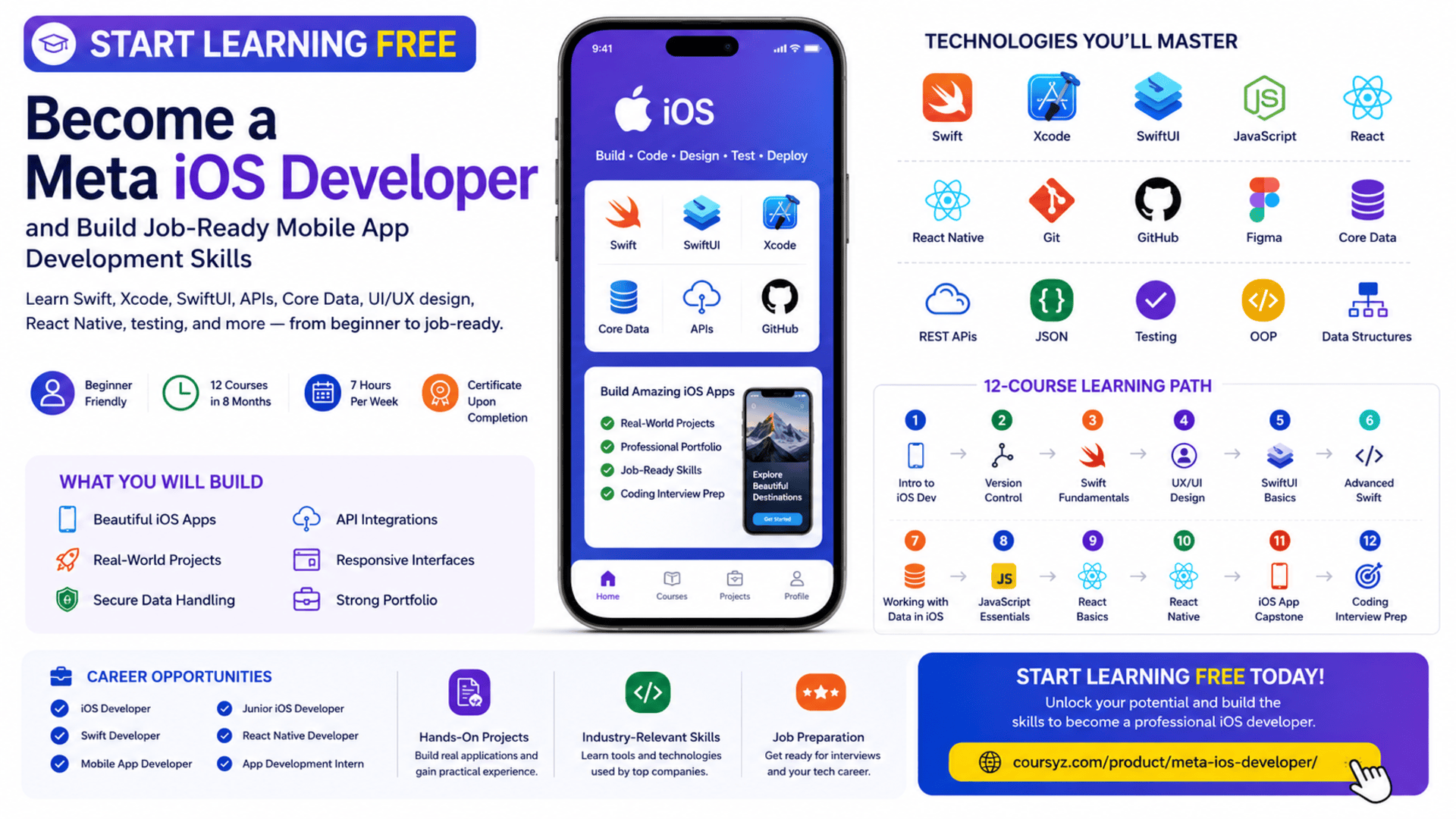
The Meta iOS Developer Professional Certificate offers a structured learning path for beginners who want to develop practical mobile application skills and prepare for entry-level iOS development opportunities.
You may be able to start learning free by opening one of the individual courses and selecting the Preview option when it is available. Preview access can help you explore selected videos and learning materials before deciding whether you need full access to assessments, projects, the capstone, and the professional certificate.
Throughout this program, you will study Swift, Xcode, SwiftUI, version control, UX and UI design, Figma, advanced programming, data management, REST APIs, Core Data, JavaScript, React, React Native, testing, portfolio development, and coding-interview preparation.
Why Learn iOS App Development?
Apple devices are used by consumers, professionals, creators, students, and businesses around the world.
Organizations need iOS applications for:
- E-commerce
- Banking and financial services
- Healthcare
- Education
- Transportation
- Entertainment
- Communication
- Productivity
- Travel
- Fitness
- Food delivery
- Business operations
An iOS developer turns product ideas and interface designs into functional applications.
Typical responsibilities may include:
- Writing Swift code
- Building interfaces with SwiftUI
- Managing navigation and application state
- Connecting applications to APIs
- Storing and retrieving data
- Testing application features
- Fixing bugs
- Managing code with Git
- Improving performance
- Preparing applications for release
- Maintaining published applications
Learning iOS development helps you understand the complete lifecycle of a mobile application, from planning and design to coding, testing, deployment, and maintenance.
About the Meta iOS Developer Professional Certificate
The Meta iOS Developer Professional Certificate is a beginner-friendly learning program designed to build practical and career-focused mobile development skills.
The program currently includes 12 courses and is designed to be completed in approximately eight months when studying around seven hours per week.
It follows a flexible, self-paced structure, allowing learners to progress according to their schedules.
No previous professional programming or mobile development experience is required.
The learning path begins with iOS development and Swift fundamentals before moving into:
- Version control
- Swift programming
- UX and UI design
- SwiftUI interface development
- Advanced Swift
- Data management and APIs
- JavaScript
- React
- React Native
- A native iOS capstone
- Coding-interview preparation
This combination introduces both native iOS development and cross-platform mobile development.
What You Will Learn
By following the complete program, you can develop skills in:
- Swift programming
- Apple Xcode
- SwiftUI
- iOS application development
- Mobile application lifecycle management
- Object-oriented programming
- Functional programming
- Data structures
- Git
- GitHub
- Linux and Unix commands
- UX and UI design
- User research
- Figma
- Wireframing
- Prototyping
- Accessibility
- Usability testing
- Unit testing
- Mocks and fakes
- RESTful APIs
- JSON
- Core Data
- Data persistence
- Data modeling
- JavaScript
- Jest
- React
- React Native
- Application architecture
- Portfolio development
- Coding-interview preparation
Course 1: Introduction to iOS Mobile Application Development
Estimated duration: 12 hours
The first course introduces the iOS development environment and the basic concepts required to begin building mobile applications for Apple devices.
You will explore:
- iOS development fundamentals
- Xcode
- Swift syntax
- Application structure
- User interfaces
- Mobile development tools
- Storyboards
- UI components
- Development environments
- Application programming interfaces
You will also begin working with the tools used to create and run iOS applications.
Learn to Use Xcode
Xcode is Apple’s integrated development environment for building applications across its platforms.
Developers use Xcode to:
- Write Swift code
- Build user interfaces
- Run applications
- Test with simulators
- Debug errors
- Manage project files
- Configure application settings
- Monitor application behavior
- Prepare builds for distribution
Becoming comfortable with Xcode is an essential part of learning professional iOS development.
Understand the iOS Application Structure
An iOS project contains multiple connected parts, such as:
- Swift source files
- Interface components
- Assets
- Application settings
- Data models
- Tests
- Dependencies
- Configuration files
Understanding the project structure helps you organize code, manage resources, and locate application features efficiently.
Course 2: Version Control
Estimated duration: 15 hours
Professional developers use version control to manage code changes and collaborate safely.
This course introduces:
- Git
- GitHub
- Repositories
- Branches
- Commits
- Merging
- Command-line tools
- Linux commands
- Unix commands
- File management
- Collaborative software workflows
You will create a GitHub repository and learn how to manage revisions to your code.
Why Git and GitHub Matter
Version control allows developers to:
- Track project history
- Restore previous versions
- Experiment in separate branches
- Collaborate with teammates
- Review code changes
- Resolve conflicts
- Publish projects
- Build a professional portfolio
A well-organized GitHub profile can also help potential employers or clients review your practical work.
Course 3: Programming Fundamentals in Swift
Estimated duration: 26 hours
Swift is the primary programming language used throughout the program.
This course introduces:
- Constants
- Variables
- Data types
- Functions
- Closures
- Conditions
- Loops
- Collections
- Data structures
- Object-oriented programming
- Code reusability
- General programming principles
You will complete exercises that help you understand how Swift programs are structured and executed.
Why Learn Swift?
Swift was created for developing software across Apple platforms.
It supports:
- Readable syntax
- Type safety
- Modern programming patterns
- Performance
- Code organization
- Application reliability
A strong Swift foundation makes later topics such as SwiftUI, testing, APIs, Core Data, and application architecture easier to understand.
Work with Variables, Functions, and Closures
Variables and constants store information used by an application.
Functions organize reusable logic.
Closures are self-contained blocks of functionality that can be passed and used throughout a program.
These concepts are important when building features such as:
- Form validation
- Data filtering
- User interactions
- Network requests
- Search tools
- Application state updates
Apply Object-Oriented Programming
Object-oriented programming helps developers organize software around classes and objects.
Important principles include:
Encapsulation
Protecting internal data and controlling how it is accessed.
Inheritance
Allowing one class to reuse or extend another class.
Polymorphism
Allowing related objects to behave differently through a shared interface.
Abstraction
Hiding unnecessary complexity and exposing only the functionality needed by other parts of the application.
These concepts help developers create code that is easier to maintain and expand.
Course 4: Principles of UX/UI Design
Estimated duration: 23 hours
A technically functional application can still fail if it is confusing or difficult to use.
This course introduces:
- User experience design
- User interface design
- User research
- User personas
- Accessibility
- Empathy
- Wireframing
- Prototyping
- Usability testing
- Figma
- Design reviews
- Interaction design
You will practise creating wireframes and prototypes in Figma.
Design Applications Around User Needs
Effective mobile design begins with understanding the user.
Important questions include:
- Who will use the application?
- What problem are they trying to solve?
- Which tasks matter most?
- What information do they need?
- What may cause confusion?
- How can the experience remain accessible?
User-centered design helps teams build applications that are useful as well as visually appealing.
Use Figma for Wireframes and Prototypes
Figma allows designers and developers to:
- Create wireframes
- Design application screens
- Build interactive prototypes
- Test navigation flows
- Share design files
- Collaborate with teams
- Review interface components
Understanding Figma can improve communication between developers and designers.
Apply Accessibility Principles
Accessible applications can be used by a wider range of people.
Important considerations include:
- Clear labels
- Readable typography
- VoiceOver support
- Sufficient color contrast
- Logical navigation
- Touch-friendly controls
- Descriptive error messages
- Dynamic text support
- Reduced-motion preferences
Accessibility should be considered throughout the design and development process.
Course 5: Create the User Interface with SwiftUI
Estimated duration: 21 hours
SwiftUI is a modern framework for building user interfaces across Apple platforms.
This course focuses on:
- SwiftUI views
- UI components
- Application layouts
- Navigation
- User interaction
- Animations
- Reusable interface elements
- Project development
- Mobile interface design
You will learn how to transform interface ideas into working application screens.
Build Interfaces with SwiftUI
SwiftUI allows developers to describe an interface using Swift code.
You can create:
- Buttons
- Lists
- Forms
- Images
- Navigation views
- Text fields
- Cards
- Menus
- Alerts
- Interactive controls
SwiftUI supports a declarative development approach. Developers describe what the interface should display, while the framework manages many updates automatically.
Create Interactive User Experiences
An application should respond clearly to user actions.
Interactions may include:
- Tapping buttons
- Entering information
- Selecting options
- Navigating between screens
- Searching and filtering
- Saving content
- Receiving feedback
- Displaying errors
Clear interaction design improves usability and user confidence.
Course 6: Advanced Programming in Swift
Estimated duration: 19 hours
The sixth course expands your Swift knowledge and introduces more advanced application-development practices.
Topics include:
- Advanced custom data types
- Search and filtering
- Inheritance
- Protocols
- Delegation
- Code organization
- Object-oriented design
- Unit testing
- Mocks
- Fakes
- Algorithms
- Software-testing principles
You will apply these concepts to build more maintainable and testable applications.
Use Protocols and Delegation
Protocols define requirements that classes, structures, or enumerations can adopt.
Delegation allows one object to assign responsibilities to another object.
These patterns are widely used in iOS development because they help separate responsibilities and reduce tightly connected code.
Test iOS Applications
Unit testing verifies that individual pieces of application logic behave correctly.
Tests may confirm that:
- A function returns the expected value
- Search results are filtered correctly
- Invalid information is rejected
- Application state changes properly
- An error is handled
Mocks and fakes allow developers to test code without relying on real network services or databases.
Course 7: Working with Data in iOS
Estimated duration: 19 hours
Most useful mobile applications work with stored or remote data.
This course introduces:
- RESTful APIs
- JSON
- Web communication
- Asynchronous programming
- Core Data
- Data persistence
- Data modeling
- Authentication
- Application data management
You will learn how Swift applications communicate with web services and store information locally.
Connect iOS Applications to APIs
APIs allow applications to exchange information with external systems.
An iOS application may retrieve:
- Product information
- User profiles
- News
- Weather data
- Restaurant menus
- Booking availability
- Financial information
- Location details
The application receives the data, often in JSON format, and converts it into information that can be displayed to the user.
Understand Asynchronous Programming
Network requests and database operations may take time.
Applications should perform these tasks without freezing the interface.
Asynchronous programming helps developers:
- Download remote information
- Upload data
- Process files
- Read databases
- Wait for external services
- Keep the interface responsive
This is essential for delivering smooth mobile experiences.
Store Data with Core Data
Core Data helps iOS applications manage and persist local information.
It can be used to store:
- User preferences
- Saved items
- Favorites
- Application records
- Offline data
- Search history
- Progress information
Data persistence allows the application to remember information after it closes.
Course 8: Mobile Development and JavaScript
Estimated duration: 45 hours
The program also introduces JavaScript to prepare learners for React and React Native.
Topics include:
- JavaScript syntax
- Variables
- Objects
- Arrays
- Functions
- Event-driven programming
- Functional programming
- Object-oriented programming
- Node.js
- Package management
- Jest
- Unit testing
You will write JavaScript programs and test them using Jest.
Why JavaScript Is Included
JavaScript provides the foundation needed for React and React Native.
Learning it allows you to:
- Work with objects and arrays
- Build interactive interfaces
- Manage application data
- Understand components
- Write reusable functions
- Create cross-platform applications
- Test code with Jest
Course 9: React Basics
Estimated duration: 30 hours
React is a JavaScript library used to create reusable interface components.
This course introduces:
- React components
- Props
- State
- Forms
- Events
- Data flow
- JSX
- Project organization
- Reusable code
- Interactive applications
You will build an application using React.
Create Reusable Components
A component may represent:
- Navigation bar
- Product card
- Search field
- Login form
- User profile
- Dashboard widget
- Notification panel
Reusable components reduce duplication and make applications easier to maintain.
Course 10: React Native
Estimated duration: 38 hours
React Native allows developers to create cross-platform mobile applications using React and JavaScript.
The course introduces:
- React Native components
- Styling
- Lists
- User input
- Pressable components
- Navigation
- Multiple screens
- JSX
- Expo
- Visual Studio Code
- Interactive mobile interfaces
This course expands your skills beyond native iOS development.
Native iOS vs. React Native
The certificate introduces two mobile-development approaches.
Native iOS Development
Native applications use:
- Swift
- SwiftUI
- Xcode
- Apple frameworks
Cross-Platform Development
React Native uses:
- JavaScript
- React
- React Native
- JSX
- Shared code
Learning both approaches helps you compare their advantages and understand which one may be more suitable for a particular project.
Course 11: iOS App Capstone
Estimated duration: 16 hours
The capstone combines the main skills developed throughout the program.
You will create a native iOS mobile application using:
- Swift
- SwiftUI
- Xcode
- User flows
- Wireframes
- Data management
- APIs
- Git
- UX and UI principles
- Application architecture
The capstone application can become an important part of your professional portfolio.
Build a Portfolio-Ready iOS Application
Your capstone can demonstrate your ability to:
- Plan application features
- Design a user flow
- Create wireframes
- Build SwiftUI interfaces
- Organize Swift code
- Manage application data
- Connect to APIs
- Apply UX principles
- Test and debug features
- Use version control
To strengthen your portfolio, customize the application with original branding, features, and documentation.
Course 12: Coding Interview Preparation
Estimated duration: 11 hours
The final course helps you prepare for technical interviews.
Topics include:
- Data structures
- Algorithms
- Pseudocode
- Coding exercises
- Problem-solving
- Computational thinking
- Technical communication
- Software-design patterns
- Interview strategies
You will practise solving problems and clearly explaining your reasoning.
Hands-On Projects and Portfolio Development
The program emphasizes practical learning.
You may complete projects involving:
- Swift coding exercises
- GitHub repositories
- Figma wireframes
- SwiftUI interfaces
- Unit tests
- API integration
- Core Data
- JavaScript applications
- React applications
- React Native applications
- A native iOS capstone
These projects can help you create a portfolio for job applications or freelance work.
Tools and Technologies Covered
The program introduces:
- Swift
- Xcode
- SwiftUI
- Apple iOS
- Git
- GitHub
- Linux and Unix commands
- Figma
- REST APIs
- JSON
- Core Data
- JavaScript
- Jest
- Node.js
- React
- React Native
- Expo
- Visual Studio Code
- Unit-testing tools
- Mobile application frameworks
Who Should Take This Program?
The certificate may be suitable for:
Complete Beginners
No previous professional development experience is required.
Career Changers
Professionals interested in technology can follow a structured path toward iOS development.
Students and Recent Graduates
Students can complement academic studies with practical projects.
Web Developers
Web developers can expand into native and cross-platform mobile development.
Designers
UX and UI designers can strengthen their technical knowledge.
Freelancers
Freelancers can develop skills for creating or maintaining mobile applications.
Entrepreneurs
Entrepreneurs can learn how mobile application ideas are designed, built, tested, and prepared for release.
How to Start Learning Free
You may be able to explore selected lessons from an individual course before paying for the complete certificate experience.
Follow these steps:
- Open the program page using the call-to-action button in this article.
- Scroll down to the list of individual courses.
- Select the course you want to explore.
- Open the selected course.
- Click Enroll.
- Sign in or create an account.
- Choose Preview instead of Start Free Trial, when available.
- Open the included videos and start learning free.
Important Access Notice
Preview availability may vary depending on:
- The individual course
- Your account
- Your country
- Your device
- Current enrollment conditions
Preview access may not include graded assignments, all projects, the capstone, instructor support, or the professional certificate.
Always review the enrollment details before starting a subscription or confirming payment.
How to Get the Best Results
Practise Swift Regularly
Write small programs using variables, functions, closures, collections, classes, and protocols.
Build Your Own SwiftUI Screens
Do not only copy the examples. Create original interfaces.
Use GitHub from the Beginning
Publish every major project with clear documentation.
Test with Multiple Screen Sizes
Use Xcode simulators to review layouts across different devices.
Build with Real APIs
Practise retrieving and displaying live or sample data.
Apply Accessibility
Use clear labels, readable text, sufficient contrast, and accessible controls.
Customize the Capstone
Add original features, branding, and professional documentation.
Prepare for Interviews
Practise data structures, algorithms, and explaining technical decisions.
Potential Career Opportunities
After developing sufficient skills and building a strong portfolio, learners may explore roles such as:
- Junior iOS developer
- Swift developer
- Mobile application developer
- SwiftUI developer
- React Native developer
- Mobile UI developer
- Application-development intern
- Junior software developer
- Freelance iOS developer
- Mobile application tester
Completing the certificate does not guarantee employment.
Employers may also evaluate:
- Swift knowledge
- Xcode experience
- SwiftUI skills
- API integration
- Testing ability
- Git experience
- Portfolio quality
- Problem-solving
- Communication
- Technical interview performance
Frequently Asked Questions
Can I start learning free?
You may be able to preview selected lessons by opening an individual course and choosing Preview when that option is available.
Is previous programming experience required?
No. The program is designed for beginners.
How many courses are included?
The current program contains 12 courses.
How long does the program take?
The suggested completion time is approximately eight months at around seven hours per week.
Does the program teach Swift?
Yes. Swift programming is a central part of the curriculum.
Will I learn SwiftUI?
Yes. One course focuses specifically on creating user interfaces with SwiftUI.
Does it include UX and UI design?
Yes. You will study user research, accessibility, wireframes, prototypes, Figma, and usability testing.
Are APIs and data storage covered?
Yes. The program covers REST APIs, JSON, Core Data, data persistence, and asynchronous programming.
Does the program include React Native?
Yes. You will study JavaScript, React, and React Native for cross-platform development.
Will I build a complete iOS application?
Yes. The capstone requires you to build a native iOS application.
Is coding-interview preparation included?
Yes. The final course covers data structures, algorithms, coding problems, and technical communication.
Does Preview access include the certificate?
No. Preview access generally does not include the complete graded experience or professional certificate.
Start Learning Free and Build Job-Ready iOS Development Skills
Learn Swift, Xcode, SwiftUI, Git, GitHub, Figma, UI/UX design, REST APIs, JSON, Core Data, testing, React Native, application development, and coding-interview preparation.
Open an individual course and look for the Preview option. Availability and included materials may vary. Complete courses, graded projects, the capstone, and the professional certificate may require paid enrollment.