
Start Learning Free: Master iOS App Development with Swift and Build Job-Ready Mobile Development Skills

Mobile applications have changed the way people communicate, manage their finances, shop, study, travel, work, and access entertainment.
For businesses, a well-designed iOS application can improve customer engagement, simplify services, increase brand visibility, and create new digital revenue opportunities. Behind these applications are developers who understand how to transform an idea into a functional, responsive, and user-friendly mobile experience.
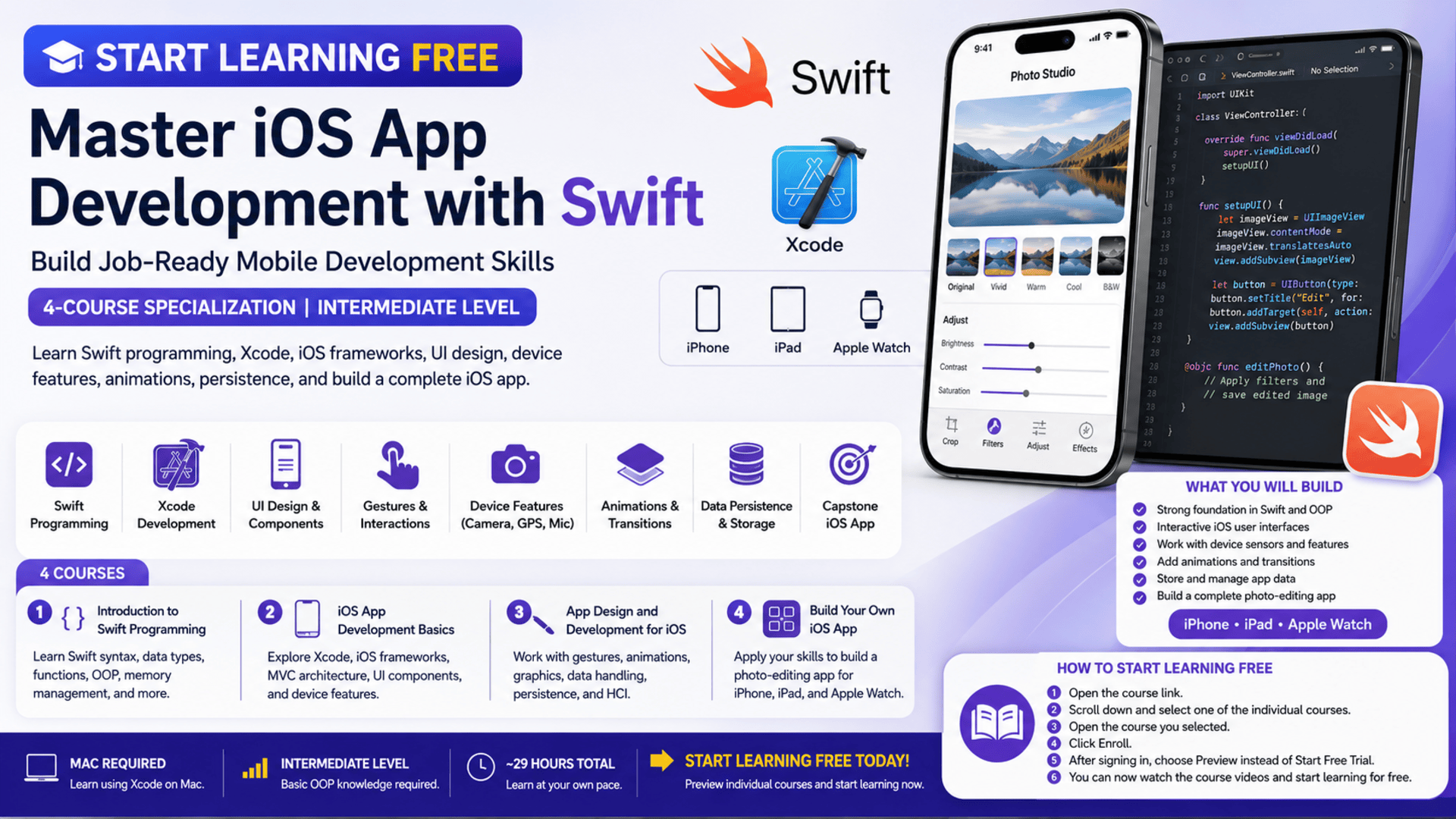
The iOS App Development with Swift Specialization offers a structured path for learners who want to understand Swift programming, Xcode, interface development, iOS frameworks, device features, animations, data persistence, and mobile interaction design.
You may be able to start learning free by opening an individual course and checking whether a Preview option or selected free lessons are available. Preview access can help you evaluate the curriculum and teaching approach before deciding whether you need the complete paid learning experience.
Why Learn iOS App Development with Swift?
Apple devices are used by consumers, professionals, creators, students, and businesses around the world.
Organizations need iOS applications for areas such as:
- E-commerce
- Financial services
- Education
- Healthcare
- Transportation
- Entertainment
- Productivity
- Communication
- Travel
- Fitness
- Business operations
- Customer support
Learning iOS development can help you understand how applications for iPhone, iPad, and Apple Watch are planned, coded, tested, and improved.
Swift is Apple’s programming language for building applications across its ecosystem. It supports modern programming principles and is used to develop interactive mobile experiences.
By learning Swift together with Xcode and core iOS frameworks, you can begin building applications that respond to user actions, access device features, display dynamic content, save data, and deliver polished visual interactions.
About the iOS App Development with Swift Specialization
This intermediate-level specialization is designed to help learners develop practical iOS programming and application-development skills.
The program contains four courses:
- Introduction to Swift Programming
- iOS App Development Basics
- App Design and Development for iOS
- Build Your Own iOS App
The courses build progressively.
You begin by studying Swift programming principles. You then move into Xcode, iOS frameworks, user interfaces, device sensors, application architecture, gestures, animations, data persistence, and advanced application features.
The final course is a project-based capstone in which you apply the knowledge developed throughout the program.
The current estimated study time shown for the four courses totals approximately 29 hours, although completion time will depend on your previous programming knowledge, practice schedule, and the complexity of your final project.
Important Requirements Before You Begin
This is not currently presented as a complete beginner program.
Learners should ideally have basic experience with an object-oriented programming language such as:
- Java
- Python
- C++
- C#
- JavaScript
- Another comparable programming language
You should understand concepts such as:
- Variables
- Functions
- Conditional statements
- Loops
- Objects
- Classes
- Basic program structure
A Mac computer is required because the courses and development environment are designed around Apple’s tools.
Access to an iPhone, iPad, or iPod may be useful for testing, although the Mac and Xcode environment are the main requirements.
Important Swift Version Notice
The current course descriptions state that the lessons use Swift 2.
Swift has evolved significantly since Swift 2. As a result, some syntax, APIs, project structures, frameworks, and development practices demonstrated in the lessons may differ from current Swift and Xcode versions.
This does not make the entire program useless. Programming principles, application architecture, interface concepts, event handling, and design fundamentals can still provide educational value.
However, learners should expect to supplement the program with current Swift documentation and updated practice resources.
What You Will Learn
Throughout the specialization, you will explore important areas of iOS application development.
You will learn how to:
- Write programs using Swift
- Work with Swift syntax and programming structures
- Apply object-oriented programming principles
- Understand functional programming concepts
- Manage application memory
- Navigate the Xcode development environment
- Build basic iOS user interfaces
- Use Apple interface components
- Apply the Model-View-Controller architecture
- Access camera, microphone, and location features
- Handle touch interactions and gestures
- Add animations and visual transitions
- Manage application data
- Apply persistence techniques
- Work with graphics and image processing
- Design interactions for mobile users
- Build a complete iOS capstone application
Course 1: Introduction to Swift Programming
The first course introduces the Swift programming language and provides the coding foundation needed for the rest of the specialization.
You will explore how Swift programs are structured and how common programming concepts are applied within the Apple development environment.
Topics include:
- Swift syntax
- Variables and constants
- Data types
- Functions
- Conditional logic
- Loops
- Collections
- Classes and objects
- Object-oriented programming
- Memory management
- Functional programming concepts
- Programming best practices
- Development environments
- Image-related programming concepts
The course is intended to move beyond basic syntax and help learners develop an intermediate understanding of Swift programming.
Why This Course Matters
Before building a complete mobile application, you need to understand how to express application logic through code.
A strong programming foundation helps you:
- Organize your code
- Reduce errors
- Create reusable functions
- Work with data
- Respond to user interactions
- Understand application frameworks
- Debug problems more effectively
This first course prepares you for the practical application-development work introduced in the following courses.
Course 2: iOS App Development Basics
The second course moves from general Swift programming into practical iOS application development.
You will begin working more deeply with Xcode and Apple’s application frameworks.
Key topics include:
- Xcode fundamentals
- Core iOS frameworks
- Cocoa Touch
- User interface components
- Application structure
- Model-View-Controller architecture
- Software design patterns
- Mobile development tools
- Interface creation
- Device capabilities
- Application testing
- Mobile interaction principles
You will also explore how applications can access device sensors and features such as:
- Camera
- Microphone
- GPS and location information
Understanding Model-View-Controller
Model-View-Controller, commonly called MVC, is an application architecture pattern.
It separates an application into three major areas:
Model: Manages application data and business logic.
View: Represents what the user sees.
Controller: Coordinates communication between the data and the interface.
Understanding this structure can help you build applications that are easier to organize, test, maintain, and expand.
Working with Device Features
Mobile applications can deliver valuable experiences because they have access to capabilities that traditional websites may not use in the same way.
For example, an application might:
- Capture a photo
- Record audio
- Detect the user’s location
- Display content based on geographic position
- Process visual information
- Respond to device input
Learning how to connect application logic with device features is an important part of practical iOS development.
Course 3: App Design and Development for iOS
The third course introduces more advanced interface, graphics, data, and interaction concepts.
You will continue developing your programming skills while learning how to create richer and more responsive application experiences.
Topics include:
- Core graphics
- Visual elements
- Touch handling
- Gestures
- Animations
- Transitions
- Alerts
- User actions
- Data manipulation
- Advanced algorithms
- Threading
- Application persistence
- Human-computer interaction
- Interface design
- Network-related concepts
- Application design
By the end of this course, you should have a stronger understanding of how to build a more advanced and functional iOS application.
Create Better Mobile Interactions
Mobile users interact with applications through taps, swipes, scrolling, gestures, buttons, menus, and visual feedback.
An effective application must communicate clearly with the user.
You will explore how interaction design can improve:
- Navigation
- Usability
- Feedback
- Visual hierarchy
- Responsiveness
- Error prevention
- Task completion
- User confidence
For example, when a user taps a button, the application should provide an immediate and understandable response.
Animations and transitions can help explain what is happening, but they should support usability rather than distract the user.
Work with Touch Handling and Gestures
Touch interaction is a fundamental part of iOS development.
Applications may need to recognize actions such as:
- Single taps
- Double taps
- Swipes
- Pinches
- Rotations
- Long presses
- Dragging
- Multi-touch gestures
These interactions can make an application feel natural and responsive when they are implemented consistently.
The course helps you understand how application components can respond to user input and trigger the appropriate program logic.
Add Animations and Transitions
Animations can make an application more engaging and easier to understand.
They can be used to:
- Move between screens
- Show or hide interface elements
- Confirm a user action
- Indicate progress
- Draw attention to important information
- Explain changes in application state
- Improve visual continuity
You will study how animations and transitions can be integrated into an iOS application.
Professional animation design should remain smooth, purposeful, and appropriate for the application’s audience.
Manage Application Data and Persistence
Many applications need to remember information after the user closes them.
This may include:
- User preferences
- Saved items
- Draft content
- Application settings
- Favorite images
- Account details
- Editing history
- Locally stored records
Data persistence allows the application to preserve information between sessions.
The specialization introduces persistence concepts that can help you understand how applications save, retrieve, and manage data.
These skills are essential when building applications that provide personalized or continuous user experiences.
Course 4: Build Your Own iOS App
The fourth course is a project-based capstone.
Instead of studying each concept separately, you will apply your accumulated knowledge to the development of a complete application.
The project focuses on building a high-quality photo-editing application.
The final application may incorporate concepts such as:
- Swift programming
- User interface development
- Images
- Photo editing
- Computer vision
- Image analysis
- Animations
- Mobile interactions
- Application architecture
- Device features
- User actions
- iOS frameworks
The broader specialization description indicates that the final application is intended to support iPhone, iPad, and Apple Watch.
Why the Capstone Project Is Important
A project-based course allows you to demonstrate more than theoretical knowledge.
It can show that you understand how to:
- Plan application features
- Organize code
- Build interfaces
- Handle user interaction
- Work with visual information
- Test application behavior
- Solve programming problems
- Connect multiple features
- Improve an application through iteration
A completed project can also become part of your development portfolio.
However, you should not rely only on the guided version.
After completing the required application, consider creating your own customized version with:
- A different visual identity
- New image filters
- Additional editing tools
- Better navigation
- Updated Swift syntax
- Accessibility improvements
- Improved error handling
- Modern interface components
- Original branding
This can help your portfolio reflect your own decisions and abilities.
Skills You Can Develop
The specialization covers skills related to:
- Swift programming
- iOS development
- Xcode
- Object-oriented programming
- Functional programming
- Memory management
- Application frameworks
- Model-View-Controller
- Interface components
- Mobile development tools
- Software architecture
- Design patterns
- User interface design
- Interaction design
- Mobile usability
- Human-computer interaction
- Animations
- Computer graphics
- Data persistence
- Image processing
- Computer vision
- Application development
- Application design
Tools and Technologies Covered
The primary tools and technologies include:
Swift
Swift is the main programming language used throughout the specialization.
Xcode
Xcode is Apple’s integrated development environment for creating applications for iPhone, iPad, Mac, Apple Watch, and other Apple devices.
Core iOS Frameworks
These frameworks provide functionality used to build application interfaces, manage user interactions, access system features, and control application behavior.
Cocoa Touch
Cocoa Touch provides key frameworks and interface components used in traditional iOS application development.
Apple Device Features
The curriculum introduces working with features such as the camera, microphone, and location information.
Who Should Take This Specialization?
This program may be suitable for several types of learners.
Programmers Expanding into Mobile Development
Developers who already understand an object-oriented language can use the program to explore Swift and iOS application development.
Students Studying Computer Science
Students can use the courses to complement programming and software-development studies with a practical mobile project.
Web Developers
Web developers interested in native mobile applications can learn how iOS development differs from browser-based development.
Mobile Developers Exploring Apple Platforms
Developers familiar with Android or cross-platform frameworks may use the specialization to explore native iOS concepts.
Entrepreneurs with an App Idea
Entrepreneurs can develop a better understanding of application structure, interfaces, technical requirements, and development workflows.
UI and UX Designers
Designers who understand iOS application development can collaborate more effectively with developers and create more technically realistic interface designs.
Who May Not Be a Good Fit?
This specialization may not be ideal for everyone.
You may need a different starting point when:
- You have never studied programming
- You do not have access to a Mac
- You want training based only on the latest Swift version
- You need a complete beginner introduction
- You want a modern SwiftUI-first curriculum
- You want direct preparation for current Apple certification requirements
- You are only interested in cross-platform development
Complete beginners may benefit from studying fundamental programming concepts before beginning this specialization.
Learners focused on current production development should combine the course with updated Swift and Xcode documentation.
How to Start Learning Free
Selected lessons may be available through a Preview option or another no-cost access method.
Follow these steps:
- Open the program page using the call-to-action button in this article.
- Scroll down to the four individual courses.
- Select the course you want to explore.
- Open the individual course page.
- Click Enroll.
- Sign in or create an account.
- Look for a Preview option instead of starting a paid trial.
- Open any available videos or lessons and start learning free.
Important Access Notice
Preview availability is not guaranteed.
The complete specialization, graded assignments, projects, assessments, and certificate may require paid enrollment.
When a Preview option is not displayed, review the page for:
- Financial aid
- Scholarship options
- Individual-course enrollment
- Free introductory lessons
- Subscription trials
- Institutional access
Always read the enrollment terms before confirming payment or beginning a subscription.
How to Get the Best Results
Refresh Your Programming Fundamentals
Review variables, functions, conditions, loops, classes, objects, and data structures before beginning.
Install the Required Development Tools
Prepare your Mac and confirm that you can install and run Xcode.
Code Along with Every Lesson
Do not only watch demonstrations. Recreate each example in your own project.
Compare Old and Current Swift Syntax
Because the course uses Swift 2, compare each concept with current Swift documentation.
Create personal notes showing:
- Original course syntax
- Current equivalent syntax
- Changed APIs
- Updated Xcode workflow
- Deprecated frameworks or methods
Build Small Independent Projects
Practise with projects such as:
- A task manager
- A photo gallery
- A location-based reminder
- A simple expense tracker
- A notes application
- A habit tracker
- A basic image editor
Use Version Control
Store your projects in Git repositories so that you can track changes and recover previous versions.
Test on Multiple Screen Sizes
Check how your layouts work on different iPhone and iPad screen sizes.
Improve Accessibility
Consider:
- VoiceOver labels
- Dynamic text
- Color contrast
- Button size
- Keyboard navigation
- Clear error messages
- Reduced motion preferences
Document Your Projects
Each portfolio project should include:
- Project overview
- Features
- Screenshots
- Technologies
- Installation instructions
- Known limitations
- Future improvements
- What you learned
Potential Career Paths
After developing current Swift knowledge and completing additional portfolio work, learners may explore roles such as:
- Junior iOS developer
- Swift developer
- Mobile application developer
- iPhone application developer
- iPad application developer
- Mobile UI developer
- Application development intern
- Junior software developer
- Freelance iOS developer
- Mobile application tester
Completing a specialization does not guarantee employment.
Employers may also evaluate:
- Current Swift knowledge
- Portfolio quality
- Xcode experience
- Problem-solving ability
- Application architecture knowledge
- Git experience
- Testing skills
- Communication
- Technical interview performance
- Understanding of modern Apple frameworks
Frequently Asked Questions
Can I start learning free?
You may be able to preview selected lessons from an individual course when a Preview option is available. Complete access is not guaranteed to be free.
Is this program suitable for complete beginners?
It is classified as intermediate and recommends previous experience with an object-oriented programming language.
How many courses are included?
The specialization contains four courses.
What will I build?
The final capstone focuses on creating a functional photo-editing application for Apple devices.
Do I need a Mac?
Yes. The course is designed and tested for a Mac-based development environment.
Do I need an iPhone or iPad?
An Apple mobile device may be helpful for testing, although the Mac requirement is the most important.
Which Swift version is used?
The current course descriptions state that the instruction uses Swift 2.
Is Swift 2 still current?
No. Swift has changed considerably since Swift 2. Learners should supplement the lessons with current Swift and Xcode resources.
Will I learn Xcode?
Yes. Xcode is one of the primary development tools covered.
Are device features included?
Yes. The curriculum introduces features such as the camera, microphone, and location information.
Does the course cover interface design?
Yes. It covers interface components, touch handling, gestures, animations, interaction design, and usability.
Will I receive a certificate through free preview access?
Preview access generally does not include the certificate or the complete graded experience.
Start Learning Free and Build iOS Applications with Swift
Explore Swift programming, Xcode, iOS frameworks, interface components, device features, animations, data persistence, image processing, and practical app development.
Open an individual course and check for Preview or other no-cost access options. Availability may vary. Complete courses, graded projects, and the specialization certificate may require paid enrollment. A Mac is required, and the current course descriptions state that instruction uses Swift 2.





