

Mobile applications have become essential to communication, shopping, banking, education, entertainment, healthcare, logistics, and business operations.
Organizations need mobile experiences that are fast, interactive, intuitive, and accessible across different devices.
However, creating separate applications for Android and iOS can require different programming languages, tools, and development teams.
React Native offers another approach.
It allows developers to use JavaScript and React concepts to create cross-platform applications that can operate on Android and iOS devices.
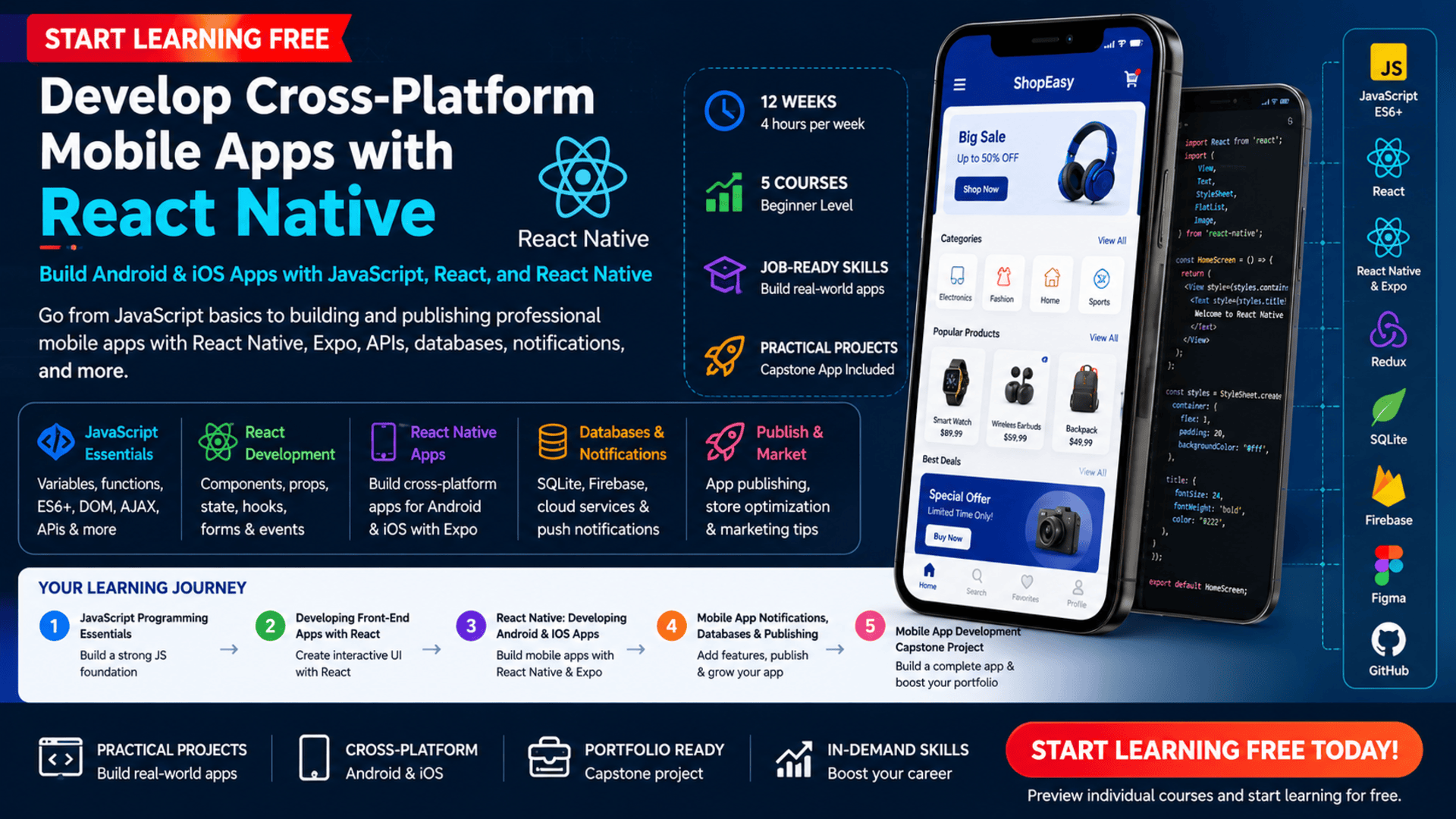
The Developing Mobile Apps with React Native program provides a structured learning path from JavaScript fundamentals to complete mobile application development.
Across five connected courses, learners study JavaScript, React, React Native, Expo, Redux, APIs, databases, notifications, publishing, interface design, GitHub, and mobile app marketing.
You may also be able to Start Learning Free by opening one of the individual courses and checking whether a Preview or audit option is available.
What Is React Native?
React Native is an application framework used to create mobile apps with JavaScript and React.
Instead of maintaining completely separate frontend codebases for Android and iOS, developers can reuse a significant amount of application logic and interface code.
React Native applications use native mobile components, allowing developers to build mobile experiences that interact with platform features while benefiting from React’s component-based development model.
React Native can be used to create:
- Business applications
- E-commerce apps
- Educational platforms
- Social applications
- Booking systems
- News apps
- Financial tools
- Productivity applications
- Health and fitness apps
- Customer-service solutions
- Internal company tools
- Data-driven mobile products
The framework is particularly valuable for developers who already understand JavaScript or React and want to expand into mobile development.
Why Learn React Native?
Cross-platform development can reduce duplicated work and make it easier to create consistent experiences across mobile operating systems.
Learning React Native can help developers:
- Build applications for Android and iOS
- Use JavaScript for mobile development
- Create reusable interface components
- Manage application state
- Handle user interactions
- Connect apps to external APIs
- Store information locally
- Add databases and cloud services
- Test and debug mobile applications
- Create notifications
- Prepare apps for publishing
- Build professional portfolio projects
React Native also connects several valuable skill areas, including JavaScript, React, mobile interface development, APIs, data persistence, debugging, and software architecture.
About the React Native Mobile Development Program
This beginner-level learning path contains five courses.
It is designed to develop practical mobile development capabilities progressively, beginning with JavaScript programming before introducing React and React Native.
The recommended schedule is approximately 12 weeks at four hours per week.
The five courses are:
- JavaScript Programming Essentials
- Developing Front-End Apps with React
- React Native: Developing Android and iOS Apps
- Mobile App Notifications, Databases, and Publishing
- Mobile App Development Capstone Project
The courses should preferably be completed in order because later courses build on the programming and interface-development concepts introduced earlier.
Basic computer literacy and introductory knowledge of HTML, CSS, and Git are recommended.
What Will You Learn?
The program covers the major technical and practical skills needed to build cross-platform mobile applications.
Key learning outcomes include:
- Understanding JavaScript programming concepts
- Using ECMAScript 6 features
- Working with arrays and data structures
- Handling errors and exceptions
- Writing functions
- Applying event-driven programming
- Manipulating the Document Object Model
- Fetching information from APIs with AJAX
- Creating interfaces with React
- Using JSX
- Building reusable React components
- Working with props, state, and hooks
- Managing application data with Redux
- Setting up a React Native development environment
- Developing mobile applications with Expo
- Creating React Native layouts and styles
- Managing navigation and lists
- Handling mobile user interactions
- Debugging and testing applications
- Adding local data persistence
- Integrating SQLite and Firebase
- Creating mobile notifications
- Designing interfaces with Figma
- Managing source code through GitHub
- Preparing applications for publishing
- Exploring mobile marketing strategies
- Building a portfolio-ready capstone project
Course 1: JavaScript Programming Essentials
Estimated learning time: 18 hours
The first course builds the programming foundation required for React and React Native development.
JavaScript is used to control application logic, respond to user actions, process information, communicate with services, and create interactive experiences.
JavaScript Fundamentals
Learners explore essential programming concepts, including:
- Variables
- Values
- Data types
- Operators
- Functions
- Events
- Arrays
- Objects
- Reference types
- Program logic
- Error handling
These foundations help learners understand how applications process instructions and respond to different conditions.
ECMAScript 6
ECMAScript 6 introduced several features commonly used in modern JavaScript development.
These may include:
- Arrow functions
- Template literals
- Classes
- Modules
- Destructuring
- Let and const
- Improved object syntax
- Promises
Understanding modern JavaScript syntax is important before working with React and React Native.
Error and Exception Handling
Applications need to respond appropriately when unexpected conditions occur.
Learners explore techniques for:
- Identifying errors
- Handling exceptions
- Debugging code
- Preventing application failures
- Communicating problems clearly
DOM Manipulation
The Document Object Model represents the structure of a web page.
Although React Native does not use the browser DOM in the same way as a website, DOM exercises help learners understand dynamic interfaces and event-driven programming before moving into React.
Learners practice:
- Finding page elements
- Changing content
- Updating styles
- Traversing page structures
- Responding to events
AJAX and APIs
AJAX allows applications to request information without refreshing an entire page.
Learners use JavaScript to fetch and display information from APIs.
This introduces concepts that later become important when mobile applications communicate with external data services.
Practical JavaScript Project
Learners apply JavaScript through an interactive website project involving:
- DOM manipulation
- Error handling
- Events
- Functions
- Navigation
- AJAX
- API data
This project creates a strong programming foundation for the remaining courses.
Course 2: Developing Front-End Apps with React
Estimated learning time: 16 hours
The second course introduces React for building interactive user interfaces.
React organizes an interface into reusable components.
A component can represent a:
- Button
- Form
- Product card
- Navigation menu
- Shopping cart item
- Profile panel
- Search field
- Dashboard section
Component-based development can make an application easier to understand, maintain, test, and expand.
JSX
JSX allows developers to describe interface structures within JavaScript-based React components.
It combines familiar markup concepts with application logic.
React Components
Learners create reusable components that can receive information and display different content.
Reusable components can reduce duplicated code and support consistent application design.
Props
Props allow information to pass from one component to another.
They help developers configure reusable components without rewriting them.
State
State represents information that may change while an application is running.
Examples include:
- Form input
- Shopping-cart contents
- Selected items
- Search results
- User preferences
- Loading states
When state changes, React can update the relevant parts of the interface.
React Hooks
Hooks allow functional components to manage state and perform other application operations.
Learners explore how hooks can support modern React development.
Forms and Event Handling
Interactive applications must respond when users:
- Click buttons
- Enter information
- Submit forms
- Select options
- Add products
- Remove items
Learners create interfaces that respond to these events.
Redux
Redux supports structured state management across larger applications.
It can help when multiple components need access to the same application information.
Practical React Applications
Learners demonstrate their skills through frontend projects, including a shopping-cart application.
These projects provide experience with:
- Reusable components
- Props
- State
- Hooks
- Forms
- Events
- Redux
- Dynamic interfaces
Course 3: React Native — Developing Android and iOS Apps
Estimated learning time: 23 hours
The third course moves from web-interface development into cross-platform mobile application development.
Learners set up the React Native environment and begin creating applications that can operate on Android and iOS.
React Native Development Environment
Learners explore:
- Development tools
- Command-line operations
- Application frameworks
- Mobile development environments
- React DevTools
- Debugging tools
- Expo
A properly configured environment helps developers build, run, test, and debug applications efficiently.
Expo
Expo provides tools and services that simplify parts of React Native development.
It can help learners:
- Start projects
- Preview applications
- Test on devices
- Access platform capabilities
- Manage development workflows
- Prepare application builds
React Native Components
React Native provides mobile interface components that differ from standard web elements.
Learners explore how to build application screens using native-oriented components.
Styling and Layouts
React Native uses JavaScript-based stylesheets to control application presentation.
Learners work with:
- Colors
- Spacing
- Typography
- Alignment
- Flexbox layouts
- Responsive behavior
- Screen organization
Events and Props
Applications respond to user interactions such as:
- Taps
- Text input
- Scrolling
- Navigation
- Selections
- Form submissions
Props support communication and configuration across application components.
State Management
State management controls how application information changes and how those changes update the mobile interface.
Learners apply React and Redux concepts in a mobile environment.
Lists and User Interactions
Many applications display lists of products, messages, tasks, articles, or records.
Learners explore how to create and manage interactive mobile lists.
Navigation
Mobile apps commonly include several screens.
Navigation allows users to move between:
- Home screens
- Detail pages
- Login pages
- Settings
- Forms
- Profile sections
Debugging, Testing, and Publishing
Learners develop practical experience with:
- Identifying application problems
- Using React DevTools
- Testing mobile behavior
- Preparing builds
- Applying publishing concepts
By the end of this stage, learners create a cross-platform mobile application using React Native.
Course 4: Mobile App Notifications, Databases, and Publishing
Estimated learning time: 28 hours
The fourth course introduces the services and processes required to transform a basic application into a more complete mobile product.
Mobile UI and UX Principles
A successful mobile app should be intuitive, visually clear, and easy to navigate.
Learners explore interface principles related to:
- Visual hierarchy
- Navigation
- Readability
- Screen organization
- User flows
- Accessibility
- Consistency
- Mobile interaction patterns
Mobile Notifications
Notifications can inform users about:
- New messages
- App updates
- Reminders
- Orders
- Account activity
- Scheduled events
- Promotions
Learners examine how notifications can improve communication and engagement.
Local Data Persistence
Data persistence allows information to remain available after the application closes.
It can support:
- User preferences
- Saved records
- Offline functionality
- Login states
- Favorites
- Recently accessed information
SQLite
SQLite provides a lightweight relational database that can operate locally on a mobile device.
It may be used for:
- Structured records
- Offline information
- Searchable data
- User-created content
- Saved items
- Cached application data
Firebase and Cloud Services
Firebase can support application functionality such as:
- Cloud databases
- User authentication
- Remote data
- Notifications
- Application services
- Real-time information
Application Publishing
Developers need to prepare applications for distribution after development is complete.
Publishing work can include:
- Preparing application builds
- Reviewing marketplace requirements
- Creating descriptions and screenshots
- Signing applications
- Submitting mobile apps
- Managing releases
Mobile App Marketing
Publishing an application does not automatically attract users.
The course also introduces marketing considerations, including:
- Target audiences
- App positioning
- Marketplace descriptions
- Promotion strategies
- Performance tracking
- User engagement
Course 5: Mobile App Development Capstone Project
Estimated learning time: 19 hours
The final course brings the program’s technical and design skills together in a complete project.
Learners can use React Native to build a portfolio-ready cross-platform mobile application.
User Stories
Learners begin by describing app features from the user’s perspective.
User stories help translate product requirements into specific development tasks.
GitHub Repository
A GitHub repository is created to manage and present the project code.
This supports:
- Version control
- Code history
- Documentation
- Collaboration
- Portfolio presentation
Figma UI and UX Design
Learners use Figma to design application screens and user flows before implementing them.
The interface design may include:
- Login
- Registration
- Home screen
- Detail screen
- Navigation
- Settings
- Interactive features
Login and Registration
Authentication screens allow users to create accounts and access the application.
Home and Detail Screens
Learners create a main application screen and a detailed information screen.
These features provide practical experience with navigation, lists, reusable components, and screen-level state.
API Integration
The capstone connects to an external API to retrieve and display current information.
Learners practice:
- Sending requests
- Processing responses
- Displaying remote data
- Managing loading states
- Handling errors
Local Storage
Data persistence is added so selected information remains available after the app closes.
Settings and Notifications
Learners add customization settings and notification features to improve the user experience.
Publishing and Marketing
The final stage explores how the completed app can be packaged, presented, promoted, and potentially published.
A well-developed capstone can become a strong portfolio project for entry-level roles, freelance proposals, or personal business ideas.
Practical Projects Included
The specialization provides several opportunities to apply new skills.
Interactive JavaScript Website
Build an interactive web project using:
- DOM manipulation
- Events
- Error handling
- AJAX
- API data
React Frontend Applications
Develop user interfaces with:
- React components
- Props
- State
- Hooks
- Redux
- Forms
- Event handling
Cross-Platform React Native App
Create an Android and iOS application using:
- React Native
- Expo
- Stylesheets
- Navigation
- State management
- Lists
- Debugging
Mobile Services Project
Improve a mobile application with:
- Databases
- Notifications
- Firebase
- SQLite
- Publishing preparation
- Marketing concepts
Capstone Mobile Application
Build a complete portfolio project involving:
- User stories
- Figma
- GitHub
- Authentication screens
- Navigation
- APIs
- Data persistence
- Settings
- Notifications
- Publishing strategy
Skills You Can Develop
JavaScript Programming
Build the programming foundation needed for React and React Native development.
React Development
Create reusable components, dynamic interfaces, forms, and state-driven applications.
React Native Development
Develop mobile apps designed to run on Android and iOS.
Cross-Platform Development
Use a shared JavaScript-based codebase across mobile platforms.
Redux State Management
Organize and manage application-wide information.
Expo Development
Build, preview, test, and prepare React Native applications.
API Integration
Connect applications to external data and services.
Mobile UI and UX Design
Create intuitive mobile interfaces and user flows.
Database Integration
Work with SQLite, Firebase, and cloud-connected data.
Data Persistence
Save application information locally between sessions.
Debugging and Testing
Identify problems and improve application reliability.
Figma
Plan screens, components, and user experiences visually.
GitHub
Manage source code and present projects professionally.
App Publishing
Prepare mobile applications for distribution.
Mobile Marketing
Plan how an application will attract, engage, and retain users.
Tools and Technologies Covered
The program introduces tools and technologies used across mobile and frontend development:
- JavaScript
- ECMAScript 6
- HTML
- CSS
- DOM APIs
- AJAX
- JSON
- React
- JSX
- React hooks
- Redux
- React Native
- Expo
- React DevTools
- Android
- iOS
- APIs
- SQLite
- Firebase
- Cloud services
- Figma
- Git
- GitHub
- Mobile notifications
- Development environments
- Publishing tools
Who Should Take This Program?
This learning path may be suitable for:
Aspiring Mobile Developers
Learners who want to build Android and iOS apps with React Native.
JavaScript Developers
Developers who want to expand from websites into mobile application development.
React Developers
Frontend developers interested in applying React concepts to native mobile interfaces.
Career Changers
Professionals exploring a transition into software or mobile development.
Students
Learners who want practical experience with programming, interfaces, APIs, databases, and app development.
Freelancers
Professionals interested in creating cross-platform mobile applications for clients.
Entrepreneurs
Founders who want to understand how mobile products are designed, developed, published, and marketed.
UI and UX Designers
Designers who want to understand how mobile interfaces are implemented through React Native.
Recommended Knowledge Before Starting
The program is classified as beginner level, but basic knowledge of the following areas is recommended:
- General computer use
- HTML
- CSS
- Git fundamentals
Previous JavaScript, React, or mobile-development experience is not required because the first courses introduce the necessary foundations.
However, learners should expect to practice coding regularly.
How Long Does the Program Take?
The recommended schedule is approximately 12 weeks at four hours per week.
Completion time may vary according to:
- Previous programming experience
- Weekly availability
- Time spent debugging
- Project complexity
- Additional coding practice
- Capstone customization
- Publishing preparation
Learners who add extra functionality to their capstone project may need more time, but the additional work can strengthen their portfolio.
Should You Complete the Courses in Order?
Yes.
The recommended sequence is:
- JavaScript Programming Essentials
- Developing Front-End Apps with React
- React Native: Developing Android and iOS Apps
- Mobile App Notifications, Databases, and Publishing
- Mobile App Development Capstone Project
JavaScript provides the programming foundation.
React introduces component-based interfaces and state management.
React Native applies those concepts to mobile development.
The fourth course adds databases, notifications, publishing, and marketing.
The capstone combines the complete learning journey.
How to Start Learning Free
The complete five-course program, graded projects, and certificate may require paid enrollment.
However, selected course materials may be available through a Preview or audit option.
Follow these steps:
- Open the program link.
- Because this is a Specialization, scroll down until you find the five individual courses.
- Select the individual course you want to explore.
- Open its course page.
- Click Enroll.
- Sign in or create an account when requested.
- Look for Preview or an audit option instead of selecting Start Free Trial or a paid plan.
- When the option appears, open the available videos or learning materials and begin studying.
Preview or audit availability may vary by course, location, account, and current enrollment options.
Selected free access may not include:
- Every course module
- Hands-on labs
- Graded assignments
- Complete projects
- The capstone
- Instructor feedback
- The full specialization
- A shareable certificate
Learners who cannot afford full enrollment should check whether financial aid or a scholarship is available.
Can You Earn a Certificate?
A shareable career certificate is available after completing the required courses, assignments, and projects through an eligible enrollment option.
The certificate may be added to:
- A LinkedIn profile
- A resume
- A CV
- A professional portfolio
- A performance review
- A personal development record
Preview or audit access does not provide the complete certificate.
For stronger career results, combine the credential with a working mobile application, GitHub repository, Figma designs, project screenshots, and clear technical documentation.
How to Build a Strong React Native Portfolio
A strong portfolio should demonstrate the ability to build complete applications rather than isolated screens.
Consider developing:
- A task-management app
- A fitness tracker
- A personal finance app
- A weather application
- A booking app
- A restaurant-ordering app
- A product catalog
- A news reader
- A messaging interface
- A notification-based reminder app
Each project should include:
- A clear problem statement
- User stories
- Figma designs
- Screenshots
- React Native code
- Reusable components
- Navigation
- State management
- API integration
- Local storage
- Database functionality
- Error handling
- GitHub documentation
- Publishing information when available
A well-documented project helps employers and clients understand what you built, why you built it, and how the application works.
Frequently Asked Questions
Can I Start Learning Free?
You can check the individual course pages for a Preview or audit option. When available, it may provide access to selected videos, readings, or course materials.
Is the complete React Native program free?
The complete specialization, graded projects, capstone, and certificate are not presented as entirely free. Selected course materials may be accessible through a Preview or audit option.
Is the program suitable for beginners?
Yes. The program is beginner level, although basic knowledge of HTML, CSS, and Git is recommended.
How many courses are included?
The specialization contains five courses covering JavaScript, React, React Native, mobile databases, notifications, publishing, and a capstone project.
Will I learn JavaScript?
Yes. The first course covers JavaScript fundamentals, ES6, data structures, functions, error handling, DOM manipulation, AJAX, and APIs.
Will I learn React?
Yes. The second course covers JSX, reusable components, props, state, hooks, forms, events, and Redux.
Can I build both Android and iOS apps?
Yes. React Native is used to build cross-platform mobile applications designed for Android and iOS.
Will I use Expo?
Yes. The React Native course includes hands-on development with Expo.
Does the program cover databases?
Yes. The curriculum includes SQLite, Firebase, cloud services, and local data persistence.
Will I learn app publishing?
Yes. The program introduces testing, debugging, marketplace publishing, release preparation, and mobile marketing.
Is there a capstone project?
Yes. The final course includes a mobile application project involving Figma, GitHub, login and registration, APIs, local storage, settings, and notifications.
Can I earn a certificate through Preview access?
No. Preview or audit access does not include the complete career certificate.
Start Developing Cross-Platform Mobile Applications
React Native allows JavaScript and React developers to create mobile applications for Android and iOS through a shared development approach.
This five-course program provides a structured path from JavaScript programming to React interfaces, React Native applications, databases, notifications, publishing, and portfolio development.
Begin by opening one of the individual courses and checking whether selected Preview or audit materials are available.
Start Learning Free today and begin developing the React Native skills needed to design, build, test, and publish professional cross-platform mobile applications.
Beginner-Friendly Cross-Platform Development
Develop Cross-Platform Mobile Apps with React Native
Learn JavaScript, React, Redux, React Native, Expo, APIs, SQLite, Firebase, notifications, Figma, GitHub, app publishing, and mobile marketing through practical projects.
Start Learning FreePreview or audit availability may vary. Selected free access may not include the complete program, hands-on labs, graded assignments, capstone project, publishing activities, or certificate. Financial aid may be available for eligible learners. This page may contain a promotional link.





